德森印刷机说明书之操作手册-4d1321fc284ac850ac024234.pdf - 第53页
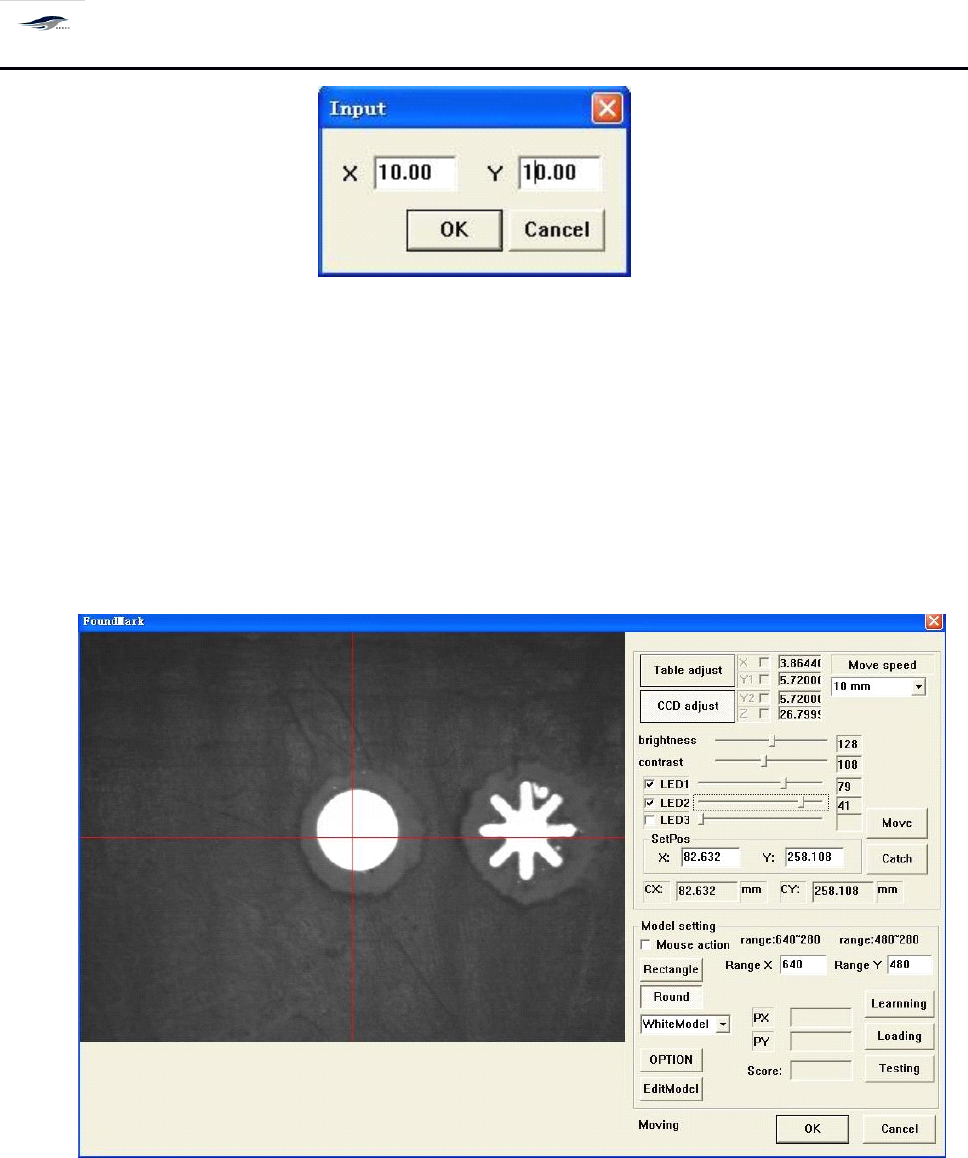
深圳德森精密设备有限公司 Shenzhen Desen Pre cision Machine Co., Ltd. - 53 - 图 4- 28 〈 I nput 〉对话框 Fig ure 4-28 “ I nput ” D ialog Box 进入方式:双击 [ 生产编辑 ] 窗口中红色圆圈 T o e nter the d ialog b o x, double click the sm all r ound c ircles i n…
深圳德森精密设备有限公司
Shenzhen Desen Precision Machine Co., Ltd.
- 52 -
确认 PCB 板上表面是否与导轨两中间压板表面平齐。 如果不平齐, 请手动调节 “ 平
台调节旋钮 ” 使之平齐。
Caution: click “ Platform
Top
Slab ” button to make OCB bearing block
at
the top slab position,
then place the PCB board on the bearing block manually to confirm whether the upper
surface of PCB board parallel with the surface of the surfaces of the middle pressure
plate
s
of guide rail. I f they are not parallel, adjust “ Platform Adjusting Knob ” manually to
make them parallel to each other.
3.
3.
3.
3.
[
[
[
[
钢网定位 ]
]
]
]
3.
3.
3.
3.
Locate
Locate
Locate
Locate
Steel
Steel
Steel
Steel
Mesh
Mesh
Mesh
Mesh
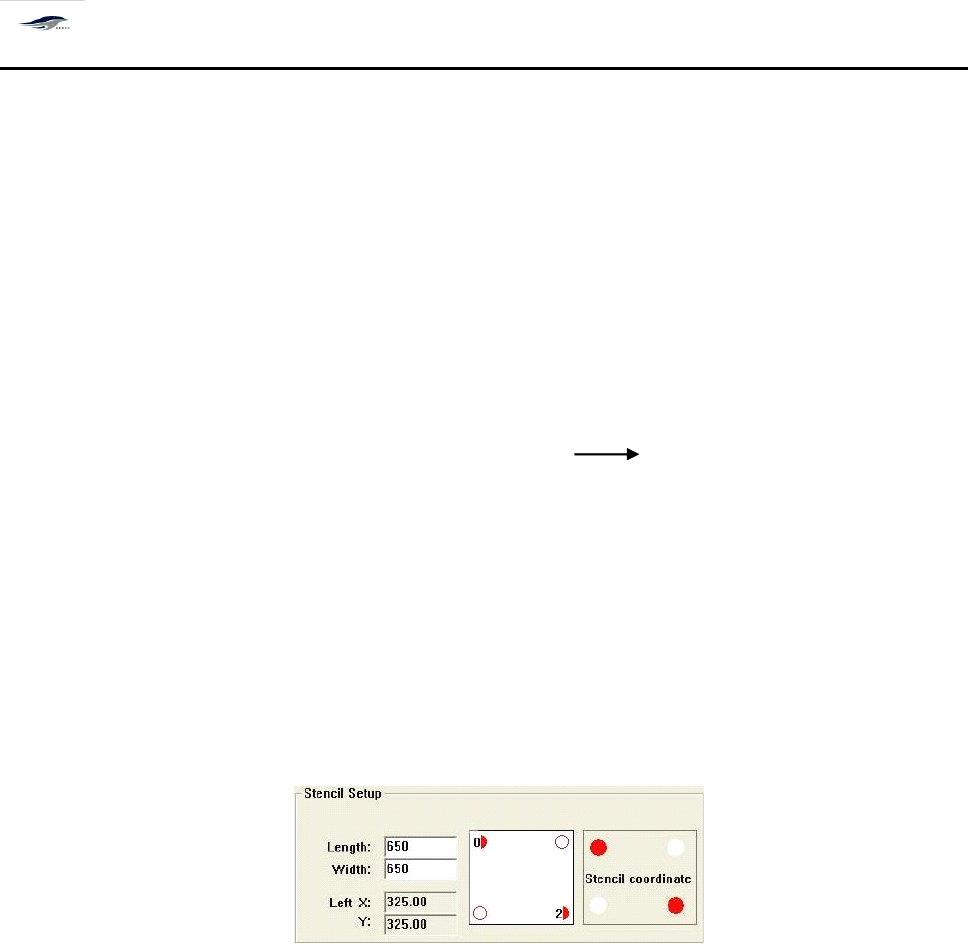
居中开的钢网只需输入长宽自动生成 X , Y 坐标值 根据钢网坐标值将钢网定位,
非居中开钢网除了输入长宽外, 还需要在钢网坐标处点击红色小点, 输入 mark 点到钢网边 的
最小绝对值。如下图 :
F or a steel mesh situated in the middle, only the length needs to be inputted to create values of
coordinates X and Y automatically. T he steel mesh can be located in accordance with the coordinate
values. F or a steel mesh not situated in the middle,
it
is necessary to input the length, click the small
red points
at
the steel mesh
’
s
coordinates and input the minimum absolute value between fiducial
mark to steel mesh
’
s
edge. S ee the figure below.
4.
4.
4.
4.
[
[
[
[
标志点设置 ]
]
]
]
4.
4.
4.
4.
Setting
Setting
Setting
Setting
of
of
of
of
Fiducial
Fiducial
Fiducial
Fiducial
mark
mark
mark
mark
1)
在以上程序完成以后,我们需要通过调用图像处理功能及标志点位置选择的辅助功
能使 PCB 板和 Stencil 网板对得更准。 先选择标志点位置, 双击生产编辑窗口中 PC B
坐标红色小点,出现 Input 窗口输入标志点到 PCB 板边缘 X 、 Y 坐标的最小绝对值
;
如图 4 – 28 所示:
1) After the above steps are finished,
it
is necessary to make the alignment between PCB board
and Stencil screen more accurate by utilizing the image processing function and the auxiliary
function of choosing fiducial mark. C hoose the position of fiducial mark, double click the small
red points of PCB board
’
s
coordinates in the Production Edit interface, then Input dialog box
will emerge. I nput the minimum absolute values from the fiducial mark to the X and Y
coordinates of edges of PCB board. S ee Figure 4-28.
深圳德森精密设备有限公司
Shenzhen Desen Precision Machine Co., Ltd.
- 53 -
图 4- 28 〈 Input 〉对话框
Figure 4-28 “ Input ” Dialog Box
进入方式:双击 [ 生产编辑 ] 窗口中红色圆圈
To
enter the dialog box, double click the small round circles in “ Production Edit ” interface.
2)
进行 标志点设置 , 此时单击 [ PCB 标志 1] —— 出现 [ 寻找标志点 ] 对话框, 如图 4 – 29 所
示
2) Set the fiducial mark. C lick “ PCB Mark 1 ”
at
this time, the “ Seek for Fiducial mark ” dialog
box will emerge. S ee Figure 4-29.
图 4- 29 〈寻找标志点〉对话框
Figure 4-29 “ Seek for Fiducial mark ” Dialog Box
对话框进入方式: [ 程序编辑 ]+ [ 生产编辑 ] + [ PCB 标志 1]
To
enter the dialog box, click “ Edit Program ”
,
“ Production Edit ” and “ PCB Mark 1 ” in
sequence.
3)
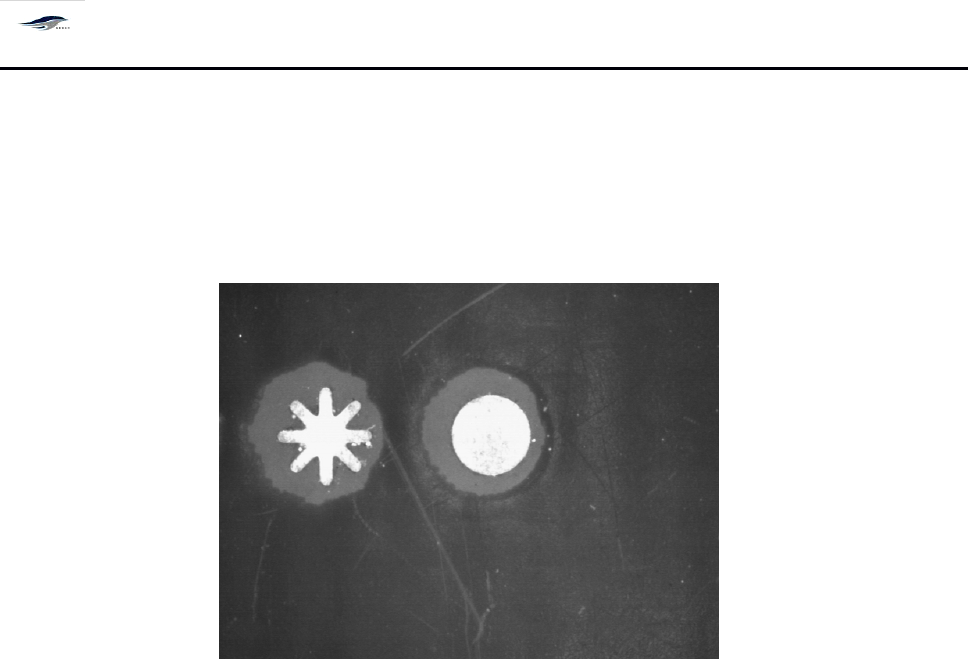
单击上图对话框中的 [ 移动 ] ,然后根据对话框中〈手动移动速度的设置〉用手移动 键
盘上的箭头键( ←↑→↓ ) ,待寻找到标志图像后 —— 再单击 [ 捕捉 ] 将图像定位。如
深圳德森精密设备有限公司
Shenzhen Desen Precision Machine Co., Ltd.
- 54 -
图 4 – 30 所示:
3) Click “ Move ” option in the above dialog box and move the keys ←
,
↑
,
→ and ↓ on the
keyboard in accordance with the “ Position of manual moving rate ” in the dialog box to seek for
the fiducial mark image, then click “ Capture ” to locate the image. S ee Figure 4-30.
图 4- 30 标志点图像
Figure 4-30 Fiducial mark Image
在上图中按住鼠标左键从图像的中间往外拉(即用红色圆圈将标志点图像包容)
Place the mouse in the above figure and press its left key and pull
it
outwards from the middle
of image (namely, make the fiducial mark image embraced by the red circle).
用鼠标点住红色方框的中心 “ 十字型 ” 图标,使之与标志点图像相切;
Click the “ Cross-shaped ” icon in the center of red box with mouse to make
it
form a tangential
relation with the fiducial mark image;
进行 “ 匹配选项 ” 设置,如图 4 – 29 中所示:匹配的分数( 7 00 ) 、匹配的精度(高)为
机器的缺省值(本机器匹配分数的设置范围为 0 ~ 1000 ,如在进行匹配时发现标志点 周
围有相似图像或标志点图像在缺损可能会影响印刷精度, 匹配分数越高, 印刷精度就 越
高,同时对 Mark
点的形状要求高。 )
Setting the “ Matching Options ” as shown in Figure 4-29: the matching score (700) and
matching precision (high) are default values of the printing machine (the setting scope of
matching score of the printing machine is 0 ~ 1000
.
Similar images or fiducial mark images
damaged around the fiducial mark found in the matching course are probably to affect the
printing precision. T he higher the matching score
is,
the higher the printing precision will be
and the stricter the requirement for the fiducial mark
’
shape will be );
单击 [ 记忆 ] ;
Click “ Memory ” ;