00198536-02_AI_Mixed-Mode_TX2iV1_TX2V2_de_en.pdf - 第94页
3 Installation 3.2 Adapting the hose connections at the pneumatics block 94 Assembly Instructions / Montageanleitung SIPLACE TX2i V1 SIPLACE TX2 V2 Option Mixed-Mode 01/2019 3.2.2.2 Gantry with vacuum hoses(gantry with …
3 Installation
3.2 Adapting the hose connections at the pneumatics block
Assembly Instructions / Montageanleitung SIPLACE TX2i V1 SIPLACE TX2 V2 Option Mixed-Mode 01/2019 93
SIPLACE TX V1 and V2:
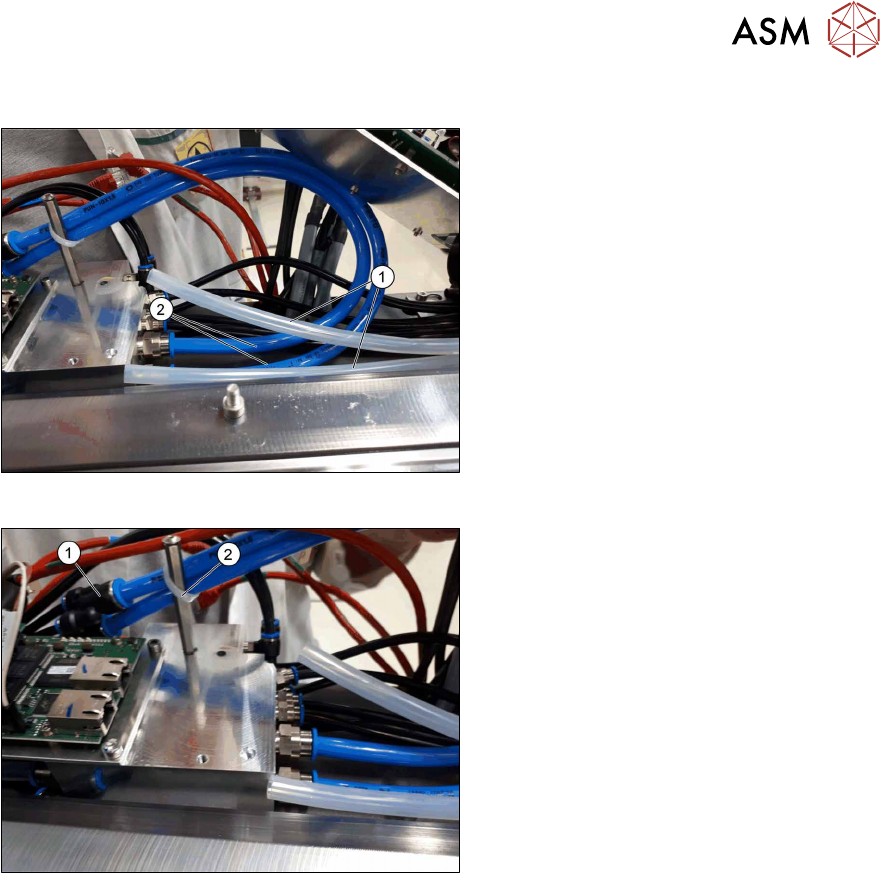
Fig.21: Converting the hoses (SIPLACETX2iV1)
► Remove the two transparent Camozzi
hoses(1) from the pneumatics block.
Place these hoses next to the pneu-
matics block and fix the hoses using
cable ties. The hoses must not rub any-
where or protrude into the travel range
of the gantries.
► Take the pneumatics hose out of the
retrofit kit and cut the hose into two
pieces of the same length (each ap-
prox. 52 cm).
► Attach the two hose pieces(2) to the
pneumatics block (instead of the previ-
ously removed Camozzi hoses).
Fig.22: Fitting the hoses (SIPLACETX2iV1)
► Connect the two Y pieces to the other
end of the pneumatic hoses(1).
► SIPLACE TX V1: Secure the two pneu-
matic hoses to the stay bolt with a
cable tie(2).
► SIPLACE TX V2: Run the two hoses
beside the pneumatics distributor to the
corresponding trailing cable (here, to
trailing cable of gantry1).
► Secure the two hoses with cable ties to
make sure that the hoses cannot pro-
trude into the travel range of the
gantries.
► Fit the mounting plate with trailing inter-
face and VBI.
3 Installation
3.2 Adapting the hose connections at the pneumatics block
94 Assembly Instructions / Montageanleitung SIPLACE TX2i V1 SIPLACE TX2 V2 Option Mixed-Mode 01/2019
3.2.2.2 Gantry with vacuum hoses(gantry with C&P20x)
SIPLACE TX V1:
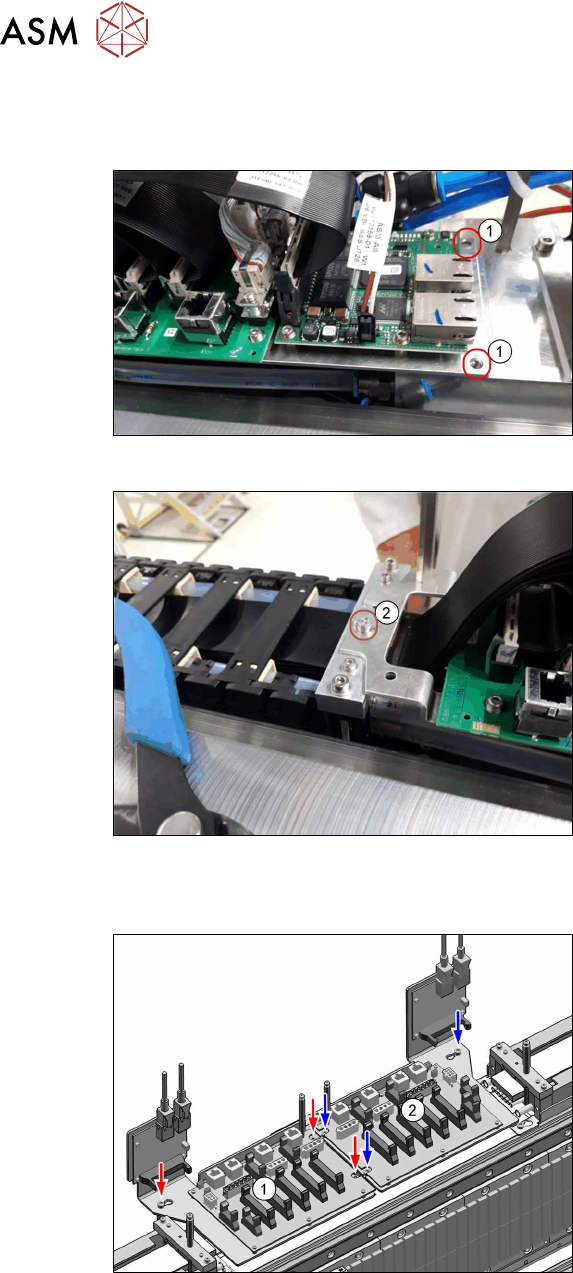
Fig.23: VBI (SIPLACETX2iV1)
Trailing interface and VBI are mounted on
the same mounting plate. Only the mounting
plate is removed, the boards can stay on the
mounting plate.
► Remove both screws (1).
Fig.24: Loosing the screw (SIPLACETX2iV1)
► Loosen the screw(2).
► Put the mounting plate with the trailing
interface and the VBI aside, so that you
have good access to the pneumatics
block lying underneath.
If necessary, unplug the GigE cables
from the VBI. Make sure that the cables
can be unequivocally assigned again
later on.
SIPLACE TX V2:
Fig.25: Trailing interfaces (SIPLACETX2V2)
Trailing interface and VBI are mounted on
the same mounting plate. Only the mounting
plate is removed, the boards can stay on the
mounting plate.
► Remove the mounting plate of the trail-
ing interface(1) (3screws).
► Put the trailing interface and the VBI
aside, so that you have good access to
the pneumatics block lying underneath.
If necessary, unplug the GigE cables
from the VBI. Make sure that the cables
can be unequivocally assigned again
later on.
3 Installation
3.2 Adapting the hose connections at the pneumatics block
Assembly Instructions / Montageanleitung SIPLACE TX2i V1 SIPLACE TX2 V2 Option Mixed-Mode 01/2019 95
SIPLACE TX V1 and V2:
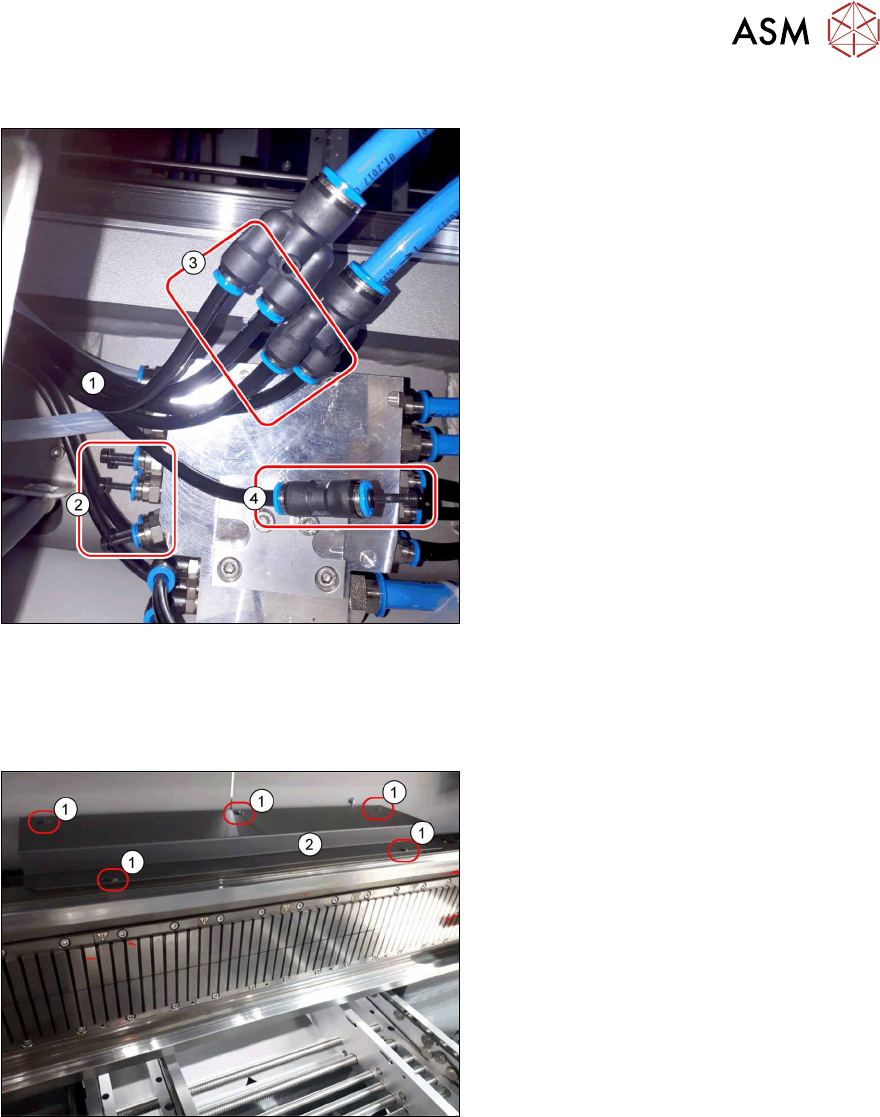
Fig.26: Converting the hoses (SIPLACETX2iV1)
► Pull the five black hoses(1) (1to5 of
the 7-fold hose) off the pneumatics
block(2).
► Connect the four hoses1 to4 to the Y
pieces(3).
The 7-fold hose may need to be separ-
ated for this.
► Close the pneumatics block with five
blanking plugs QSC‑6H(2) from the
retrofit kit.
► Close the hose5(4) (7-fold hose) with
a push-in connection QS‑6(1) and the
blanking plug QSC‑6H(2) from the ret-
rofit kit.
► Fit the mounting plate with trailing inter-
face and VBI.
3.2.3 Installing the cover of the trailing interface
SIPLACE TX V1:
Fig.27: Cover over the trailing interface 1 and2
► Use five screws(1) to fit the cover(2)
over the trailing interface1 and2.
ð The installation of the pneumatics
conversion kit has now been com-
pleted.