EUS0153210_YFact_Standard_E.pdf - 第74页
2-40 2 Board Explorer n Setting value sample by model Model YVi-Mini YV i-X2 YVi-X2H YVi-DT (20μm) YVi-DT (15μm) YVi-DTL YVi-LH YVi-MH Visual field size X (µm) 30400 25800 32000 20400 15300 30400 30400 30400 Visual field…
2-39
2
Board Explorer
8
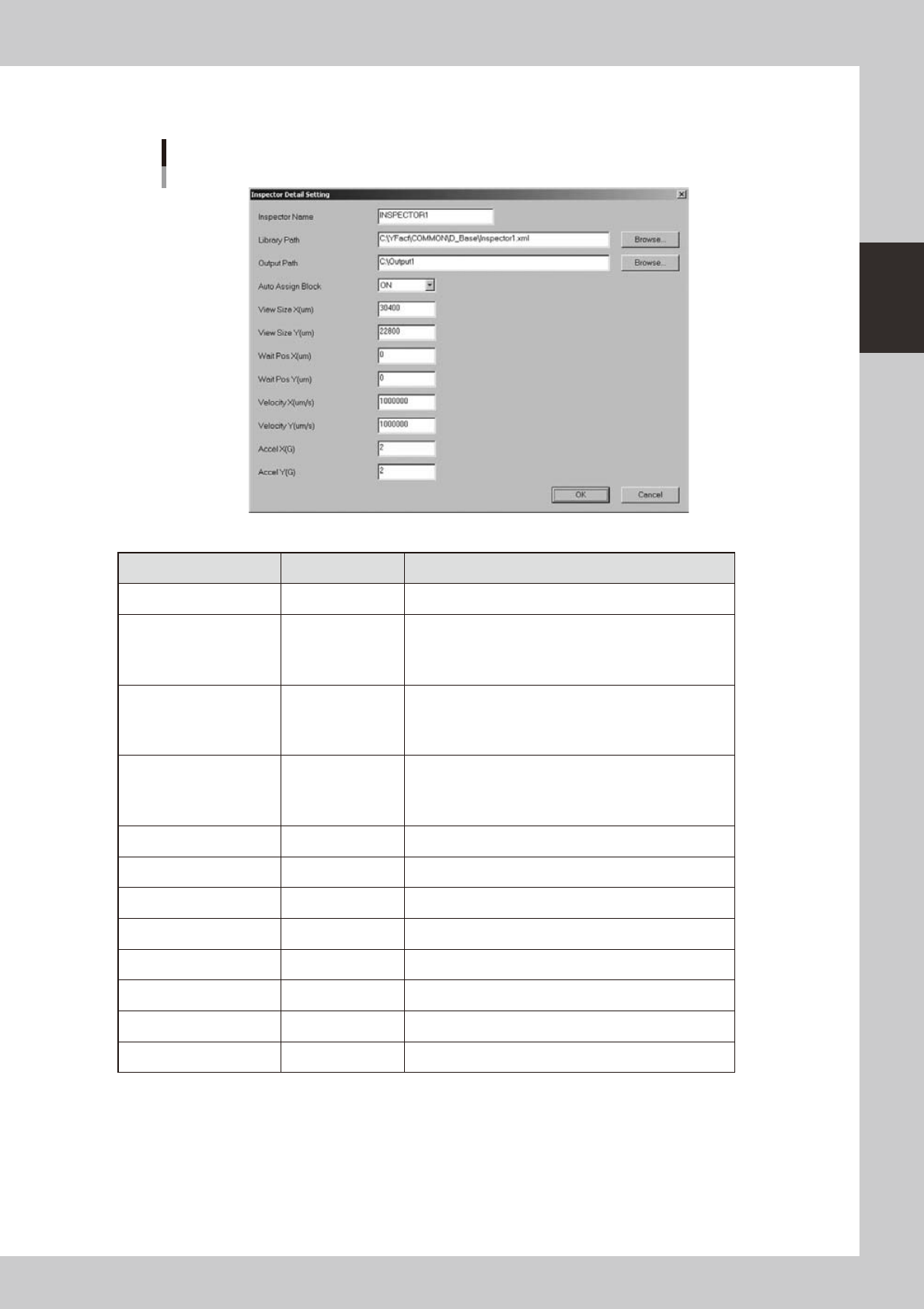
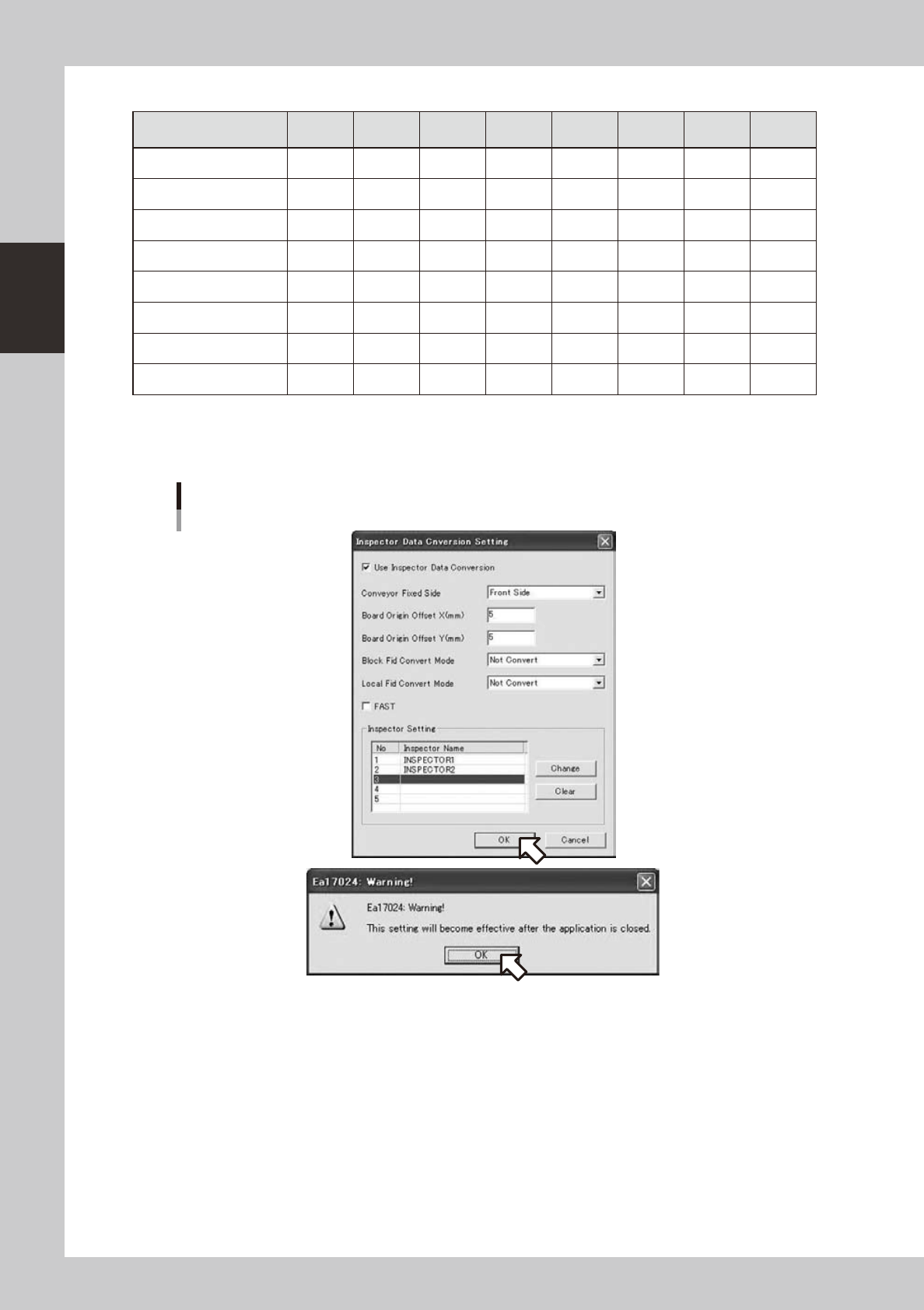
Inspector detail setting screen will be indicated if the [Change] button is clicked in
the Inspection program conversion setting screen.
Inspector detail setting screen
642D1-S0-00
Item Range Description
Inspector name Up to 20 characters Sets up item name shown in the menu.
Library path
Up to 259 characters
Sets up an xml file for shape data table used in conversion.
Clicking the reference button enables the selection from the
file selection screen.
Output path
Up to 259 characters
Sets up the default output destination of the converted
Inspection program.
Clicking the Reference button enables the selection from
the folder reference screen.
Auto assign block OFF / ON
Sets up if auto assign block is conducted during conversion.
To use the function, it is necessary to match items
subsequent to the visual field size X item with items of the
inspector unit.
View size X (µm) 10000 to 999999 View size X of inspector (µm)
View size Y (µm) 10000 to 999999 View size Y of inspector (µm)
Camera standby position X (µm)
999999 to 999999 Camera standby position X of inspector (µm)
Camera standby position Y (
µ
m)
999999 to 999999 Camera standby position Y of inspector (µm)
Camera movement speed X (µm/s)
1 to 2147483647 Camera movement speed X of inspector (µm/s)
Camera movement speed Y (µm/s)
1 to 2147483647 Camera movement speed Y of inspector (µm/s)
Camera acceleration X (G) 0.001 to 9.999 Camera acceleration X of inspector (G)
Camera acceleration Y (G) 0.001 to 9.999 Camera acceleration Y of inspector (G)
2-40
2
Board Explorer
n
Setting value sample by model
Model YVi-Mini YVi-X2 YVi-X2H
YVi-DT
(20μm)
YVi-DT
(15μm)
YVi-DTL YVi-LH YVi-MH
Visual field size X (µm) 30400 25800 32000 20400 15300 30400 30400 30400
Visual field size Y (µm) 22800 17200 24000 15400 11500 22800 22800 22800
Camera standby position X (µm)
0 0 0 0 0 0 0 0
Camera standby position Y (µm)
0 0 0 0 0 0 0 0
Camera movement speed X (µm/s)
1000000 1000000 1500000 2500000 2500000 2500000 1500000 1000000
Camera movement speed Y (µm/s)
1000000 1000000 1500000 2500000 2500000 2500000 1500000 1000000
Camera acceleration X (G)
2.000 2.000 2.500 0.670 0.670 1.217 2.200 2.000
Camera acceleration Y (G)
2.000 2.000 2.500 0.670 0.670 1.065 2.200 2.000
The value may differ depending on machine adjustment, camera in operation and optional lenses.
Adjust according to the adjustment value of the inspector unit in use.
9
Click the [OK] button and restart the Board Explorer to save the changed setting.
Saving changed setting and restarting Board Explorer
642D2-S0-10
2-41
2
Board Explorer
4.2.5 Restrictions
•Datacanbeconvertedonlywhenlinedata,notrespectivemachines,isselected.
•Printerdatacannotbeconverted.
•Whenusingdispenserdata,somedatasuchaslibrarynameofconversiontypecorrespondencecannotbeused.
•WhenconvertingtoInspectionprogram,skipandreferencedataarenotoutput.
•ConvertstolowerbottomoriginregardlessoforiginspecificationsofYamahamachinesasboardoriginisleftbottom
regardless of flow direction.
•Upto60000mountingpointscanbeconvertedincludingdotdispensedata.Nomoredatacanbeconverted.
•TheBoardNameafterconversioncanincludeupto20characters.
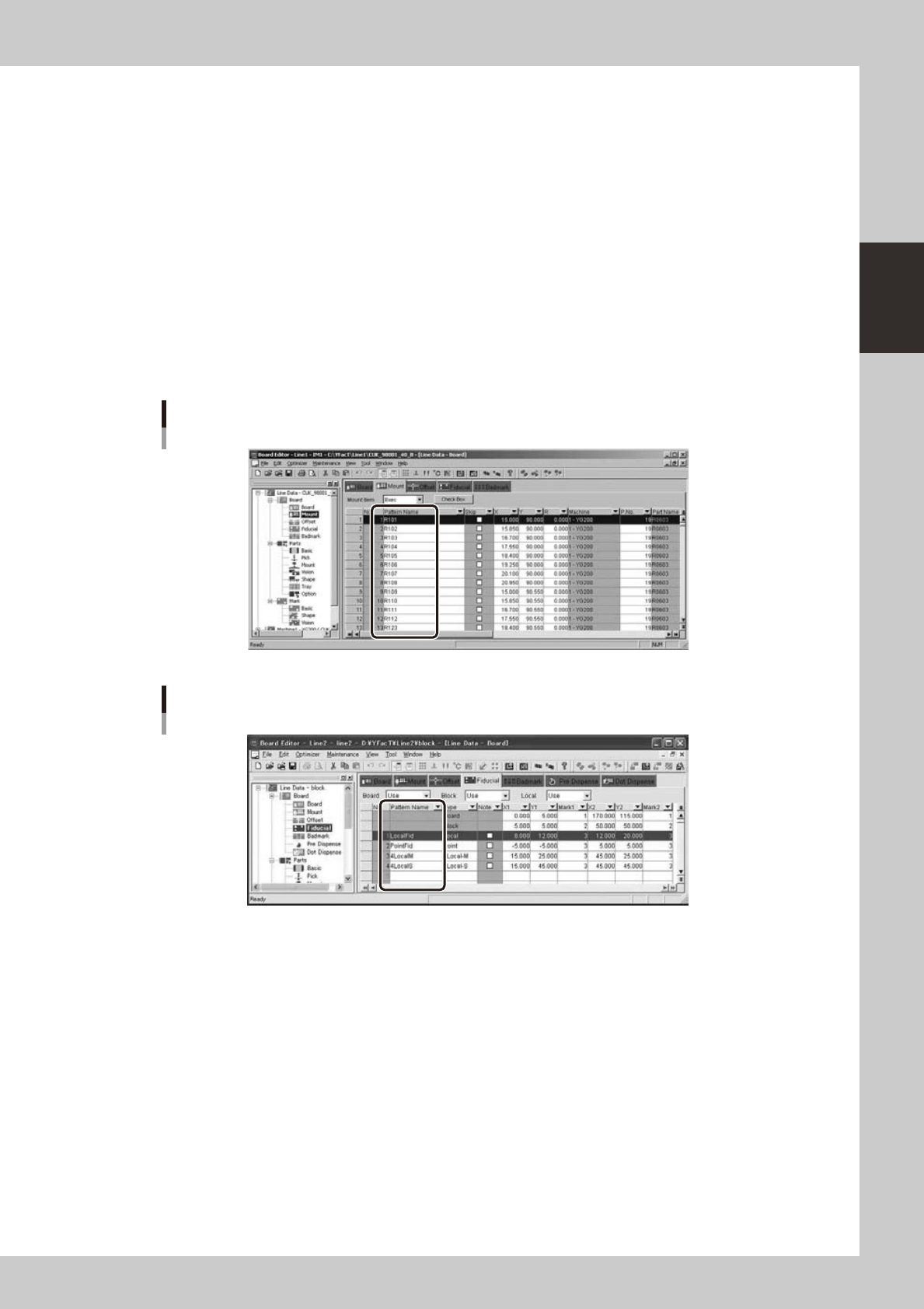
•Thepatternnameofmountinformationcanincludeuptoninecharacters.
•PartsizeisusedforinspectionfieldofInspectionprogram.Dotdispenseinformationcontainsnosizeinformationand
inspection field of 5.0 mm x 5.0 mm will be output.
•Dotdispenseinformationcontainsnopartnameanditisimpossibletouselibraryofinspector.
•YoumustsetthePatternNamesintheFiducialInformationwithin9characters.
Pattern name of mount information
642D4-S0-00
The Pattern Names in the Fiducial Information
642D5-S0-00