00195166-0402_SM_D4_EN.pdf - 第153页
Service W ork Replacing the Intermediate Distributo r [00330648] C&P12 Placement Head Service Manual SIPLACE D4 153 4.5.4 Replacing the Intermed iate Distributor [00330648] Removal/Installation The following supply v…
Service Work
C&P12 Placement Head Replacing the Component Camera (D Series) [03014449-xx]
152 Service Manual SIPLACE D4
Installation
See also:
J
6.3.1 Calibrating the C&P Head and Cameras [
J
221]
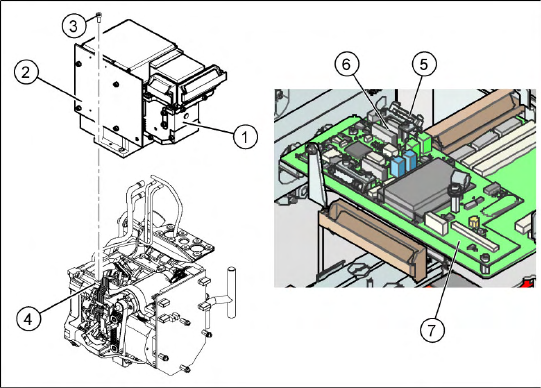
X Make sure that all contact surfaces are clean.
X Place the holes in the camera on the parallel
pins (4).
X Carefully position the camera on the C&P
head, until the camera plinth lies flat on the
contact surface of the front part of the C&P
head.
X Fix the camera in place with the four screws
provided (3).
X Fit the front part of the C&P head (4).
X Reconnect the flat ribbon cables (6) to the
Vision board (7) of the gantry head distributor.
X Refit the flat ribbon cable strain relief (5). This
reestablishes the ground connection.
X Start the machine.
X Use the SITEST program to calibrate the C&P
head.
Service Work
Replacing the Intermediate Distributor [00330648] C&P12 Placement Head
Service Manual SIPLACE D4
153
4.5.4 Replacing the Intermediate Distributor [00330648]
Removal/Installation
The following supply voltages and signals are routed by the intermediate distributor to the individual
placement head modules or to the head board:
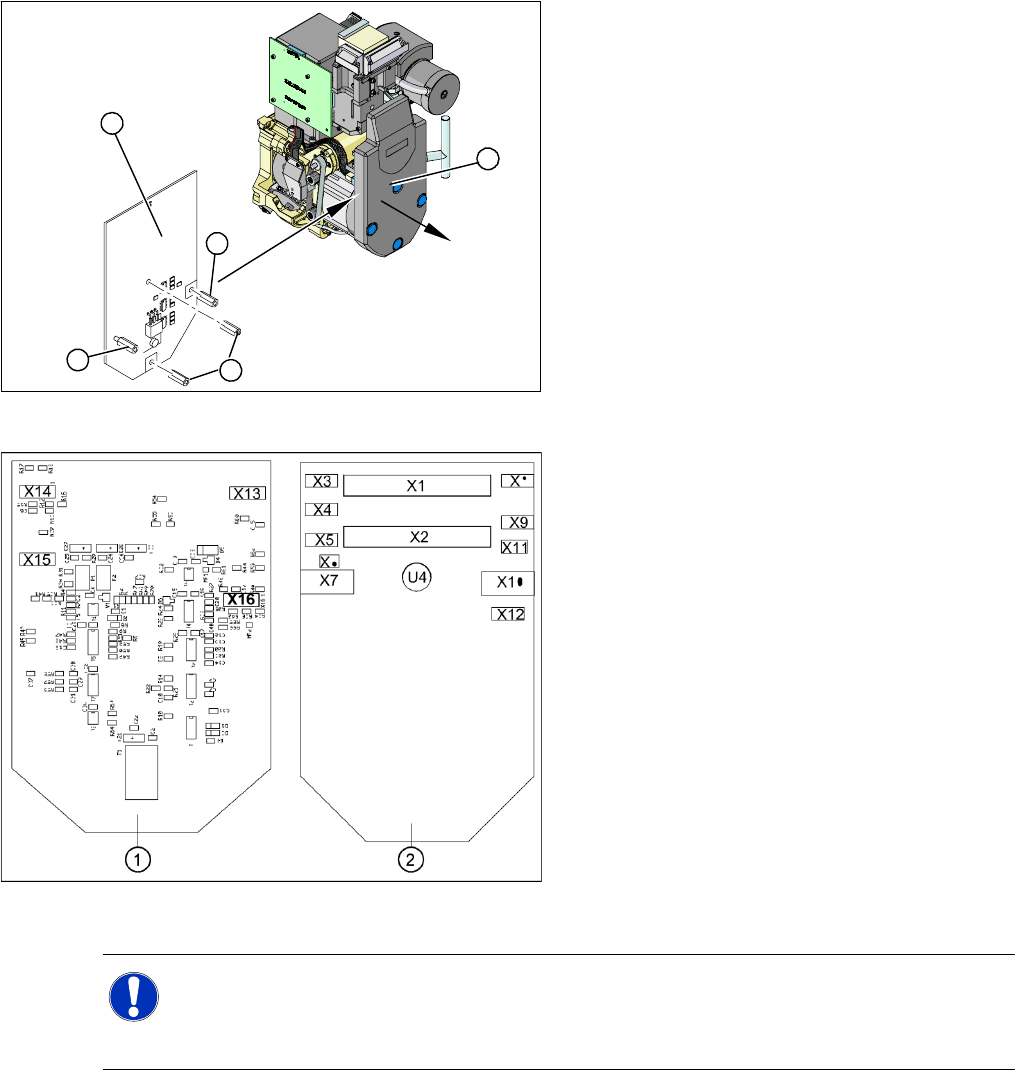
X Please observe the ESD regulations for the
following work and use an ESD ground strap.
X Loosen the four fastening screws and remove
the cover (1), by pulling these off the 4 snap
fasteners.
X Undo the four spacer bolts (3) and tilt the
intermediate distributor (2) a little.
3
3
1
3
2
4-41: Position of the sockets
Legend
1. Front of the intermediate distributor
2. Back of the intermediate distributor
U4 = pressure sensor
X Carefully disconnect the hose from the
pressure sensor (U4).
X Disconnect the connection plugs from their
slots. Refer to the circuit diagram folder for the
relevant machine.
X Remove the intermediate distributor.
X Restore connections X1......X12.
X Push the hose onto the pressure sensor tube
(U4).
X Fasten the intermediate distributor.
NOTE:
X No settings are required.
X The axis machine data can be rewritten in the memory of this board via the SITEST menu
Replace head
.

Service Work
C&P12 Placement Head Replacing the Intermediate Distributor [00330648]
154 Service Manual SIPLACE D4
Connectors Description
X1, 40-pole Connected to plug X14 on the head board
Voltage supply, tacho and track signals for the Z axis drive
Signal from light barrier "Z axis in top position"
Signal from light barrier "Z axis in bottom position" (sensor stop signal)
Control signal for the air blast valve
Supply voltage +5 VDC, ±15 VDC
Reference point signal for the DP axis
Track signals for the DP axis
X2, 40-pole Connected to plug X13 of the gantry head distributor
Voltage supply and track signals for the star axis drive
Reference point for the star axis
Analog air blast pressure value
Supply voltages +5 VDC, ±15 VDC, +24 VDC
X3, 10-pole Connection for the Z motor and Z tacho signal (Tacho signal is not used on the HF machine)
X4, 10-pole Connection for the Z axis track signals
X5, 10-pole Connection for the star motor
X6, 6-pole Connection for the air blast valve
X7, 10-pole Connection for the DP axis track signals
X10, 10-pole Connection for the "Z axis up" signal
X11, 8-pole Connection for the light barrier "Z axis down" signal (sensor stop signal)
X12, 10-pole Connection for the star axis track signals
X13, 10-pole Test connection for the Z axis track signals
X14, 10-pole not used
X15, 10-pole Test connection for the star axis track signals
X16, 10-pole Test connection for the DP axis track signals