00197501-02_AI_WPC_Umbau_X-Series_S_DE_EN.pdf - 第84页
Review 4 Operator Tasks 4.3 Automatic Calibration 84 Assembly Instructions / Montageanleitung SIPLACE WPC an SIPLACE X-Serie S SIPLACE WPC on SIPLACE X Series S 03/2020 4.3 Automatic Calibration The fixed table needs to …

Review
4 Operator Tasks
4.2 Undocking the SIPLACE WPC5/WPC6
Assembly Instructions / Montageanleitung SIPLACE WPC an SIPLACE X-Serie S SIPLACE WPC on SIPLACE X
Series S 03/2020
83
4.2 Undocking the SIPLACE WPC5/WPC6
Preparatory work
► Go to Manual operations => Entire machine functions and perform a Overall reference
run.
► Perform a SIPLACE WPC reference run. To do this, select Manual operations => Subsys-
tems => WPC and click on Reference run.
► Use the software to move the lifting axis of the SIPLACE WPC5/WPC6 into the transport posi-
tion. To do this, select the Move into transport position
button. The SIPLACE WPC5/WPC6
will be moved to a defined position, from which it can be safely transported.
► Disconnect the SIPLACE WPC5/WPC6 from the power supply and the data supply.
Removing the SIPLACE WPC5/WPC6
► Open the machine covers on the relevant changeover table.
► Move the changeover table out of the machine.
► Fasten the hexagonal shaft (crank handle) to the lifting mechanism of the SIPLACE WPC and
turn in a clockwise direction, to lift the SIPLACE WPC5/WPC6.
► Stop turning as soon as you have enough room to undock the SIPLACE WPC5/WPC6 from
the machine. Make sure that the feeder mechanism does not get caught anywhere!
► Remove the SIPLACE WPC5/WPC6.
Transporting the SIPLACE WPC5
► When the lifting axis is in its lowermost position (transport position), the SIPLACE WPC5/
WPC6 can be moved on a level floor.
► To transport on the hand lift, ALWAYS turn the carriage COMPLETELY up. If you do not, the
weight of the SIPLACE WPC will burden the lifting spindle of the carriage and the spindle
could be bent.
Review
4 Operator Tasks
4.3 Automatic Calibration
84 Assembly Instructions / Montageanleitung SIPLACE WPC an SIPLACE X-Serie S SIPLACE WPC on SIPLACE X
Series S 03/2020
4.3 Automatic Calibration
The fixed table needs to be calibrated before operating the SIPLACE WPC5/WPC6.
NOTICE
Incorrect version of the station software.
The insert type requires version 701.1 of the station software.
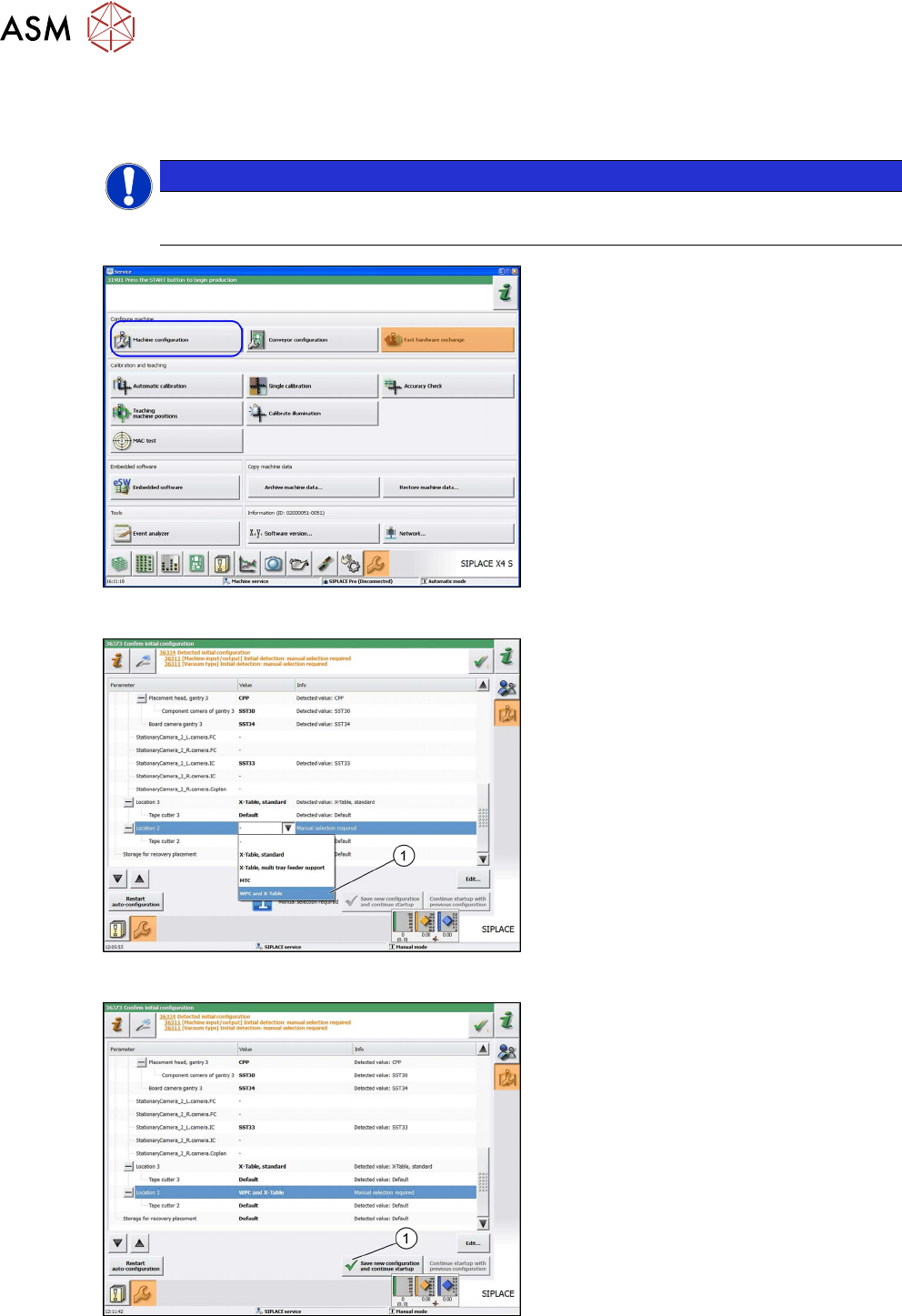
Fig.41: Machine configuration
► In the station software view, click on
Service
, Configure Machine and se-
lect Machine Configuration
.
Fig.42: Table type
► Go to the Machine Configuration view
and select the table type WPC and X
table (1).
Fig.43: Save new configuration and continue startup.
► Go to the Machine Configuration view
and select the Save new configura-
tion and continue startup (1) button.
ð The selection of the table type will
be confirmed.
► Go back to the Station Software view
at Service, Configure Machine
.
Review
4 Operator Tasks
4.3 Automatic Calibration
Assembly Instructions / Montageanleitung SIPLACE WPC an SIPLACE X-Serie S SIPLACE WPC on SIPLACE X
Series S 03/2020
85
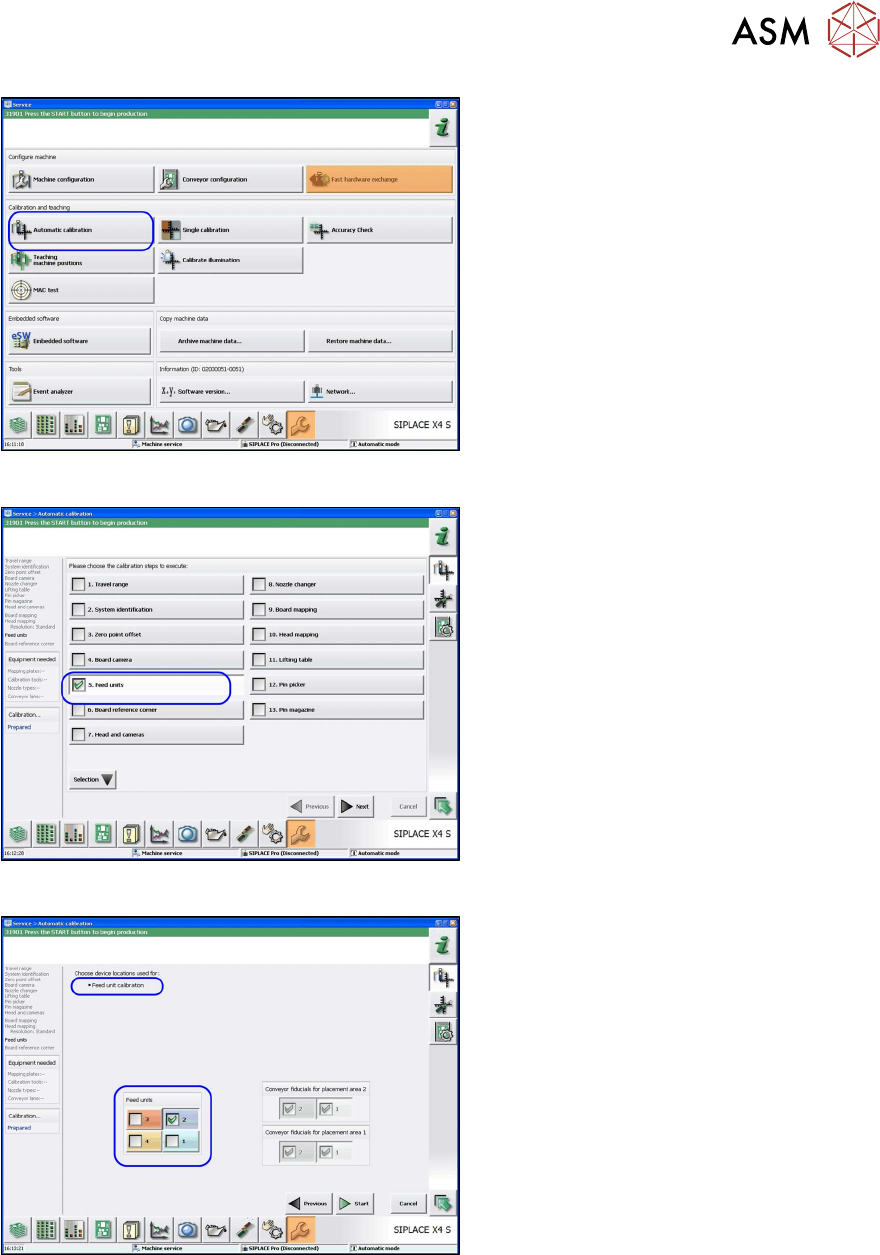
Fig.44: Automatic calibration
► In the Station Software view, click on
Service
, Configure Machine and se-
lect Automatic Calibration
.
ð The Automatic Calibration view
will be shown.
Fig.45: Automatic calibration: feed units
► Go to the Automatic Calibration view
and select the calibration step Feed
units.
► Click Next.
ð The Feed unit calibration view will
open.
Fig.46: Feed unit calibration
► Go to the Feed unit calibration view
and select the feeder unit at location 2.
► Click on Start.