00195366-01_InstallationManual_EDM_en.pdf - 第51页
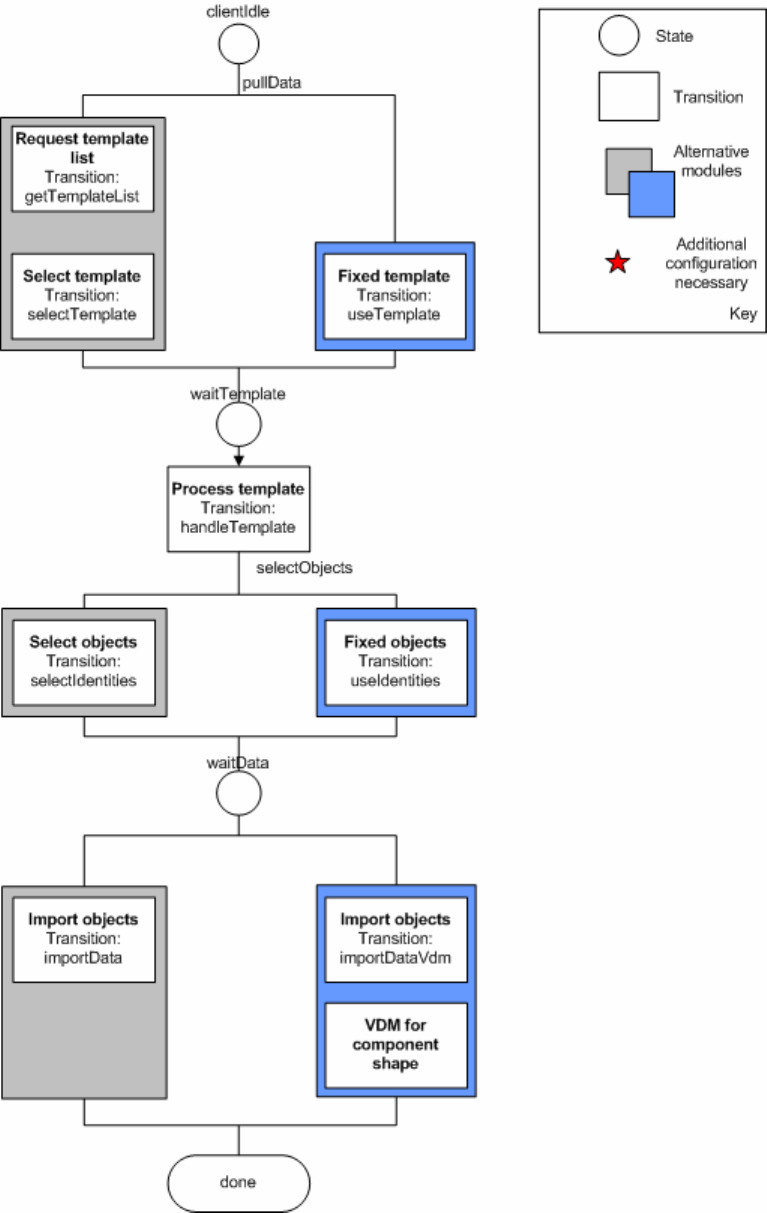
Installation Manual SIPLACE EDM Edition 11/2006 Figure 15 Current configuration options for client workflows 51 of 66

Installation Manual SIPLACE EDM Edition 11/2006
An example for Table 9:
<customConfig>
<add key=“templateName“ value=“All Component Shapes“/>
</customConfig>
Module: Fixed Objects
Key Form Contents
List containing the names of the
objects to be transferred.
objectNames A semicolon-separated (“;”), full SIPLACE Pro path.
The following generalized constructs are allowed for
the object names:
Type:* - All objects of this type
Type:Path\* - All objects of this type in this
path (not in subfolders of this
path)
Table 10 Additional settings for "fixed objects"
An example for Table 10:
<customConfig>
<add key=“objectNames“ value=“Import\100.gf;System\12.gf;System\100*“/>
</customConfig>
50 of 66
Installation Manual SIPLACE EDM Edition 11/2006
Figure 15 Current configuration options for client workflows
51 of 66
Installation Manual SIPLACE EDM Edition 11/2006
5.3.3 Default configuration
See 7.2. ClientWorkflow.xml
52 of 66