00192169-01.pdf - 第52页
Order No. 00192 169-01 User Manual - Productivity Lift E_SPLFS03_V40_11_0300_200300_V1_14.doc Last update: 20.03.2000 - Version V 1.14 Page 52 9.2 Automatic tracking via CAN bus The lift is connected to other systems via…
Order No. 00192 169-01 User Manual - Productivity Lift
E_SPLFS03_V40_11_0300_200300_V1_14.doc Last update: 20.03.2000 - Version V 1.14 Page 51
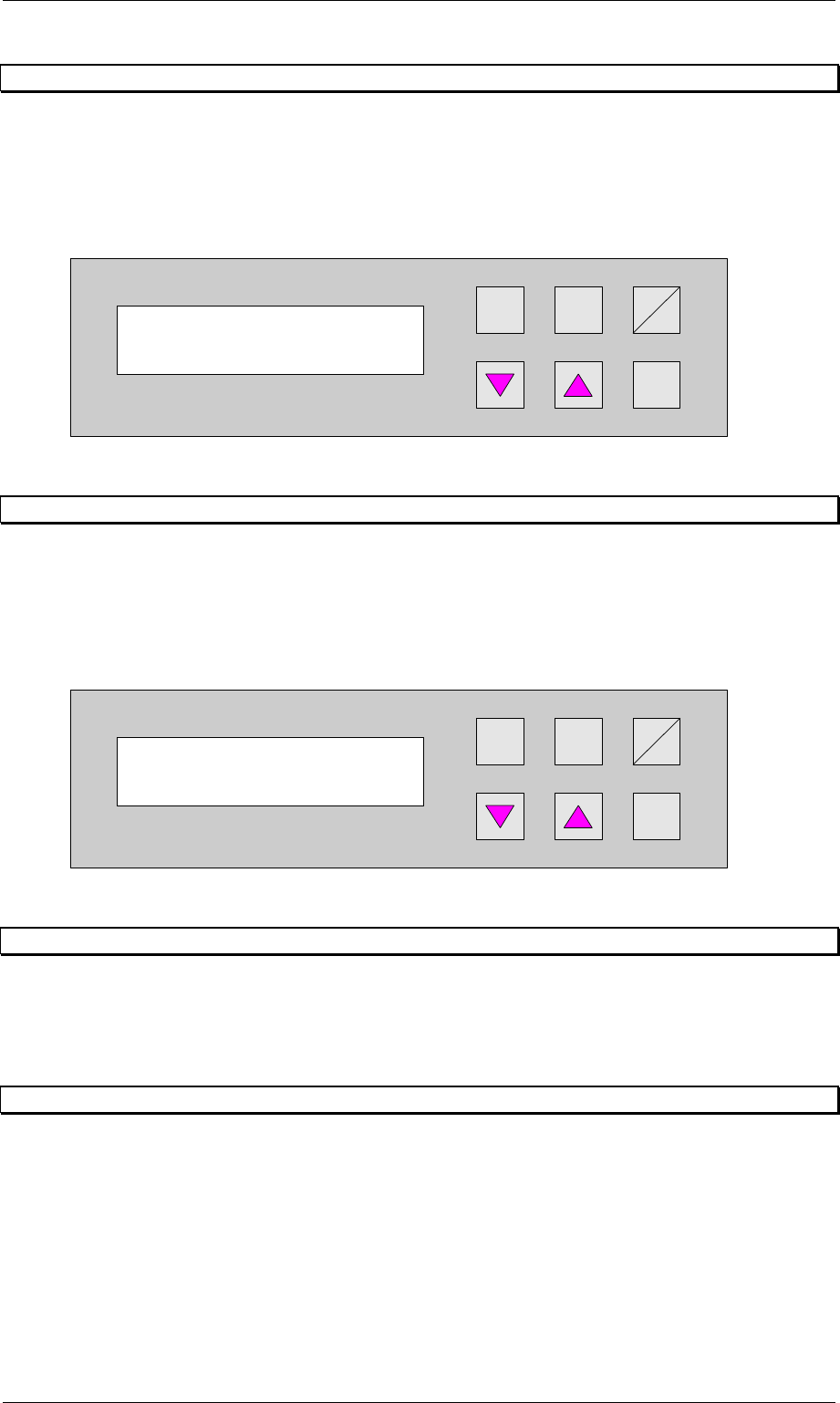
8.6 Manual mode 6 Width lift 2
Function to set the width for the shuttle.
The cursor keys s and t can be used to increase and/or decrease the width of the
conveyor.
The Enter key can be used to proceed to the next test function. To cancel the procedure, exit
the menu using the Start/Stop key.
Hand
Stop
Start
Enter
Alt
Figure 70: Manual mode 6 width lift 2
8.7 Manual mode 7 Width belts
Function to set the width for the underfloor conveyor.
The cursor keys s and t can be used to increase and/or decrease the width of the
conveyor.
The Enter key can be used to return to the first test function. To cancel the procedure, exit
the menu using the Start/Stop key.
Hand
Stop
Start
Enter
Alt
Figure 71: Manual mode 7 width belts
9 Automatic tracking option available
The Productivity Lift can be fitted with two types of automatic tracking.
1. Tracking via hybrid light barriers
2. Tracking via CAN bus
9.1 Automatic tracking via hybrid light barriers
The system is equipped with an automatic tracking facility for the transport width.
In the automatic operating mode, the transport width is tracked automatically. Built-in hybrid
light barriers detect the position of the mobile transport cheek of the previous or following
device and automatically adapt the transport width of the lift. The sensor mechanism detects
the direction in which adjustment is made and proceeds accordingly. If signals overlap, a
reference run is performed. In this case, the width setting is increased to the maximum width
and then the transport width is reset.
Manual mode 6
Width lift 2
Manual mode 7
Width belts
Order No. 00192 169-01 User Manual - Productivity Lift
E_SPLFS03_V40_11_0300_200300_V1_14.doc Last update: 20.03.2000 - Version V 1.14 Page 52
9.2 Automatic tracking via CAN bus
The lift is connected to other systems via a CAN bus. The data for the current width are
transferred via this CAN bus. The configuration of the lift determines which system is
responsible for the width and how the width is queried and checked.
Communication via CAN bus is only possible with our systems.
10 Technical Data
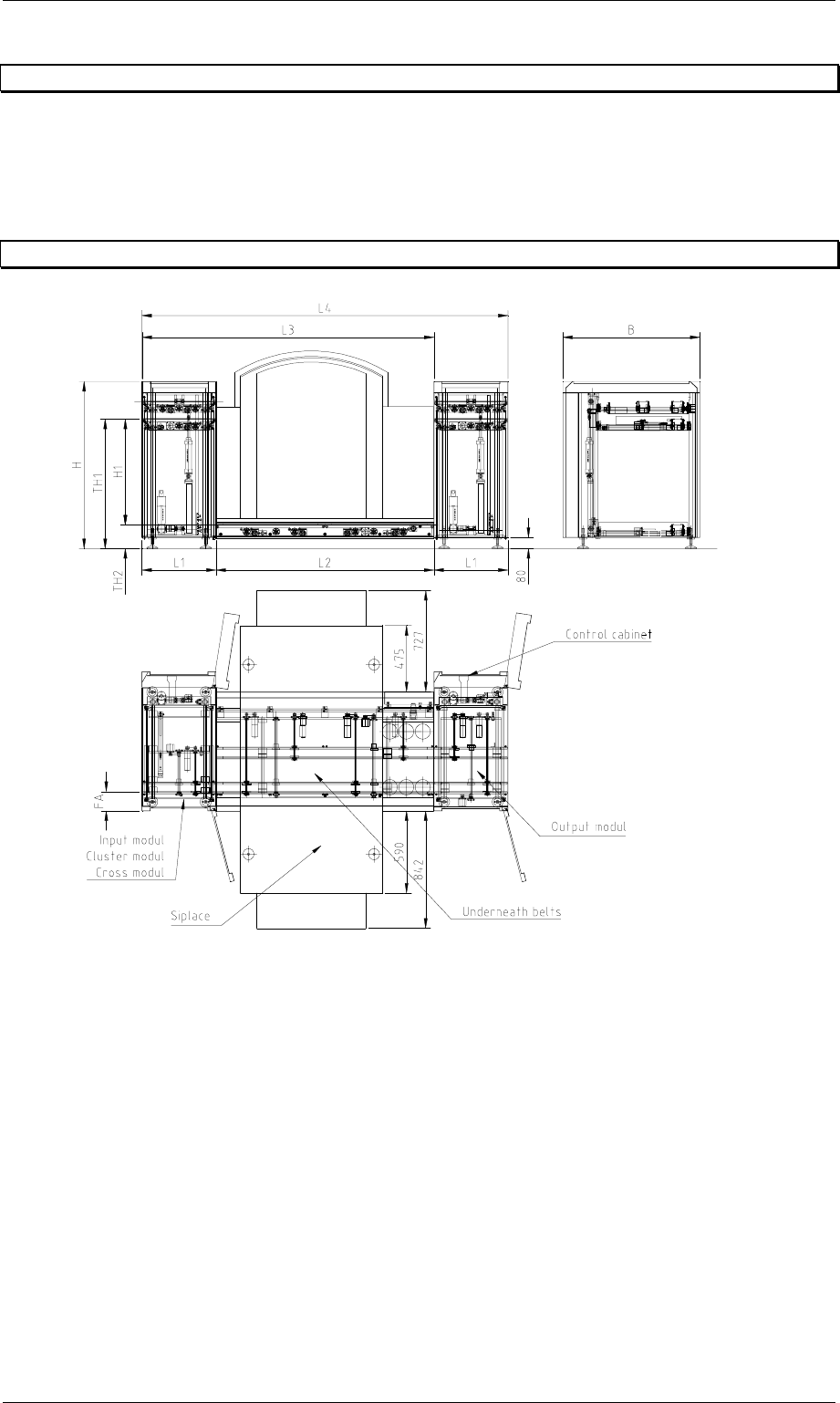
Figure 72: Technical Data
Installation and operation instructions
For the installation and operation of the productivity lift the following advice have to be
observed:
1. Area load allowed for undercover 0,2 t/m²
2. room temperature 15°C until 35°C
3. humidity in the area 30% until 70%
4. average humidity ≥ 45%
Order No. 00192 169-01 User Manual - Productivity Lift
E_SPLFS03_V40_11_0300_200300_V1_14.doc Last update: 20.03.2000 - Version V 1.14 Page 53
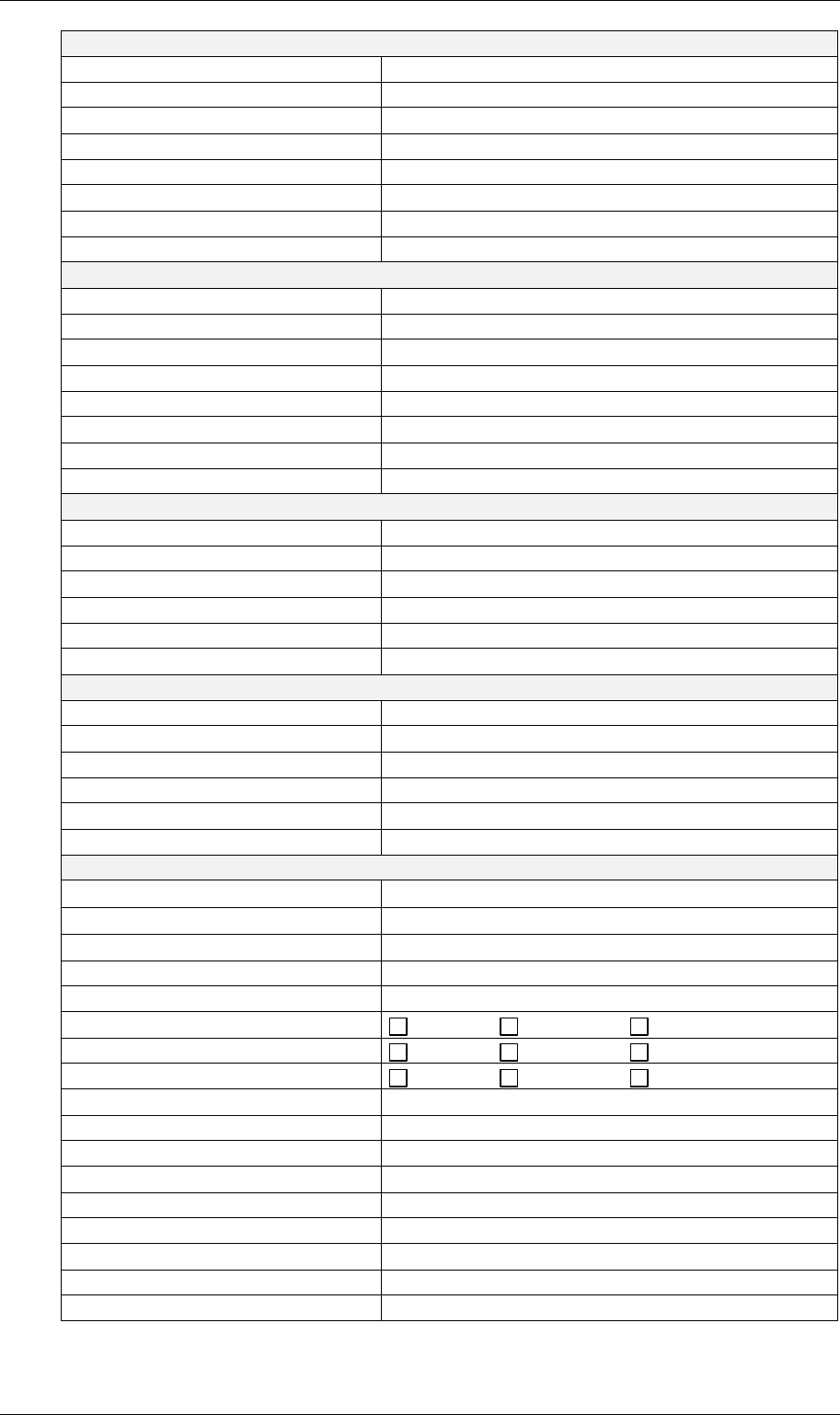
Machine type: input module, cluster module, cross module
Length L1 540 mm
Width B 1045 mm
Height H 1200 mm with TH1 930 mm
Shuttle H1 760 mm
Weight 212 kg
Width adjustment Shuttle with stepper motor
Width adjustment Top conveyor manual
Machine type: output module
Length - lift L1 540 mm
Width B 1045 mm
Height H 1200 mm with TH1 930 mm
Shuttle H1 760 mm
Weight 212 kg
Width adjustment Shuttle with stepper motor
Width adjustment Top conveyor manual
Underfloor conveyor for Siplace short for S20
Length lower belt L2 1595 mm
Total module length L3 2135 mm
Total unit length L4 2675 mm
Weight 90 kg
Width adjustment with stepper motor
Underfloor conveyor for Siplace long for HS50
Length lower belt L2 2385 mm
Total module length L3 2925 mm
Total unit length L4 3465 mm
Weight 120 kg
Width adjustment with stepper motor
All machine types
Transport height - above TH1
930 mm ± 30 mm
Transport height - below TH2
170 mm ± 30 mm
PCB width 50 - 217 mm
PCB length 50 - 460 mm
PCB edging during transport 3mm
Interface inlet ... Siemens SMEMA
Interface outlet ... Siemens SMEMA
Automatic tracking none at inlet at outlet
Electrical connection 230V / 50Hz or 110V / 60Hz AC
Power input 0,4 kW
Secondary voltage 24V DC
Fuse-protection 1x 6,3A
Compressed air supply 5 bar and 10 l/min
Controller CAN/MM100 and CAN/MS1
Operation via control desk CAN/P50
Programme version V 40.11