Autosite_Users_Manual.pdf - 第72页
Operation 3-14 AutoSite User Manual 6. As sho wn in Figure 3 -9, set t he Base onto t he pin driver hea d, making sure the guide pins on the pin driver head line up with the guide holes in the Bas e. 7. Squeeze the Base …

Operation
AutoSite User Manual 3-13
Inserting the DIP or PLCC Base
This section explains how to insert the DIP and PLCC Bases into
AutoSite.
About the Base
Similar to a programming module, the DIP Base and PLCC Base serve as
the interface between a device and AutoSite. The DIP and PLCC Bases are
designed to help isolate programming problems and hardware problems.
For more information, see the section “Isolating Programming
Problems.”
Inserting a Base
Follow the procedure below to insert a Base into AutoSite.
Note: You can install and remove a Base with the power on as long as you are
not performing a device operation.
1. Make sure the handler is idle.
2. Clear all devices from the handler.
3. If the pin driver head is attached to a handler, remove the pin driver
head from the handler. See the handler manual for more information.
4. If a programming module is installed in the pin driver head, remove
the programming module from the pin driver head. Set the
programming module aside. See the handler manual for more
information.
CAUTION: Do not touch the pins that are exposed when you remove the
programming module.
5. Slide the compression handle onto the pin driver head. The
compression handle is shown in Figure 1-1.
Operation
3-14 AutoSite User Manual
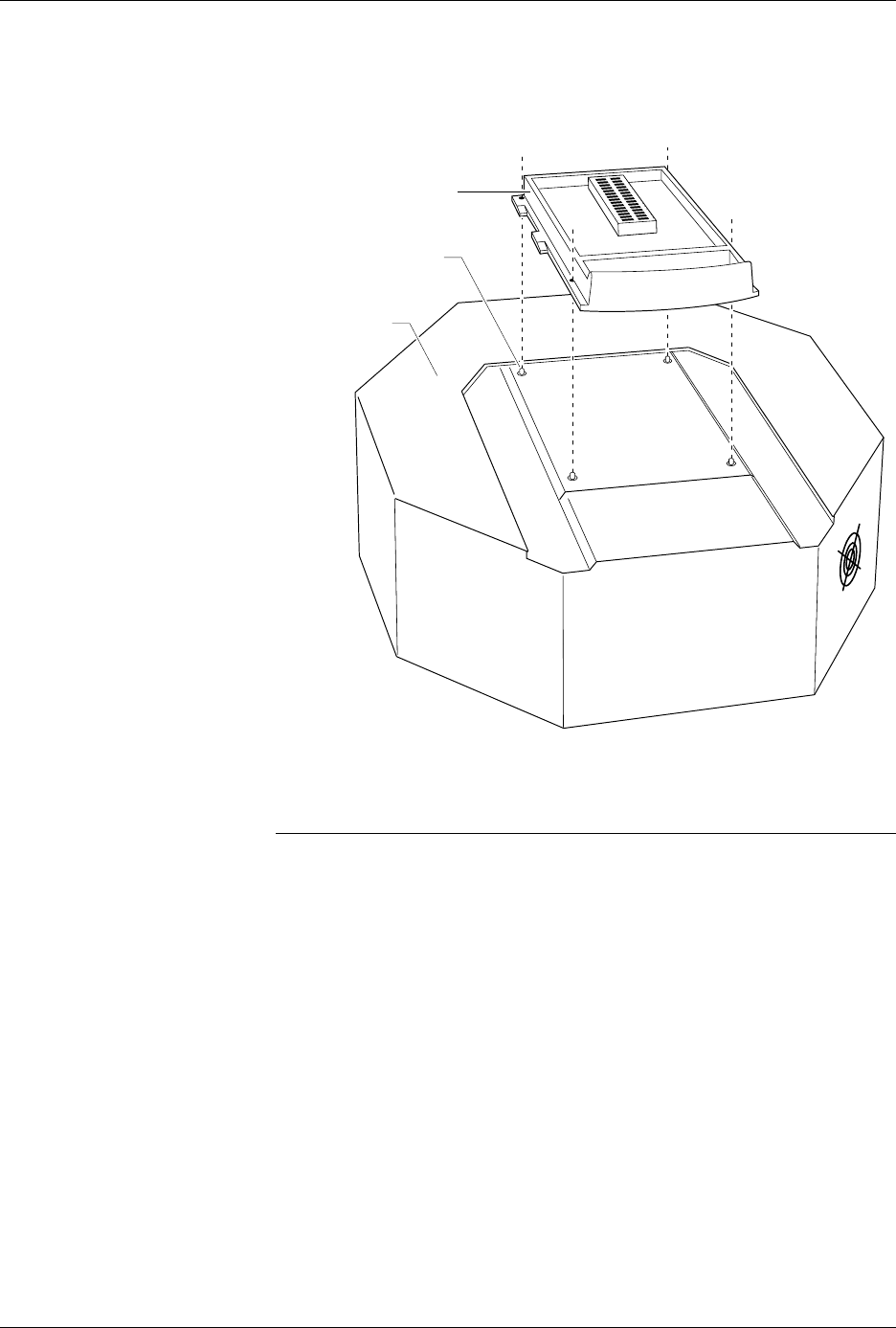
6. As shown in Figure 3-9, set the Base onto the pin driver head, making
sure the guide pins on the pin driver head line up with the guide
holes in the Base.
7. Squeeze the Base and the clamp ring together, securing the Base to
the pin driver head. You do not need to use excessive force.
CAUTION: You can damage AutoSite by squeezing too hard.
With the Base installed in the pin driver head, you can perform the
following procedures:
• Update AutoSite to a new version of system software. See the
User
Notes and Update Instructions
that accompany the new software.
• Program PLCC devices one at a time. See the section titled “Inserting
PLCC Devices and Using MatchBooks” for more information.
Figure 3-9
Aligning the Base on the Pin
Driver Head
1381-1
PIN DRIVER
HEAD
DIP BASE
GUIDE PIN
(1 OF 4)
Operation
AutoSite User Manual 3-15
Removing a Base
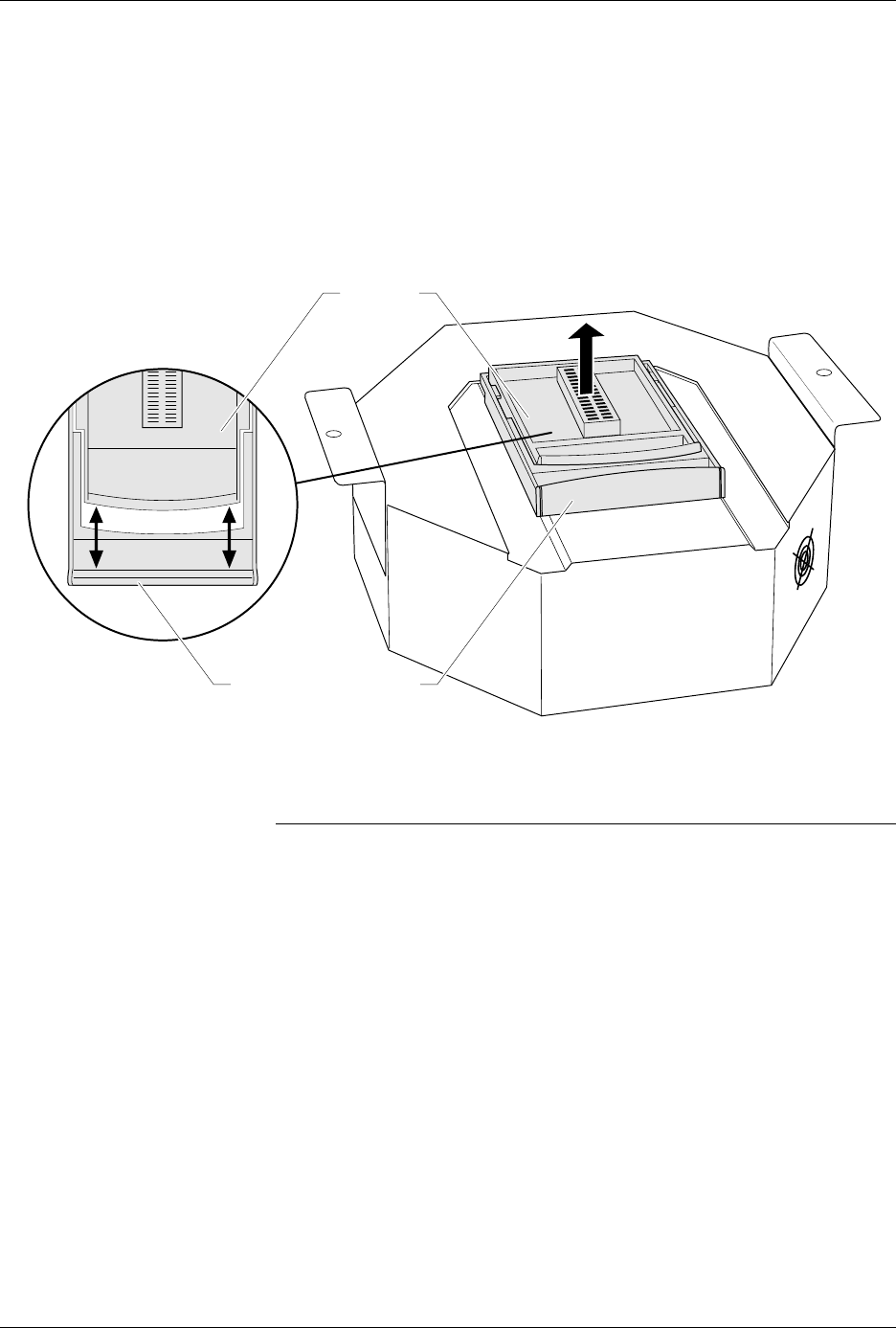
When removing a Base from AutoSite, be sure to apply even pressure
while moving the handles apart. If you exert uneven pressure on the
handles, you could damage the clamp ring.
To remove a Base, follow the steps described below.
1. As shown in Figure 3-10, remove the Base by separating the handles
on the Base and the clamp ring with your thumbs and fingers.
2. Lift the Base up and out of the pin driver head. Store the Base in a safe
place.
CAUTION: Do not touch the pins that are exposed when you remove the
Base.
Once the Base is removed from AutoSite, we suggest you reinstall a
programming module in the pin driver head. For more information on
installing a programming module and reconnecting the pin driver head
to a handler, see the section titled “Changing a Programming Module”
earlier in this chapter.
Figure 3-10
Removing a Base
1380-2
DIP BASE
COMPRESSION HANDLE