IT Feeder Manual-45Series(English V2.0)Ver5.pdf - 第32页
在线预览 IT Feeder Manual-45Series(English V2.0)Ver5.pdf PDF 文档。
IT Feeder System
1-19
displayed. Barcodes can be read wrongly due to damages to barcodes or wrong key in
during direct input. In the former case, reissue barcodes in the Part Station or enter them
manually.
A barcode that is not generated by the Part Station can not be read. In this case, register
the reel in the Part Station first and use it.
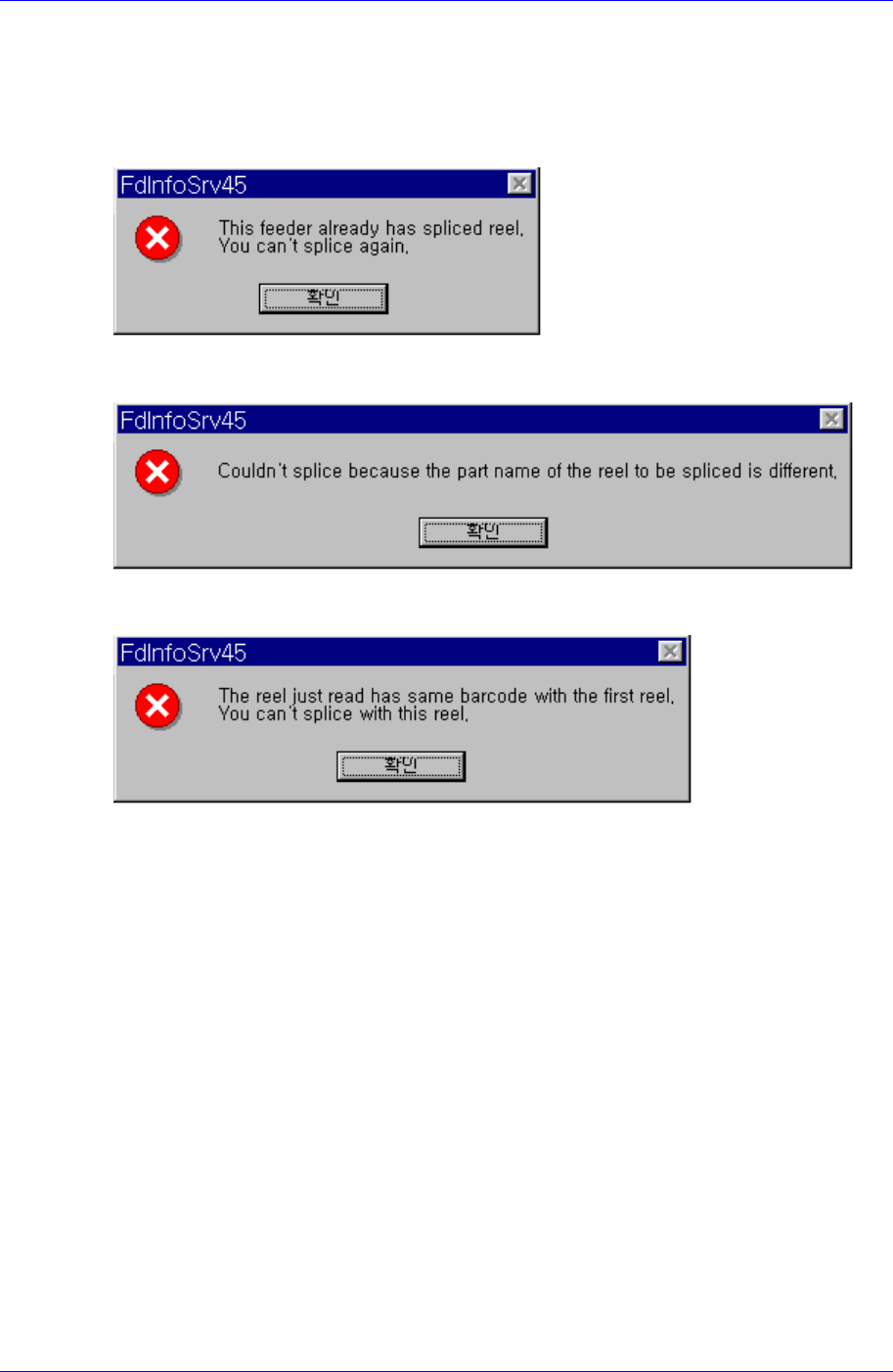
When splicing the selected feeder, if it has been already spliced, the message as above is
displayed.
When performing splicing in the Splicing Screen Configuration, it appears if the 2
nd
reel
code is not identical.
When performing splicing in the Splicing Screen Configuration, it appears if the 2
nd
reel
code is identical.
Part Station
Chapter 2. Part Station
2-1
2.1. Overview
Part Station, a module in IT Feeder Station, is a Windows program that registers
PartReels necessary for Off-Line PCB operations and creates Barcodes by using the
newly created ReelCodes.
This program reads the registered part code in the machine from the database and creates
the Part Reel barcode for the corresponding part. Each station program of the IT feeder
consists of the Oracle DB that is controlled commonly.
Memo
Each part number used in all equipment must be controlled by a unique code. In other
words, once a part is registered, that part should have the same name. Otherwise, it will
be very difficult to control parts consistently. Therefore, at the beginning of system
construction, all workers should bear this in mind. For example, if 1005 Type 100Ohm
resistance is registered as A in CP40, it should be registered as A in other equipment
(CP45FV, CP60, CP40) also. Part registration data (Vision data, Align data, etc) can differ
from equipment to equipment, but one name should be used for all equipment so that Part
Station can always create the ReelCode for 1005 Type 100Ohm resistance as PartName
A.
Part Station always creates unique Reelcodes and duplicated codes are not created. The
purpose is to control parts by the reel. The basic installation directories and file structures
of Part Station are as follows. The user can change the installation directory if desired.
For detailed information on installation method, please refer to “Installation of Part
Station in IQ Feeder Station”.
Program location
C:\ Program Files\SamsungTechWin\ITFeeder\PartStation
System requirements to run this program are as follows.
CPU: IBM PC compatible Pentium over 266Mhz (Pentium 333MHz or higher
processor is recommended)
OS: Over Microsoft Windows 2000
Memory: Over 128MB (over 256MB is recommended)
Hard Disk: 2MB hard disk space (need to secure at least 2GB of free hard disk
space)
The Part Station system consists of the Part Station program, Oracle Database Client,
waste Reel.bak for backup files, and Recycle.dat. The operation of Feeder Station and IQ
Module of the equipment is interrelated.