Eaton 9155 8-15 kVA.pdf - 第31页
UPS 8 – 15 kV A, 230V 50/60 Hz output User ’ s Guide 1 022403 Revision D 31 User Set tings The UPS has the following typical set tings that are user configurable. Note that some of the set tings become effective at the ne…
UPS 8 – 15 kVA, 230V 50/60 Hz output
User’s Guide
1022403
Revision D
30
7. User operations
The UPS has a four-button graphical LCD with backlight. It provides useful information about
the unit itself, load status, events, measurements, and settings.
The LCD backlight is switched on by pressing any button. It has a timeout that automatically
switches off after 15 minutes of inactivity.
Display functions
As default and after 15 minutes of inactivity the UPS is showing the selectable start screen:
1. Logo screen
2. Mimic screen (See User Settings on LCD screen)
The screen backlit has automatic shutdown after long period of inactivity. It will light up once a
button is pushed. The right side button will initiate the text to the screen. The scrolling through
the menu structure is done with buttons indicated by the images of the LCD screen. The
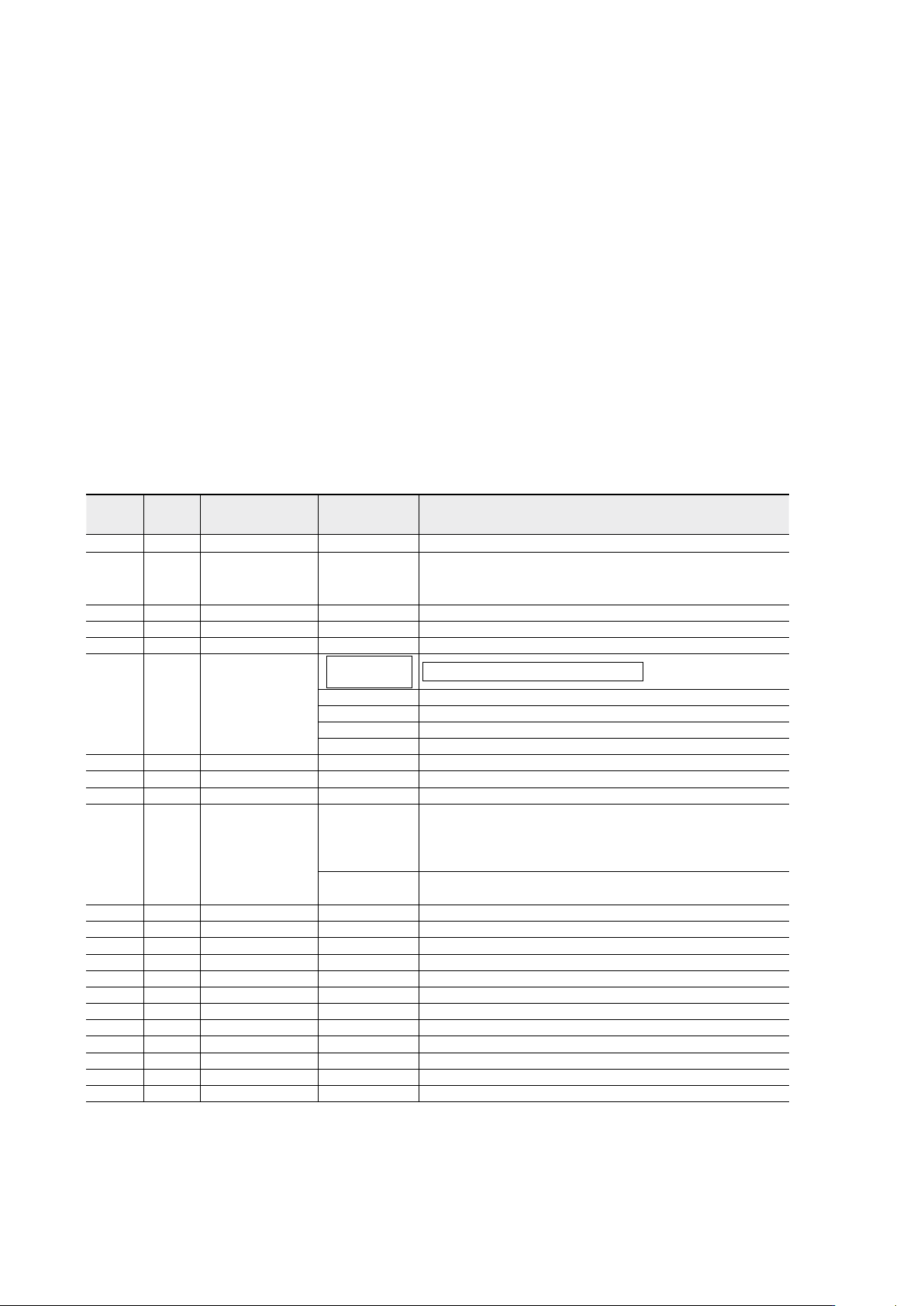
menu structure is shown in the table below. There are small differences in the menu structure
between single and parallel mode.
Parallel
Mode
Single
Mode
Main Menu Submenu Menu functions
I
x x UPS STATUS ->
UPS off / System normal / UPS supporting load / UPS on battery
/ UPS on bypass / +active alarms and notices / +battery status
(resting, charging, floating, not connected, discharging)
I
x x EVENT LOG -> Notice / Alarm
I
x x MEASUREMENTS
PARALLEL
SYSTEM
Parallel unit 1...4 kW/Parallel total kW
OUTPUT Voltage / Current / Frequency / Power
BATTERY Voltage / Current / Runtime
INPUT Voltage / Current / Frequency
BYPASS Voltage / Frequency
I
x x CONTROL -> Goto bypass / Battery test / Display test / Reset error state
I
x x SETTINGS
USER SETTINGS
Date / LCD contrast / Change language / Relay config / Signal
inputs / Serial port config / Parallel operation settings / Start
screen / User password / Audible alarms / Battery charging
method / +list of std. settings
SERVICE SET-
TINGS
Adjust parameters / Adjust events / Reset custom / Clear history
/ + modem call settings
I
x x IDENTIFICATION -> UPS Type / Part nro. / Serial nro / Revisions
I
x TURN UPS ON -> -
I
x TURN UPS OFF
I
x TURN SYSTEM ON
I
x TURN UPS OFF
I
x TURN SYSTEM OFF
Table 33. Menu map for display functions.

UPS 8 – 15 kVA, 230V 50/60 Hz output
User’s Guide
1022403
Revision D
31
User Settings
The UPS has the following typical settings that are user configurable. Note that some of the
settings become effective at the next start-up of the UPS. User settings can be configured via
LCD menu. Select SETTINGS →USER SETTINGS
Description Available settings Default setting
General:
Display contrast adjustment + / - Moderate
Display language [English], [Spanish], [French], [German] English (British)
Date & time [xxxx-xx-xx] 0001-01-01
Audible alarms [Normal], [Disabled] Normal
Normal screen in display [logo], [mimic] Product name
User settings password [Not required], [Set] Not required
Nominal values:
Nominal output voltage (L-N) [220], [230], [240] 230 Volts
Nominal output frequency [50 Hz], [60 Hz] 50 Hz
Rectifier phase current limit Step: 1 A 32 A
Communication and connectivity:
Disable control commands [Enabled], [Disabled] Disabled
Communication speed [1200], [2400], [9600], [19200] 19200 bps.
Std. relay output function
[UPS ON/OK], [Custom], [Battery low], [Sys-
tem on bypass], [System on battery]
UPS ON/OK
Signal input #1-2 function [Empty], [see Signal inputs] Empty
Hardware remote off delay for hardware
Remote off with restart function.
Step: 1 sec. 120 sec
XSlot relay output 1-4 function [Nothing], [see Signal inputs]
XSlot defaults:
#1: on battery
#2: battery low
#3: UPS on/ok
#4: on bypass
XSlot input signal (long break via Rx) Nothing
XSlot shutdown signal activation delay before
the signal is accepted.
Step: 1 sec. 5 sec
Bypass and syncronisation:
Usage of bypass [Enabled], [Disabled] Enabled
Require synch at transfer on bypass [Required], [Not Required] Not required
Transfer on bypass on overload [Immediately], [after delay] Immediately
Synchronization enable [Enabled], [Disabled] Enabled
Bypass voltage deviation high limit +1% ... +20%, step: 1% +10%
Bypass voltage deviation low limit -1% ... -20%, step: 1% -15%
Synchronization window 0.5 ... 3.0 Hz, step: 0.1 Hz ±2.0 Hz
Frequency slew rate (not in parallel mode) 0.1 ... 3.0 Hz/s, step 0.1 Hz/s 0.2 Hz/s

UPS 8 – 15 kVA, 230V 50/60 Hz output
User’s Guide
1022403
Revision D
32
Battery information and settings:
ABM charging cycling disable [Enabled], [Disabled] Enabled
Charging temp compensation [Enabled], [Disabled] Enabled
Battery size setting Step: 1 Watts/cell 24 Watts/cell
Number of 36 pcs. battery strings 0 (no batteries), 1, 2, 3, 4... 1 string
Battery low alarm level Step: 0.01 V/cell 1.88 V/cell
Automatic battery support test [Enabled], [Disabled] Enabled
Maximum charging current Step: 0.1 A [max. 25 Amps] 3 A
Output on, automatic delay time before turning
the output on
[Disabled], [Set delay, step: 1 sec] 0 sec.
Output off, automatic delay time on battery
after which output is turned off
[Disabled], [Set delay, step: 1 sec] Disabled
User preferences:
Operation priority while rectifier input break [On battery], [On bypass] On battery
Site wiring fault w/ wrong Neutral connection [Enabled], [Disabled] Enabled
Power Strategy [Standard], [High Efficiency] Standard
Parallel settings:
Parallel unit number
[Single unit], [Unit #1], [Unit #2], [Unit #3],
[Unit #4]
Single unit
Parallel operation mode [Redundant mode], [Capacity mode] Redundant mode
Synchronization [Enabled], [Disabled] Enabled
Start auto calibration
Parallel XCP [System], [Unit] System
Minimum units to support load [0], [1], [2], [3], [4] 2
Table 34. User setting in the LCD menu screen.