Eaton 9155 8-15 kVA.pdf - 第32页
UPS 8 – 15 kV A, 230V 50/60 Hz output User ’ s Guide 1 022403 Revision D 32 Battery information and settings: ABM charging cycling disable [Enabled], [Disabled] Enabled Charging temp compensation [Enabled], [Disabled] En…

UPS 8 – 15 kVA, 230V 50/60 Hz output
User’s Guide
1022403
Revision D
31
User Settings
The UPS has the following typical settings that are user configurable. Note that some of the
settings become effective at the next start-up of the UPS. User settings can be configured via
LCD menu. Select SETTINGS →USER SETTINGS
Description Available settings Default setting
General:
Display contrast adjustment + / - Moderate
Display language [English], [Spanish], [French], [German] English (British)
Date & time [xxxx-xx-xx] 0001-01-01
Audible alarms [Normal], [Disabled] Normal
Normal screen in display [logo], [mimic] Product name
User settings password [Not required], [Set] Not required
Nominal values:
Nominal output voltage (L-N) [220], [230], [240] 230 Volts
Nominal output frequency [50 Hz], [60 Hz] 50 Hz
Rectifier phase current limit Step: 1 A 32 A
Communication and connectivity:
Disable control commands [Enabled], [Disabled] Disabled
Communication speed [1200], [2400], [9600], [19200] 19200 bps.
Std. relay output function
[UPS ON/OK], [Custom], [Battery low], [Sys-
tem on bypass], [System on battery]
UPS ON/OK
Signal input #1-2 function [Empty], [see Signal inputs] Empty
Hardware remote off delay for hardware
Remote off with restart function.
Step: 1 sec. 120 sec
XSlot relay output 1-4 function [Nothing], [see Signal inputs]
XSlot defaults:
#1: on battery
#2: battery low
#3: UPS on/ok
#4: on bypass
XSlot input signal (long break via Rx) Nothing
XSlot shutdown signal activation delay before
the signal is accepted.
Step: 1 sec. 5 sec
Bypass and syncronisation:
Usage of bypass [Enabled], [Disabled] Enabled
Require synch at transfer on bypass [Required], [Not Required] Not required
Transfer on bypass on overload [Immediately], [after delay] Immediately
Synchronization enable [Enabled], [Disabled] Enabled
Bypass voltage deviation high limit +1% ... +20%, step: 1% +10%
Bypass voltage deviation low limit -1% ... -20%, step: 1% -15%
Synchronization window 0.5 ... 3.0 Hz, step: 0.1 Hz ±2.0 Hz
Frequency slew rate (not in parallel mode) 0.1 ... 3.0 Hz/s, step 0.1 Hz/s 0.2 Hz/s

UPS 8 – 15 kVA, 230V 50/60 Hz output
User’s Guide
1022403
Revision D
32
Battery information and settings:
ABM charging cycling disable [Enabled], [Disabled] Enabled
Charging temp compensation [Enabled], [Disabled] Enabled
Battery size setting Step: 1 Watts/cell 24 Watts/cell
Number of 36 pcs. battery strings 0 (no batteries), 1, 2, 3, 4... 1 string
Battery low alarm level Step: 0.01 V/cell 1.88 V/cell
Automatic battery support test [Enabled], [Disabled] Enabled
Maximum charging current Step: 0.1 A [max. 25 Amps] 3 A
Output on, automatic delay time before turning
the output on
[Disabled], [Set delay, step: 1 sec] 0 sec.
Output off, automatic delay time on battery
after which output is turned off
[Disabled], [Set delay, step: 1 sec] Disabled
User preferences:
Operation priority while rectifier input break [On battery], [On bypass] On battery
Site wiring fault w/ wrong Neutral connection [Enabled], [Disabled] Enabled
Power Strategy [Standard], [High Efficiency] Standard
Parallel settings:
Parallel unit number
[Single unit], [Unit #1], [Unit #2], [Unit #3],
[Unit #4]
Single unit
Parallel operation mode [Redundant mode], [Capacity mode] Redundant mode
Synchronization [Enabled], [Disabled] Enabled
Start auto calibration
Parallel XCP [System], [Unit] System
Minimum units to support load [0], [1], [2], [3], [4] 2
Table 34. User setting in the LCD menu screen.
UPS 8 – 15 kVA, 230V 50/60 Hz output
User’s Guide
1022403
Revision D
33
Configuring user settings
User settings can be configured via front panel. Select Settings from main menu and then select
User Settings.
Changing language
Pressing and holding down the first button on the left for about 3 seconds selects the language
menu. This action is possible from any LCD menu screen.
The default firmware has four main languages: English, Spanish, French and German. Other
local language packages including Chinese, Greek and Russian can be requested from the local
service representative.
Changing charging current
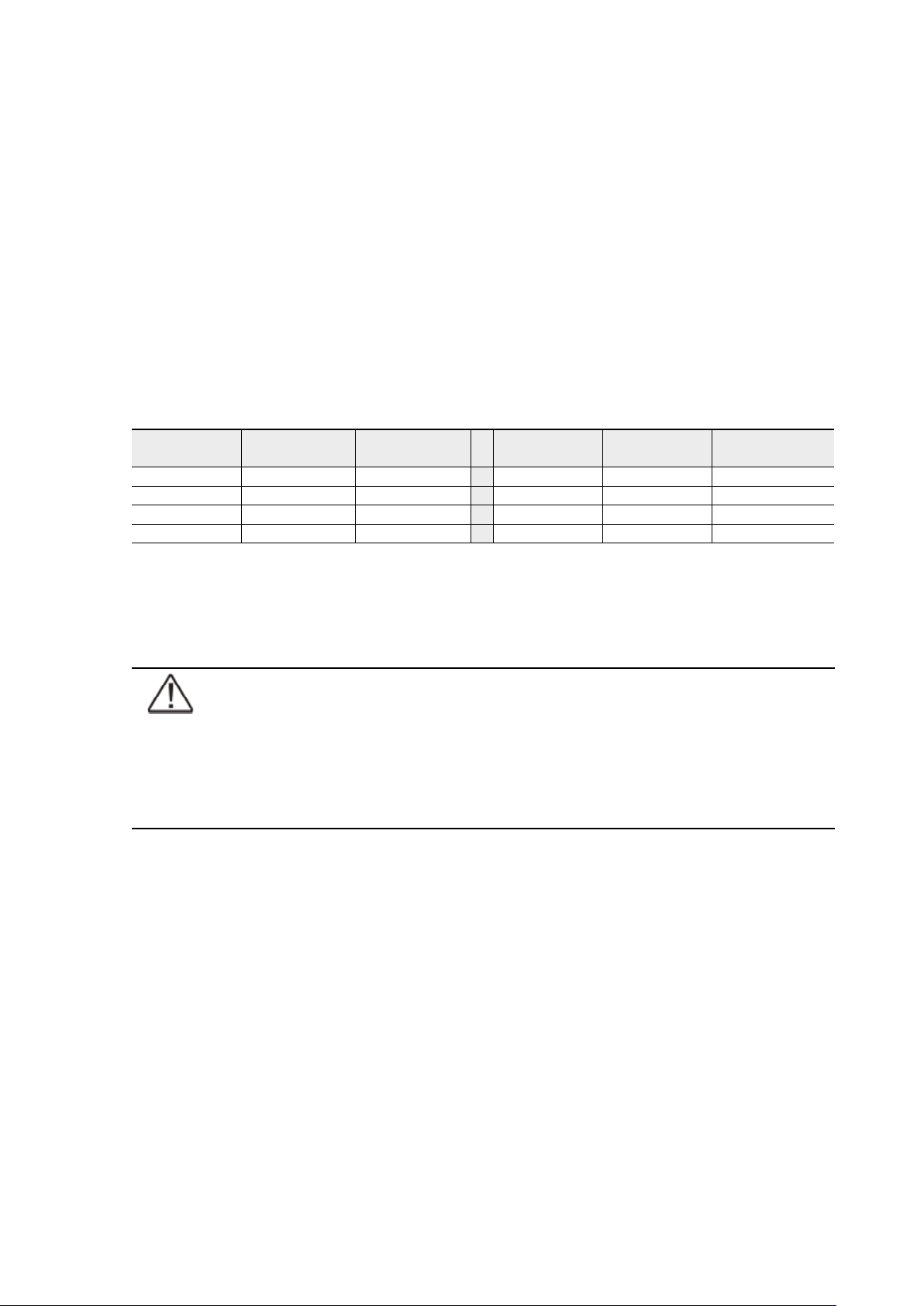
Maximum charging current setting should be checked when needed back-up time needs more
than 3 Amps charging current.
Table 35. Required battery charge currents.
Select Maximum charging current from User Settings menu. Default setting is 3.0 Amps and it is
changeable up to 20 Amps. Minimum step is 0.1 A.
Note!
Maximum charging current is dependent on output load and power rate of the
UPS. If the UPS is supporting maximum output load the highest level of Maximum
charging current is 3.0 A, which is also the default setting. As a thumb rule, 1 kW
decrease in the load provides extra 2.0 A charging capacity. For example, the
charging capacity is 5 Amps at 8 kW load, and 7 A at 7 kW load.
Using relay outputs
Relay outputs can be used for remote alarm indications.
Each relay has four standard pre-programmed settings for alarms:
• on bypass, UPS ok, battery low, on battery
One of the standard relay settings is “custom” that can be customised by the user.
The procedure to select customised alarms:
1. Push any key of the control panel to enable the functions on the LCD screen.
2. First select “SETTINGS”, then “USER SETTINGS” and finally “RELAY CONFIG” from the LCD menu.
3. Select the relay what is needed to be configured (ALARM-1 is fixed relay output X57).
4. Select “empty” to clear old settings.
5. Select “custom” and activate needed alarms with the button on the right.
6. After the selection press “OK” button
7. Finally test that UPS alarms correctly
Load (kVA)
p.f. 0.7
Back-up time Min current
Load (kVA)
p.f. 0.7
Back-up time Min current
10 1 h 1.8 A 15 1 h 2.5 A
10 3 h 4 A 15 3 h 6.5 A
10 5 h 6.5 A 15 5 h 9 A
10 10 h 13 A 15 10 h 18 A