Eaton 9155 8-15 kVA.pdf - 第33页
UPS 8 – 15 kV A, 230V 50/60 Hz output User ’ s Guide 1 022403 Revision D 33 Configur ing user set tings User set tings can be configured via front panel. Select S ettings from main menu and then select User Set tings. Chan…

UPS 8 – 15 kVA, 230V 50/60 Hz output
User’s Guide
1022403
Revision D
32
Battery information and settings:
ABM charging cycling disable [Enabled], [Disabled] Enabled
Charging temp compensation [Enabled], [Disabled] Enabled
Battery size setting Step: 1 Watts/cell 24 Watts/cell
Number of 36 pcs. battery strings 0 (no batteries), 1, 2, 3, 4... 1 string
Battery low alarm level Step: 0.01 V/cell 1.88 V/cell
Automatic battery support test [Enabled], [Disabled] Enabled
Maximum charging current Step: 0.1 A [max. 25 Amps] 3 A
Output on, automatic delay time before turning
the output on
[Disabled], [Set delay, step: 1 sec] 0 sec.
Output off, automatic delay time on battery
after which output is turned off
[Disabled], [Set delay, step: 1 sec] Disabled
User preferences:
Operation priority while rectifier input break [On battery], [On bypass] On battery
Site wiring fault w/ wrong Neutral connection [Enabled], [Disabled] Enabled
Power Strategy [Standard], [High Efficiency] Standard
Parallel settings:
Parallel unit number
[Single unit], [Unit #1], [Unit #2], [Unit #3],
[Unit #4]
Single unit
Parallel operation mode [Redundant mode], [Capacity mode] Redundant mode
Synchronization [Enabled], [Disabled] Enabled
Start auto calibration
Parallel XCP [System], [Unit] System
Minimum units to support load [0], [1], [2], [3], [4] 2
Table 34. User setting in the LCD menu screen.
UPS 8 – 15 kVA, 230V 50/60 Hz output
User’s Guide
1022403
Revision D
33
Configuring user settings
User settings can be configured via front panel. Select Settings from main menu and then select
User Settings.
Changing language
Pressing and holding down the first button on the left for about 3 seconds selects the language
menu. This action is possible from any LCD menu screen.
The default firmware has four main languages: English, Spanish, French and German. Other
local language packages including Chinese, Greek and Russian can be requested from the local
service representative.
Changing charging current
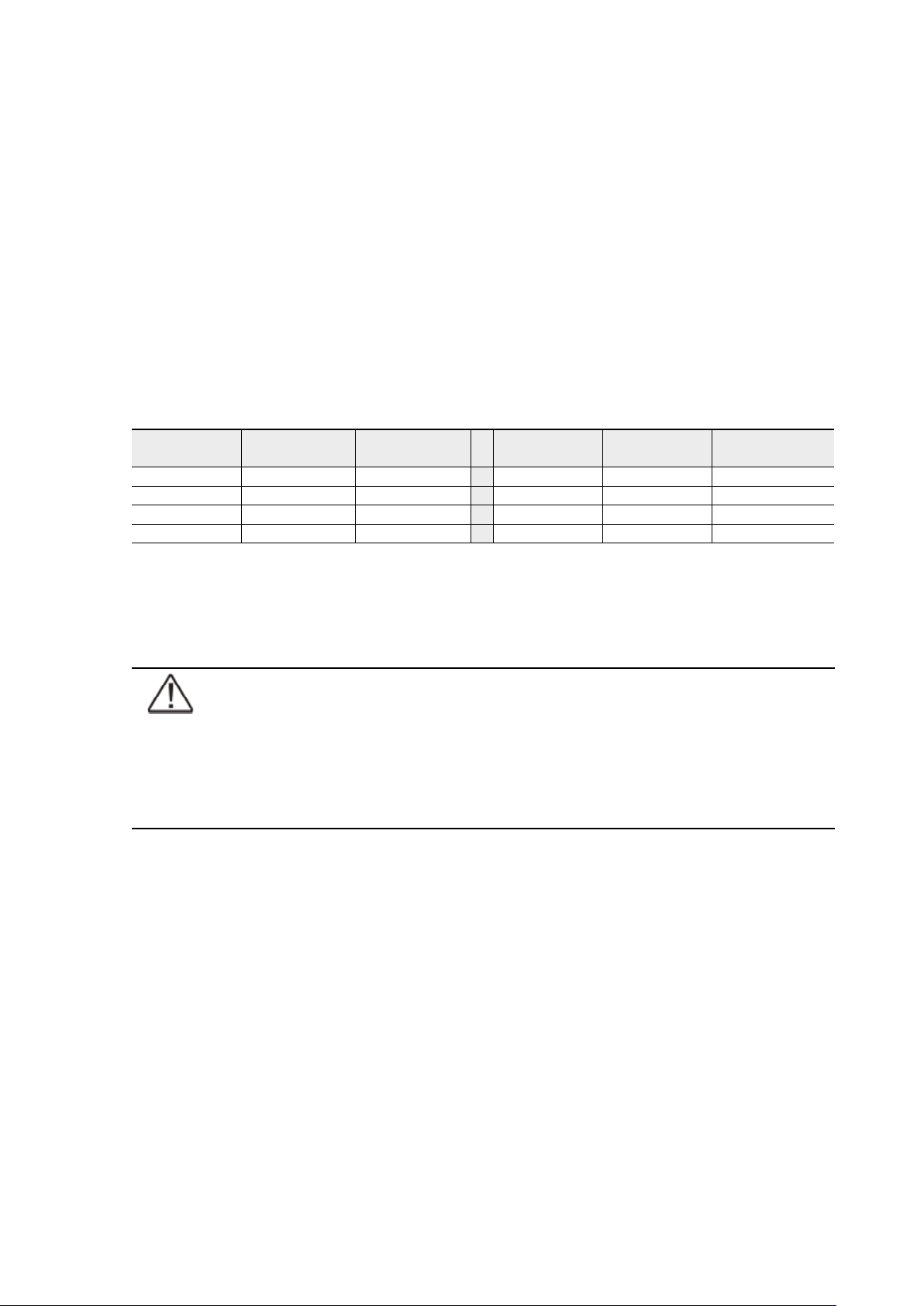
Maximum charging current setting should be checked when needed back-up time needs more
than 3 Amps charging current.
Table 35. Required battery charge currents.
Select Maximum charging current from User Settings menu. Default setting is 3.0 Amps and it is
changeable up to 20 Amps. Minimum step is 0.1 A.
Note!
Maximum charging current is dependent on output load and power rate of the
UPS. If the UPS is supporting maximum output load the highest level of Maximum
charging current is 3.0 A, which is also the default setting. As a thumb rule, 1 kW
decrease in the load provides extra 2.0 A charging capacity. For example, the
charging capacity is 5 Amps at 8 kW load, and 7 A at 7 kW load.
Using relay outputs
Relay outputs can be used for remote alarm indications.
Each relay has four standard pre-programmed settings for alarms:
• on bypass, UPS ok, battery low, on battery
One of the standard relay settings is “custom” that can be customised by the user.
The procedure to select customised alarms:
1. Push any key of the control panel to enable the functions on the LCD screen.
2. First select “SETTINGS”, then “USER SETTINGS” and finally “RELAY CONFIG” from the LCD menu.
3. Select the relay what is needed to be configured (ALARM-1 is fixed relay output X57).
4. Select “empty” to clear old settings.
5. Select “custom” and activate needed alarms with the button on the right.
6. After the selection press “OK” button
7. Finally test that UPS alarms correctly
Load (kVA)
p.f. 0.7
Back-up time Min current
Load (kVA)
p.f. 0.7
Back-up time Min current
10 1 h 1.8 A 15 1 h 2.5 A
10 3 h 4 A 15 3 h 6.5 A
10 5 h 6.5 A 15 5 h 9 A
10 10 h 13 A 15 10 h 18 A

UPS 8 – 15 kVA, 230V 50/60 Hz output
User’s Guide
1022403
Revision D
34
Normal start-up
Check the mechanical and electrical installation of the UPS before start-up. Go through the
checklist below together with another person.
Check
Read the attached safety manual before you work on the unit.
The unit is fixed according to mechanical installation
The ambient conditions are within specification.
The cooling air will flow freely.
The UPS is grounded properly.
The input and bypass voltages match the UPS nominal voltage.
The input, bypass, battery and output terminal connections are OK.
Appropriate input and bypass fuses and disconnectors are installed.
Appropriate backfeed warning sign for disconnectors are installed.
Appropriate cables sizes are used.
The external control connections inside the UPS are OK.
There are no tools, foreign objects or dust inside the UPS from the installation.
Covers are in place.
Optional MBS is placed to UPS position as default.
You are then ready to proceed with the starting up the UPS:
1. Turn the battery and input circuit breakers to ON position.
2. UPS will enter a stand-by mode and starts to charge batteries with a cooling fan
operational. Output is without the voltage in the stand-by mode.
3. Push any key of the control panel to enable the functions of the LCD screen
4. Select “TURN UPS ON” from the LCD menu (see: Display Functions)
5. Press and hold
↵ button for 2 sec. There shall be no sound during the hold.
The UPS shall check its internal functions, synchronise to bypass and start to supply the load.
The green LED is blinking if there occurs an active notice. In normal operation the green LED is
constantly lit if no new active notice such as ‘unsyncronised’ or similar notices present.
The output voltage shall be verified from the output measurements screen of the LCD. If there is
voltage in the output then UPS is supplying the load.
Battery start-up
UPS will start on battery if mains is not available. Note that the UPS behavior may be slightly
different from the normal start-ups.
Start-up after EPO
1. Find out the reason that caused EPO
2. Check that there are no risk to start the UPS again
3. Follow Normal start-up check list and procedure