00195398-0103-AI-01005Paket_DE_EN.pdf - 第59页
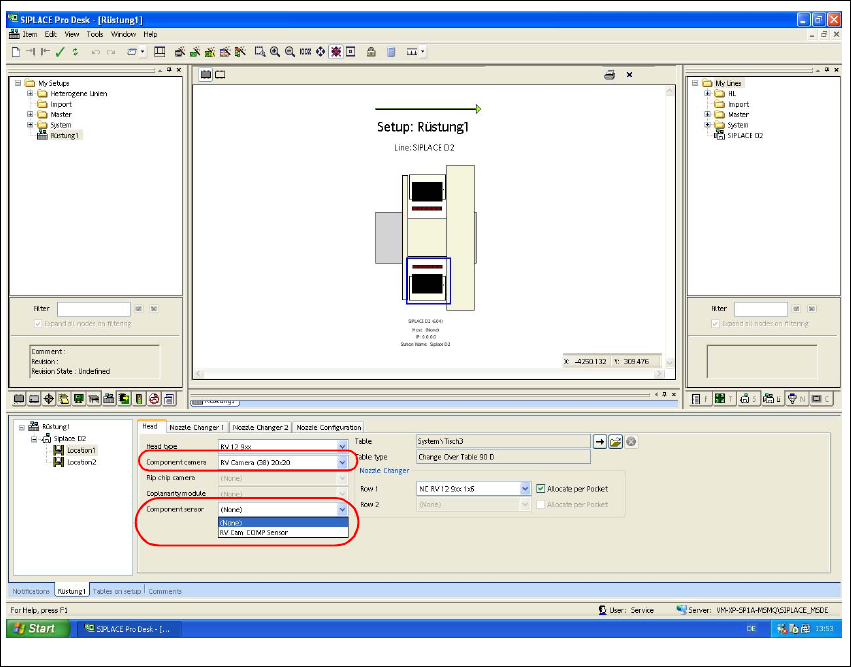
Asse mb ly In st ruct i on s 0100 5- Pac ket Edi t io n 12 /200 7 59 Fig. 35 SI PL AC E Pro " s et up edi t or " - "he ad " t ab Æ G o to "Component camera" and select the "RV Camera (3…

Assembly Instructions 01005-Packet
Edition 12/2007
58
3.6.8 Costumer requires MFU using customer-owned 01005 components
This measurement can be performed when required by the customer. A MFU with 01005 compo-
nents can only count as a test for the placement capability of the components. 3
In no way should a measured offset be entered into a
FK_Off.ma during this process. 3
NOTE:
The proof for the machine capability is executed using the default components, i.e. "Ceram Pads
2x2mm taped" (00359505-01). 3
3.7 Configurations in SIPLACE Pro
3.7.1 Configuring the Setup
During setup and, if applicable, during the 0201-placement of the component sensor, the new
component camera must be entered. 3
Æ Open the required setup in SIPLACE Pro.
Æ Select the "Head" tab.
Assembly Instructions 01005-Packet
Edition 12/2007
59
Fig. 35 SIPLACE Pro "setup editor" - "head" tab
Æ Go to "Component camera" and select the "RV Camera (38) 20x20" type.
Æ Ensure that the "Component sensor" is available at the machine.
Æ If the component sensor is not available, select "None" in the Setup Editor to deactivate the
component sensor.
Æ If the component sensor is available, you need to activate the sensor in this menu.
3
Assembly Instructions 01005-Packet
Edition 12/2007
60
3.7.2 Controlling and Configuring the Component Shape, if necessary
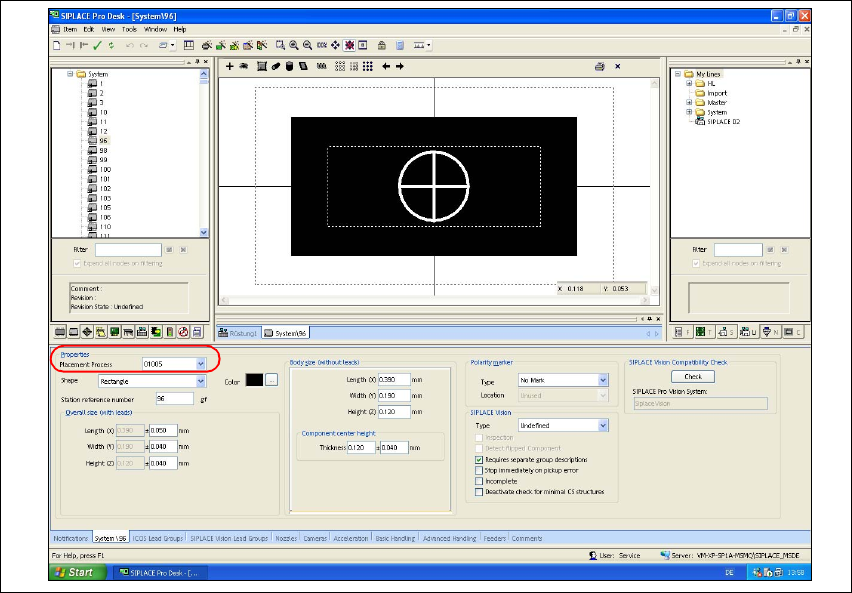
In SIPLACE Pro, the default component shapes 96 and 97 are already defined for the 01005-com-
ponents. Check and, where necessary, configure the 01005 component settings. 3
Æ Open the Component Shape Editor in SIPLACE Pro.
Æ Open the component shape for a 01005-component (e.g. GF 96).
Æ Go to "Properties", choose the "Replacement Process" list field and select "01005".
Fig. 36 SIPLACE Pro "Component Shape Editor" - "CS" tab
After the component has been placed at the DLM3 placement head, the placement process
"01005" activates the validation of the component presence with specific checks. During this pro-
cess, SIPLACE Pro verifies automatically,
– whether the travel profile 33 or 34 for controlled placement and 35 for controlled pickup are
activated.
– whether "RV Camera (38) 20x20" is activated.
– whether the "Type 905" nozzle is activated.
– whether the feeder "3x8mm S-Tape 01005 CO" is activated.
– whether the vacuum check is activated.
– using the component camera, whether the component does no longer remain at the nozzle af-
ter placement. That means that the component has been placed safely.