00195398-0103-AI-01005Paket_DE_EN.pdf - 第61页
Asse mb ly In st ruct i on s 0100 5- Pac ket Edi t io n 12 /200 7 61 3.7. 2.1 Configuring the Automatic Pick up Correction Æ S elect the " Basic ha ndling" tab. Æ A ctivate the checkbox "Automat ic Pickup …
Assembly Instructions 01005-Packet
Edition 12/2007
60
3.7.2 Controlling and Configuring the Component Shape, if necessary
In SIPLACE Pro, the default component shapes 96 and 97 are already defined for the 01005-com-
ponents. Check and, where necessary, configure the 01005 component settings. 3
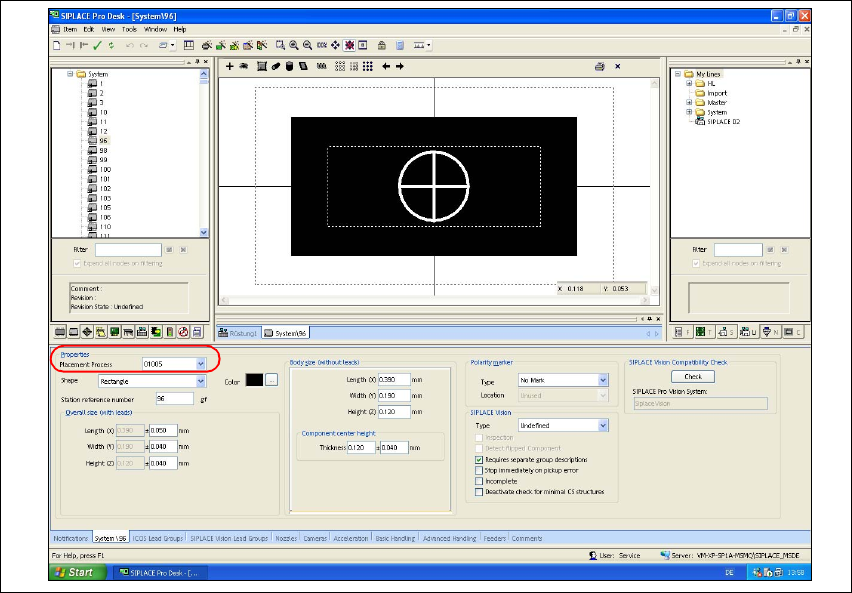
Æ Open the Component Shape Editor in SIPLACE Pro.
Æ Open the component shape for a 01005-component (e.g. GF 96).
Æ Go to "Properties", choose the "Replacement Process" list field and select "01005".
Fig. 36 SIPLACE Pro "Component Shape Editor" - "CS" tab
After the component has been placed at the DLM3 placement head, the placement process
"01005" activates the validation of the component presence with specific checks. During this pro-
cess, SIPLACE Pro verifies automatically,
– whether the travel profile 33 or 34 for controlled placement and 35 for controlled pickup are
activated.
– whether "RV Camera (38) 20x20" is activated.
– whether the "Type 905" nozzle is activated.
– whether the feeder "3x8mm S-Tape 01005 CO" is activated.
– whether the vacuum check is activated.
– using the component camera, whether the component does no longer remain at the nozzle af-
ter placement. That means that the component has been placed safely.
Assembly Instructions 01005-Packet
Edition 12/2007
61
3.7.2.1 Configuring the Automatic Pickup Correction
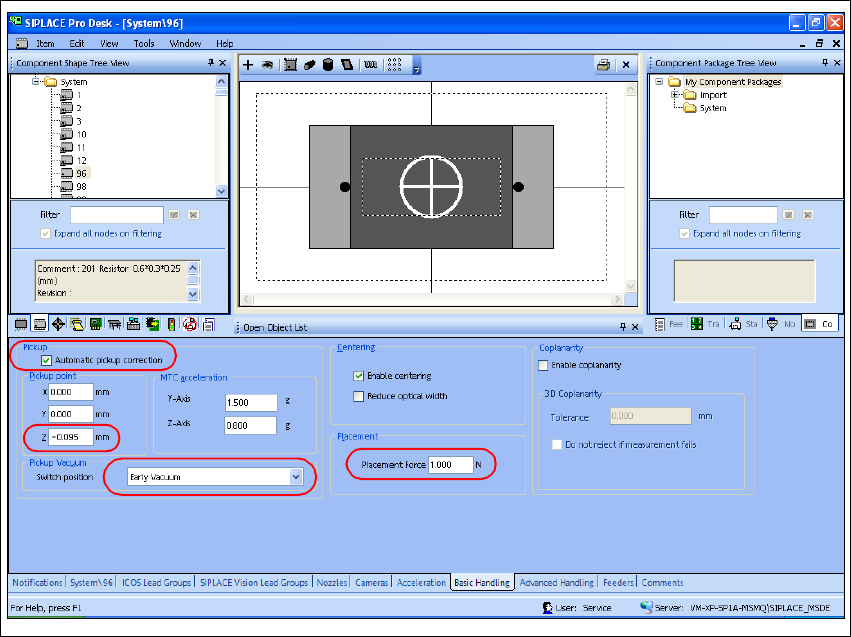
Æ Select the "Basic handling" tab.
Æ Activate the checkbox "Automatic Pickup Correction".
Æ Check the default settings and make corrections, if necessary.
Æ Go to "Pickup Position" => "z" and enter the value -0,095 mm to adjust the head space height.
Æ Go to "Pickup vacuum => and select "Early vacuum".
Æ Enter a "Placement Force" of 1.0 N at "Placement".
Fig. 37 SIPLACE Pro "component shape editor" - "basic handling" tab
Assembly Instructions 01005-Packet
Edition 12/2007
62
3.7.2.2 Controlling and Configuring Advanced Settings, where necessary
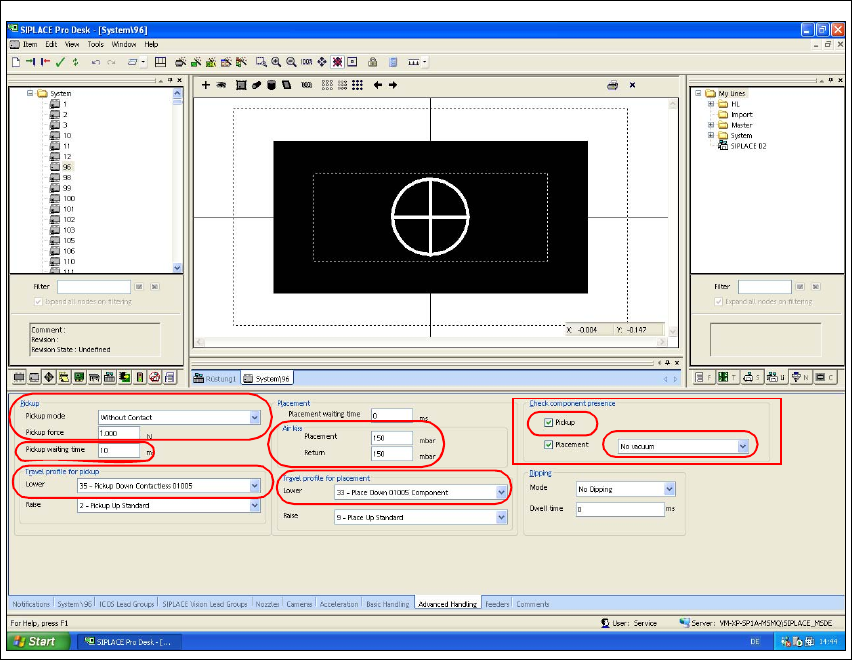
Æ Select the "Advanced Edits" tab.
Æ Go to "Check component process" and select the list field
"No vaccum". Then activate the checkbox "Pickup".
Æ Go to "Pickup Mode" and select the list field "No Contact".
Æ Enter 1.0 N at "Pickup Force".
Æ Check the standard settings for the travel profiles (travel profiles 33 or 34 for verified placement
and 35 for verified pickup) and make corrections, if necessary.
Fig. 38 SIPLACE Pro "component shape editor" - "advanced edits" tab
Æ Go to the "Air Kiss" option to check the settings for air kiss. Make edits only when necessary
in accordance with the following values:
– Air kiss values for placement (only C&P head)
– 0 mbar: no air kiss
– 1- 50 mbar: short air kiss (approx. 4ms)
– 51-150 mbar: medium air kiss (approx. 12ms)
– > 150 mbar: long air kiss (approx. 37ms)