SA_HF_intern_0194307-02_eng.pdf - 第53页
SIPL ACE HF-Ser ies Replacing the Guide Slide of the Y-Axis [03020303-xx] Serv ice Gan tri es 3 Copy ri ght © 200 4 S ie m ens 0019 43 07- 02 Is su e 1 1/ 2004 3-39 3.1.6 Replacing the Guid e Slide of the Y -Axis [030 2 …
3
Service
Gantries
SIPLACE HF-Series
Replacing the X-axis Read Head [03006472]
3-38
00194307-02 Issue 11/2004 Copyright © 2004 Siemens
3.1.5.1 Adjusting the Grub Screw
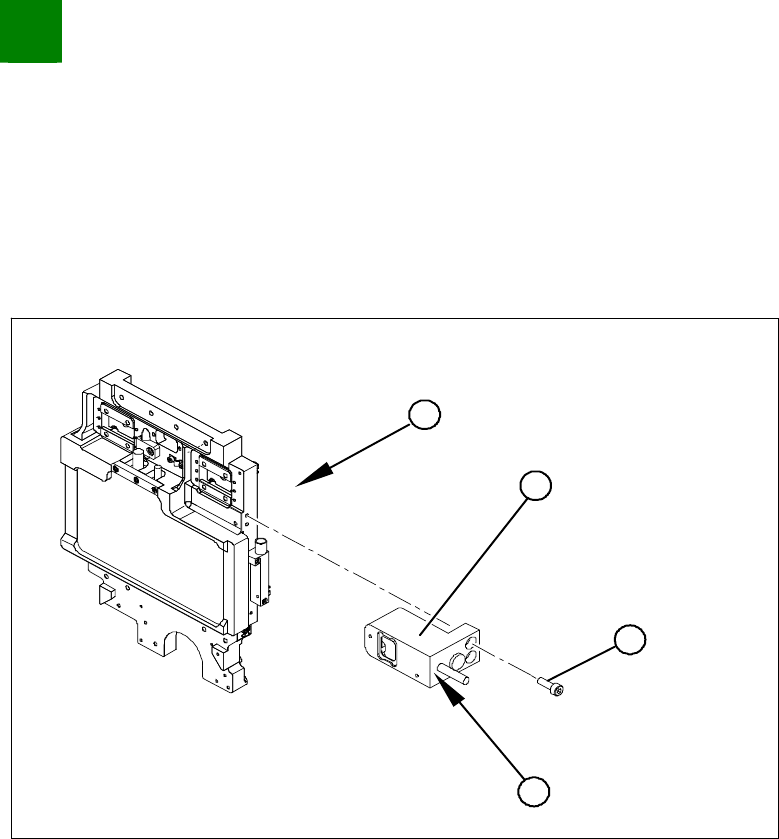
Adjusting the grub screw
Long Allen wrench size 1.5 for the grub screw on the read head
Varnished grub screw or locking varnish (Loctite No. 241)
4
3
1
2
Use the long Allen wrench (no ball head) to loosen the grub
screw (4) on the read head (2). The grub screw applies
pressure to the head mount and prevents unwanted movement
of the read head.
Remove the grub screw (4) and apply a little locking varnish
(Loctite No. 241) to it.
Screw the grub screw back in (4) until you are almost at the end
of the thread.
Install the read head (2) with the three fastening screws (3) so
that there is a gap of 0.4 mm between the read head and the
scale. Use the corresponding thickness gauge (plastic).
Tighten the grub screw (4) until you feel a slight resistance (not
too tight).
The read head is now fastened correctly.

SIPLACE HF-Series
Replacing the Guide Slide of the Y-Axis [03020303-xx]
Service
Gantries
3
Copyright © 2004 Siemens 00194307-02 Issue 11/2004 3-39
3.1.6 Replacing the Guide Slide of the Y-Axis [03020303-xx]
NOTICE!
If the guide slides need to be replaced on a machine with 2 gantries on
one side (e.g. HF-3), one of these gantries must be dismantled. Make
sure you replace the guide slides on both gantries. If there is only one
gantry on one side of the machine, this gantry need not be removed.
Tools and parts
4 or 8 guide slides [03020303-xx]
Screws and nut holders (order number 666400 from 2004 Hoffmann Catalogue)
Torque wrench
Cable ties
Blue covers [00355787-xx]
4 transportation locks for the gantry [03031930-xx]
3
Service
Gantries
SIPLACE HF-Series
Replacing the Guide Slide of the Y-Axis [03020303-xx]
3-40
00194307-02 Issue 11/2004 Copyright © 2004 Siemens
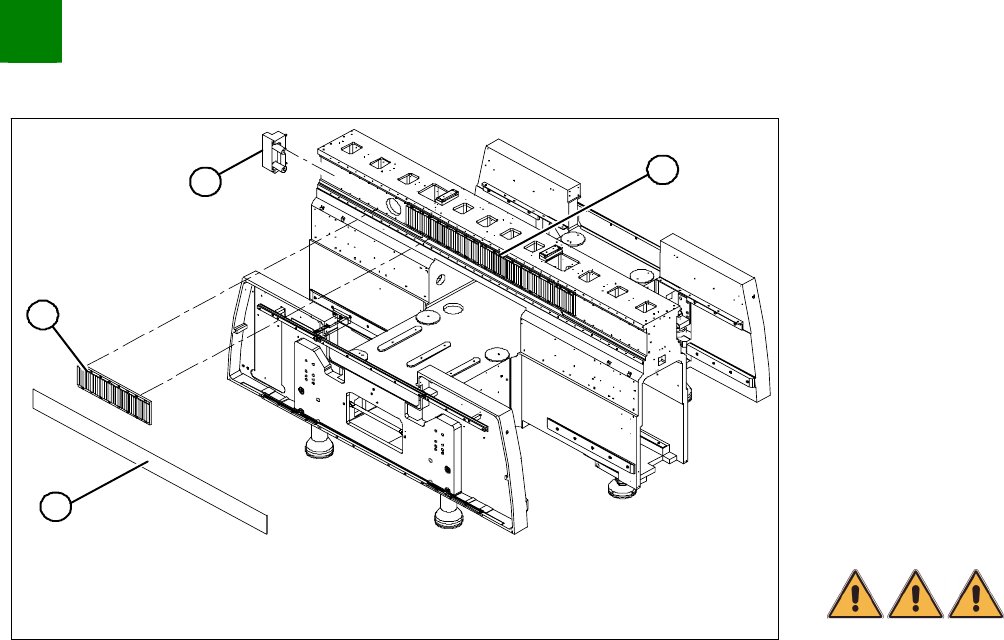
Dismantling the Magnet Cover and the Magnetic Strip
1
4
3
2
Lift the magnet cover plate (1) at the side with the long
magnetic strip and then fix the end of the cover plate to the X
gantry with adhesive tape. You can now access the long
magnetic strip.
Lever up the blue covers and loosen the 16 screws fastening
the long magnetic strip (4).
NOTE
If the blue cover is damaged (kinks, cracks etc.), replace it during
reinstallation. White or pale patches in the plastic indicate areas of
damage.
Remove the long magnetic strip (4).
DANGER
Please take special care when working in the vicinity of the powerful
magnetic fields produced by the magnetic strip. Risk of serious
injuries through trapping limbs.
Close the magnet cover plate and fix it to the machine base.
Remove the buffer (3) from the side with the long magnetic strip
(4).
Remove the cover plate from the central cover and then the
black plastic covers on the guide rails.