00197622-02_IM_OIS_SIS_12.1_DE_EN.pdf - 第14页
SIPLACE OIS V12.1 / Insta llation Manual Ausgabe 05/2015 Edition 14 The following dial og box is opened. Figure 3-12: Connection to OIS Serv er ► Enter the computer n ame or the TCP/I P address of the OI S Server. ► If y…
SIPLACE OIS V12.1 / Installation Manual Ausgabe 05/2015 Edition
13
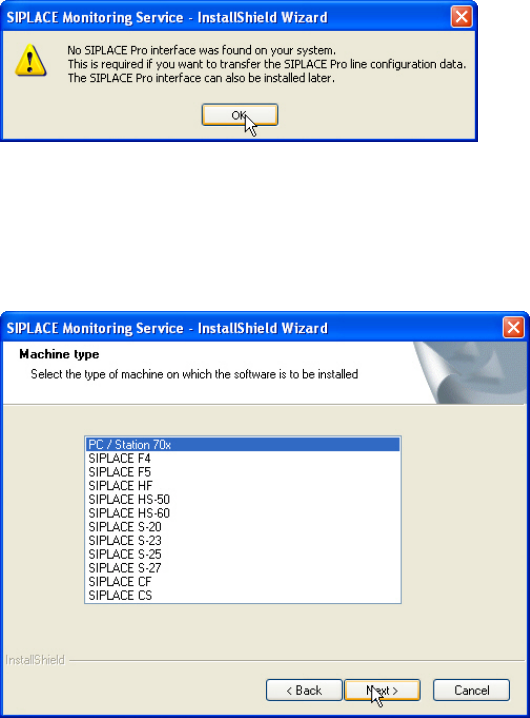
This warning is displayed by Monitoring Server if SIPLACE Pro has not been installed. However,
SIPLACE Pro may be installed later.
Figure 3-10: SIPLACE Pro not installed
► Click OK to confirm the warning.
► Click Next >, to continue the installation.
The following dialog box is opened.
Figure 3-11: Selecting machine type
► Select the machine type on which OIS Client is to be installed.
► Select the Personal Computer type for machines with station software version 70x.
► Click Next >.
SIPLACE OIS V12.1 / Installation Manual Ausgabe 05/2015 Edition
14
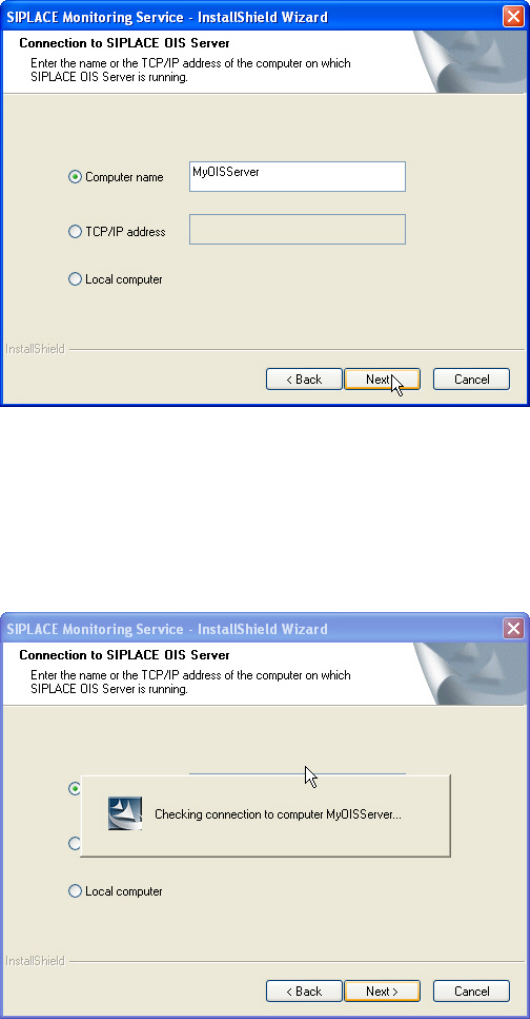
The following dialog box is opened.
Figure 3-12: Connection to OIS Server
► Enter the computer name or the TCP/IP address of the OIS Server.
► If you are installing OIS Client on the OIS Server computer, select Local Computer.
► Click Next >.
The following dialog box is opened.
Figure 3-13: Checking connection to OIS Server
SIPLACE OIS V12.1 / Installation Manual Ausgabe 05/2015 Edition
15
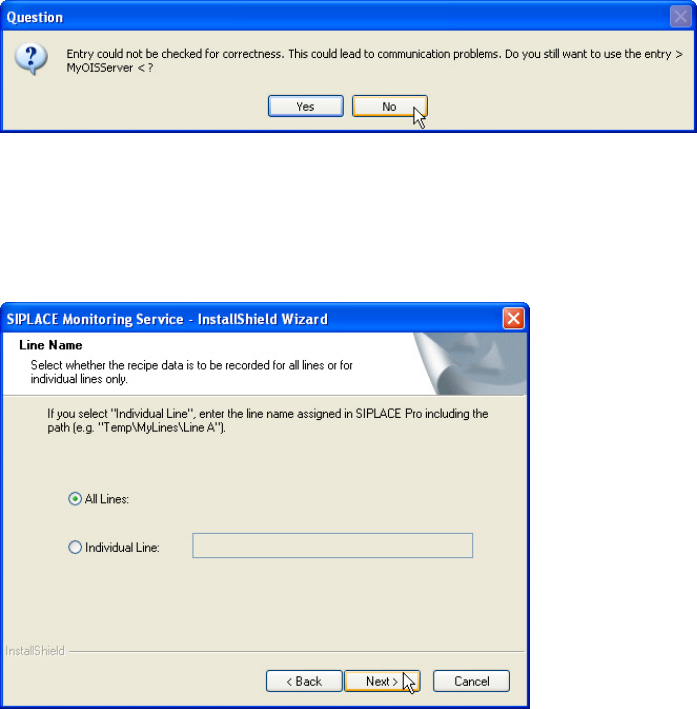
If the connection cannot be checked, the following question is displayed.
Figure 3-14: Connection cannot be checked
► Click No and check your entry again.
► Click Next > as soon as the entry has been successfully checked for correctness.
The following dialog is opened by Monitoring Server.
Figure 3-15: Selecting line(s)
► Select the line(s) for which the recipe data is to be recorded.
► Click Next >.
The operating levels of the OIS system are mapped to operating system user accounts. The
following two user groups are created in the User Manager on the OIS Server computer for this
purpose.
● OisEngineers for the Line engineer operating level
● OisAdministrators for the Administrator operating level
Only those users who are members of the relevant user group are permitted to switch to a given
operating level.
The following users are created and assigned to the user groups by default during installation:
● OisEngineer for the Line engineer operating level, is a member of the OisEngineers user
group
● OisAdministrator for the Administrator operating level, is a member of the
OisAdministrators user group
The next two dialog boxes allow you to assign a password to each user.