00195488_Install_SQLExpress2005_manual.pdf - 第7页
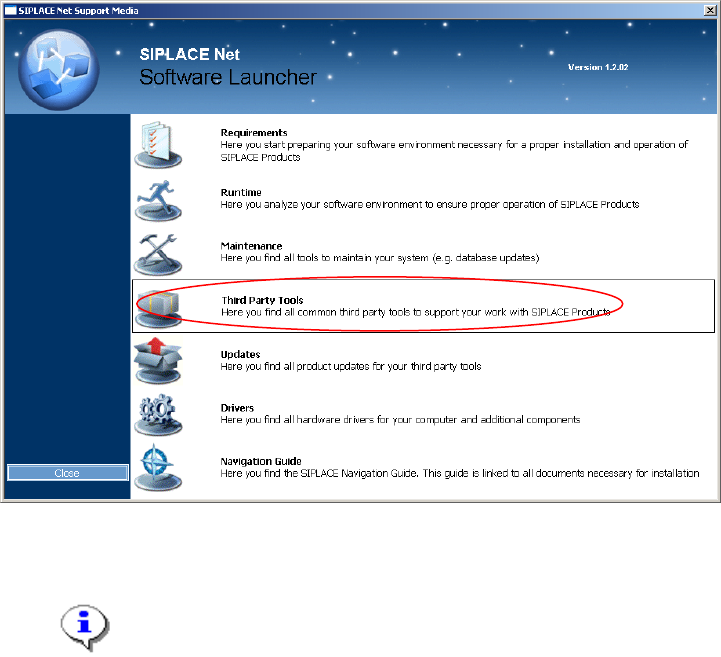
Installation of SQL 2005 Express Edition 02/2011 US 7 / 54 → Select “Third Party Tools” .
Installation of SQL 2005 Express Edition 02/2011 US
3 Installation
3.1 SQL 2005 Express Prerequisites
SQL 2005 Express SP1 and SP2 setup requires one of the following operating systems:
- Microsoft Windows XP Professional Service Pack 2, 32 Bit Version
- Microsoft Windows Server 2003 Service Pack 1, 32 Bit Version
SQL 2005 Express SP1 and SP2 setup requires the following components to be installed:
- Microsoft Windows Installer 3.1 or later
- Microsoft .Net Framework 2.0 or later
In this chapter the installation of these components is described.
3.1.1 Installation of .Net Framework 2.0
→ Insert the SIPLACE Net Support Media into your drive.
The following dialog appears:
Fig. 3-1: Support Media Software Launcher
Note:
If the dialog doesn’t appear start your Windows Explorer, browse to the file
autorun.cmd on the DVD and doubleclick it.
6 / 54
Installation of SQL 2005 Express Edition 02/2011 US
7 / 54
→ Select “Third Party Tools”.
Installation of SQL 2005 Express Edition 02/2011 US
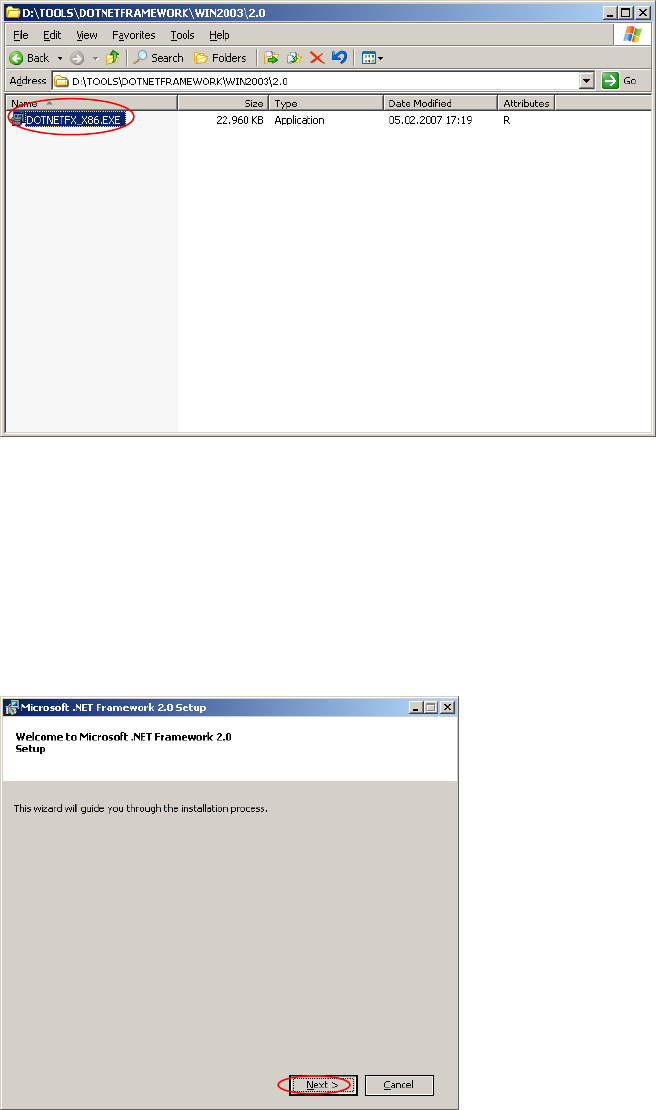
An Explorer Window appears.
→ Navigate to the folder <DRIVE>:\TOOLS\DOTNETFRAMEWORK\<OS>\2.0 :
Fig. 3-2: .Net Framework 2.0 Installation on Support Media
8 / 54
→ Double-click Dotnetfx_x86.exe in the folder <DRIVE>:\TOOLS\DOTNETFRAMEWORK\<OS>\2.0
After a few seconds the following window appears:
Fig. 3-3: .Net Framework 2.0 Welcome dialog
→ Click the Next > button.