A10011-ASM-T47-EN-Spec-X-Serie S_DMS.pdf - 第48页
48 ASM Software Products Overview Workflo ws ASM Sof tware Product St an dard Option Planning ASM Production Planner Fully automatic product group ing and optimization b y taking deliv- ery deadlines into account X SIPLA…
47
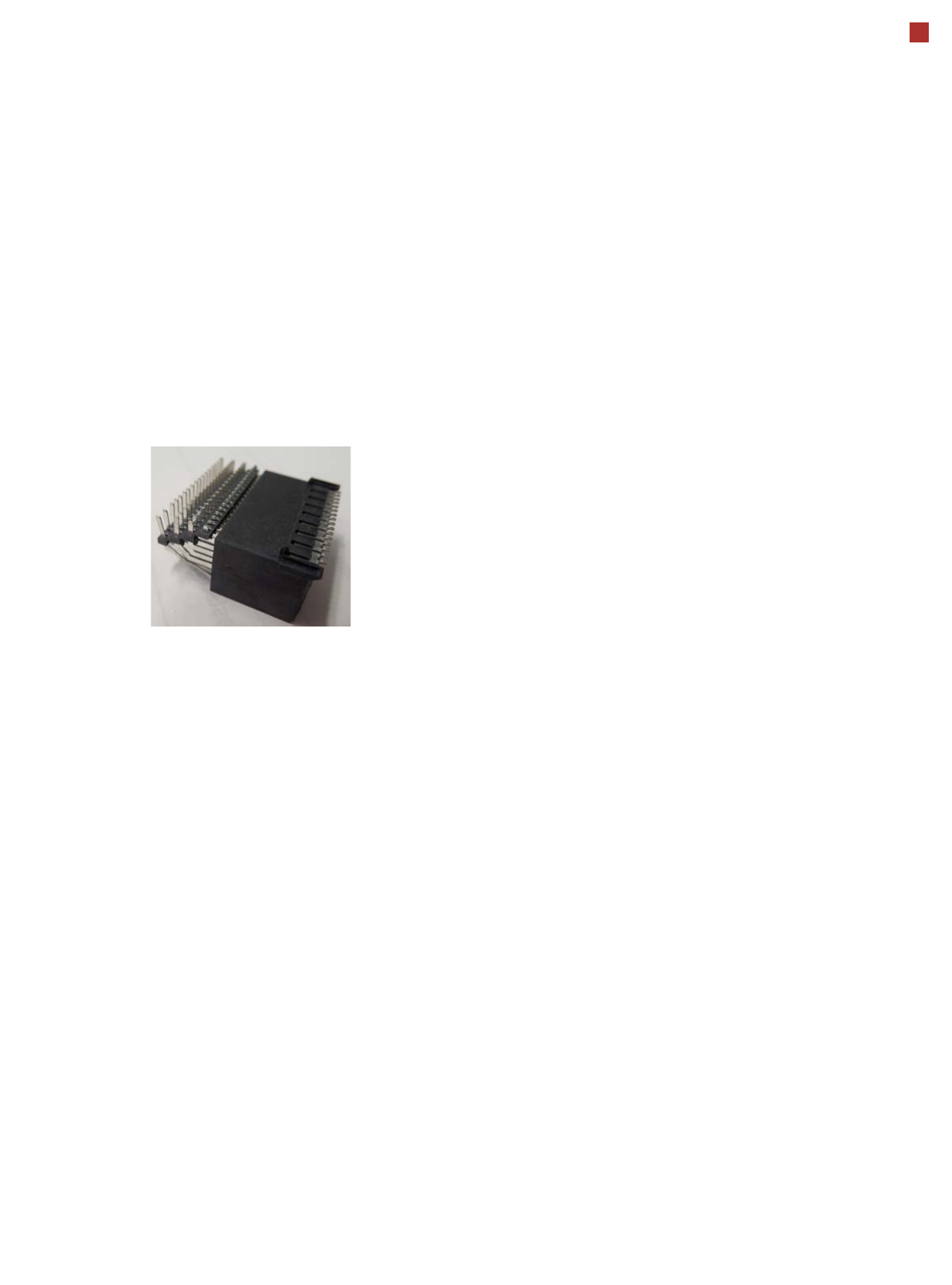
OSC package
The licensed OSC package
contains functions for simpli-
fied placement of odd
shaped components (OSC),
such as connectors or sock-
ets.
The license is activated via
SIPLACE PRO.
For detailed information,
refer to the OSC package
user guide, item number
[00198374-xx].
The following functions are
contained in the OSC pack-
age:
OSC measurement options
• Customized odd shaped
component
This enables the user to
describe any abstract pat-
tern on a component e.g.
connection leads of a tri-
angular shape. This pat-
tern can then be easily
created and edited at the
station, using the wizard
function.
• Stereo measurement
Stereo measurement
means that two images
are taken of each compo-
nent, from different direc-
tions, using a stationary
camera. These images
are overlapped to show
connectors, pins etc. in 3D
to support easy and pre-
cise evaluation of struc-
tures which, due to color,
shading or background
structures, are difficult to
recognize in conventional
2D measurement.
• Special position evalua-
tion
This function supports
separate definition of posi-
tion-determining features
(x,y, angle) independent
of the features for good-
bad recognition.
Placement of snap-in com-
ponents
This function monitors
whether snap-in components
engage in the board prop-
erly, during automatic place-
ment.
Automatic calculation of
optimum acceleration
This function enables the
user to automatically calcu-
late the optimum accelera-
tion of individual axes for a
component at the station.
The acceleration values
found can then be checked in
an additional test run and
sent back to the program-
ming system if successful.
Pin in paste height check
This option extends the
"snap-in" function for CPP
and Twin heads.
Placement of very high
components
In special application cases
the software can place a very
high component with auto-
matic collision prevention.
Additional force levels for
TH and CPP head
•30 N for TH
• 15 N for CPP
48
ASM Software Products
Overview
Workflows ASM Software Product Standard Option
Planning
ASM Production Planner
Fully automatic product grouping and optimization by taking deliv-
ery deadlines into account
X
SIPLACE SiCluster Professional / SiCluster Multiline
Fully automatic product grouping X
Virtual production
SIPLACE Pro
One application for all programming tasks
X
SIPLACE LED Pairing
Simple placement of LEDs with multiple classes
X
Process optimization
ASM DFM HealthCheck
Automatic determination of optimum print parameters
X
Production
SIPLACE Station Software
Diverse operating system
X
ASM OIS
Operator Information System
X
Material Management
ASM Material Manager
Control and optimization of SMD material management
X
ASM Line Monitor
Overview of material consumption in the lines.
X
Preparation
ASM Setup Center
Avoid setup errors with reliable setup verification
X
SIPLACE Material Setup Assistant
Optimization of offline setup preparation and of material flow
X
Factory monitoring
ASM EDM
Convenient data management for placement programs
X
ASM Traceability
Traceability of the placement processes
X
SIPLACE Explorer
Line monitoring system
X
Factory Integration
ASM OIB
Seamless integration of SIPLACE software solutions with third
party systems
X
ASM Remote Smart Factory
Professional remote service infrastructure
X

49
SIPLACE station software
General
The diversity of functions and
applications in the station
software illustrates the
extreme flexibility of our
machines. This software
supports operators in their
daily work, helping them to
simplify processes on the
machine and to increase pro-
ductivity along the line. Three
different user levels ensure
that each operator has
access to the information
and options required to per-
form his specific work on the
machine.
Our station software is con-
tinuously equipped with new
features so that we are sure
to keep pace with our cus-
tomers' needs.
The benefits of the station
software at a glance:
Quick access to all
machine functions and
systems
Whether maintenance tasks,
calibration or board conveyor
functions, the station soft-
ware gives you quick and
easy access to everything
you need.
Best in Class" NPI Feature
New products need to be
produced error-free right
from the very first board.
SIPLACE fully satisfies this
requirement with its
SIPLACE station software.
For example, unknown com-
ponent shapes can be
described in detail in only a
few minutes with the Compo-
nent Shape Wizard. If you
need to correct pickup and
nozzle positions, this is
quickly and conveniently
possible with the station soft-
ware and can even be trans-
ferred to SIPLACE Pro when
necessary
Very user-friendly design
The intuitive and structured
design of the station software
helps the user to complete
his tasks quickly and effi-
ciently during the placement
process.
Highly robust in the place-
ment process
The station software is
equipped with many func-
tions to keep the placement
process stable and running
reliably, despite changing
conditions.
This includes self-repair rou-
tines for nozzles and feeder
modules, automatic recogni-
tion of board warpage, self-
repair routines for fiducial
recognition and much more.