_482615_RE1304003 8mm ZS feeder maint.pdf - 第10页
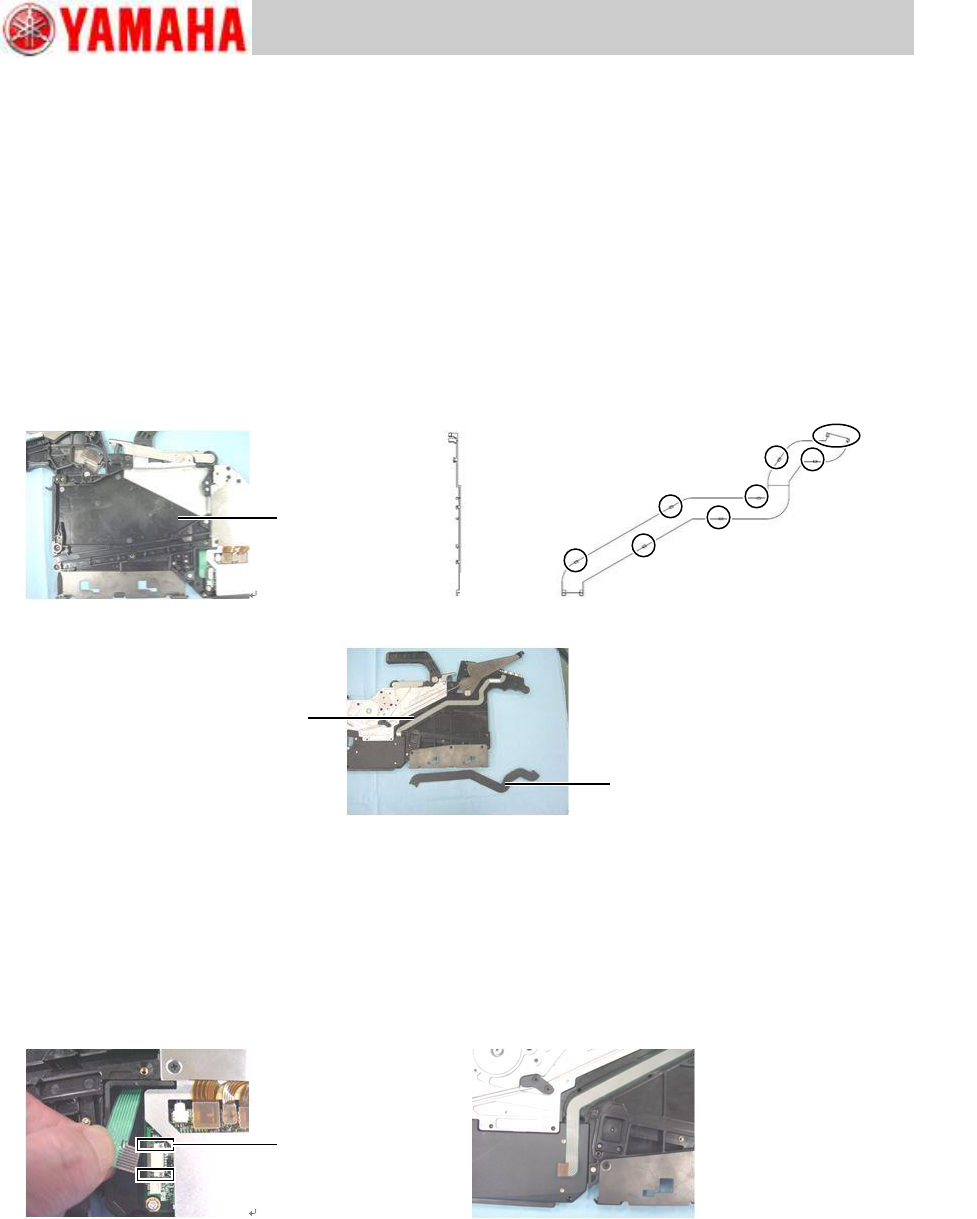
Trained Customers Service Information 10 / 27 SI 1304003E- 00 0 = 8mm ZS feeder maintenance procedures 1 Step 7 Remove the harn ess from the top tape box. The harness is att ached to the t op tape cover box with double-s…
Trained Customers
Service Information
9/27
SI1304003E-000 = 8mm ZS feeder maintenance procedures 1
2.7 Replace the operation switch
2.7.1 Remove the operation switch
Step 1 Remove the top tape box cover referring to “2.2 Replace the top tape box cover”,
step 1.
Step 2 Press the claws of the membrane cover with tweezers or a precision driver from inside
of the top tape cover to remove the membrane cover.
Step 3 Detach the upper claws by using a precision driver or needle-nose pliers, and then
detach the lower claws by pulling the cover.
Note
When removing the membrane cover, be careful not to break the claws since they are very
small.
Step 4 Remove the EL box cover referring to “2.3 Replace the EL box cover”, step 1.
Step 5 Remove the harness of the operation switch from the connector on the feeder board
assy.
Step 6 Pull off the connection of the harness to the membrane cover side.
Note
When removing the connector, use a driver with plastic tip and take care not to damage the
feeder board assy and the connector.
Connector lock
Top tape box
Upper side
Lower side
Membrane cover
Membrane cover
ー
Operation switch
Trained Customers
Service Information
10/27
SI1304003E-000 = 8mm ZS feeder maintenance procedures 1
Step 7 Remove the harness from the top tape box.
The harness is attached to the top tape cover box with double-sided adhesive tape.
Step 8 Remove the operation switch from the top tape box with a precision driver, and pull out
the harness.
The operation switch is attached to the top tape box with double-sided adhesive tape.
Operation switch
Trained Customers
Service Information
11/27
SI1304003E-000 = 8mm ZS feeder maintenance procedures 1
2.7.2 Install the operation switch
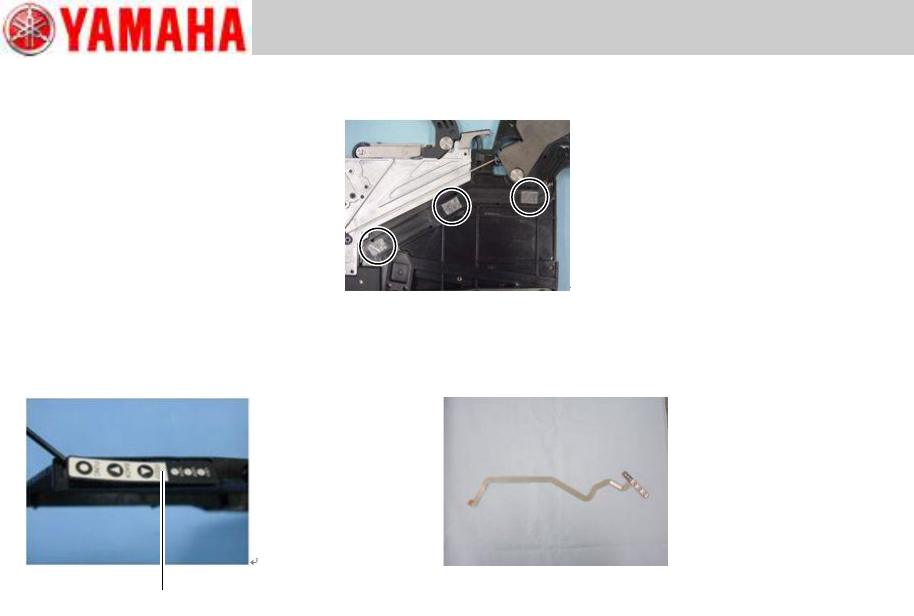
Step 1 Put a new operation switch harness through the cut out part of the top tape box. Then
remove the release liner on the back of the operation switch and attach the switch to
the specified position on the top tape box.
Attach the harness of the operation switch to the double-sided adhesive tapes on the groove
under the membrane cover and lead the harness into the EL box.
Note
If adhesion of the adhesive tapes is weak, replace it with a new one available on the market.
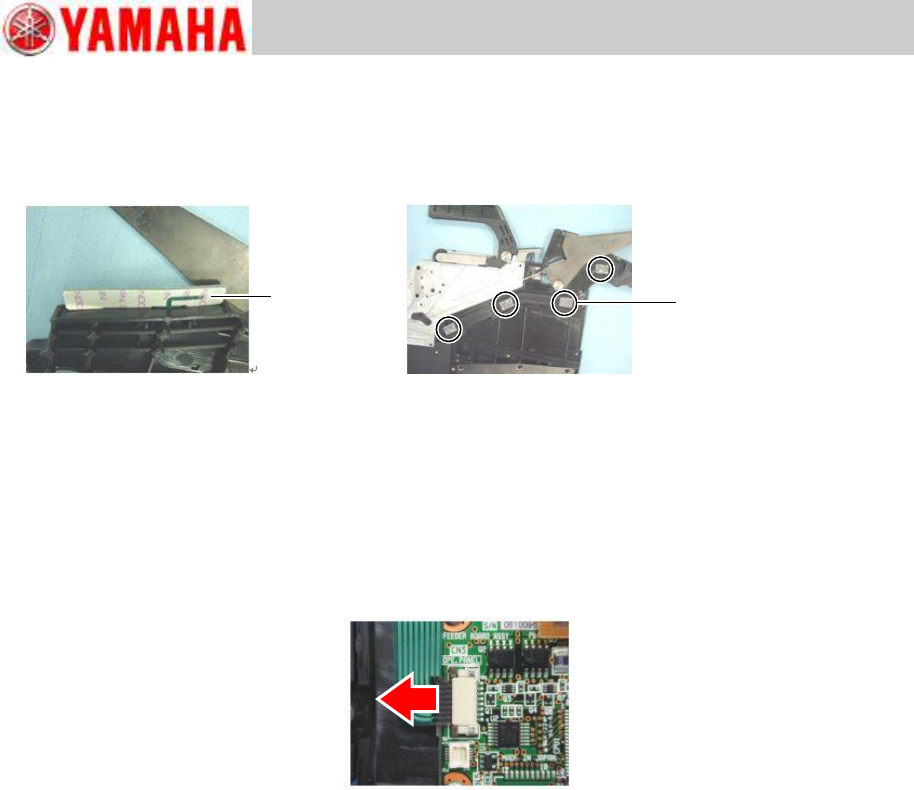
Step 2 Make sure that the stopper of the connector of the feeder board is unlocked. Then
insert the connecting part of the harness into the connector and lock the stopper.
Note
Jiggle the harness gently to check if the harness is securely connected.
Step 3 Firstly, insert the claws at the lower part of the membrane cover into the EL box. Then
insert the claws in order from lower to upper ones to attach the cover to the body.
Note
The claws of the membrane cover are small and fragile. Take care not to break the claws in
this step.
Step 4 Install the top tape box cover to the feeder body referring to “2.2 Replace the top
tape box cover”, step 2.
Step 5 Install the EL box cover to the feeder body referring to “2.3 Replace the EL box
cover”, step 2.
Step 6 After replacing the operation switch, set the tape feeder to a feeder station and press
the operation switch to check if it works properly.
Release liner
Double-sided
adhesive tape