_482615_RE1304003 8mm ZS feeder maint.pdf - 第7页
Trained Customers Service Information 7/ 27 SI 1304003E- 00 0 = 8mm ZS feeder maintenance procedures 1 2. 5 Replac e the cutter Step 1 Open the tail cover assy l ocated at the rear of th e top tape box and remove t he sc…
Trained Customers
Service Information
6/27
SI1304003E-000 = 8mm ZS feeder maintenance procedures 1
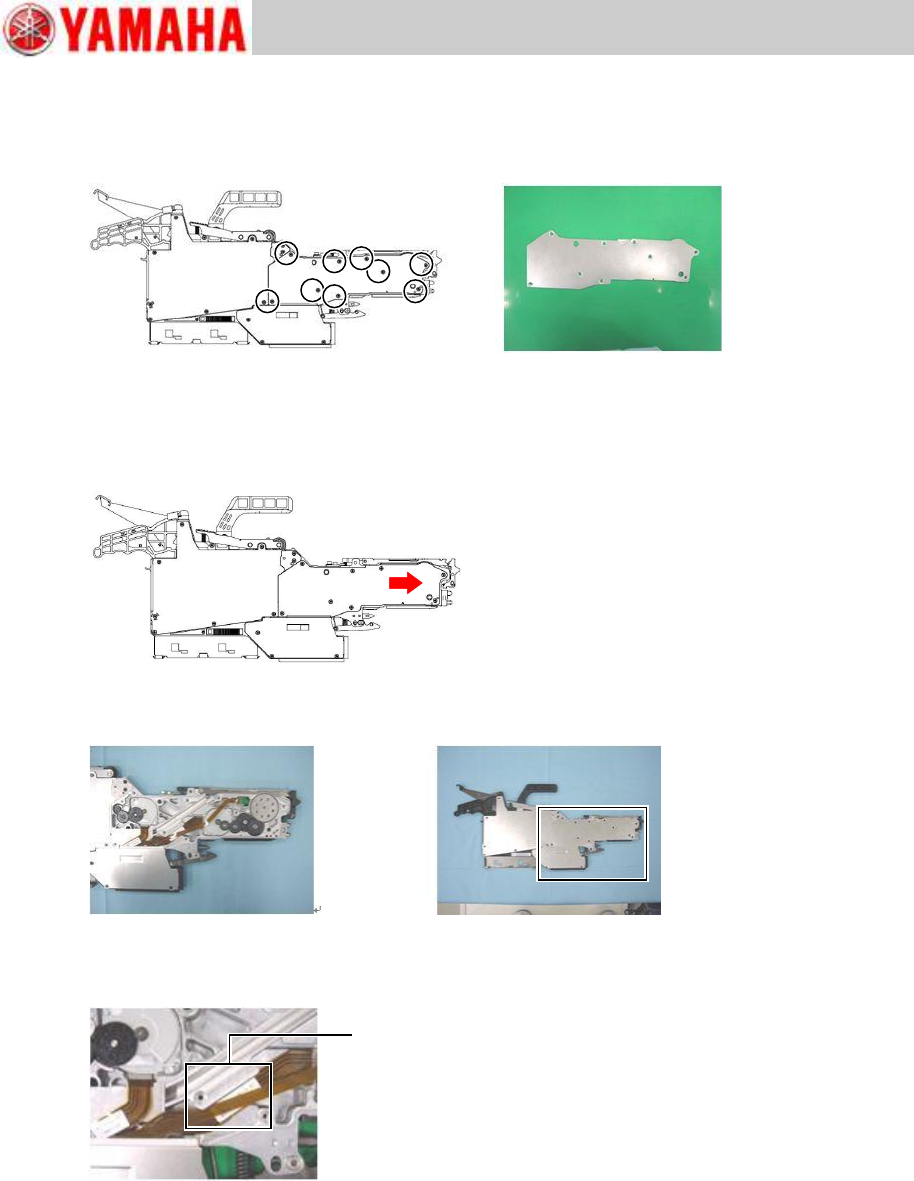
2.4 Replace the feeder side cover
Step 1 Remove the feeder side cover from the feeder by removing the cover’s nine screws
and sliding the cover forward. Use a Phillips screwdriver (No.1).
Caution
Do not lift up the side cover when removing it from the feeder body, as the peel gear, feed
gear, collar and other parts may attach to the cover and come off together with the cover. To
avoid this, slide the cover forward to remove it from the body, and check that the gears or
collars stay in position not being attached to the cover.
Step 2 Install the new feeder side cover on the feeder with the screws removed in step 1. Use
the Phillips screwdriver (No.1) and tighten the screws to 40Ncm.
Note
Before installing the feeder side cover on the feeder, check that the flexible flat cables of the
feed motor and the ABS board are fitted in the gap in the feeder body neatly.
Gap in feeder body
Trained Customers
Service Information
7/27
SI1304003E-000 = 8mm ZS feeder maintenance procedures 1
2.5 Replace the cutter
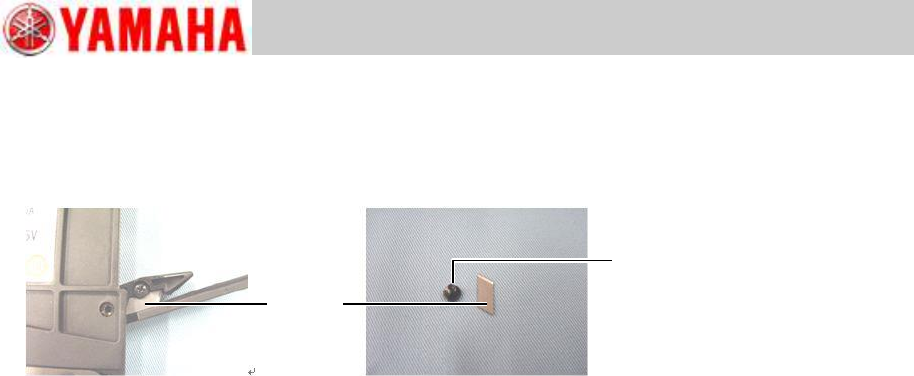
Step 1 Open the tail cover assy located at the rear of the top tape box and remove the screw
that secures the cutter by using the Phillips screwdriver (No.1), and remove the cutter
from the tail cover assy with tweezers or needle-nose pliers.
Step 2 Set the new cutter to the tail cover assy so that its blade faces up, and secure it with
the screw removed in step 1. Use the Phillips screwdriver (No.1) and tighten the screw
to 30Ncm.
Note
An off-the-shelf cutter can also be used.
Caution
Handle the blade with care when replacing the cutter.
Screw
Cutter
Trained Customers
Service Information
8/27
SI1304003E-000 = 8mm ZS feeder maintenance procedures 1
2.6 Replace the tail cover assy
2.6.1 Remove the tail cover assy
Step 1 Remove the top tape box cover referring to “2.2 Replace the top tape box cover”,
step 1.
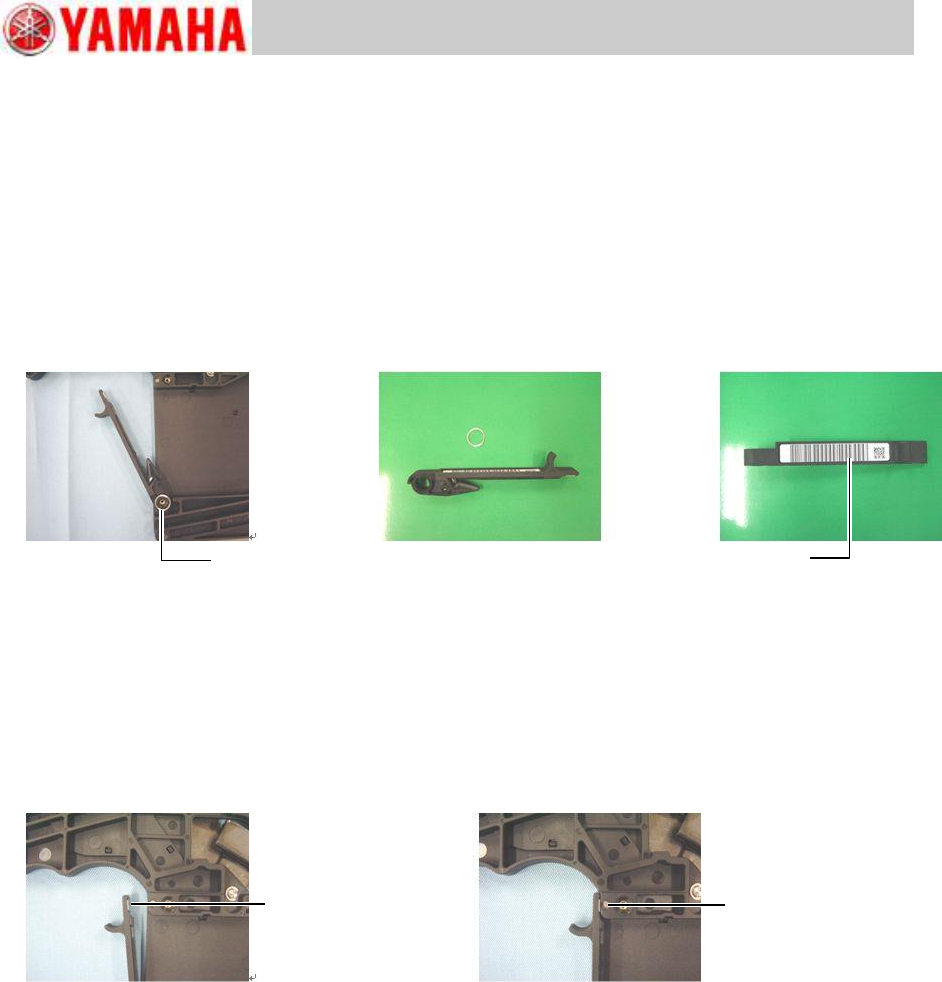
Step 2 Remove the wave washer from the axis of the top tape box. Then pull the tail cover
assy upward to remove it from the top tape box.
Note
When placing an order for a new barcode, let us know the serial number of the feeder whose
tail cover assy is to be replaced.
2.6.2 Install the tail cover assy
Step 1 Attach the new barcode to the new tail cover assy.
Step 2 Install the tail cover assy (that includes the magnetic catch plate and cutter) to the top
tape box, and make sure it is secured with the magnet properly.
Step 3 Install the top tape box cover to the feeder body referring to “2.2 Replace the top
tape box cover”, step 2.
Wave washer
Barcode
Magnet catch plate
Magnet