00192216-01.pdf - 第55页
SIPLACE 80 S-20 / S-23HM/ F4 / F4-6 / F5 2 Retrof itting Instructions for Ceramic S ubstrate Centering Unit (Optional) 04/2000 Issue 2.4 Sequence of Retrofitting 55 Fig. 2.4.6 Running and Fastening the Proximity Switch C…
2 Retrofitting Instructions for Ceramic Substrate Centering Unit (Optional) SIPLACE 80 S-20 / S-23HM/ F4 / F4-6 / F5
2.4 Sequence of Retrofitting 04/2000 Issue
54
Å Remove grease from the assembly surfaces for the adhesive-type mounting pedestal:
– 1 pedestal in the input area, by machine frame -> see Fig. 2.4.5 -> 1)
– 1 pedestal on the housing of the PCB conveyor drive unit (see Fig. 2.4.6 -> 2) .
Å Install the 2 mounting pedestals (item no.: see Section 2.3.2).
5XQQLQJDQG&RQQHFWLQJ9DOYHDQG3UR[LPLW\6ZLWFK&DEOHV
Å In the PCB conveyor area, remove the cover from the PCB conveyor control and from the cable
pit closest to the stationary conveyor side.
Å Remove the connector sleeves from the solenoid valve cable (see Fig. 2.6.1).
The connector sleeves are intended for installing the option on S-15 and F3.
Å Use the crimp pliers (data for pliers: see Section 2.3.3):
Å Strip the wire ends of the solenoid valve and proximity switch cables to the length required
for the contacts AMPMODU contacts BU 0.12 - 0.56 mm.
Å Attach die AMPMODU contacts BU 0.12 - 0.56 mm to all wire ends.
Å Wire one AMPMODU connector Bu 2 x 3-pin each to proximity switch cable and solenoid
valve cable of specific ceramic substrate centering unit 1 / 2 .
Connector allocation and wire color allocation -> see Fig. 2.6.1 and Fig. 2.6.2.
(on the solenoid valve cable: white corresponds to blue).
Å Insert one AMP LATCH coding pin for each AMPMODU connector (position: see :Key" in
the circuit diagrams, Fig. 2.6.4 and Fig. 2.6.5).
Å Run the solenoid valve cable from the conversion PCB for the PCB conveyor -> Continue in
cable pit in direction of input -> into cutout, to right downward in the input area (into the inside
of the machine frame) -> Out through the large circular opening on the right next to the com-
pressed air unit.
Å Run the cable of the inductive proximity switch from the conversion board of the PCB conveyor
-> Continue in the cable pit -> Continue upward onto the housing of the conveyor drive unit
(see Fig. 2.4.6) in the direction of the output.
SIPLACE 80 S-20 / S-23HM/ F4 / F4-6 / F5 2 Retrofitting Instructions for Ceramic Substrate Centering Unit (Optional)
04/2000 Issue 2.4 Sequence of Retrofitting
55
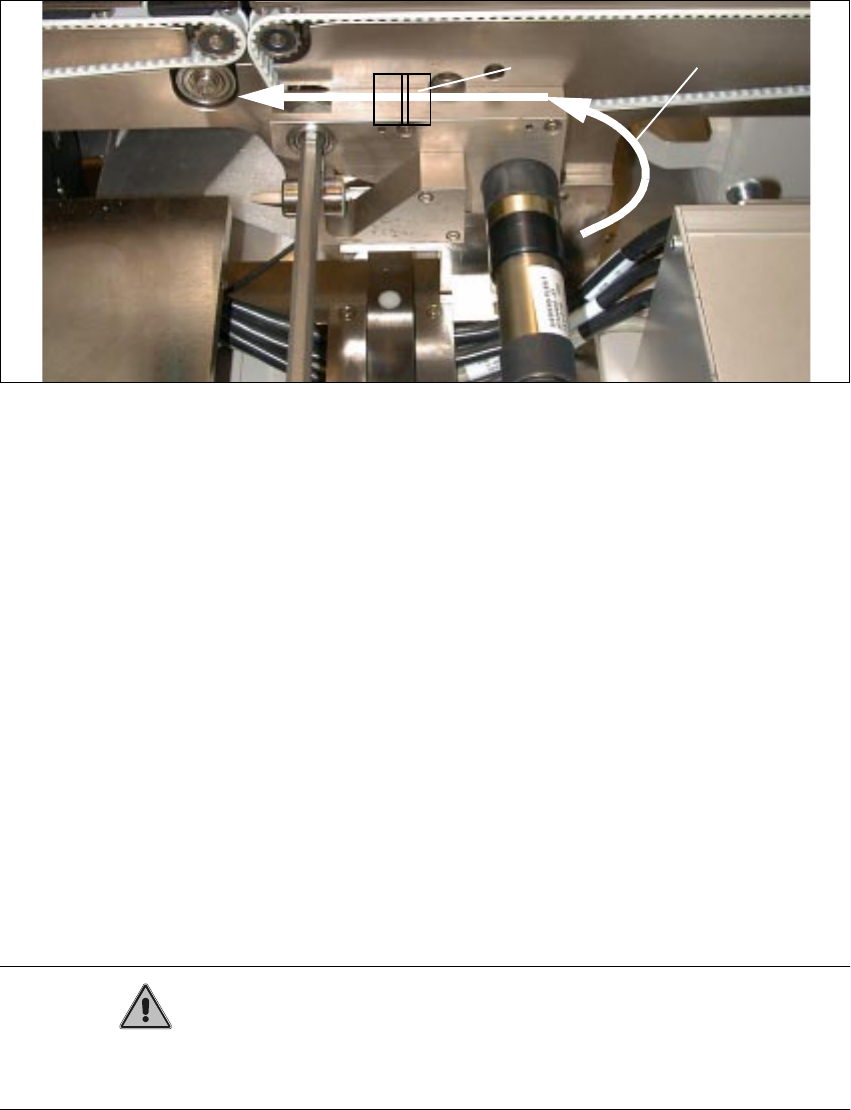
Fig. 2.4.6 Running and Fastening the Proximity Switch Cable and Pneumatic Hose
Key to Fig. 2.4.6:
1. Run proximity switch cable and pneumatic hose
2. Adhesive-type mounting pedestal and cable ties
Å Make the plug-and-socket connection of solenoid valve cable and proximity switch cable to
conversion PCB for PCB conveyor.
Allocation of the plug-and-socket connections (see also circuit diagrams and PCB layout in
Section 2.6):
– Ceramic substrate centering unit 1:
X 46 -> Proximity switch 1
X 48 -> Solenoid valve 1
– Ceramic substrate centering unit 2:
X 47 -> Proximity switch 2
X 49 -> Solenoid valve 2
CAUTION
The cables and the pneumatic hose have to be run such that they are not pinched when the lifting
plate moves up and they do not rub on the corners of the plate.
Å During the subsequent reassembly of the compressed air unit, make certain that you do not
pinch any cable or pneumatic hose.
2 Retrofitting Instructions for Ceramic Substrate Centering Unit (Optional) SIPLACE 80 S-20 / S-23HM/ F4 / F4-6 / F5
2.4 Sequence of Retrofitting 04/2000 Issue
56
Å Tip the compressed air unit back up and fasten it to the machine frame on the RH side with 2
socket hex head cap screws.
Å Fasten the cables to the pedestals with cable ties and stow the extra lengths of cable in the
cable pit.
Å To ascertain the unused length of proximity switch cable that is required, hold the centering
unit at approximately the point on the stationary conveyor side at which the centering unit
will eventually be installed.
Å Make certain that the plug-and-socket connections are not under tension.
Å Install the cover on the cable pit and the conveyor control.