00192216-01.pdf - 第58页
2 Retrofitting Instructions for Ceramic Substrate Centering Unit (O ptional) SIPLACE 80 S-20 / S-23HM/ F4 / F4-6 / F5 2.4 Sequence of Retrofitt ing 04/2000 Issue 58 Fig. 2.4.7 Installing the X-Centering Unit on the Lifti…

SIPLACE 80 S-20 / S-23HM/ F4 / F4-6 / F5 2 Retrofitting Instructions for Ceramic Substrate Centering Unit (Optional)
04/2000 Issue 2.4 Sequence of Retrofitting
57
,QVWDOOLQJWKH6OLGH8QLWIRUWKH;'LUHFWLRQ5HWURILW.LW
Å Loosen the screws on the slide unit that fasten the body to the support rail (2 socket hex head
cap screws M4, see Fig. 2.4.7 -> 2, 3).
Å Lift off body with slide unit.
Å Use a 2.5 mm punch.
Drive the 2 parallel pins 3M5x10 DIN 6325 so far into the holes in the centering unit (see Fig.
2.4.7 -> 4) that they project about 4 mm on the bottom of the support rail.
-> The pins are not included in the retrofit kit (see Section 2.3.2) !
NOTE:The centering holes and the thread to fasten the slide unit are already including in the lifting
table plate.
Å Install the support rail with the centering pins into the lifting table plate and secure the screws
holding the support rail ((2 screws: M4 x 30, see Fig. 2.4.7 -> 5).
-> The screws are not included in the retrofit kit (see Section 2.3.2) !
Å Screw the body back on the support rail (2 socket hex head cap screws M4).
Å If you have not already done so, adjust the holder on the slide unit to the substrate size to be
processed thereafter (see Fig. 2.4.8).
2 Retrofitting Instructions for Ceramic Substrate Centering Unit (Optional) SIPLACE 80 S-20 / S-23HM/ F4 / F4-6 / F5
2.4 Sequence of Retrofitting 04/2000 Issue
58
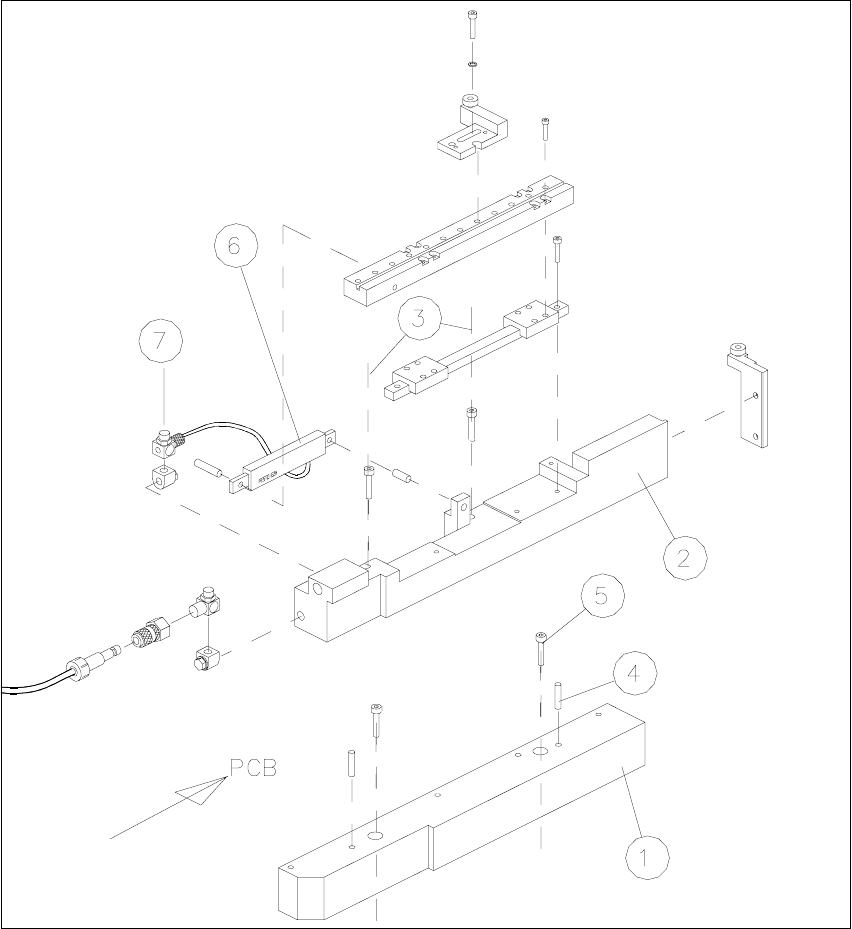
Fig. 2.4.7 Installing the X-Centering Unit on the Lifting Table Plate
1. Bottom part of slide unit
2. Body with slide unit
3. Loosen the screws fastening the body (2 socket hex head cap screws M4)
4. 2 parallel pins 3M5x10 DIN 6325 (for installation on the lifting table plate)
5. 2 socket hex head cap screws M4 x 30 (for installation on the lifting table plate)
6. Flat type compressed air cylinder
7. Throttle valve (opening speed)

SIPLACE 80 S-20 / S-23HM/ F4 / F4-6 / F5 2 Retrofitting Instructions for Ceramic Substrate Centering Unit (Optional)
04/2000 Issue 2.4 Sequence of Retrofitting
59
6HWWLQJWKH2SHUD WLQJ'LVWDQFHRIWKH3UR[LPLW\ 6ZLWFK
Å Make certain that the operating surface of the inductive proximity switch is set 0.2 mm back
from the stop surface of the slide unit in the hole.
This precludes the possibility that the proximity switch might serve as a stop during the opening
movement and being damaged as a result.
Å If necessary, correct the position of the proximity switch (grub screw, size 1 Allen wrench).
$GMXVWLQJWRWKH6XEVWUDWH6L]H
To ensure the 3-point contact of the substrate for the centering unit in the Y-direction, the ceramic
substrate centering unit has to be adjusted to the substrate size to be processed afterwards.
The thrust-piece holder and the long guide rail have to be removed to do this (see Fig. 2.4.3 -> 5,
10).
Å Adjust the arrangement of the ball bearings in the long guide rails and in the thrust-piece holder
to the substrate size, as shown in Fig. 2.4.8.
Å If necessary, use a punch (2.5 mm) to drive out the pertinent shaft including the ball bearings
(pressure seating).
NOTE
Carefully save the ball bearings that were removed, including the shaft, so that they will be again
be available for a change made back to a smaller substrate size.
Å If necessary, also adjust the holder on the "slide unit for X-direction) to the required substrate
size (see Fig. 2.4.8).