00192216-01.pdf - 第61页
SIPLACE 80 S-20 / S-23HM/ F4 / F4-6 / F5 2 Retrof itting Instructions for Ceramic S ubstrate Centering Unit (Optional) 04/2000 Issue 2.4 Sequence of Retrofitting 61 ,QVWDOOLQJWKH/LIWLQJ7 DEOH&RQQH FWLQJW…
2 Retrofitting Instructions for Ceramic Substrate Centering Unit (Optional) SIPLACE 80 S-20 / S-23HM/ F4 / F4-6 / F5
2.4 Sequence of Retrofitting 04/2000 Issue
60
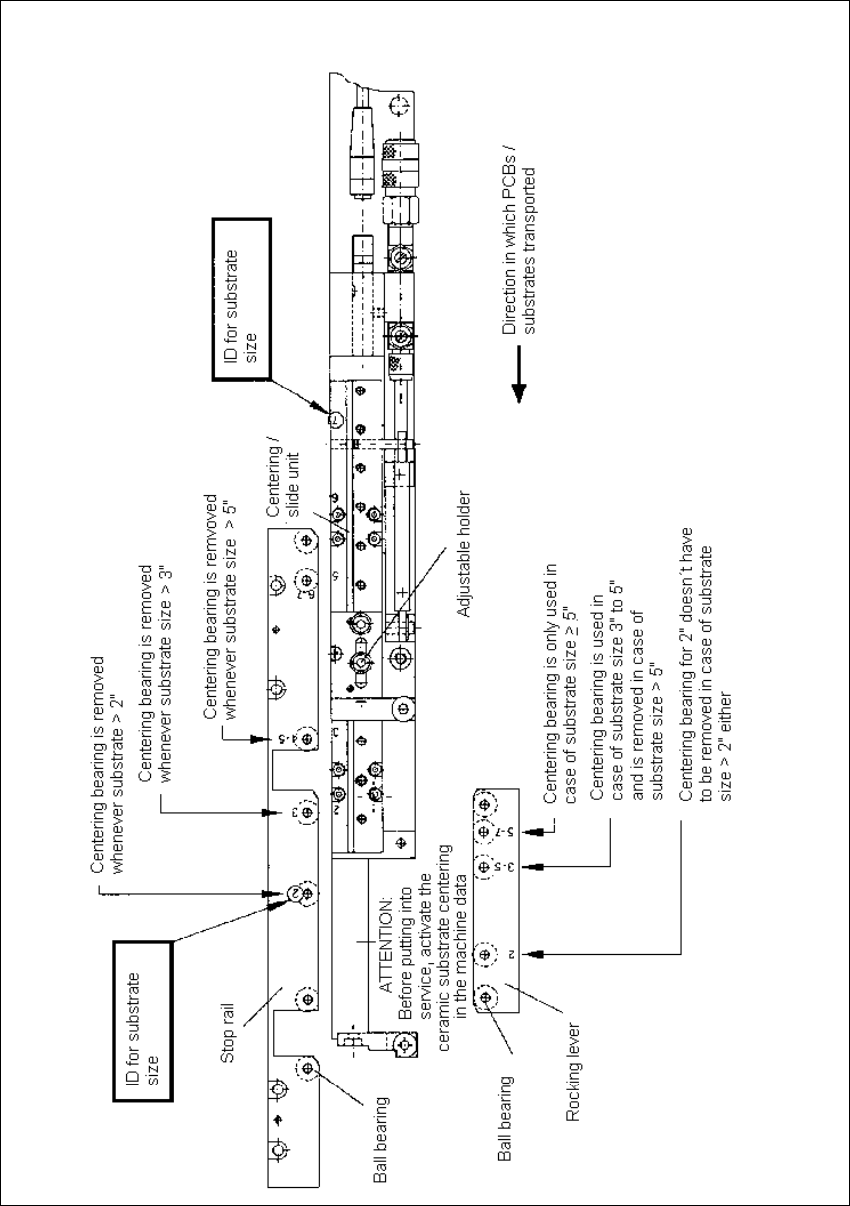
Fig. 2.4.8 Adjusting the Substrate Size

SIPLACE 80 S-20 / S-23HM/ F4 / F4-6 / F5 2 Retrofitting Instructions for Ceramic Substrate Centering Unit (Optional)
04/2000 Issue 2.4 Sequence of Retrofitting
61
,QVWDOOLQJWKH/LIWLQJ7DEOH&RQQH FWLQJWKH 6OLGH8QLW
WARNING OO
During the subsequent installation of the lifting table plate there is a risk of body members being
pinched, crushed or cut off, e.g., between the outer edges of the lifting table plate and the con-
veyor assemblies.
Å Make certain that the transmission lever on the pertinent lifting table motor is folded down on
the lifting curve.
Å Holding the lifting table with both hands, place it into the guiding tubes with the guide pillars
vertical.
Å Let the lifting table plate slowly side down.
Å Check whether the lifting table plate is
FRPSOHWHO\
seated on the lifting curve.
Å Install the pertinent ball bearing on each rocking lever (see Fig. 2.4.1 -> 2). While doing so, put
the spacer disk back in.
Å Make the plug-and-socket connection between the proximity switch on the "slide unit, X-direc-
tion" (see Fig. 2.4.3 -> 13).
Å Connect the pneumatic hose of each solenoid valve to the threaded hose connection of the
pertinent slide unit (see Fig. 2.4.3 -> 14).
Å Re-install the reinforcement strip on the movable conveyor side (inside).
,QVWDOOLQJ7RS0RXQW&DPHUD$WWDFKP1R]]OH&KDQJ&KDQJHRYHU7DEOHV
:3&
Å Remove all tools, etc., from the work area of the machine.
Å Move the gantry or gantries into the area over the PCB conveyor.
NOTE:
Be careful not to push the gantries together too much, otherwise the crash switch will be actuated
later when you turn the machine ON.
Å Remove the cover over the cameras carefully so that any parts, screws, etc. that may be lying
on it do not drop into the cameras.
Å Re-install the top-mounted camera attachments and the nozzle changer.
Å Re-install the waste chute.
2 Retrofitting Instructions for Ceramic Substrate Centering Unit (Optional) SIPLACE 80 S-20 / S-23HM/ F4 / F4-6 / F5
2.4 Sequence of Retrofitting 04/2000 Issue
62
Å If a movable component changeover table has to be connected, now turn the compressed air
back on at the main switch of the machine’s compressed air unit.
Connect the movable component changeover table.
Å Where applicable, use a pallet truck to move the (non-movable) component changeover table
back into the machine.
Å Where appropriate, set up component table 1 or 2 as specified under "Setup".
If applicable, carry out the set-up of the component table, as scheduled in the "Setting Up".
Å Where applicable, move the WPC into the machine.
Å If this hasn’t been done already, turn the compressed air back on at the main switch on the
machine’s compressed air unit.
$FWLYDWLQJWKH2SWLRQLQWKH0$'DWD
Å Connect the machine to the mains and turn on the machine.
For the time being the control remains OFF.
Å $FWLYDWHWKHFHUDPLFVXEVWUDWHFHQWH ULQJXQLWLQWKH0$GDWD
$GMXVWLQJWKH*XLGH5DLOV
Å Turn on the compressed air and the control.
Å Carry out the reference run. After the reference run, adjust the width of the PCB conveyor to
the width of the adjustment plate (or a suitable PCB).
Å Place the adjustment plate of adequate length (see Section 2.3.3) in the PCB conveyor such
that one-half of the plate is in the adjusted area, the other in the area to be adjusted.
Å Push the guide rail to be adjusted against the adjustment plate such that a clearance exists
that is small but sufficient for satisfactory transport (< 0.2 mm in terms of the PCB’s largest di-
mension).
)DVWHQ
the guide rail(s) in this position.
Å Manually push the adjustment plate through the entire PCB conveyor and make certain that it
moves easily and without resistance to the next conveyor and to the conveyor of the preceding/
following machine.
Å If necessary, align the guide rail(s) appropriately once more.
Å Remove all tools, etc., from the working area of the machine.
&DOFXODWLQJWKH1R]]OH&KDQJHU¶V3RVLWLRQDQG&KHFNLQJ,WV2SHUDWLRQ
Å Load the SITEST program and calculate the position of the nozzle changer.
Å Check the input signal (0 -> 1) of the proximity switch(es) and the output signal for the pertinent
solenoid valve of the ceramic substrate centering unit.