00197193-01_IM_SIPLACE_EDM_2_0_EN.pdf - 第16页
EDM V2.0 / Installation Manual Ausgabe 04/2012 Edition 4.2.3 EDM Master (Master Server) Figure 4-5: Configuring the EDM database The installation procedure is identical for both option s. ► Select the server for the Clea…
EDM V2.0 / Installation Manual Ausgabe 04/2012 Edition
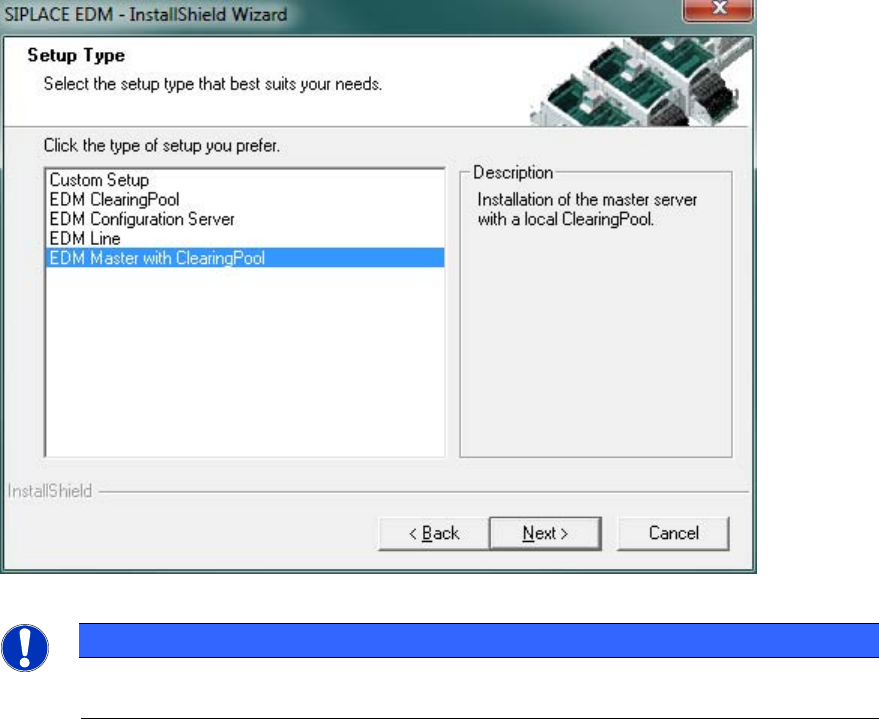
Since SIPLACE EDM comprises several applications whose installation procedure depends on the
role of the workstation, you must select the type of installation you want to perform.
Figure 4-4: EDM installation – setup type selection
NOTICE
For a basic installation scenario, it may be sufficient to consider the “EDM Master with
Clearing Pool” and “EDM Line” setup types.
The setup program provides these setup types as options:
● Clearing Pool
Installs the Clearing Pool GUI, the EDM Data Transfer Manager and the EDM Tool. Use this
option if you want to grant a data preparation engineer access to the Clearing Pool database
and push mode from his workstation.
● EDM Configuration Server
Installs a dedicated EDM Configuration Server without any other EDM functionality.
● EDM Line (Line Server)
Installs an EDM Line Server including the EDM Client. Use this option if you want to insert a
local SIPLACE Pro installation into a line in your EDM system.
● EDM Master (Master Server)
Installs an EDM Configuration Server, the Master Server, the Clearing Pool database, a
Clearing Pool GUI and the EDM tool. Use this option to install EDM on your central SIPLACE
Pro server. There should only be one Master Server per EDM system.
● Custom Setup
This option lets you choose between all possible combinations of EDM applications on a
computer.
The following subsections provide a deeper insight into the different setup procedures.
15
EDM V2.0 / Installation Manual Ausgabe 04/2012 Edition
4.2.3 EDM Master (Master Server)
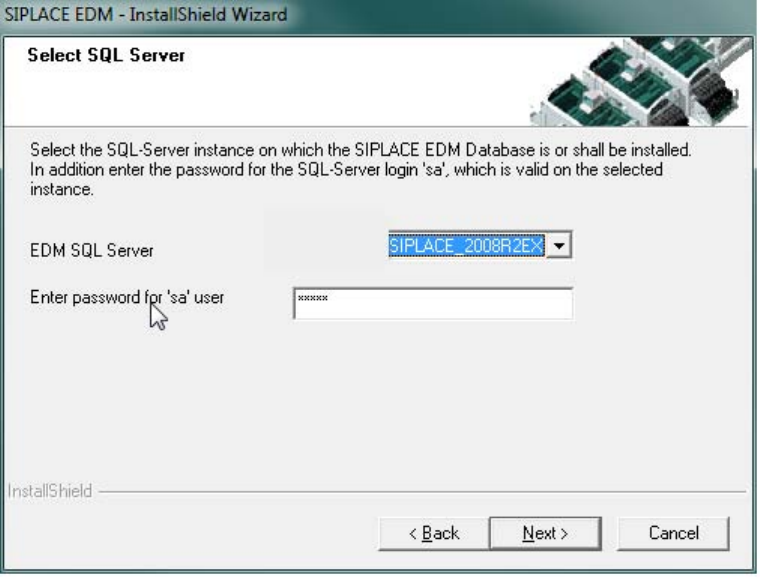
Figure 4-5: Configuring the EDM database
The installation procedure is identical for both options.
► Select the server for the Clearing Pool database.
► Enter the password for the database user 'sa'.
Only SQL server instances on the local host are available for selection.
If no EDM database yet exists:
► Confirm the creation of the new database.
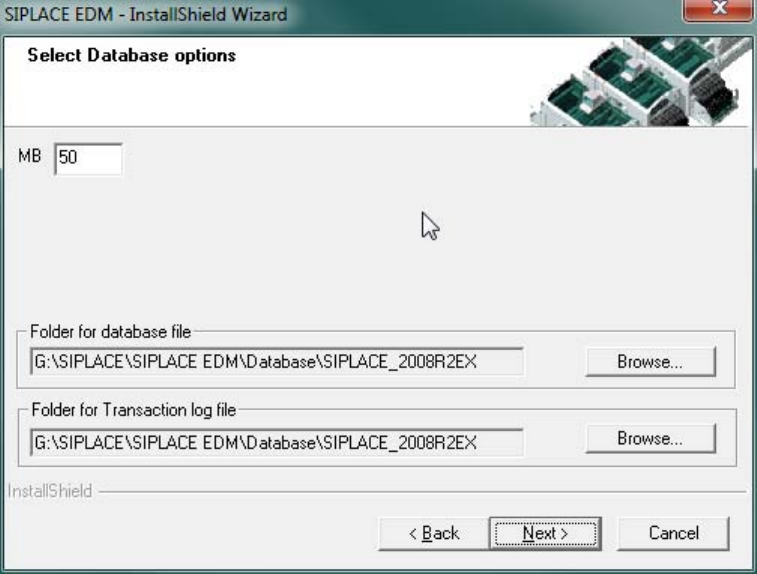
► Enter the database options in the following screen
The default settings are generally sufficient.
► Confirm your entries with Next.
16
EDM V2.0 / Installation Manual Ausgabe 04/2012 Edition
Figure 4-6: EDM database options
If a compatible EDM database has already been detected, this is taken over and converted to the
current version. Otherwise you are asked whether you want to replace the database or select a
different server.
► Confirm your selection with Next.
► Use the Basic EDM Configuration Dialog (cf. section 5.2.1 on page 23), which is presented
now, to edit the fundamental settings.
17