00197975-06_UM_TX-Serie_EN.pdf - 第266页
5 Tasks at the placement machi ne User manual SIPLACE TX-Series 5.10 Setting up the feeder modules From software version 713.0 Ed ition 01/2020 266 5.10.4.4 Splice sensors S plice sensors can be retrofitt ed to the SIPLA…
User manual SIPLACE TX-Series 5 Tasks at the placement machine
From software version 713.0 Edition 01/2020 5.10 Setting up the feeder modules
265
Pull the cover foil at the side of the pick-up window forward and out underneath the pick-up
window.
Fold the cover foil back until it lies against the pull-off edge (item 3 in fig. 5.10 - 5, page 264).
5
Push the lever (item 5 in fig. 5.10 - 5, page 264) back to lower the pickup window.
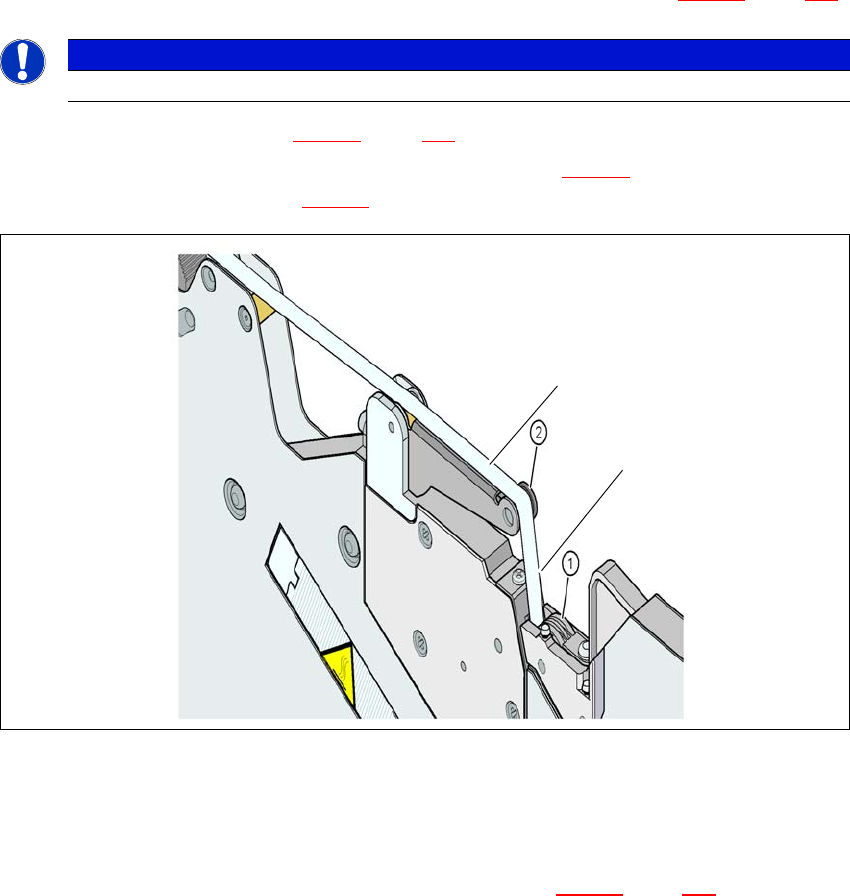
Guide the cover foil over the cover foil rocker (item 2 in fig. 5.10 - 7) until it reaches the foil
packing wheels (item 1 in fig. 5.10 - 7
).
5
Fig. 5.10 - 7 Guiding the cover foil to the foil packing wheels
(1) Cover foil packing wheels
(2) Cover foil
5
On the operator panel, press the FOIL button (item 3 in fig. 5.10 - 6, page 264) until the cover
foil is tensioned. The cover foil rocker points down and stops the drive motor.
Cut the component tape flush with the front end of the feeder module.
PLEASE NOTE
Do not lower the pick-up window until the cover foil is lying against the pull-off edge.
(1)
(2)

5 Tasks at the placement machine User manual SIPLACE TX-Series
5.10 Setting up the feeder modules From software version 713.0 Edition 01/2020
266
5.10.4.4 Splice sensors
Splice sensors can be retrofitted to the SIPLACE SmartFeeder.
SIPLACE SmartFeeders with a splice sensor already installed can also be supplied (see section
3.8
, from page 155).
5.10.5 Configuring components on the SIPLACE SmartFeeder
The operation and setting up is described in the SIPLACE SmartFeeder X /Xi job guides.
User manual SIPLACE TX-Series 5 Tasks at the placement machine
From software version 713.0 Edition 01/2020 5.11 Observing displays on the feeder module
267
5.11 Observing displays on the feeder module
5
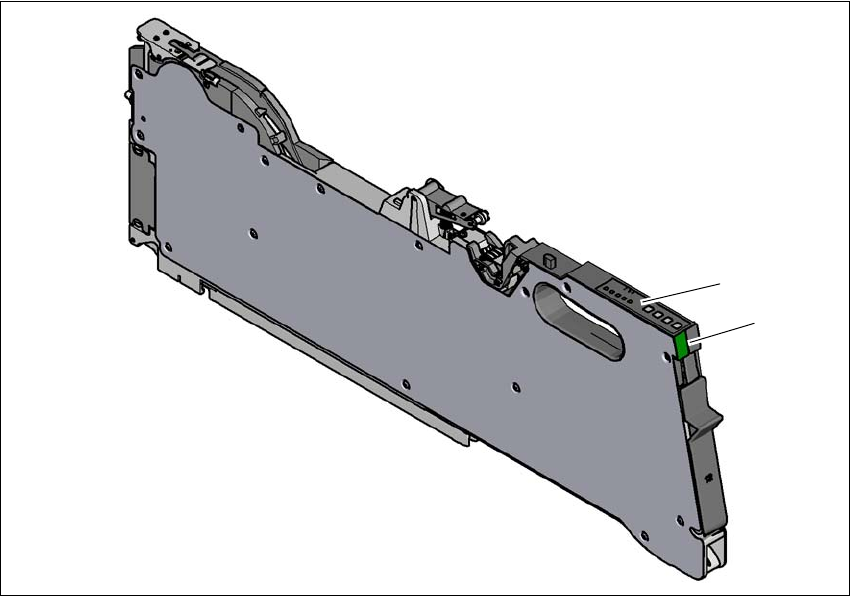
Fig. 5.11 - 1 SIPLACE SmartFeeder X
(1) Operating panel - LED display
(2) Status display
(2)
(1)