00197628-02_VD_SIPLACE_Pro_12.1_DE_EN.pdf - 第16页
SIPLACE Pro V12.1 / Softw are Version Descriptio n Ausgabe 05/2015 Edition 16 Optionally, t he Repo rt Setup displays the pickup locations f or which individual bar code fiducial s have to be provided on t he tape reel o…
SIPLACE Pro V12.1 / Software Version Description Ausgabe 05/2015 Edition
15
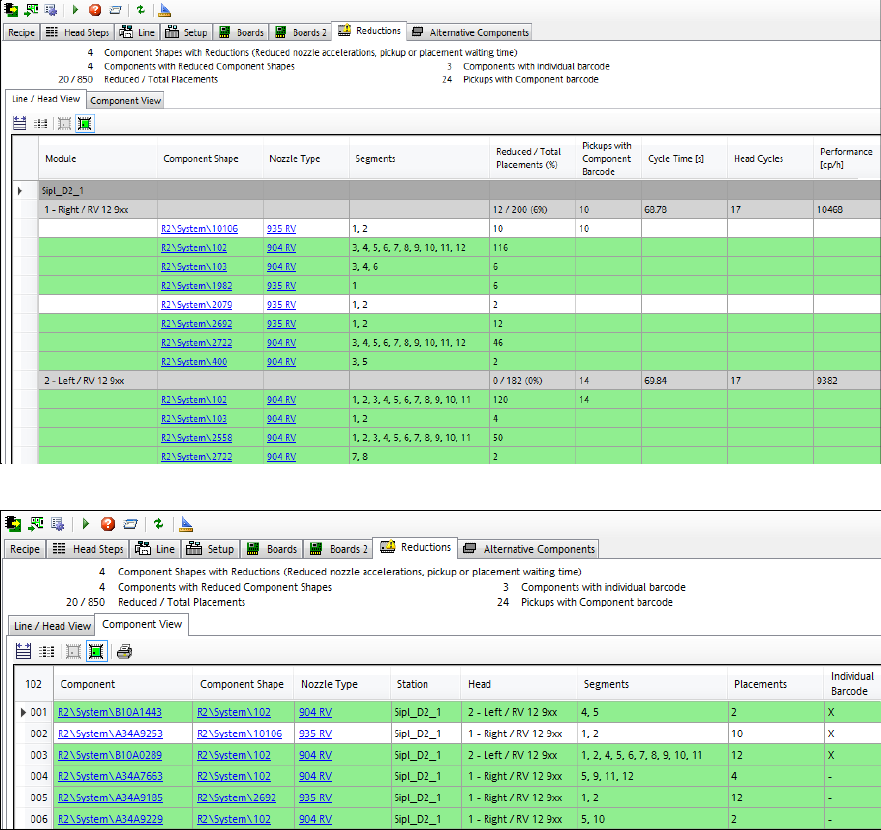
The exact number of pickups and components with individual barcode fiducials is displayed in the
Reductions tab views of the Recipe Analyzer.
Figure 4-7: Reductions – Line / Head View
Figure 4-8: Reductions – Component View
SIPLACE Pro V12.1 / Software Version Description Ausgabe 05/2015 Edition
16
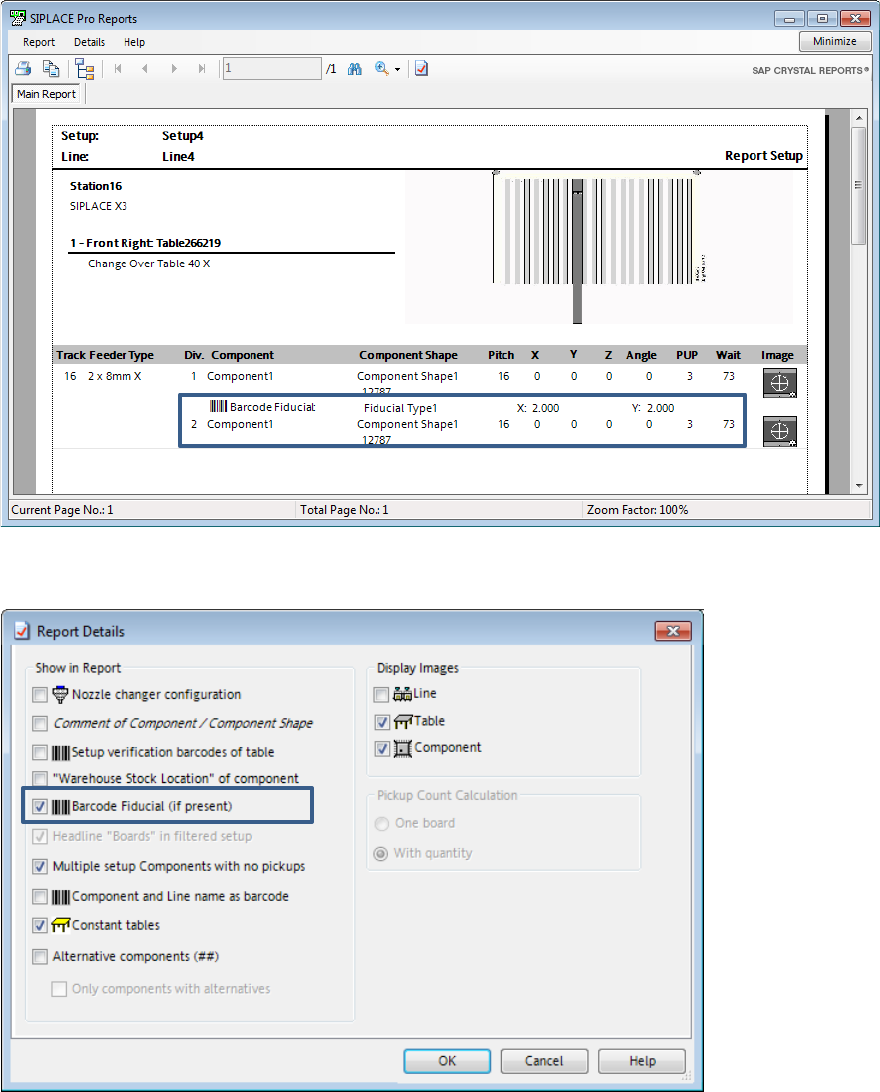
Optionally, the Report Setup displays the pickup locations for which individual barcode fiducials
have to be provided on the tape reel or on the component. Then the barcode fiducial and its offset
will be displayed for pickup locations for which a barcode fiducial has been defined.
Figure 4-9: Report Setup
This feature can be enabled and disabled in the Report Details dialog:
Figure 4-10: Report Details settings
If the option is enabled but reading the barcode fiducial fails, the component will be picked up and
rejected in the respective reject bin. As soon as the defined number of repicks has been reached,
the feeder gets disabled and a detailed error message is displayed on the station GUI. The
operator is prompted to perform an additional teaching.
SIPLACE Pro V12.1 / Software Version Description Ausgabe 05/2015 Edition
17
4.2 C&P20 P 4xxx Placement Head on SIPLACE SX1/SX2 (V2)
SIPLACE Pro supports the C&P20 P 4xxx placement head on the SIPLACE SX1/SX2 (V2)
placement machine.
The functionality and configurations that are valid for the C&P20 placement head are supported for
the C&P20 P 4xxx placement head, as well.
NOTICE
The C&P20 P 4xxx and C&P20 placement heads should not be combined at one station!
4.3 WDTL – Multiple Set-up Components in Barcode Controlled
Production with Synchronous Dual Lane Mode
SIPLACE Pro now supports multiple set-up components in barcode controlled production with
synchronous dual lane mode. Multiple set-up components means that the components are set-up
on more than one station.
In synchronous dual lane mode, each of the two boards gets the same unique ID for the SIPLACE
Pro job in the first station. This ID will be transferred by WDTL through the line.
If boards with the same ID are moved together into another station, the boards will be placed
together with the same SIPLACE Pro job. This is the usual case.
If boards with different IDs are moved together into another station, the boards will be separated
and separately placed in asynchronous mode.
Prerequisites
– All stations in the line must be equipped with the same station software (708.1 version or
higher).
– WDTL has to be provided through the complete line. If a SIPLACE cluster is interrupted by a
device like an AOI system, WDTL is only possible via individual PCB barcodes.
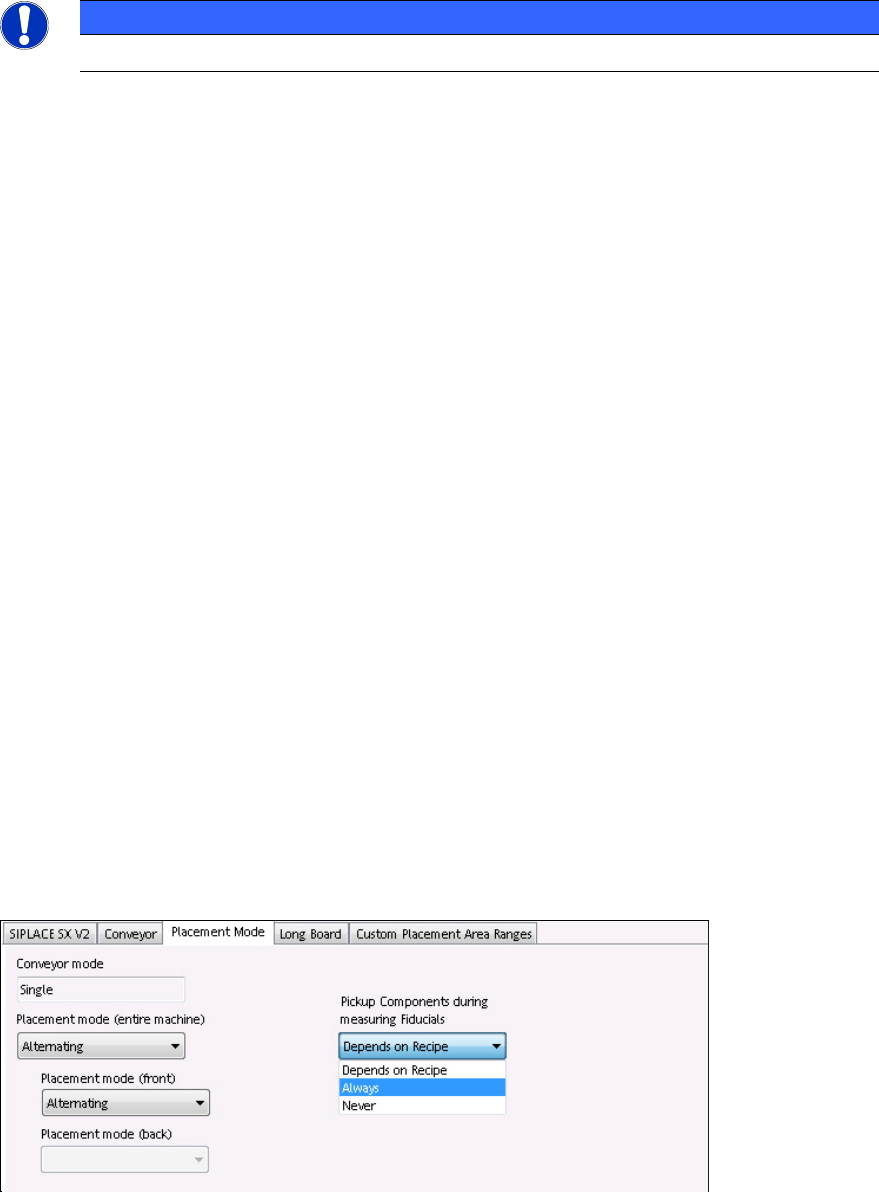
4.4 Configurable "Pickup Components during Measuring Fiducials"
Previously it was standard that the components were already picked up and measured while the
board entered the machine for a faster passing through. This practice was only suppressed if ink
spots had to be evaluated.
As of this SIPLACE Pro version and station software version 708.1, the pickup behavior can be
configured in the Setup Editor.
Figure 4-11: Pre-pickup settings