00197628-02_VD_SIPLACE_Pro_12.1_DE_EN.pdf - 第19页
SIPLACE Pro V12.1 / Softw are Version Descriptio n Ausgabe 05/2015 Edition 19 5 Restrictions In the following, existing restrictions in SIPLACE Pro are des cribed . Miscellaneous – 10 - fold and 15 - f old stick magazine…
SIPLACE Pro V12.1 / Software Version Description Ausgabe 05/2015 Edition
18
The following settings are available:
Depends on Recipe (default)
Pre-pickup is performed depending on the recipe characteristics. Essentially, pre-pickup is
suppressed if any of the following conditions apply:
– Ink spots have to be measured to determine skipped panels.
– There are components that require reduced speed on the gantry with the camera.
– There are components from "slow" feeders (e.g. WPC) on the placement head of the gantry
with the camera.
Always
Pre-pickup is always performed even if ink spots are present. This setting can be used if the ink
spot failure rate is known to be extremely low.
Never
No pre-pickup is performed. The system always waits for successful fiducial and ink spot
measurement. A warning icon will be displayed in the Setup Editor indicating that this option
reduces the placement speed.
4.5 Placement of 03015 / 0201 Components with C&P20 A 10xx or
C&P20 P 4xxx
The component shapes that can be selected in SIPLACE Pro for the placement process are based
on the imperial units, i.e. on inches (1 inch = 2.4 cm) with one exception: the 03015 component
shape is based on the metric system.
As of this SIPLACE Pro version, a new metric-based 0201 component shape can be defined in
addition to the existing, inch-based 0201 component shape.
For the metric-based 0201 component shape a new nozzle type has been introduced that is
supported by the C&P20 A 10xx and C&P20 P 4xxx placement heads. The nozzle number 1002 is
assigned to the C&P20 A 10xx placement head and 4102 to the C&P20 P 4xxx placement head.
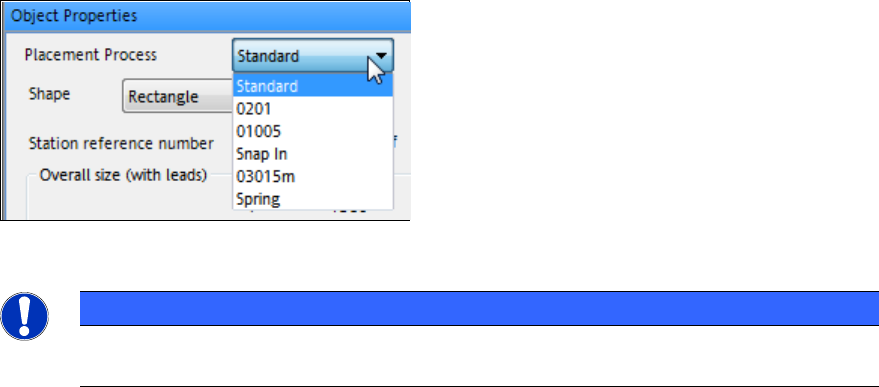
The 0201 component shapes (= inch-based) or 03015m (= metric-based) can be selected for the
placement process.
Figure 4-12: Component shapes
NOTICE
SIPLACE Pro treats the metric-based 0201 component shapes as 03015m component
shapes. Therefore, in this case 03015m has to be selected and not 0201!
4.6 Automatic Selection of Stopper Positions for Long Board Option
The SIPLACE Pro Optimizer selects the stopper positions for the Long Board Option automatically.
SIPLACE Pro V12.1 / Software Version Description Ausgabe 05/2015 Edition
19
5 Restrictions
In the following, existing restrictions in SIPLACE Pro are described.
Miscellaneous
– 10-fold and 15-fold stick magazines can not be combined on the same linear feeder.
– SIPLACE Pro object names (e.g., recipe) must not exceed 125 ASCII characters (including
folder names). If the station software is 504 or older, these names are shortened to 20 ASCII
characters.
– If various users optimize the same job at the same time, the job which was most recently
completed successfully will overwrite all corresponding recipes
– The operator must manually place manual tray carriers (Carrier 30, Carrier 51, Carrier X,
Carrier SX, Arbitrary Carrier E, Manual Tray Holder E Speed, Manual Tray Holder E Flex) in the
initial setup.
– If you work with reduced acceleration for a component shape, this is seen as a "special case"
and the accuracy of 5% for the simulated Optimizer production time will not be achieved.
– The Optimizer does not check if the tray size is bigger than the carrier.
– The WPC can take up to 10 different component types per level. This restriction does not apply
for machines from station software version 70x.
Station-wise Download
– When the line control server is rebooted, station-wise downloading will be canceled. After
rebooting, you will need to perform a complete line download to restart production.
– Station-wise downloading supports setup changes in asynchronous dual operation only when
you have the same definition for both lanes.
– Station-wise downloading supports synchronous dual operation as of station software version
704.
Changed Values of a Component Packaging
If you change the values for a type of component packaging after this has been assigned to a
component, these values will not be updated for the component concerned.
The component package has to be re-assigned to the component after the component package
values have been modified.
ASCII Centroid Import
If component shapes are selected in the ASCII Centroid Import Wizard, all the existing links
between components and component shapes will be overwritten with the imported information.
WPC5 / WPC6
– Components up to a height of 30mm can be placed with a force of 70N with the WPC5 as of
serial number 1485 and the WPC6 as of serial number C1486 only.
– Components up to a height of 40mm can be placed with the WPC5 as of serial number B3000
and the WPC6 as of serial number C3000.
– Due to the refill module, components > 25mm cannot be positioned on the levels 1 – 3 and
27 – 28 on the WPC6. The levels 4 – 28 will be set up automatically by the SIPLACE Pro
Optimizer. The levels 1 – 3 have to be blocked manually by the operator.
SIPLACE Pro V12.1 / Software Version Description Ausgabe 05/2015 Edition
20
X4i S placement machine
– The traveling range in X direction is limited for the gantries 2 and 4 on the X4i S placement
machine.
– If a pin picker is installed on the X4i S placement machine, the maximum board length is
410mm.
X3 S and X4 S placement machines
If a pin picker is installed on the X3 S and X4 S placement machines, the maximum board length is
410mm.
TrayStak Feeder AX
– The feeder is only supported on the X4i S placement machine and can be positioned on the
locations 2 and 3 only.
– A table of type "DX Table 40 X" has to be configured. Additionally, the "WPC X" table insert has
to be selected s in order to release the traveling range of the placement head for the feeder.
– Only one Dip module LDU-X can be installed beside the feeder.
– If 2 TrayStak Feeder AX are installed together with an LDU-X, the table has to be manually
selected in the Auto Configuration of the station software.
– No nozzle changer support.
– Stationary camera cannot be used.
– CPP placement head supported only.
– Feeder and placement heads are neither controlled in SIPLACE Pro nor in the station software.
– Due to the hardware, the sequence oft he components (chain) cannot be warranted. Therefore,
setup verification with SIPLACE Setup Center cannot be performed.
– After the machine has been rebooted or the feeder has been locked / unlocked, the feeder has
to be manually activated with the buttons on the feeder each time.
– If the feeder is used without a reject conveyor, this may result in incomplete head cycles what
causes a reduced placement performance.
– If there is no space to put back the component, it will be rejected.
C&P20 M 1xxx placement head
– Supported on the CA-series and the SIPLACE X4 S micron / X4i S micron placement machines
only.
Twin VHF 5xx placement head
– Supported on the SX1/SX2 V2 placement machine only.
– No fast gantry exchange possible.
– Must not be used together with the VHF P&P placement head on a machine.
SIPLACE JTF-S
Supported on the SX1/SX2 V2 and the SIPLACE X-series S placement machines only.