xp141-241-341-5.0E.pdf - 第125页
C C h h a a p p t t e e r r 5 5 P P e e r r i i p p h h e e r r a a l l A A d d j j u u s s t t m m e e n n t t s s

FK-9F98-29 XP Series Training Text for Service Engineers
Edition 5.0 XP241 – Chapter 4 Loader Adjustment Page 12 of 12
Fuji Machine Mfg. Co., Ltd. Okazaki.
SMT Equipment Quality Assurance Dept.
4 – 12 CS Section
NOTES:

C
C
h
h
a
a
p
p
t
t
e
e
r
r
5
5
P
P
e
e
r
r
i
i
p
p
h
h
e
e
r
r
a
a
l
l
A
A
d
d
j
j
u
u
s
s
t
t
m
m
e
e
n
n
t
t
s
s
FK-9F98-29 XP Series training Text for Service Engineers
Edition 5.0 XP241 – Chapter 5 Peripheral Adjustments Page 1 of 19
Fuji Machine Mfg. Co., Ltd. Okazaki.
SMT Equipment Quality Assurance Dept.
5 – 1 CS Section
Chapter 5 Peripheral Adjustments
In order to carry out adjustments on the MTU it is sometimes necessary to use the T and U axis
jog commands in the [Maintenance A] – [Jog] screen. In machine software version V1.30 and later
versions, the T and U axes are disabled by default as a safety precaution. To enable them for the
duration of the adjustment select [Maintenance C] – [Proper Data Editor] – [OPERATION_2] –
[JogInterlockOFF] and change the value from 0 to 1. After the adjustment is complete, remember
to return this to its original value. The following adjustment procedure is for the old type of MTU,
for the new type of MTU (type 2) refer to chapter 9 of this manual.
5.1 Adjusting the MTU (old type)
Note: Be extremely careful when operating the MTU, especially
when trays are inside.
Tray stopper adjustment
1. Remove the plastic covers from the MTU door.
2. Put trays in the magazine top and bottom shelves.
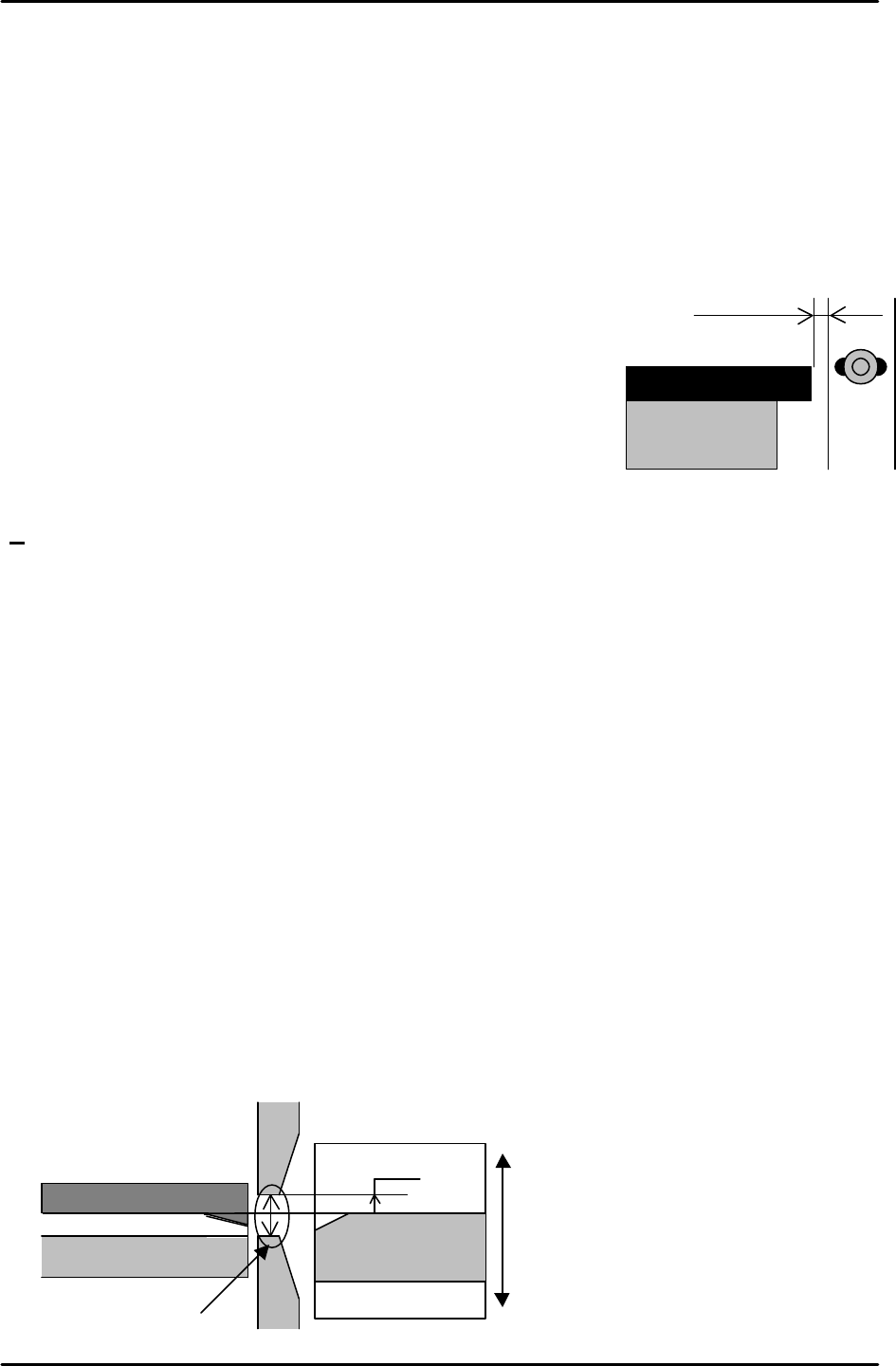
3. With the door closed set the gap between the long white plastic stopper on the door and
the trays to 0.5 – 1.0mm.
Note: ensure that the gap between the long white stopper and the trays is 0.5 to 1.0 mm
at all positions up and down the T axis.
Tray conveyance position measurement
1. Position the M.T.U magazine at the position where the bottom rung [01, 02] is level with
the U axis conveyor surface. Input this position in [Maintenance C] – [Proper Data Editor]
– [Tray] - T_Tray Org.
2. Ensure that the transfer from T axis to U axis is smooth and there is no jolting when trays
are extended and retracted at this height.
Adjusting the Position of the Guide Bar
1. Set a tray shelf at tray position [01, 02] and bring it to the T_Tray Org position.
2. Set the bottom edge of the upper guide bar 8 mm above the surface of the tray shelf.
3. Set the top edge of the lower guide bar 10 mm below the bottom edge of the upper guide
bar.
Tray
0.5 ~1.0mm
Adjust the height to align the Tray
reference rail and No.01 tray height.
No.01 tray
Tray reference rail
Upper guide bar
Lower guide bar
10mm
8mm