xp141-241-341-5.0E.pdf - 第150页
FK-9F98- 29 XP Series Training Text for Service Engineers Edition 5.0 XP241 – Chapter 6 Proper Data Measurements Page 4 of 20 Fuji Machine Mfg. Co., Ltd. Okazaki. SMT Equipment Quality Assurance Dept . 6 – 4 CS Section 8…
FK-9F98-29 XP Series Training Text for Service Engineers
Edition 5.0 XP241 – Chapter 6 Proper Data Measurements Page 3 of 20
Fuji Machine Mfg. Co., Ltd. Okazaki.
SMT Equipment Quality Assurance Dept.
6 – 3 CS Section
6. 2 Measuring the mark camera resolution
Equipment: Glass gage for mark camera resolution measurement (Z3502DFAJ0020).
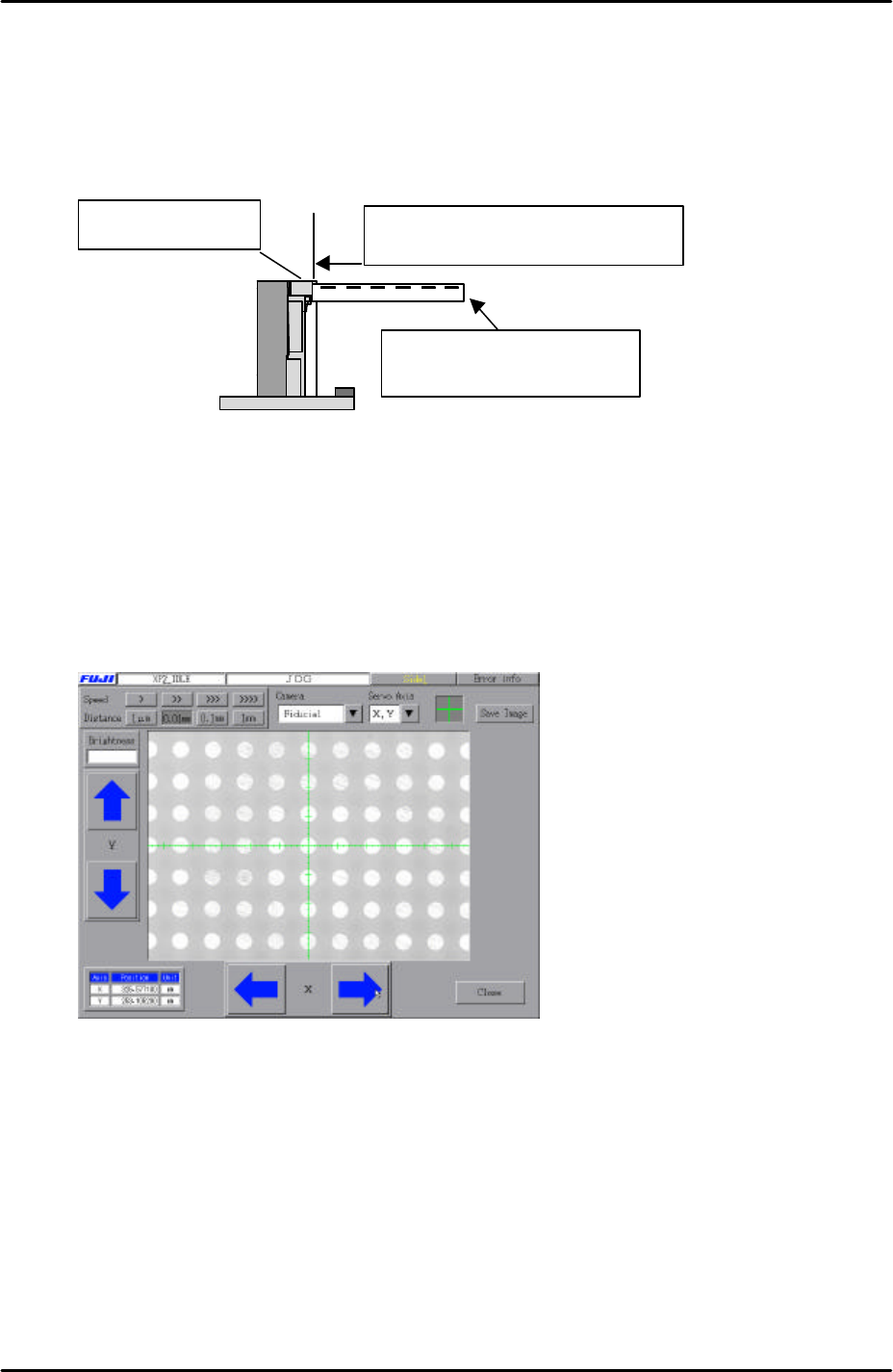
1. Clamp the glass gage in the main table. Ensure it is flush with the reference rail.
2. Select [Maintenance A] – [Jog] – [Fiducial] to display the mark camera live image.
3. Bring the mark camera above the center of the glass gage and select the cross
hairs.
4. Inch the mark camera until it is centered on the center dot in the image (if the image
is too bright then ensure the emergency switch is pressed and then use your hand
to shade the mark camera until the dots on the glass gage become visible) :
5. Select [Maintenance A] – [I/O Check] – [Y010 Fiducial Lamp] – ON.
6. Select [Program] – [Template editor] – and then right click on the screen to display a
menu box.
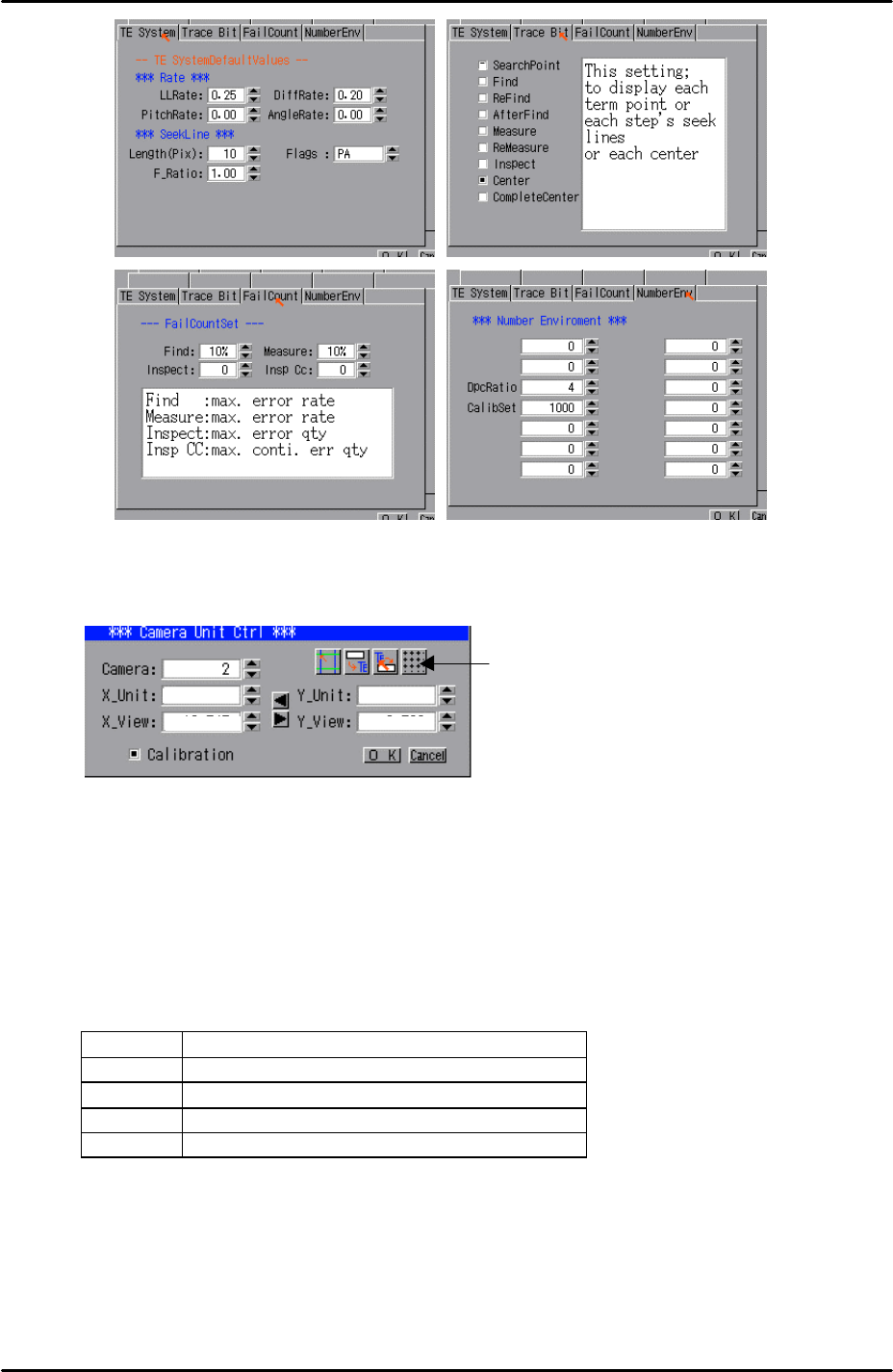
7. Select [Utility] – [Default Setting] and confirm that the default settings are identical
to those shown below:
The reference rail
Push the glass gauge against the
reference rail and clamp the gauge.
The glass gauge should be
printed side up.
FK-9F98-29 XP Series Training Text for Service Engineers
Edition 5.0 XP241 – Chapter 6 Proper Data Measurements Page 4 of 20
Fuji Machine Mfg. Co., Ltd. Okazaki.
SMT Equipment Quality Assurance Dept.
6 – 4 CS Section
8. Select [Utility] – [Scale Setting] – [Camera 2] – and click on the resolution
measurement tab:
9. Answer YES to the question “Set Center?” and the resolution measurement will
proceed.
10. Answer NO to the question “Do you save calibration data to FD?”
11. To the next question “Save Calibration Data?” answer YES.
12. Confirm that the resolution results are within the tolerances described below:
Mark camera resolution tolerances
X_Unit 0.017 ~ 0.0189
X_View 10.9 ~ 12.1
Y_Unit 0.017 ~ 0.0189
Y_View 8.16 ~ 9.07
13. The resolution calibration is now complete. Right click on the screen and select
return.
Resolution
Measurement
FK-9F98-29 XP Series Training Text for Service Engineers
Edition 5.0 XP241 – Chapter 6 Proper Data Measurements Page 5 of 20
Fuji Machine Mfg. Co., Ltd. Okazaki.
SMT Equipment Quality Assurance Dept.
6 – 5 CS Section
6.3 Measuring the mark camera orientation
Equipment: lever type dial gage (0.01mm).
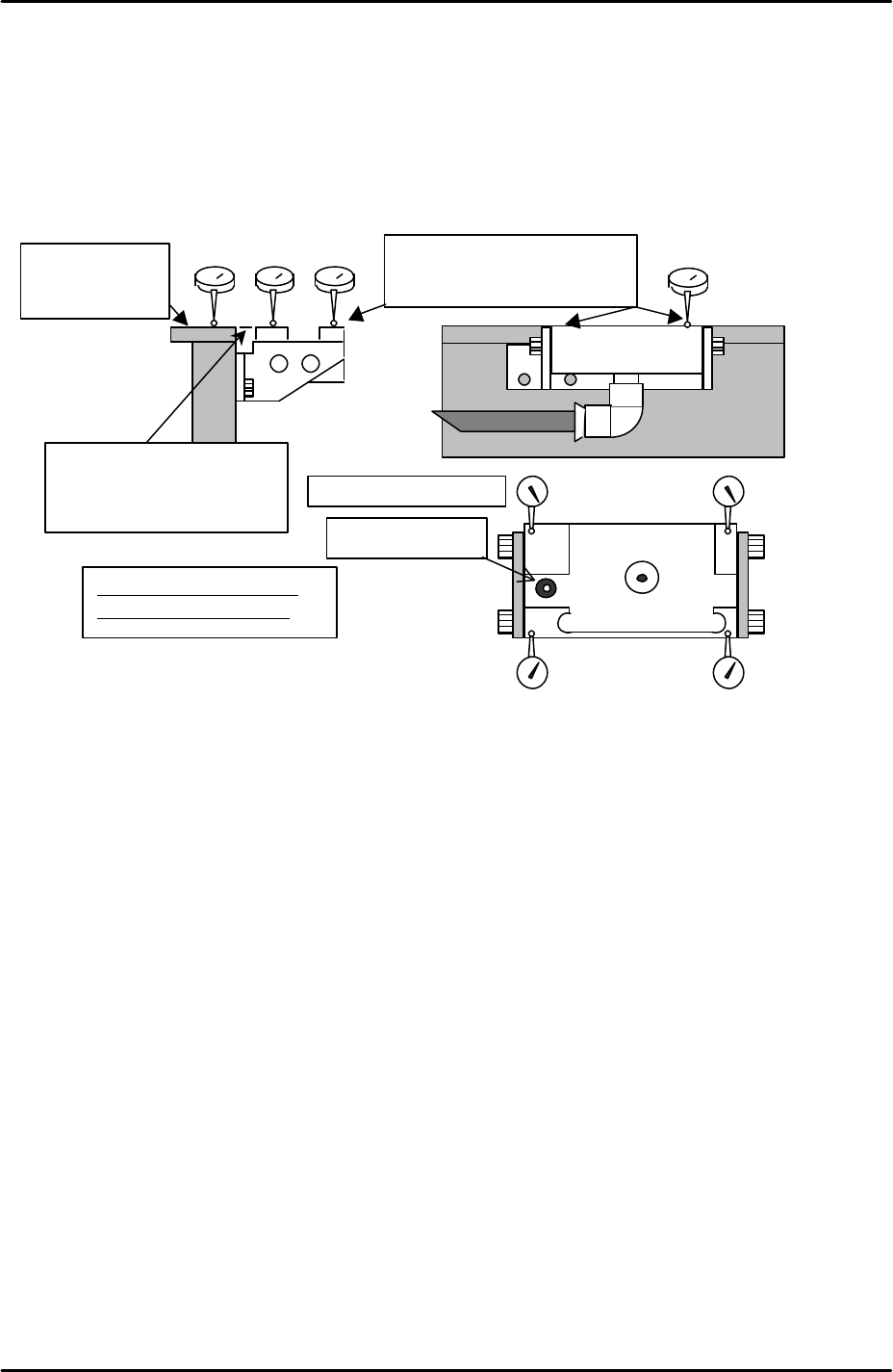
1. Adjust the height of the glass gage station so that it is level with the reference rail
(tolerance +/- 0.05mm). Also ensure that the glass gage station is flat (tolerance
0.05mm).
2. Select [Maintenance A] – [JOG] – [Fiducial] and display the crosshairs on the
screen.
3. Inch the mark camera until it is centered on the fiducial mark on the left of the parts
gage station.
4. Select [Maintenance C] – [Mark camera Measurement] – [FMarkPos Measure] –
[START] – [Change mark position] – [Execute] to save the fiducial mark position.
5. Select [Angle Measure] to measure the mark camera orientation.
6. Select [X Unit measure] to measure the mark camera resolution. Note that this is
not the primary resolution measurement, therefore do not save the results. Check
that the resolution values are within 0.05mm of those recorded in step 6.2 and then
press cancel.
7. Select [Y Unit measure] to measure the mark camera resolution. Note that this is
not the primary resolution measurement therefore do not save the results. Check
that the resolution values are within 0.05mm of those recorded in step 6.2 and then
press cancel.
8. If the deviation between the resolution values recorded in steps 6.2 and 6.3 is more
than 0.05mm re-measure the resolution using the glass gage procedure described
in 6.2.
9. Note that 6.2 is the primary resolution measurement because it reads a whole
Set dial to “0” on
the top surface of
the reference rail.
Adjust the flatness to within
0.05mm in the 4 corners of the
glass gauge station.
Tolerance: for 4 corners of
the height within 0.05mm
Fiducial mark
Flatness: within 0.05mm
Adjust to within +/- 0.05mm
for the height of the reference
rail and parts gauge station.