00198268-02_GS_SIPLACE-Pro-14.1-R17-1_EN.pdf - 第56页
3 T utorial Getting S tarted SIPLACE Pro 14.1 (R17-1) 3.8 Exercise 7: Performing a Download with the Line Control GUI 05/2017 Edition 56 3 Fig. 3 - 21 LCGUI: Production schedule for Job1 _Lesson5 Key 3 3 (1) T ree view -…
Getting Started SIPLACE Pro 14.1 (R17-1) 3 Tutorial
05/2017 Edition 3.8 Exercise 7: Performing a Download with the Line Control GUI
55
Aim of exercise 3
You will create a simple production schedule for the job created in Exercise 5 and optimized in
Exercise 6 and will then send this to the line. 3
How to create a production schedule and perform a download 3
3
From the View menu, select the function Production Schedules - Show Tree View.
Move the cursor to this tree view and right-click with the mouse.
Select the function New Production Schedule from the context menu.
Select Linie1_Lesson4 at My Lines\Getting Started or choose another line to which a con-
nection already exists. The line will be shown in the Line view area.
Move the cursor to the editing area for the recipes and right-click with the mouse.
Select the function Add boards from the context menu.
Select the board Single_PCB from My Boards\Getting Started
A new recipe will be created. Save this recipe at My Recipes\Getting Started , as Down-
load_Single_PCB. Confirm with OK.
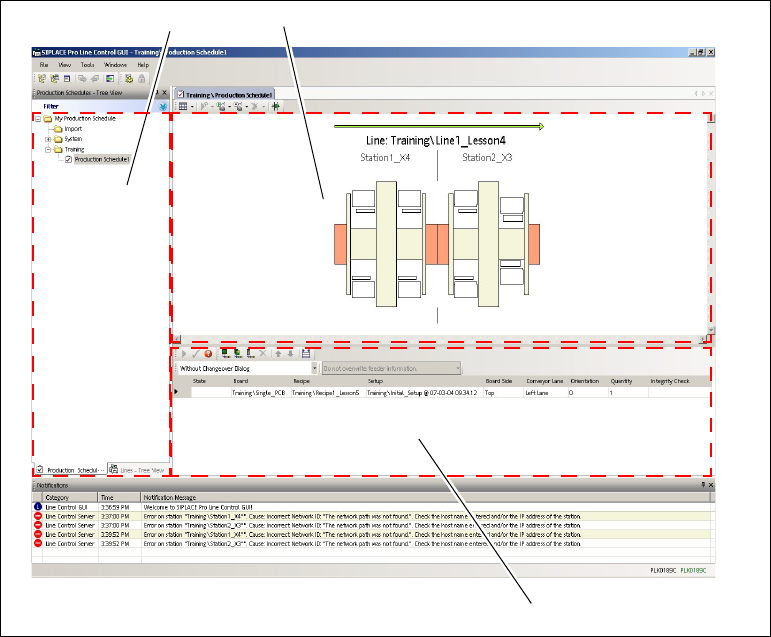
In the recipe list editing area (see Fig. 3 - 21 on page 56), mark the column Setup and click on
the button to select the optimized setup Initial_Setup@xxxx.
Mark the recipe in the production schedule and perform an integrity check. To do this, click on
the icon in the toolbar of the recipe list.
– If the integrity check is successful, the Status column will display the message "Checked"
and the Integrity Checkcolumn will shown the data and time of the check.
Mark the recipe line via the icon in the cell header.
Define the production schedule recipe for the stations by starting a download with the
icon.
Confirm the Conveyor lane emptied message withOK, as soon as the line has been emptied.
Note
The following exercise describes the standard download procedure. To perform this ex-
ercise, you must have a connection to your stations. If the line from the previous exercis-
es is used, error messages could be issued.
3 Tutorial Getting Started SIPLACE Pro 14.1 (R17-1)
3.8 Exercise 7: Performing a Download with the Line Control GUI 05/2017 Edition
56
3
Fig. 3 - 21 LCGUI: Production schedule for Job1_Lesson5
Key
3
3
(1) Tree view - production schedules (2) Line view area
(3) Recipe list editing area 3
3
2
1

Getting Started SIPLACE Pro 14.1 (R17-1) Index
05/2017 Edition
57
Index
C
Changeover instructions
. . . . . . . . . . . . . . . . . . .52
Changing the Language
. . . . . . . . . . . . . . . . . . .20
Cluster Board
. . . . . . . . . . . . . . . . . . . . . . . . . . .36
Configurations
. . . . . . . . . . . . . . . . . . . . . . . . . . .20
Context Menu
. . . . . . . . . . . . . . . . . . . . . . . . . . .19
Creating a Board
. . . . . . . . . . . . . . . . . . . . . . . . .34
Creating a Component Shape
. . . . . . . . . . . . . .31
Creating a Job
. . . . . . . . . . . . . . . . . . . . . . . . . . .41
Creating a Placement Line
. . . . . . . . . . . . . . . . .39
D
Download
. . . . . . . . . . . . . . . . . . . . . . . . . . 44, 55
Drag & Drop
. . . . . . . . . . . . . . . . . . . . . . . . . . . .29
E
Editing Area
. . . . . . . . . . . . . . . . . . . . . . . . 10, 18
Editing Area - Download
. . . . . . . . . . . . . . . . . . .56
Enable Auto-Hide
. . . . . . . . . . . . . . . . . . . . . . . .17
Equipment
. . . . . . . . . . . . . . . . . . . . . . . . . . 13, 15
Error Dialog
. . . . . . . . . . . . . . . . . . . . . . . . . . . . .47
F
F1 Key
. . . . . . . . . . . . . . . . . . . . . . . . . . . . . . . . . .7
G
Generic Line Device
. . . . . . . . . . . . . . . . . . . . . .16
H
Hide Tree View
. . . . . . . . . . . . . . . . . . . . . . . . . .17
I
Importing ASCII Data
. . . . . . . . . . . . . . . . . . . . .26
Initial Setup
. . . . . . . . . . . . . . . . . . . . . . . . . 39, 41
Integrity Check
. . . . . . . . . . . . . . . . . . . . . . . . . .55
L
Line Control GUI User Interface
. . . . . . . . . . . . .54
Line view area
. . . . . . . . . . . . . . . . . . . . . . . . . . .56
M
Measurement Unit
. . . . . . . . . . . . . . . . . . . . . . . 12
Menu Bar
. . . . . . . . . . . . . . . . . . . . . . . . . . . . . . 10
N
Nozzle configuration
. . . . . . . . . . . . . . . . . . . . . 49
O
Online Help
. . . . . . . . . . . . . . . . . . . . . . . . . . . . . 7
Optimization
. . . . . . . . . . . . . . . . . . . . . . . . . . . 43
Optimization Parameters
. . . . . . . . . . . . . . . . . . 45
Optimization Status
. . . . . . . . . . . . . . . . . . . . . . 47
Optimized Setup
. . . . . . . . . . . . . . . . . . . . . . . . 43
Optimizing the Job
. . . . . . . . . . . . . . . . . . . . . . 45
P
Password
. . . . . . . . . . . . . . . . . . . . . . . . . . . . . . 9
Performing Optimization
. . . . . . . . . . . . . . . . . . 46
Placement List
. . . . . . . . . . . . . . . . . . . . . . . . . . 26
Presettings
. . . . . . . . . . . . . . . . . . . . . . . . . . . . 20
Printer
. . . . . . . . . . . . . . . . . . . . . . . . . . . . . . . . 16
Printer Processes
. . . . . . . . . . . . . . . . . . . . . . . 16
Printing
. . . . . . . . . . . . . . . . . . . . . . . . . . . . . . . 21
Process Materials
. . . . . . . . . . . . . . . . . . . . . . . 16
Product Objects
. . . . . . . . . . . . . . . . . . . . . . . . . 13
Production Schedule
. . . . . . . . . . . . . . . . . . . . . 55
R
Remedy Error
. . . . . . . . . . . . . . . . . . . . . . . . . . 47
Report
. . . . . . . . . . . . . . . . . . . . . . . . . . . . . . . . 46
Report Manager
. . . . . . . . . . . . . . . . . . . . . . . . 21
Reset default layout
. . . . . . . . . . . . . . . . . . . . . 20
Result setup
. . . . . . . . . . . . . . . . . . . . . . . . . . . 46
Print
. . . . . . . . . . . . . . . . . . . . . . . . . . . . . . 51
Report
. . . . . . . . . . . . . . . . . . . . . . . . . . . . . 48
Right-Clicking the Mouse
. . . . . . . . . . . . . . . . . 19
S
Setting the Measurement Unit
. . . . . . . . . . . . . . 12
Setup modification generator
. . . . . . . . . . . . . . 52
Show recipe results
. . . . . . . . . . . . . . . . . . . . . . 49
Show Server Name
. . . . . . . . . . . . . . . . . . . . . . 10
Show User Name
. . . . . . . . . . . . . . . . . . . . . . . 10