00193802-01.pdf - 第173页
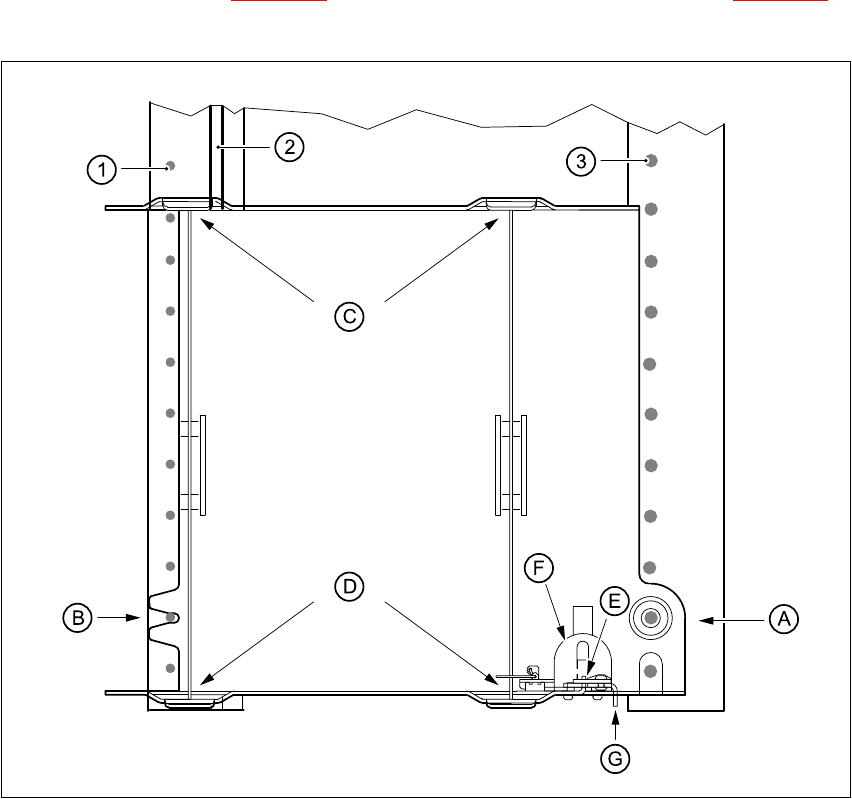
User Manual SIPLAC E CF 6 Component han dling Software version SR.101.xx 06/2003 US Edition 6.7 Support for waffle-pack trays (manual tray) 173 6.7.3 Changing the retainer Æ Hold the r etainer ( G in Fig. 6 .7 - 1 ) fir …

6 Component handling User Manual SIPLACE CF
6.7 Support for waffle-pack trays (manual tray) Software version SR.101.xx 06/2003 US Edition
172
6.7 Support for waffle-pack trays (manual tray)
PLEASE NOTE 6
The support for the waffle-pack magazine must only be placed on the right-hand component trol-
ley of the SIPLACE CF. The waffle-pack magazine support can only be positioned so that the
right edge fills no more than track 73. 6
6.7.1 General
The support for waffle-pack trays allows components to be picked up from individual waffle-pack
trays. The waffle-pack trays are changed manually.
The support for waffle-pack trays is placed on the component feeder table, just like a conveyor.
There are two different versions of the support, the only difference being the width.
Support for large waffle-pack tray
(260mmx360mm, fills 9 locations) part no. 00116430-01
Support for small waffle-pack tray
(136mmx360mm, fills 5 locations) part no. 00116432-01
6.7.2 Installation
Æ Insert the front side of the support for waffle-pack trays into the associated centering pin (B in
Fig. 6.7 - 1
).
Æ Then position the rear side of the support for the waffle-pack tray onto the centering ball on
the component feeder table (A in Fig. 6.7 - 1
).
Æ Check that the manual tray support is firmly seated on the component table.
Æ Position one side of the waffle-pack tray carrier in the mounting (C in Fig. 6.7 - 1). Then press
the other side into the mounting (D in Fig. 6.7 - 1
).
Æ Slide the waffle-pack tray up against the stop (E in Fig. 6.7 - 1).
Æ Secure the waffle-pack tray carrier by pressing the thrust pad (F in Fig. 6.7 - 1) downwards.
Æ To remove the waffle-pack tray carrier, press the thrust pad once more.
PLEASE NOTE 6
Using the support for small waffle-pack trays (136mm) a waffle-pack tray (JEDEC or CENELEC
waffle-pack tray) can be fitted directly to the support, in other words, without a waffle-pack tray
carrier being used. The thrust pad will require changing. 6
User Manual SIPLACE CF 6 Component handling
Software version SR.101.xx 06/2003 US Edition 6.7 Support for waffle-pack trays (manual tray)
173
6.7.3 Changing the retainer
Æ Hold the retainer (G in Fig. 6.7 - 1) firmly. Press the thrust pad downwards (F in Fig. 6.7 - 1)
and remove the retainer by pressing it out sideways.
Fig. 6.7 - 1 Installation
6
(1) Centering pins
(2) Magnetic rail
(3) Centering balls
6.7.4 Data entry
Define the waffle-pack trays as described in the SIPLACE C Pro software manual.
6 Component handling User Manual SIPLACE CF
6.7 Support for waffle-pack trays (manual tray) Software version SR.101.xx 06/2003 US Edition
174