3OM-1208-011_w.pdf - 第137页
3-50 AIVEDT -ID 0606-009 2. Editing of Pattern Program 2. Editing of Pattern Program 2.1 "Pattern Program" Window When the [EDIT] button on the main menu bar is pressed, the "PP . DA T A" window opens…
3-49
AIVEDT-ID
(D03_04)
H
The height for each individual patterns (unit PCBs) can be corrected.
Note
When a parameter is set as "H" data in the last line (last step No.), it
becomes invalid because "E" is set in the "C (Control Command)" text
box.
(D03_05)
C
Enter some of the following control commands.
Notice
If a control command other than the following ones is used, the step
becomes invalid.
- (hyphen) :
This command handles the steps as those for component
placement.
S :
This command invalidates the steps specified as those for
component placement.
C :
This command invalidates the steps specified as those for
component placement.
Note:
As for dispensers, these steps become valid.
D :
This command handles the steps as those for component
placement.
Note:
As for dispensers, these steps become invalid.
E :
When placement data (O) is not created, this shows the
end of the steps in the placement data (P).
Note
Confirm that "0" (zero) is set in the "X [mm]", "Y [mm]", and "Z=theta
[deg]" text boxes of the last line (last step No.) and set "E".
(D03_06)
Comment
Set a comment for each step No.
Alphanumeric characters and symbols can be used.
Up to 32 characters (alphanumerics and marks) can be used.
Note
The automatic operation is not affected by these comments.
0606-009
1.5 Placement Data
3-50
AIVEDT-ID
0606-009
2. Editing of Pattern Program
2. Editing of Pattern Program
2.1 "Pattern Program" Window
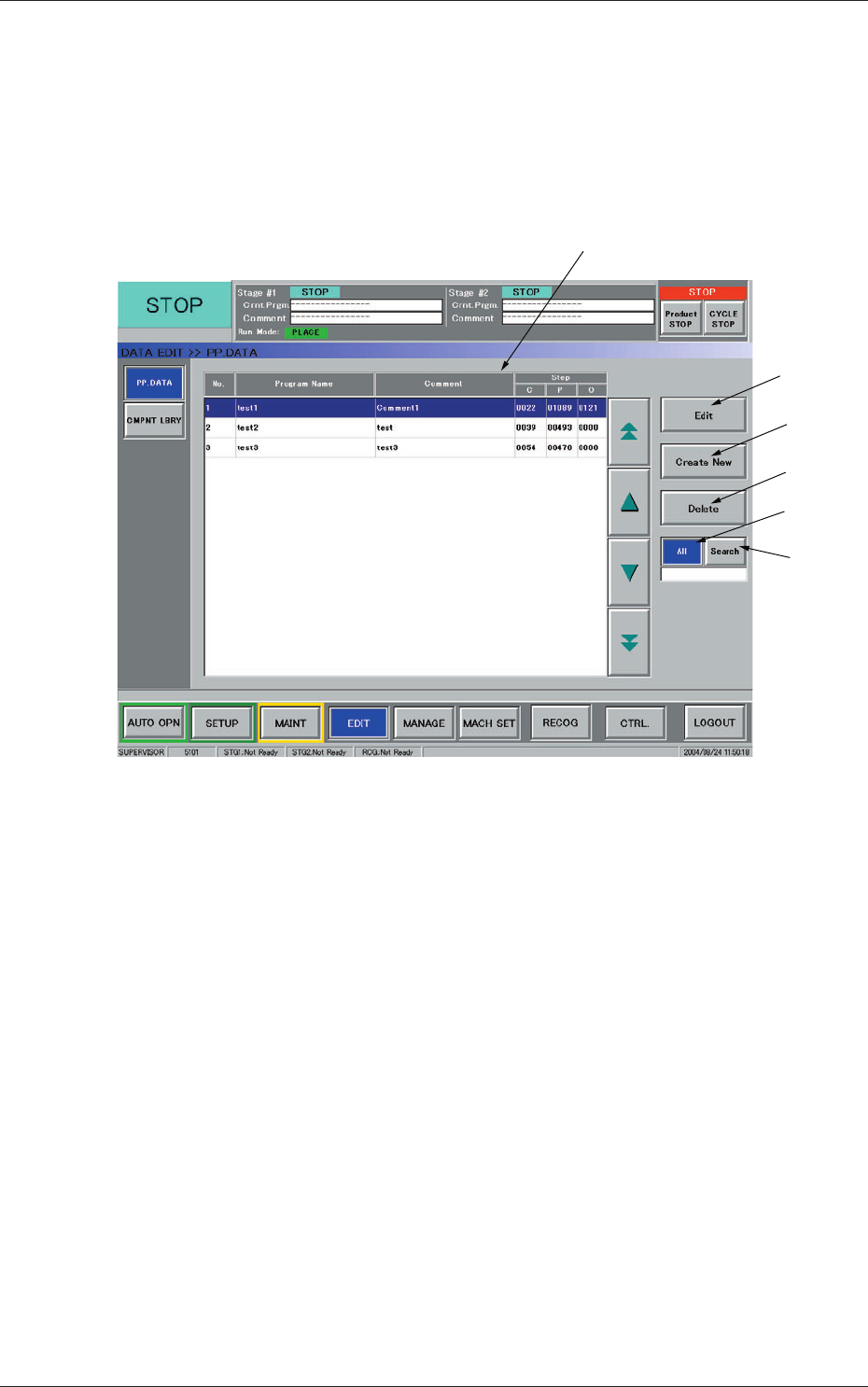
When the [EDIT] button on the main menu bar is pressed, the "PP. DATA"
window opens together with a submenu bar.
[1]
[2]
[3]
[4]
[5]
[6]
Fig. 3C36 "PP.DATA" Window
[1] List of Model Names
Listed are the registered model names (pattern program names).
[2]
[Edit] Button
When pressed, this button opens an edit window for the selected model
(pattern program).
[3] [Create New] Button
When pressed, this button opens the edit window for a new pattern
program.
[4] [Delete] Button
When pressed, this button deletes the selected model (pattern program).
3-51
AIVEDT-ID
[5] [All] Button
When pressed, this button displays all registered models in the "List of
Model Names" pane.
[6] [Search] Button
When pressed, this button helps you find a model from the "List of
Model Names" pane.
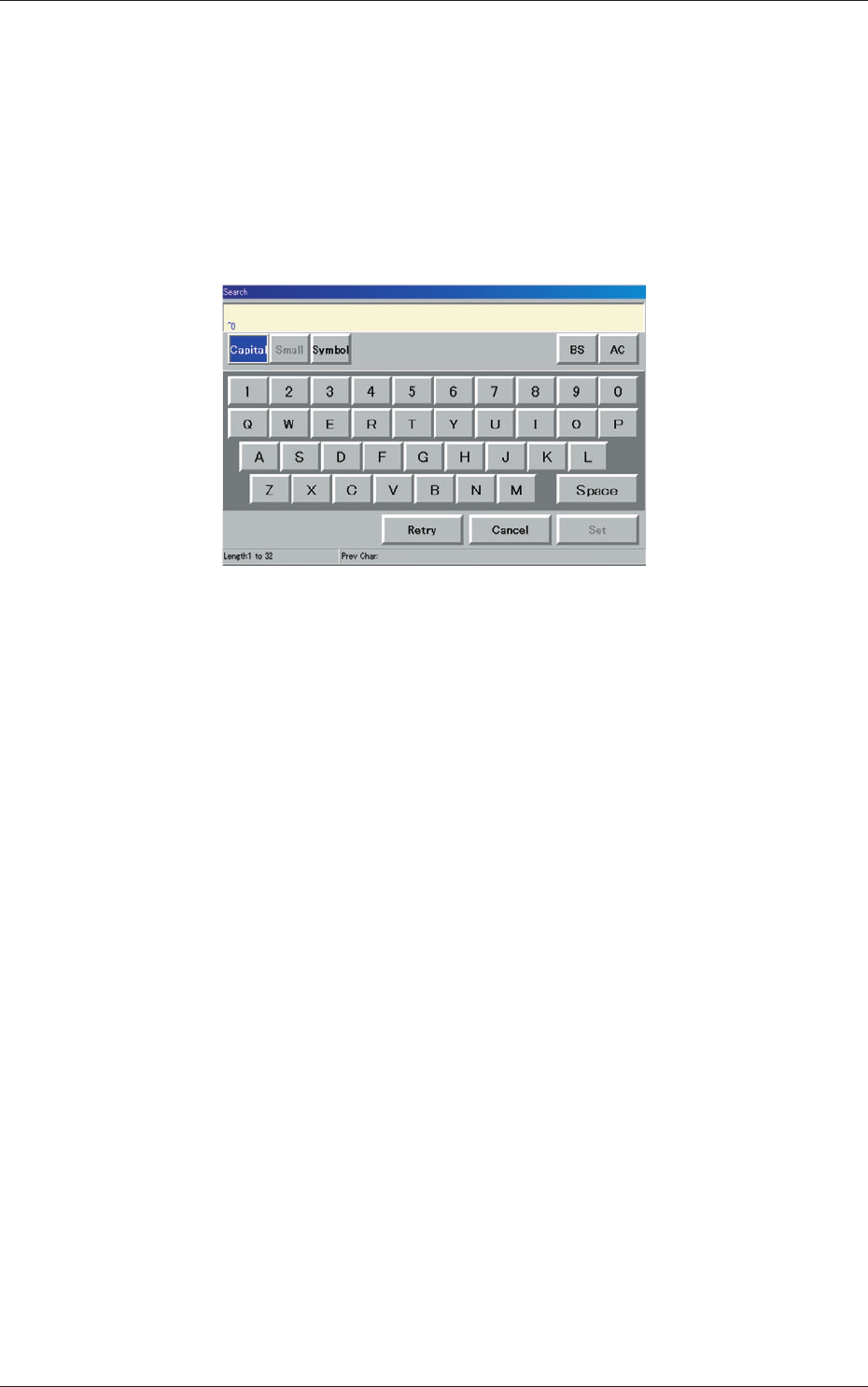
When this button is pressed, the "Search" window opens.
Fig. 3C37 "Search" Window
When the desired model name is entered in the entry box and the [Set]
button is pressed, the search function starts working and the result
appears in the "List of Model Names" pane.
"*" (asterisk) and "?" (question mark) can be used as wild cards.
abc* : The search function retrieves the program names which start
with "abc".
a?c : The search function retrieves the program names which start
with "a" and contain "c" as the third character
.
0606-009
2.1 "Pattern Program" Window