3OM-1208-011_w.pdf - 第159页
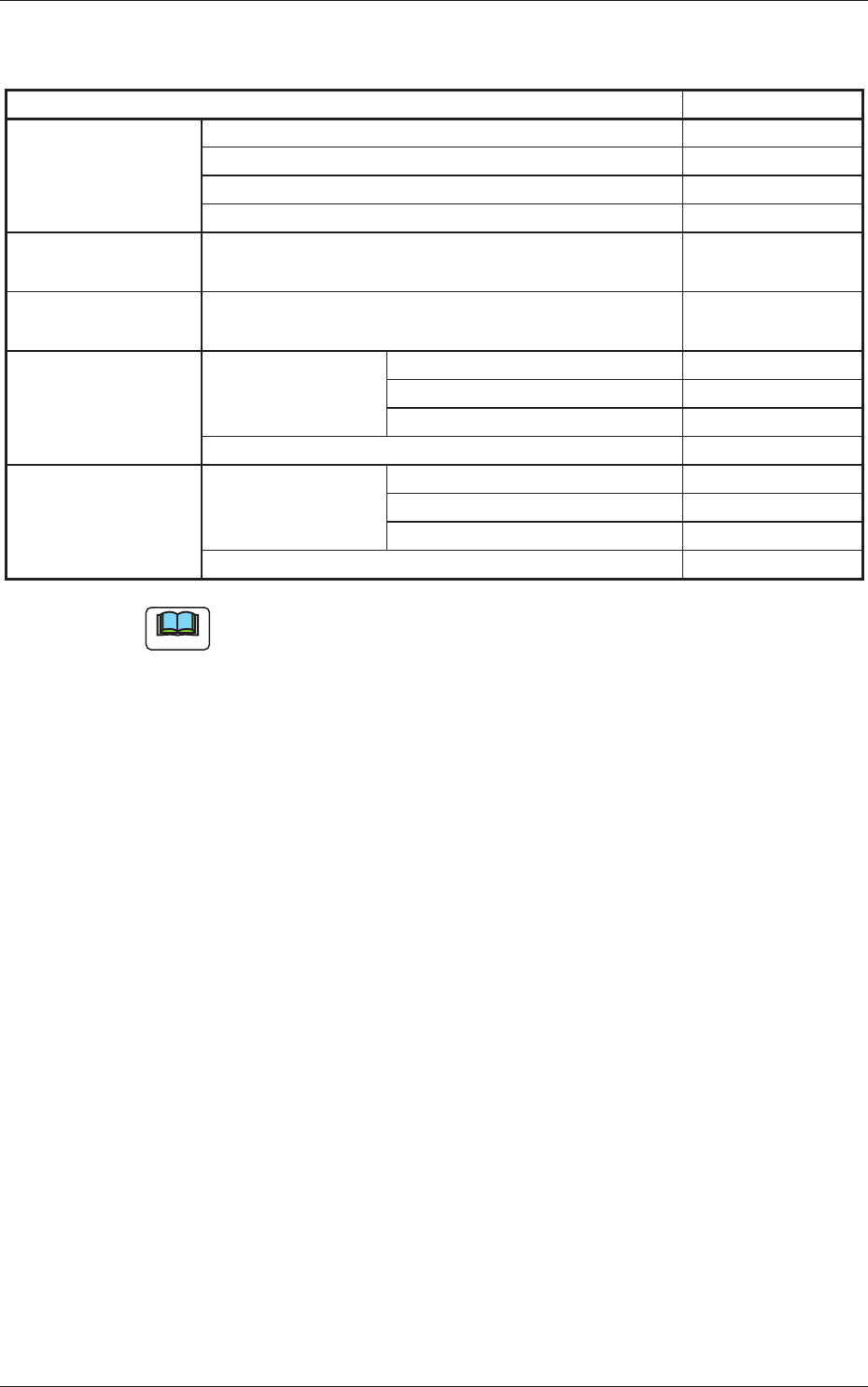
3-72 AIVEDT -ID (2) Creation of Operation Data • PCB Data Create the data in the same way as described in "3.1 Single Pattern (Global Recognition Enabled)". • PEC Recognition Data T able 3C13 PEC recognition fu…
3-71
AIVEDT-ID
•
List of Required Data
Table 3C12
Pattern Program Required Data
Operation Data PCB Data
PEC Recognition Data
PEC Recognition Mark Data
Setup Data Note (a)
Placement
Head/Nozzle Data
Heads 1 through 4
Placement Feeder
Location Data
Feeder Bases #1 through #4
Placement Data U01 P-data P-data
Unit Control Note (b)
Unit PCB Fiducial
O-data
Placement Data Un P-data P-data ×
Unit Control ×
Unit PCB Fiducial ×
O-data ×
Note
(a) Create this data for automatic conveyor width adjustment.
(b) Specify these parameters (data) according to the situational changes.
0606-009
3.2 Repetitive Patterns (Image Recognition Enabled)
3-72
AIVEDT-ID
(2) Creation of Operation Data
•
PCB Data
Create the data in the same way as described in "3.1 Single Pattern (Global
Recognition Enabled)".
•
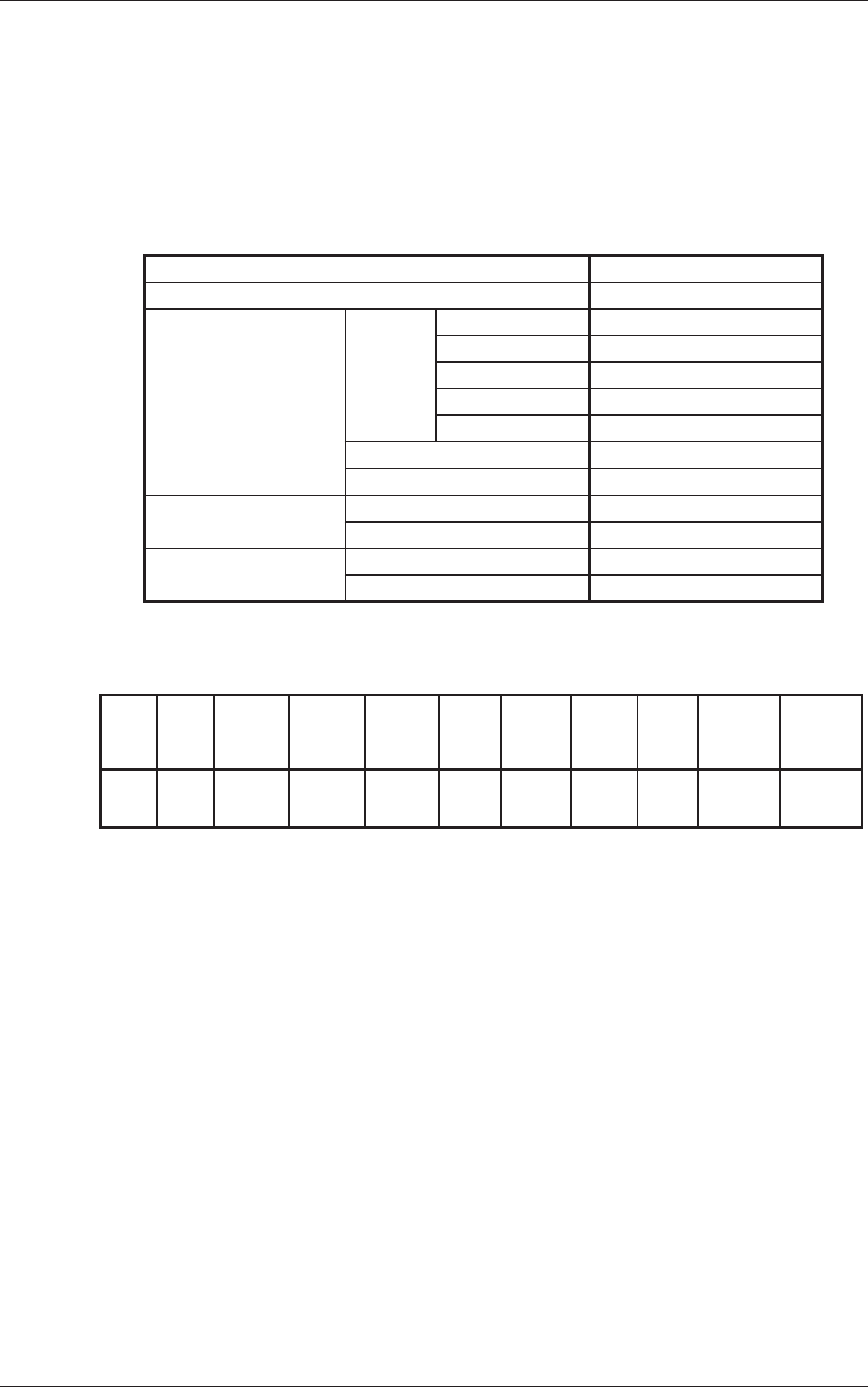
PEC Recognition Data
Table 3C13
PEC recognition function Enable
Correction algorithm Standard
PEC recognition
Mode
Global Zone 1 Disable
Zone 2 Disable
Zone 3 Disable
Zone 4 Disable
Zone 5 Disable
Image Enable
Iocal Disable
Beam Stage 1 Automatic (1 or 2)
Stage 2 Automatic (1 or 2)
Sequence Stage 1 After Pick Up
Stage 2 After Pick Up
•
PEC Recognition Mark Data
Table 3C14
Mark
No.
Mark
Size
D1 [mm]
1 Round 1.00 0.00 0.00
000.00 05.0 Bright High Standard Standard
(Normal)
Mark
Type
Mark
Size
D2 [mm]
Mark
Size
D3 [mm]
Angle
[deg]
Window
Size
[mm]
Mark
Image
Mark
Level
Lighting
Level
Coax
Lighting
Level
Ring
•
Setup Data
Create this data when the automatic setup function is used.
(3) Creation of Placement Head/Nozzle Data
Create the data in the same way as described in "3.1 Single Pattern (Global
Recognition Enabled)".
(4)
Creation of Placement Feeder Location Data
Create the data in the same way as described in "3.1 Single Pattern (Global
Recognition Enabled)".
0606-009
3.2 Repetitive Patterns (Image Recognition Enabled)
3-73
AIVEDT-ID
0606-009
(5) P-data (U01)
•
Unit Control
Create the data in the same way as described in "3.1 Single Pattern (Global
Recognition Enabled)".
•
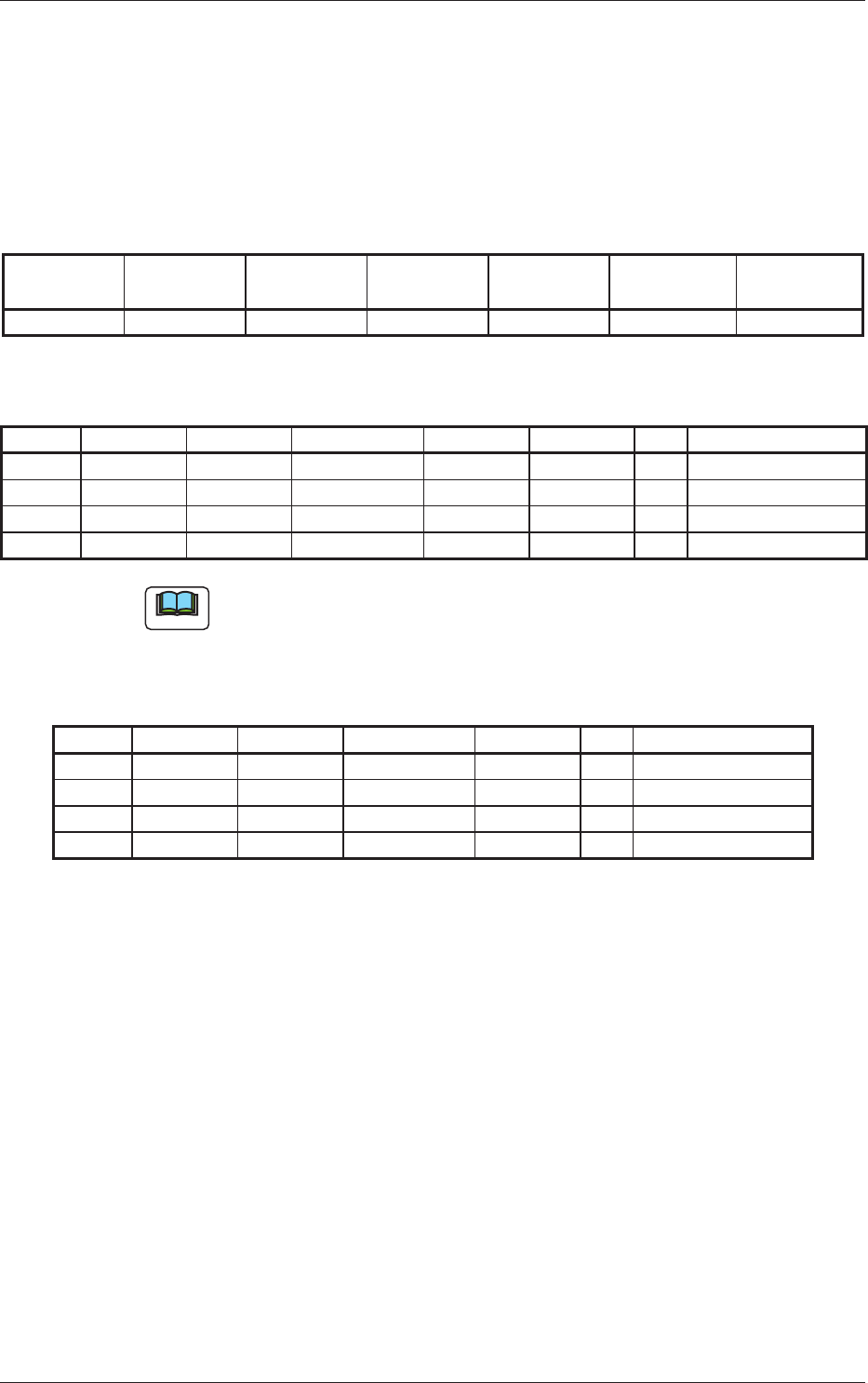
Unit PCB Fiducial
Table 3C15
Unit PCB
Fiducial
Recog Coord
X1 [mm]
Recog Coord
Y1 [mm]
Recog Coord
X2 [mm]
Recog Coord
Y2 [mm]
Fiducial Mark
FM1
Fiducial Mark
FM2
Enable FX
1
FY
1
FX
2
FY
2
1 1
•
P-data
Table 3C16
P-No. X [mm] Y [mm] Z = theta [deg] H [mm] Fdr No. C Comment
1 X
1
Y
1
+000.00 +0.000 101 -
2 X
2
Y
2
+090.00 +0.000 103 -
3 X
3
Y
3
+180.00 +0.000 105 -
4 +000.000 +000.000 +000.00 +0.000 000 P
Note
Set "P" or "Q" in the "C" text box of the last step. "C" represents "Control
Command".
(6) O-data (U01)
Table 3C17
O-No. X [mm] Y [mm] Z = theta [deg] H C Comment
1 0X
1
0Y
1
+000.00 +0.000 -
2 0X
2
0Y
2
+000.00 +0.000 -
3 0X
3
0Y
3
+000.00 +0.000 -
4 +000.000 +000.000 +000.00 +0.000 P
3.2 Repetitive Patterns (Image Recognition Enabled)