00197712-01_IM_SUPPORT_MEDIA_2.0_EN.pdf - 第15页
Support Media 2.0 12/2014 Edition 15 Due to security restrictio ns of some operating sy stems, it is no t possible to select a network-based Addi tional Software Sea rch Fol der . Only local folders or local ly mapped US…
Support Media 2.0 12/2014 Edition
14
4.4 Download of required, but not distributed software
The Support Media Prerequisite Analyzer offers multiple ways of downloading and
installing software components.
CAUTION
Legal changes regarding redistribution
The redistribution right is affecting the delivery through digital media like DVD as
well as manual delivery through ASM Assembly Systems personnel.
The following chapter describes the available options exemplarily.
4.4.1 Download options of Prerequisite Analyzer
In Prerequisite Analyzer on the Pending Actions Summary page, before installation of
prerequisites takes place, the media will be checked for the availability of all required
software packages. If at least one of the required packages is missing, you will get one of
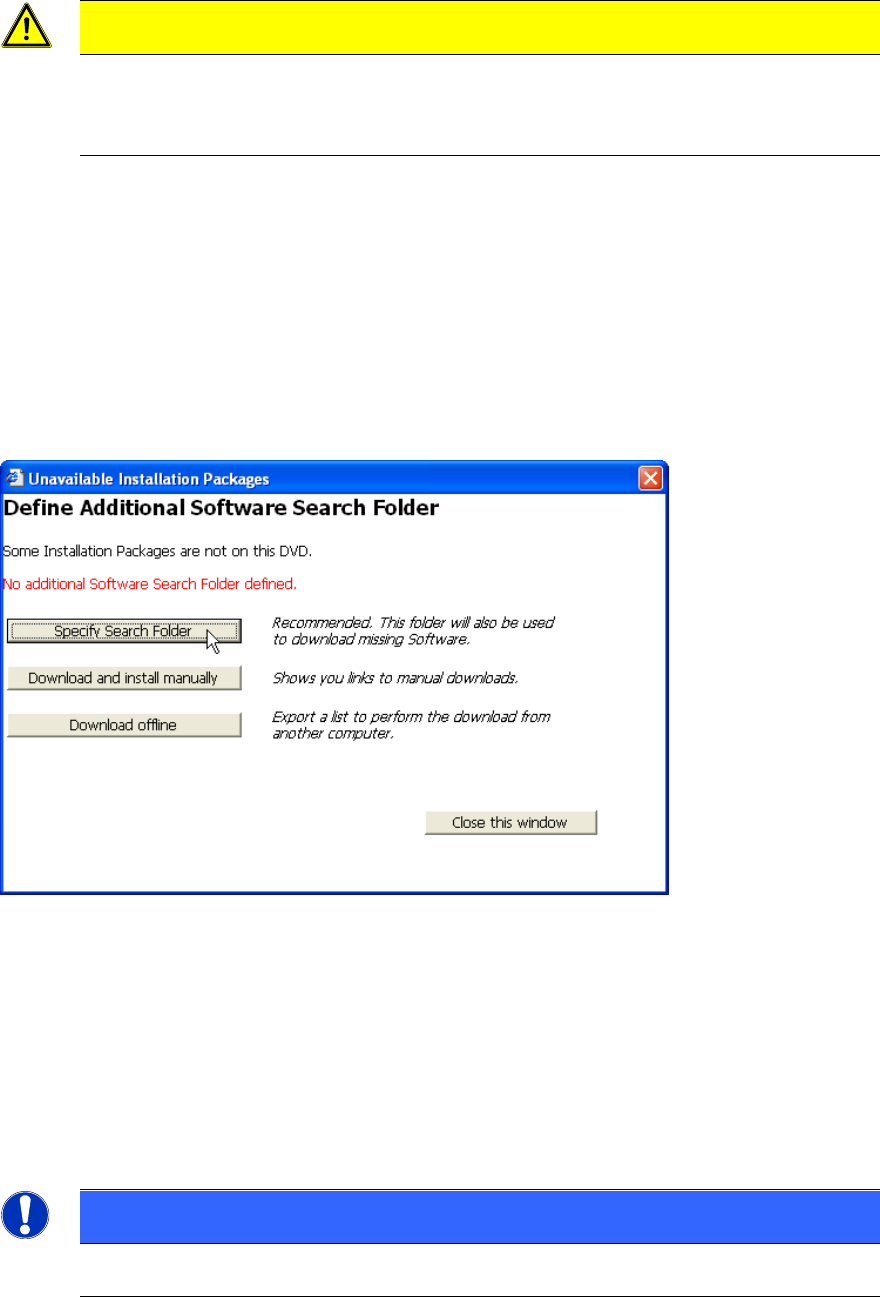
the following two dialogs, with the options sorted by relevance. In this chapter, we give
you a basic overview of the options available.
Figure 4-1: Unavailable Installation Packages – No Additional Software Search Folder defined
► Click the Specify Search Folder button to select a (local) folder to search for missing
software packages.
► Click the button Download and install manually to show the list of missing software
packages together with information and links for manual download and installation.
► Click the button Download offline if you don’t have web- access from your computer
and want to download the missing packages using another computer with web-access.
NOTICE
Only local drives supported
Support Media 2.0 12/2014 Edition
15
Due to security restrictions of some operating systems, it is not possible to select
a network-based Additional Software Search Folder.
Only local folders or locally mapped USB drives are allowed.
Of course, you may copy all the files from the network drive to a local folder to
use them.
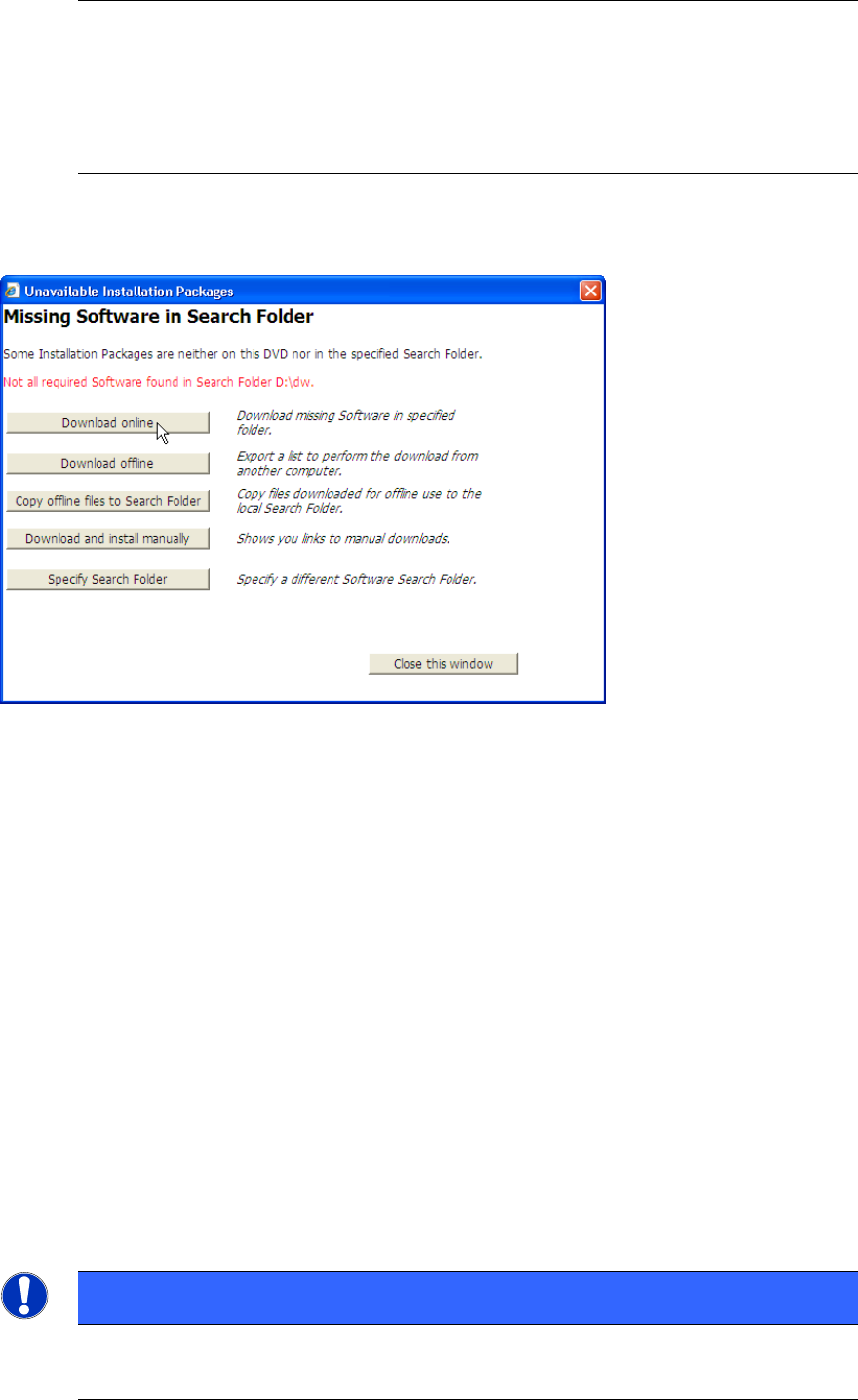
After you once selected the Additional Software Search Folder you get the following dialog
if required software packages are still not found.
Figure 4-2: Unavailable Installation Packages – Additional Software Search Folder defined, but not all required software
packages found
► Click the button Download online to initiate the download of missing software
packages on this computer directly
► Click the button Download offline if you don’t have web- access from your computer
and want to download the missing packages using another computer with web-access.
► Click the button Copy offline to Search Folder if you already downloaded all needed
files on another computer and now want to copy the files back to this computer. This
option also allows copying files from network drives to the local computer.
► Click the button Download and install manually to show the list of missing software
packages together with information and links for manual download and installation.
► Click the Specify Search Folder button to select a different (local) folder to search for
missing software packages.
4.4.2 Download Online option
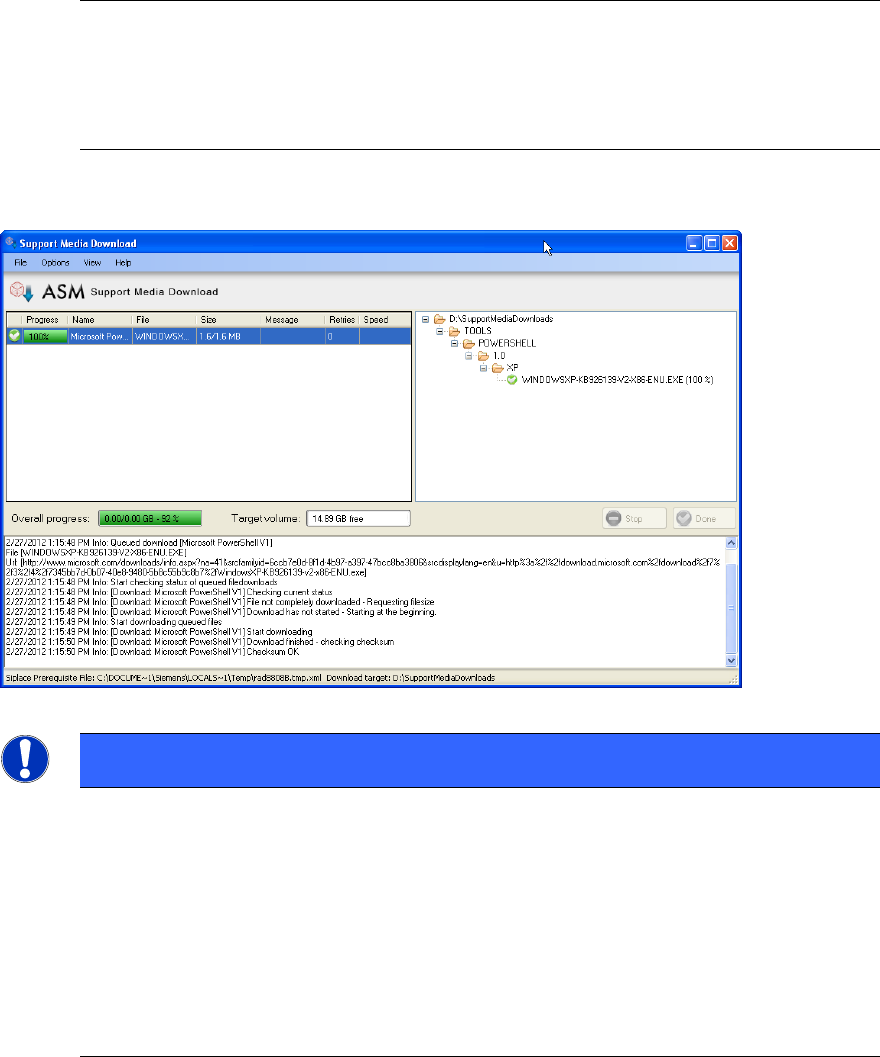
After you selected the Download Online option the Support Media Download Tool will be
used to download missing required software packages to the Additional Software Search
Folder you defined before.
NOTICE
Download Tool requires .Net Framework 3.5 SP 1
To use the Download Tool, .Net Framework 3.5 SP 1 is required. Analyzer will
Support Media 2.0 12/2014 Edition
16
detect, if .Net Framework is missing and asks you to install it using the
appropriate Analyzer Profile from the profile group SIPLACE Net.
If you get this message, step back to the Product Selection page and select the
appropriate profile in SIPLACE Net\.Net Framework stand- alone setups only
(deselect previously selected profiles) to install .Net Framework 3.5 SP 1.
The following picture shows you an example.
Figure 4-3: Screenshot of Support Media Download tool
NOTICE
Complete download not always possible
Depending on the products you selected, your operating system and its
configuration, the availability of web-based links, etc. there might be software
packages missing, which can’t be downloaded automatically.
You will get an appropriate warning message, depending on your situation (e.g.
all missing software packages are not downloadable, only a part of missing
packages are not downloadable).
Please use the Download and install manually option if you encounter this
problem. It will show you alternative hints and links on how to get/install the
missing packages.
When the download of missing software packages completed successfully and no other
packages are missing, the Install button will be visible and the Analyzer will allow
continuing automatic preparation of your computer.
4.4.3 Download Offline option
After you selected the Download Offline option, Analyzer will ask for the location to store
the Download List as shown in the following picture.