00197712-01_IM_SUPPORT_MEDIA_2.0_EN.pdf - 第25页
Support Media 2.0 12/2014 Edition 25 4.5 Support of Fire wall Starting w ith SuP 50 release produc ts, firew all configurations are supporte d . Each product w ill create a set o f Microsoft W indo ws Firew all rules f…
Support Media 2.0 12/2014 Edition
24
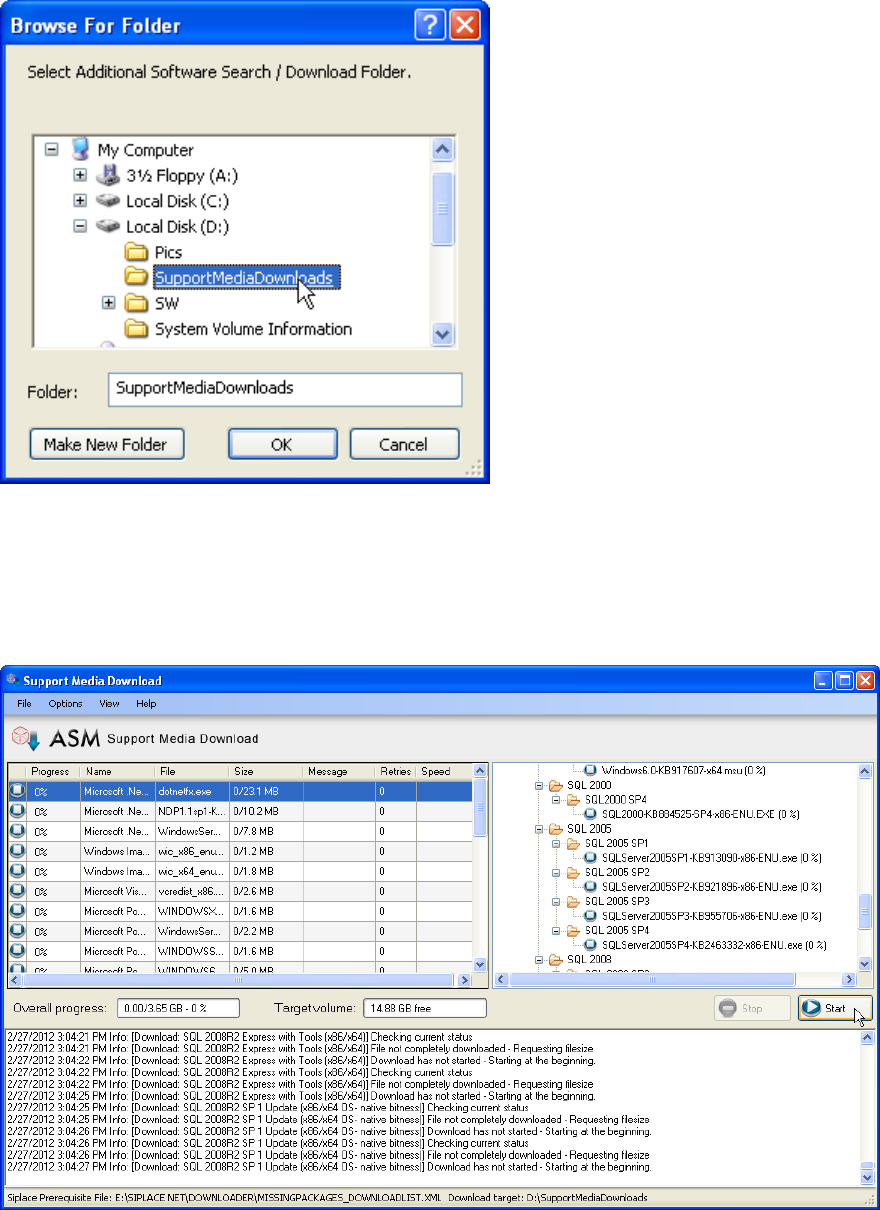
Figure 4-12: Folder Selection dialog window
► In the new folder selection dialog window, select or create the Download Folder.
► Click OK to accept the choice
The Support Media Download Tool will be started.
Figure 4-13: Support Media Download Tool
► Click the Start button to start the download.
► After the download completes, click the “Done” button to close the Download Tool.
► In Prerequisite Analyzer, select this new directory structure as Additional Software
Search Folder, as described in the chapters above.
Support Media 2.0 12/2014 Edition
25
4.5 Support of Firewall
Starting with SuP50 release products, firewall configurations are supported.
Each product will create a set of Microsoft Windows Firewall rules for the supported
operating systems so that the communication of the SIPLACE Product only will be
enabled.
The Support Media will disable the Microsoft Windows Firewall for all SIPLACE Line
software versions before Release SuP50.
The Support Media will maintain in the prerequisites profile the information, if the
SIPLACE Line Product will support the configuration of the Microsoft Windows Firewall
The Support Media will create firewall rules for the basic OS feature like Microsoft
SQL Server; NetBIOS name resolution, MSMQ and others. It is required to run the
Support Media to create a complete required set of firewall rules for a computer
system. Only OS features will be configured which are installed with the Support
Media. When OS features like IIS are installed manually, the firewall rules will not be
activated.
The Support Media will create a required set of firewall rules for a preinstalled SQL
Server 2008 R2 and higher, to allow remote access.
The Support Media will not actively activate the firewall.
The firewall rules will only configure the inbound network traffic.
The firewall rules will be activated for all network location awareness profiles in
Microsoft Windows Vista and above.
Configuration is only supported for Microsoft Windows Firewall. Other firewalls have to
be configured manually.
All firewall rules are listed in the appendix of this document. All documented rules are
listing the ports for informational purpose. These are not part of the firewall rules which
will be created, except the rules which are marked with “Port” in the first column.
CAUTION
Firewall rules installed by SIPLACE can be overridden in customer domain
The customer group policies in the Windows domain can influence the by
SIPLACE installed firewall rules.
4.6 Critical Usage Notes
CAUTION
Installing Support Media from a network drive/local folder
Do not use Support Media from a network drive/local folder, as this causes
following problems:
Problems with Internet Explorer security not allowing certain scripts.
Problems with pathnames of files from prerequisites larger than 256
characters.
Support Media 2.0 12/2014 Edition
26
It is strongly recommended to use a DVD / mapped ISO file instead.
Support Media contains the freeware ISO mapping tool WinCDEmu which also supports
creating ISO files from inserted DVDs. You can find it in the Tools subdirectory.
If you seem to have general problems with .HTA files (e.g. security warnings or unknown
file extension), you may try to use the HTAFix registry file provided on DVD1.
4.7 Known Issues
Removed "outdated" Installation packages (since V1.11):
Some Installation packages (like Microsoft SQL 2008 SP 1 Express - see above section
"New DVD content") have been removed from the DVDs to save space for easier
distribution of Support Media.
Prerequisite Analyzer will detect, if required Prerequisites are missing on the DVD and
show you options how to retrieve the missing packages.
Microsoft SQL Server/Express 64 Bit:
If you installed a 32 Bit Microsoft SQL Edition on your 64 Bit OS and want to use the 64
Bit Edition, you have to uninstall the Edition before.
Microsoft SQL Server:
If you plan to install Microsoft SQL Server Edition, please see the Navigation Guide
documents regarding manual SQL installation to ensure you use the correct installation
options.
Analyzer now also includes Profiles (in "SIPLACE Net") helping to prepare your computer
for Microsoft SQL Server installations.
After installation, you may (re-)run Prerequisite Analyzer to apply possibly required
updates and install all other required Prerequisites. Additionally, Analyzer will warn you if it
finds known conflicting settings.
OS Setting - Language for Non-Unicode programs
This Support Media build *should* work independent of the setting "Language for Non-
Unicode programs" (this setting may cause problems on Chinese systems).
Now, all Script files (*.VBS;*.HTA;*.HTML;*.HTM;*.CSS) are converted to Unicode during
Support Media build (directories "Scripts" and "SIPLACE Net" on DVD1) and written log
files use ANSI characters.
However, there might be still cases, where problems occur - if you encounter problems
please use the language setting "English (United States)" for Non-Unicode programs.
Net Framework 4.0 may require a reboot before proceeding
New with Support Media V1.13: Analyzer will be restarted automatically after reboot
and login with same account.
Choose Password policy