00198521-01_UM_LDU_E_EN.pdf - 第32页
3 Function description and structure 3.3 Basic process 32 User Manual SIPLACE Linear Dipping Unit E 12/2018 3.3.6 Dip process and dwell time The dip process in placement machines roughly consists of the following steps: …
3 Function description and structure
3.3 Basic process
User Manual SIPLACE Linear Dipping Unit E 12/2018 31
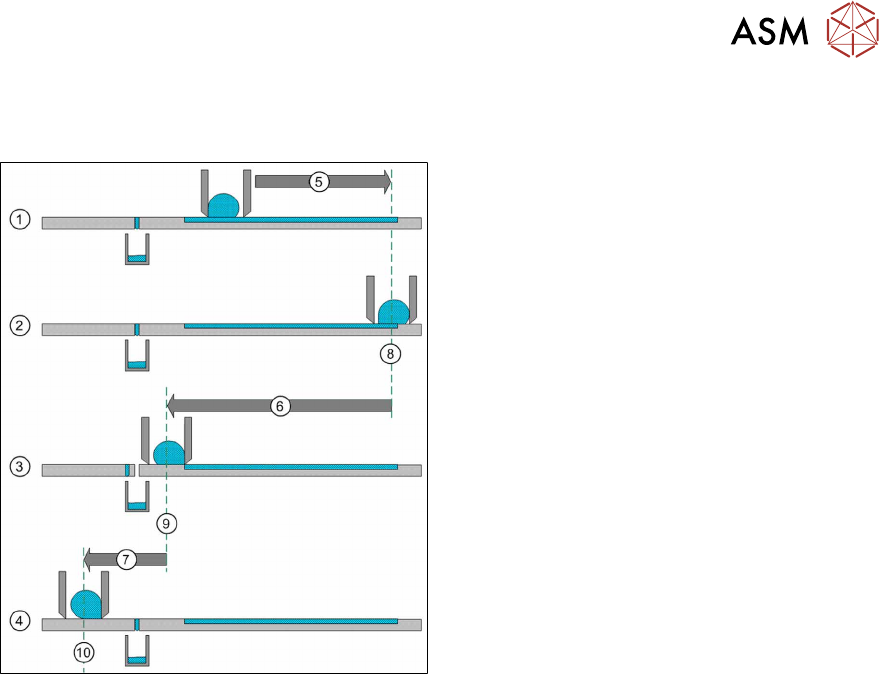
3.3.5 Squeegee speed
The squeegee speed has a great influence on the surface of the flux after application.
1. The squeegee axis moves with maximum
speed forward to the reverse position(5).
2. The squeegee axis is now in the reverse
position(8).
3. The squeegee axis moves with adjustable
squeegee speed over the cavity(6) back in
the acceleration position(9).
4. The squeegee axis moves with maximum
speed(7) back to the park position on the
park plate(10).
The squeegee speed is set in the line software: 4.1.10 "Setting the warm-up cycle and the squee-
gee speed" [}38].
The optimum squeegee speed for the flux used must be determined in tests. It is therefore useful to
use the following standard speeds as a starting point:
●
Flux = 200mm/s
●
Solder paste = 100mm/s
3 Function description and structure
3.3 Basic process
32 User Manual SIPLACE Linear Dipping Unit E 12/2018
3.3.6 Dip process and dwell time
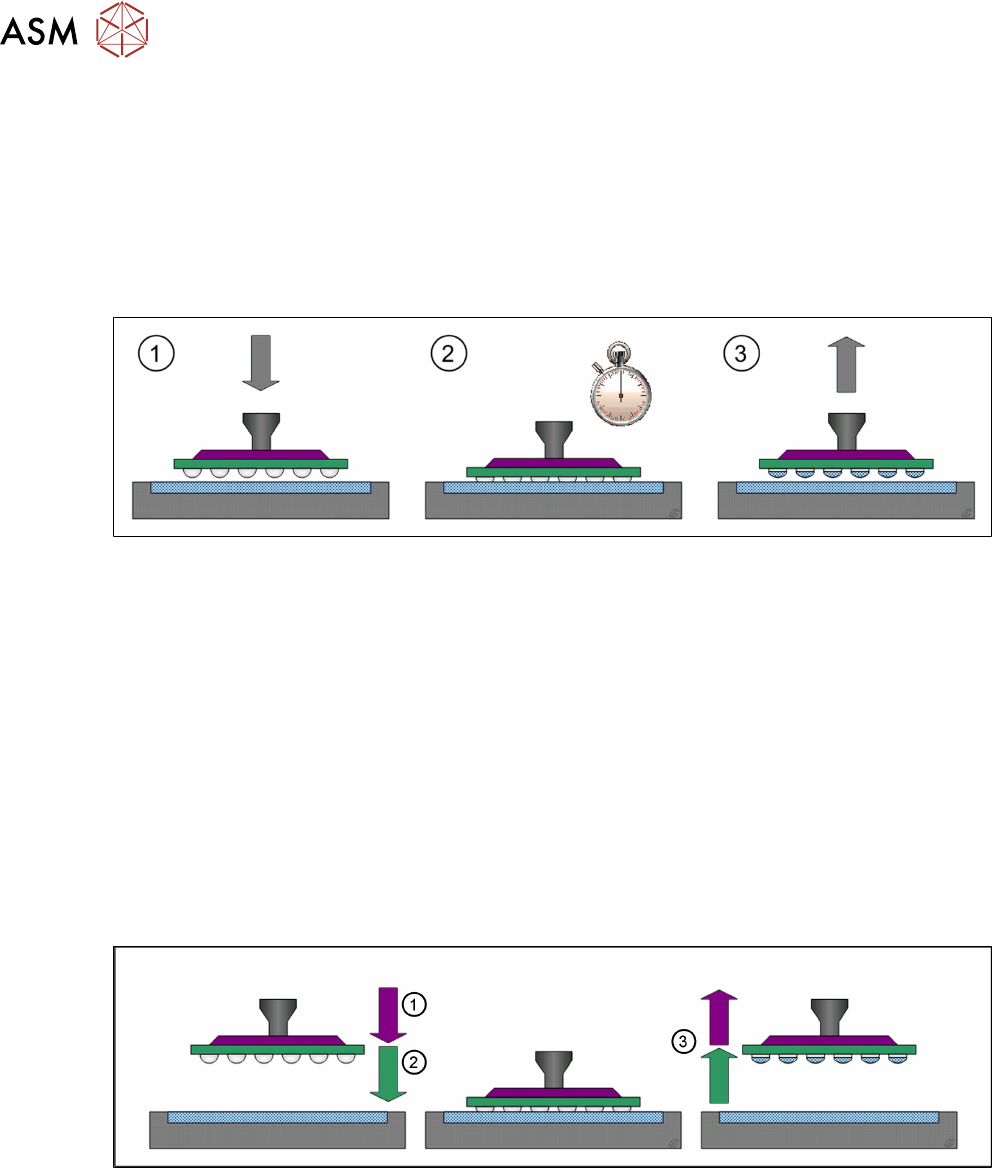
The dip process in placement machines roughly consists of the following steps:
1. Pick component up from the relevant feeder module
2. Dip component in the flux
3. Check and center component with the Vision system
4. Place component on the board
The detailed dipping procedure (step 2) consists of the following steps:
1. The placement head moves with the component over the LDU to an unused part of the dip-
ping area. The placement head moves down until the component reaches the bottom of the
cavity.
2. The down sensor for the placement head starts a dwell time.
3. After the end of the dwell time, the placement head moves up again.
During the dwell time, the flux can coat the component on the parts which have been dipped into it.
The dwell time can be set in the line software: 4.1.5 "Setting the dip sequence and the dwell
time" [}35]. The correct dwell time must be determined through tests.
3.3.7 Creep distance
Depending on the viscosity of the flux used, it can be necessary to adjust the speed down or speed
up when dipping into the cavity. Components which get stuck in the flux of the cavity when the
nozzle moves up indicate that the speed up is too high. A speed down that is too high can lead to
uneven wetting of the component balls/bumps.
The distance between the surface of the cavity depth and the creep point is the creep distance.
(1) The placement head moves down with normal speed until it reaches the adjustable creep point
where it slows down to the adjustable speed down value.
(2) The placement head moves down with the speed down until it reaches the surface of the cavity
depth.
(3) The placement head moves up with the adjustable speed up until it reaches the creep point
where it accelerates to normal speed.
Creep point, speed down and speed up for each component and flux are set in the line software:
4.1.7 "Setting the creep distance" [}37].
4 Operation
4.1 Settings in the line software
User Manual SIPLACE Linear Dipping Unit E 12/2018 33
4 Operation
4.1 Settings in the line software
In order to use the LDU in a placement order, the following settings have to be defined in the line
software before start-up:
●
Setting up
●
Flux used
●
Dip parameters for the components used:
– Flux used
– Dip sequence
– Cavity depth of the dip plate
– Pressing force when dipping
– Dwell time when dipping
– Travel profile when dipping
– Waiting time at placement
●
Processing Parameters for the flux used:
– Cicatrization time
– Curing time
– Squeegee speed
– Number of squeegee cycles during the warm-up cycle
4.1.1 Setting up the LDU
●
The LDU cannot be set up in the 6 outer tracks on the right- and left-hand side of the
changeover table.
●
The LDU can be set up directly next to any feeder modules.
●
The LDU should not be configured in direct vicinity to feeder modules for very small compon-
ents.
●
It is recommended not to set up any linear feeder and stick feeder modules together with the
LDU on the same changeover table.
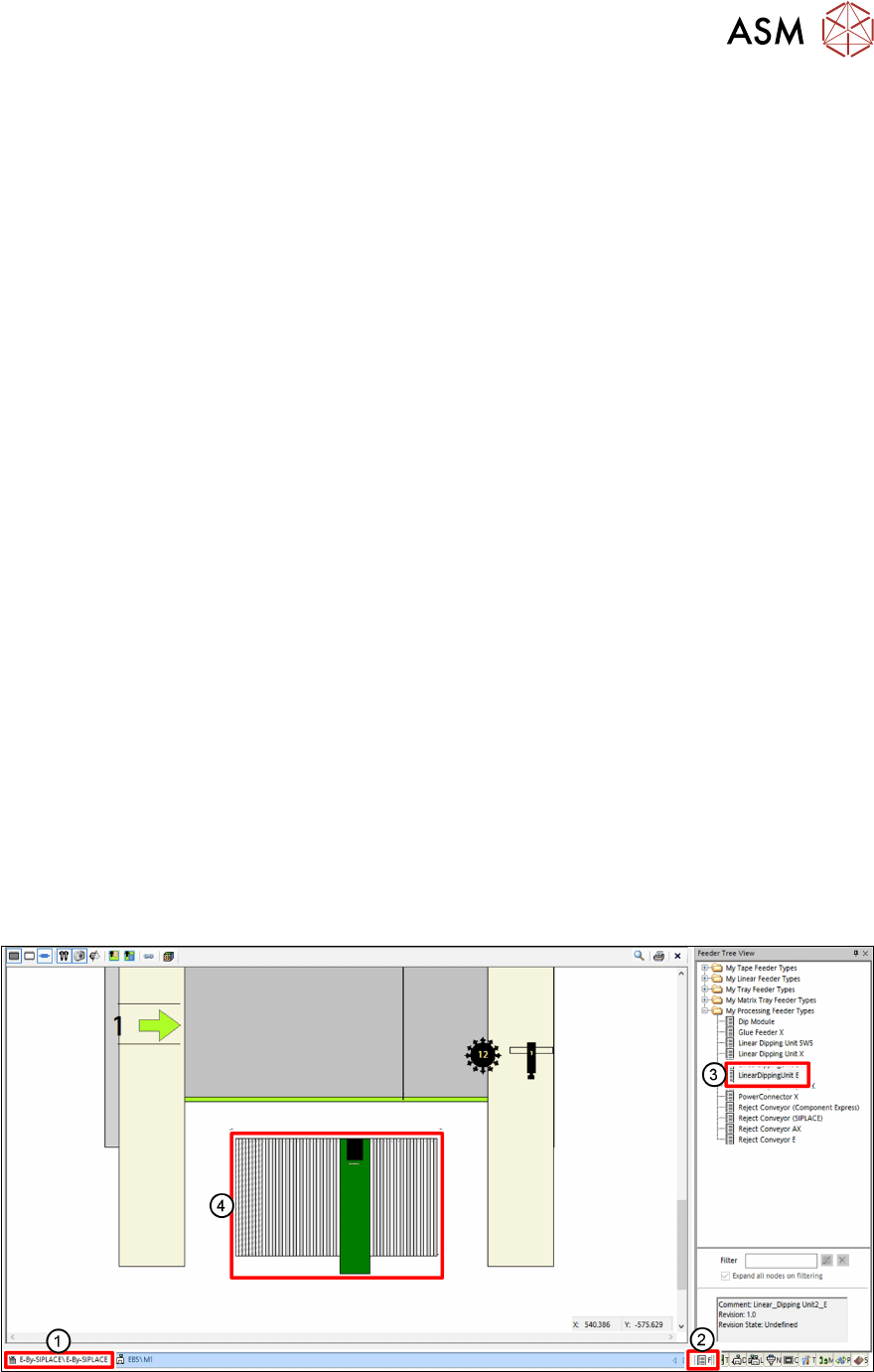
► In the line software, click on the Setup tab(1).
► Click on the Feeder Tree View tab(2).
► Drag the relevant LDU from the tree view(3) to the desired track of the changeover table(4).