00198521-01_UM_LDU_E_EN.pdf - 第49页
4 Operation 4.11 Monitoring production User Manual SIPLACE Linear Dipping Unit E 12/2018 49 4.11 Monitoring production During production, the correct functioning of the LDU should be checked regularly. For this pur- pose…
4 Operation
4.10 Starting a warm-up cycle
48 User Manual SIPLACE Linear Dipping Unit E 12/2018
4.10 Starting a warm-up cycle
The LDU provides a warming function. This helps to influence the viscosity of the flux before it is
used. During this warm-up cycle the LDU performs a number of squeegee processes which can be
set. This moves the flux and "warms" it up.
The number of squeegee processes is set in the line software: 4.1.10 "Setting the warm-up cycle
and the squeegee speed" [}38].
For information on the viscosity of a flux, see chapter 3.3.4 "Viscosity and thixotropy" [}30].
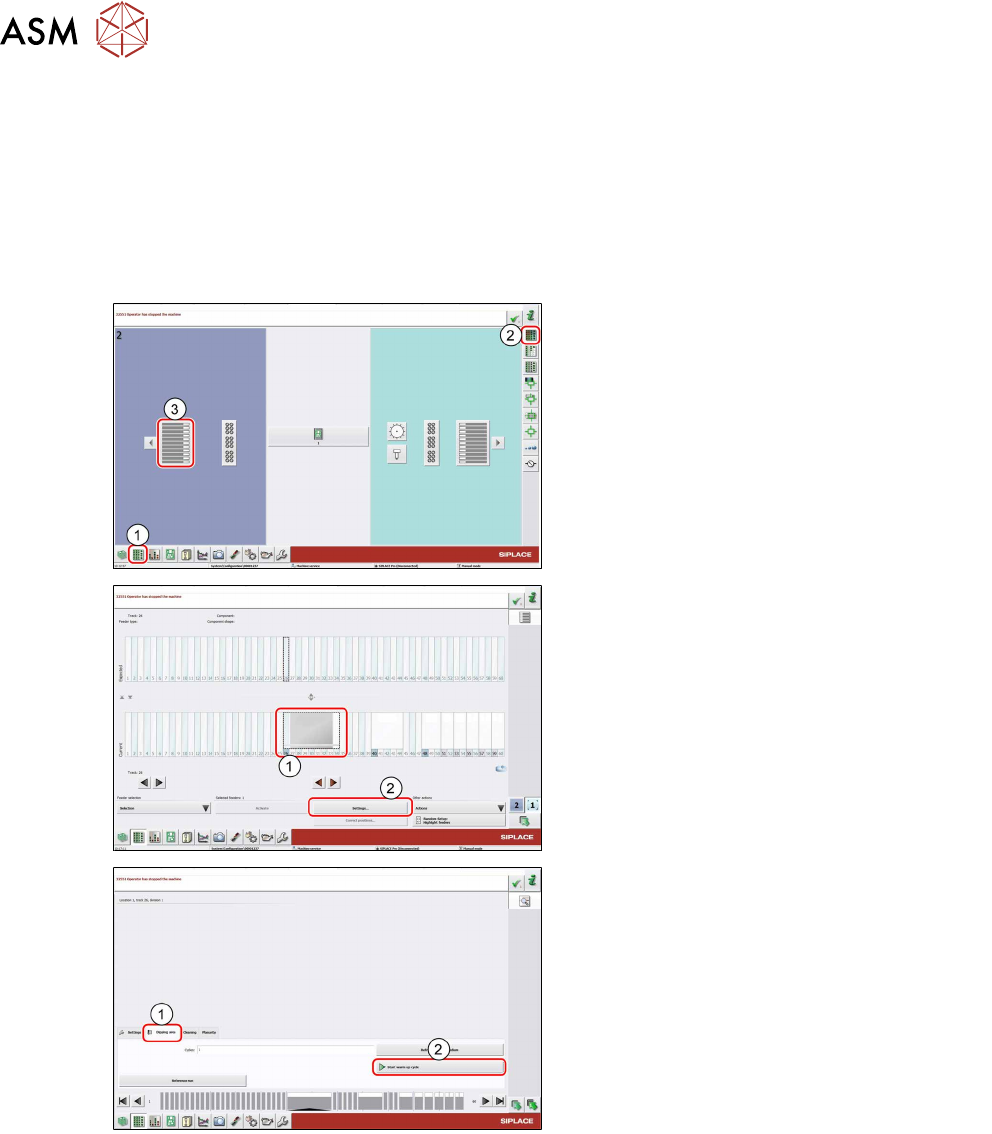
► In the station software, select the Setup
view(1) and then the Locations area (2).
► Select the Table (3) on which the LDU is
set up.
► Select the icon of the LDU(1).
► Click on the Settings... button (2).
► Select the Dipping area tab (1).
► Click on the Start warm-up cycle button
(2).
The LDU performs the set number of squeegee
processes.
► Click on the Start warm-up cycle button
(2) again to stop the process.
After finishing the warm-up cycle, the production can be started.
4 Operation
4.11 Monitoring production
User Manual SIPLACE Linear Dipping Unit E 12/2018 49
4.11 Monitoring production
During production, the correct functioning of the LDU should be checked regularly. For this pur-
pose, perform the following steps:
► Check the level of flux in the flux tank and fill in more flux if necessary.
► Check the required flux layer height in the cavity of the dip plate and prepare the flux again if
necessary (see chapter 4.12 "Refreshing the dipping medium" [}50]).
► Check the downholder for contaminants and clean it if necessary.
► Check the application unit for any leakage and remove any flux which leaks out.
► Check whether there are components or other contaminants on the application unit, in the
cavity or in the flux or flux tank. Stop the production process if necessary and remove these
contaminants with a pair of tweezers or clean the complete LDU application unit (see chapter
5 "Cleaning" [}59]).
CAUTION
Components or other contaminants on or in the application unit
can cause considerable damage to the LDU!
► Remove any components or contaminants immediately from the LDU.
► Use a suitable measuring device to check occasionally the required flux layer height in the
cavity in the dip plate (see chapter 4.14 "Checking the layer thickness" [}52]).
Cleaning of the LDU after use
Do not leave the LDU standing for longer periods with the flux inside. The flux could dry out and
clog up the LDU mechanics. There is then a risk that the mechanics are damaged when you restart
the machine.
► Clean the LDU after each shift.
► Clean the LDU at least once a day.
► Clean the LDU when it is taken out of the production process.
4 Operation
4.12 Refreshing the dipping medium
50 User Manual SIPLACE Linear Dipping Unit E 12/2018
4.12 Refreshing the dipping medium
With the Refresh dipping medium function you can perform a set number of squeegee move-
ments to refresh the flux in the cavity.
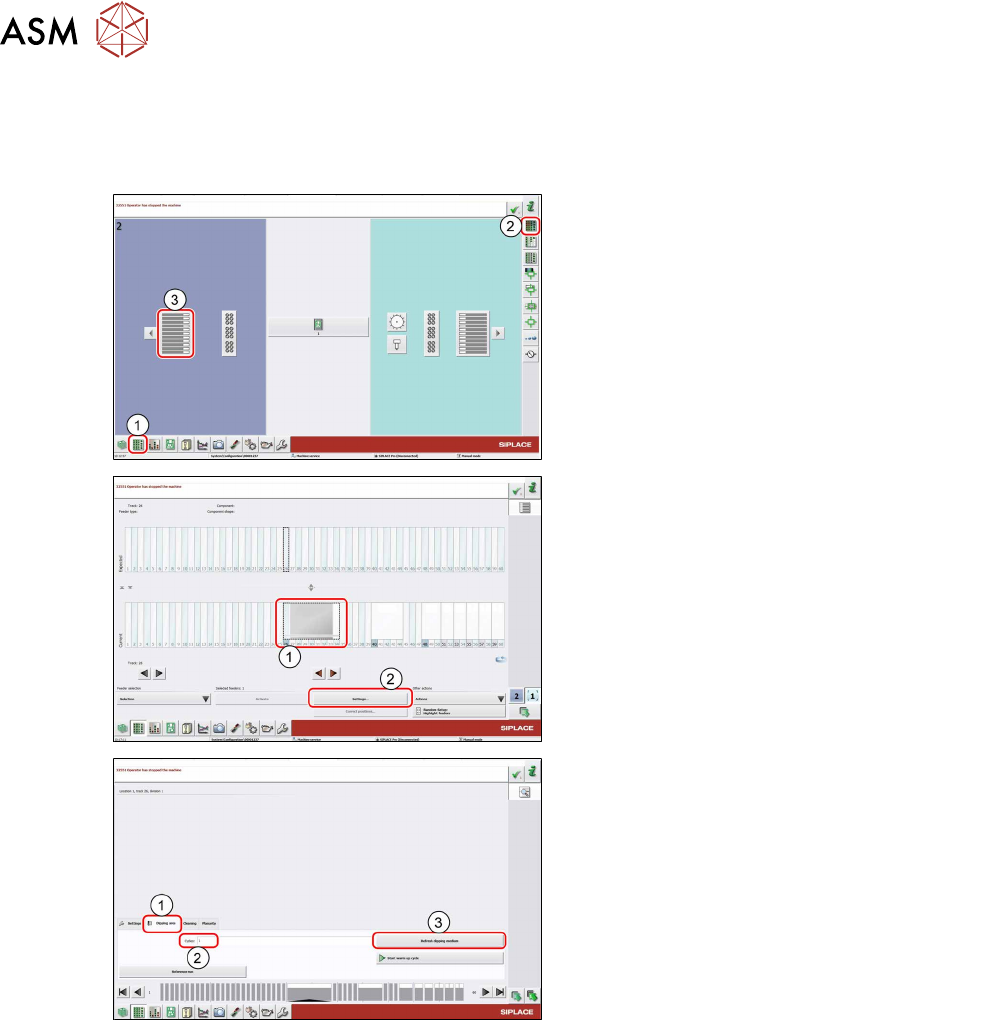
► In the station software, select the Setup
view(1) and then the Locations area (2).
► Select the Table (3) on which the LDU is
set up.
► Select the icon of the LDU(1).
► Click on the Settings... button (2).
► Select the Dipping area tab (1).
► If required, enter the desired number of
squeegee movements to be performed in
the Cycles field.
► Click on the Refresh dipping medium
button (3).
The LDU performs the set number of squeegee
movements.