Printer 600 Adjustable Screen Mount.pdf
$'-867$ %/(6&5((1 02817 $60 02'8/( 29(59,(: Chapter Issue 3 May 03 Technical Reference Manual 12.1 CHAPTER 12 ADJUST ABLE SCREEN MOUNT (ASM) MODULE OVERVIEW Introduct ion T wo screen change modules ar…

$'-867$%/(6&5((102817$60
02'8/(29(59,(:
Chapter Issue 3 May 03 Technical Reference Manual 12.1
CHAPTER 12 ADJUSTABLE SCREEN MOUNT (ASM)
MODULE OVERVIEW
Introduction Two screen change modules are available on the machine this chapter
describes the adjustable manual load system. The correct type of screen for the
product to be printed is manually loaded into the assembly.
The module is a floating assembly mounted on a bearing set. The screen is held
in the assembly using pneumatically activated flaps that lock its position. The
whole assembly is aligned to the correct printing position. During printing, the
module is magnetically clamped to the machine chassis to maintain the aligned
position.
The module can be easily adjusted by an operator to accommodate screens
from the standard 29″ square through to 12″ square.
Screen images can be front or centre justified and a depth adjuster is used to
set the position of the screen for printing.
Purpose The chase is the mechanism that holds the screen during the print operation.
A screen is manually loaded from the front of the machine into the open cavity
of the C shaped chase and is positioned so that it can be aligned and clamped
in preparation for printing.

$'-867$%/(6&5((102817$60
02'8/(29(59,(:
12.2 Technical Reference Manual Chapter Issue 3 May 03
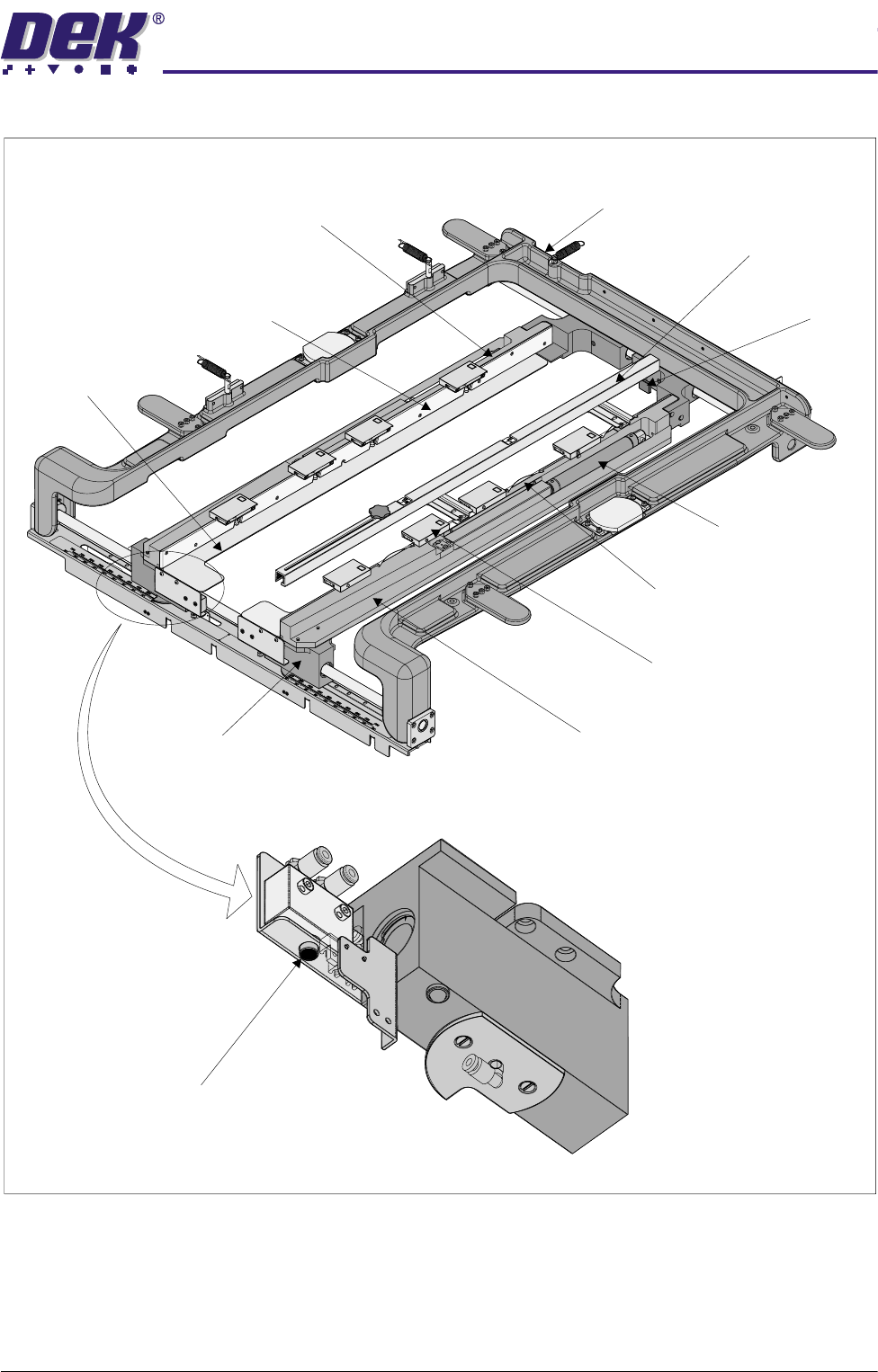
Elements The major elements of the screen change module are:
• The Chase C Casting
• Chase Right Hand Rail Assembly
• Chase Left Hand Rail Assembly
• Screen at Centre Sensor - Transmitter and Receiver
• Screen Depth Adjuster
• Web Assemblies (4 positions)
Operation The front cover is opened to gain access to the chase. The pneumatic push
buttons located on the underside of the front left and right hand web assemblies
are operated, releasing all four web assemblies on the front and rear linear ball
bush shafts. Releasing the web assemblies allows the user to adjust the
position of the chase left and right hand rail assemblies, to accommodate for
the appropriate size screen. The depth adjuster is set for either front or centre
justified screen image. The screen is loaded from the front of the machine and
slid into the machine along the top of stencil support plates. Three stencil
location leaf springs located in the right hand chase rail assembly ensure that
the screen is held in the correct location for printing, against the stencil guide
strips on the left hand chase rail assembly. The screen is pushed toward the
rear of the machine until it reaches the screen stop on the screen depth adjuster.
The user selects Screen Change, the four flap assemblies on each chase rail
assembly operate, clamping the screen to the stencil support plates.
$'-867$%/(6&5((102817$60
02'8/(29(59,(:
Chapter Issue 3 May 03 Technical Reference Manual 12.3
Figure 12-1 Screen Change Overview
Chase Casting
Right Hand Rail Assembly
Push Button Valve
Left Hand Rail Assembly
Screen Depth Adjuster
Screen Stop
Web Assembly
(in 4 positions)
Stencil Support Plate
(in 2 positions)
Stencil Guide Strip
(in 10 positions)
Stencil Location Leaf Spring
(in 3 positions)
Flap Assembly
(in 8 positions)
Chase Assembly (Isometric View)
View on Underside of Front Web Assembly
Double Acting
Pneumatic Cylinder
(in 2 positions)