Printer 600 Adjustable Screen Mount.pdf - 第13页
$'-867$ %/(6&5((1 02817 $60 326,7,21,1* Chapter Issue 3 May 03 Technical Reference Manual 12.13 POSITIONING The lef t and right hand cha se rail assemblies ar e adjusted to acco mmodate the widt h of the sc…

$'-867$%/(6&5((102817$60
6(48(1&(6
12.12 Technical Reference Manual Chapter Issue 3 May 03
SEQUENCES
CAUTION
SCREEN CHANGE.
It is not recommended to attempt to remove the screen
until the chase clamps have energized (clamped). Any attempt to pull the
screen out of the machine results in excessive force being exerted onto
the actuator return springs as both the screen and chase are pulled
together.
Screen Unload If Change Screen is selected from the MMI the screen is manually unloaded
as follows:
1. The chase clamps are energized.
2. The screen clamps are de-energized.
3. The operator is prompted to remove the screen.
Screen Load The screen is loaded into the chase as follows:
1. If required, adjust the left and right chase rail assemblies to accommodate
the new screen width.
2. If required, adjust the screen depth adjuster to accommodate the new
screen depth.
3. The screen is manually loaded into the chase.
4. Change Screen is selected on the MMI.
5. The screen clamps are energized.
6. The chase clamps remain energized.
$'-867$%/(6&5((102817$60
326,7,21,1*
Chapter Issue 3 May 03 Technical Reference Manual 12.13
POSITIONING
The left and right hand chase rail assemblies are adjusted to accommodate the
width of the screen to be loaded.
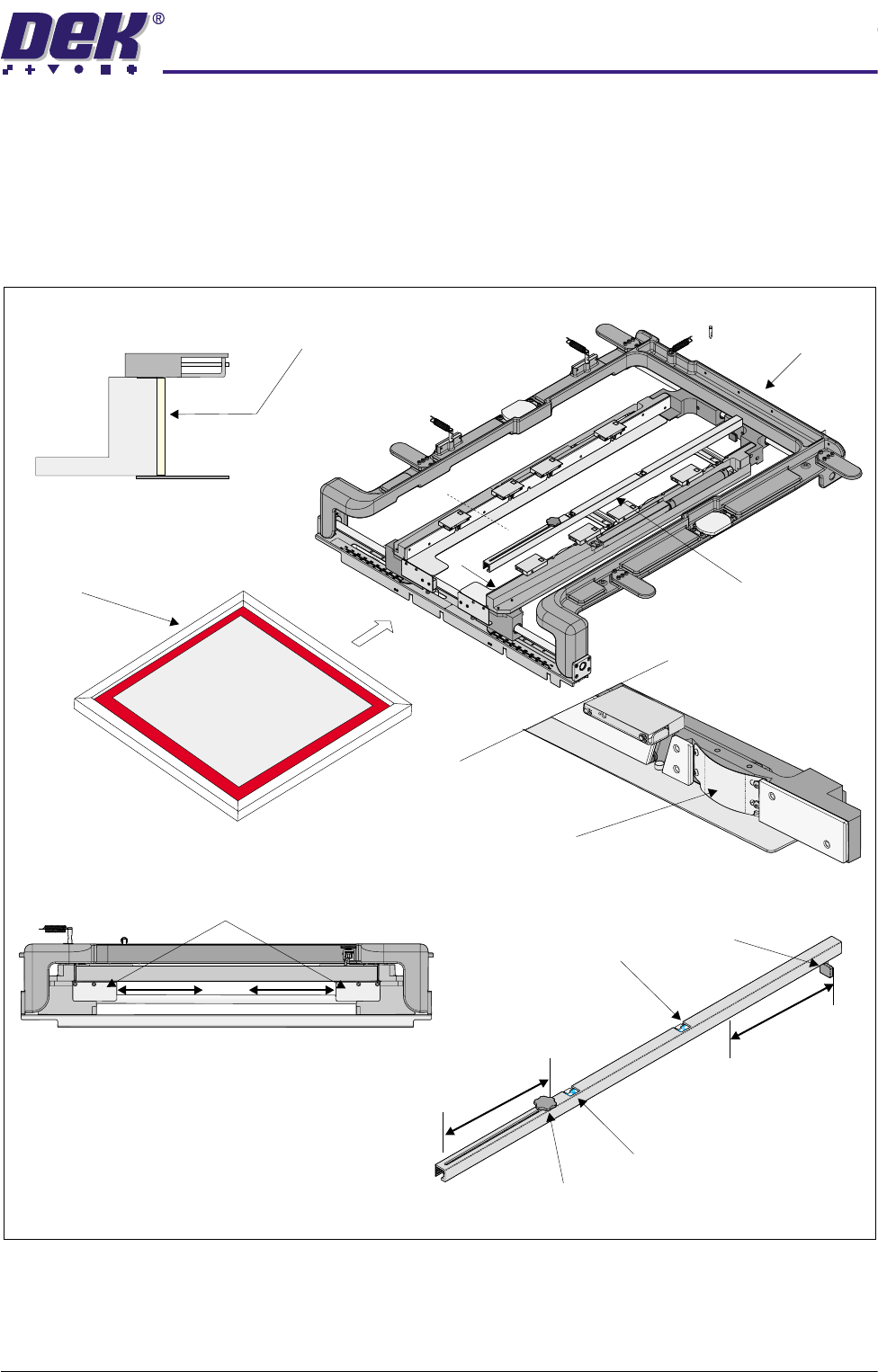
The screen is loaded from the front of the chase and aligned with the datum
face of the stencil guide strips by stencil location leaf springs.
Figure 12-9 Screen Load
The screen is loaded into the chase until it reaches the stop at the end of the
depth adjuster. The adjuster is set so that the screen locates to the correct
position for printing.
Chase Assembly
B
Screen Depth Adjuster
Screen
A
A
Sectional View A-A
Stencil Guide Strip
View on Arrow B
Stencil Location Leaf Spring
Stencil Stop
Imperial Scale
Metric Scale
Knob
Screen Depth Adjuster
View on Front of Chase Assembly
Web Assemblies
$'-867$%/(6&5((102817$60
326,7,21,1*
12.14 Technical Reference Manual Chapter Issue 3 May 03
The depth adjuster has two scales one is in metric and the other in imperial
units.
NOTE
The screen and product are built to a particular tolerance, this tolerance must
be taken into account when measuring.
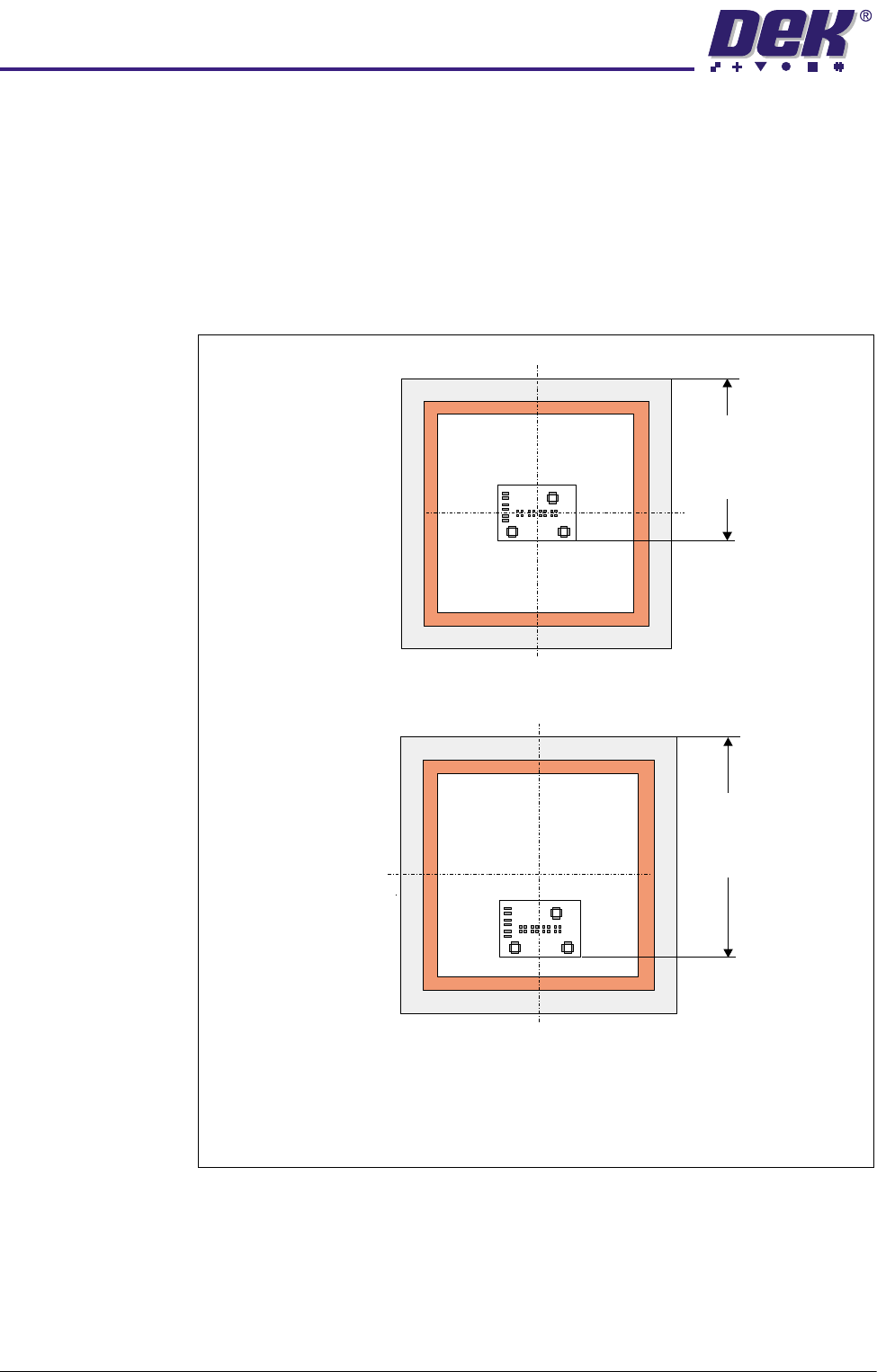
To correctly position the screen in the machine whether it is centre or front
justified, the user sets the measurement Distance to Image on the screen
depth adjuster as defined in the graphic below.
Front Justified
Distance
to
Image
Distance
to
Image
Centre Justified
Screen Depth Adjuster Scale = Distance to Image
NOTE
Distance to Image is measured from the rear face of the stencil to the front
edge of the image.