00192299-02.pdf - 第105页
SIPLACE HS-50 2 Retrofitting Instructions: Mechanical Ceramic Subs trate Centering HS-50 01/01 Issue 2.7 Checking the Function 105 Å In pr ocessi ng area 1 loosen th e screws f astening the connec tion rai l on insid e…
2 Retrofitting Instructions: Mechanical Ceramic Substrate Centering HS-50 SIPLACE HS-50
2.7 Checking the Function 01/01 Issue
104
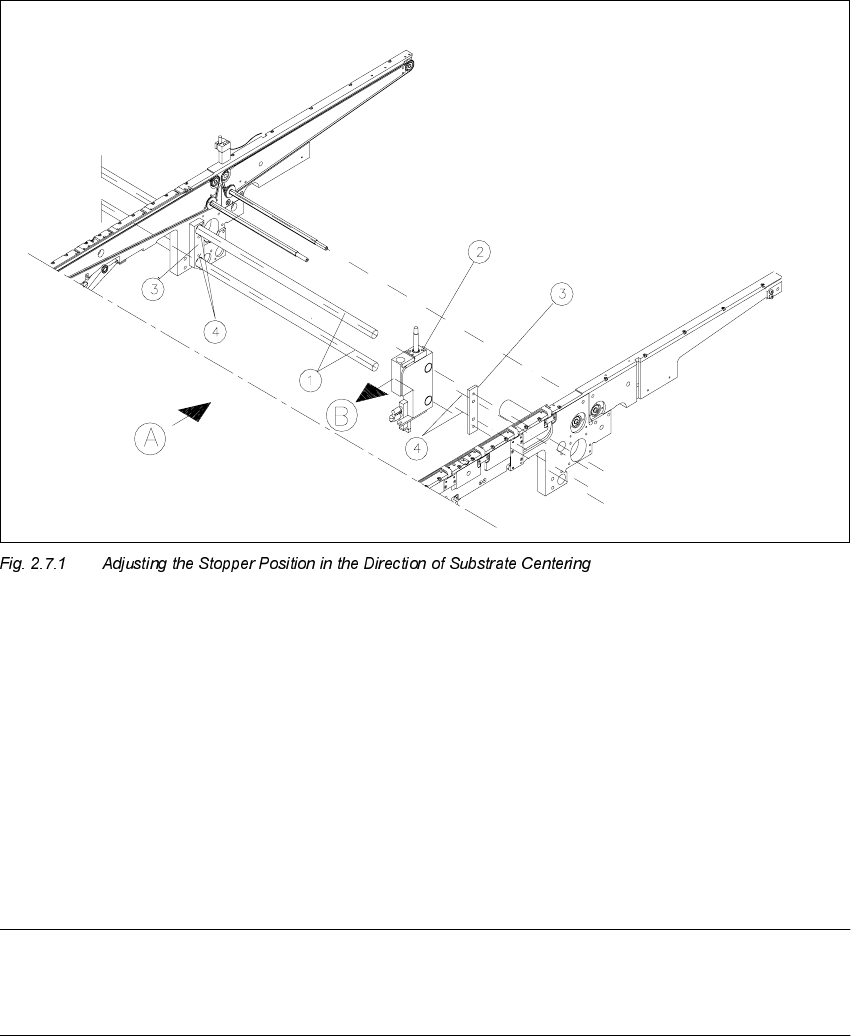
$GMXVWLQJWK H6WRSSHU3RVLWLRQ
.H\
A) PCB / substrate transport direction
B) Direction for adjusting the postion of the stopper
1. Stopper axles (on dual conveyor: continuous axles for belt 2)
2. Stopper assembly
3. Connection rail on fixed and movable side of the conveyor
4. Fastening for the connection rails: 2 socket hex head cap screws M4
NOTE:
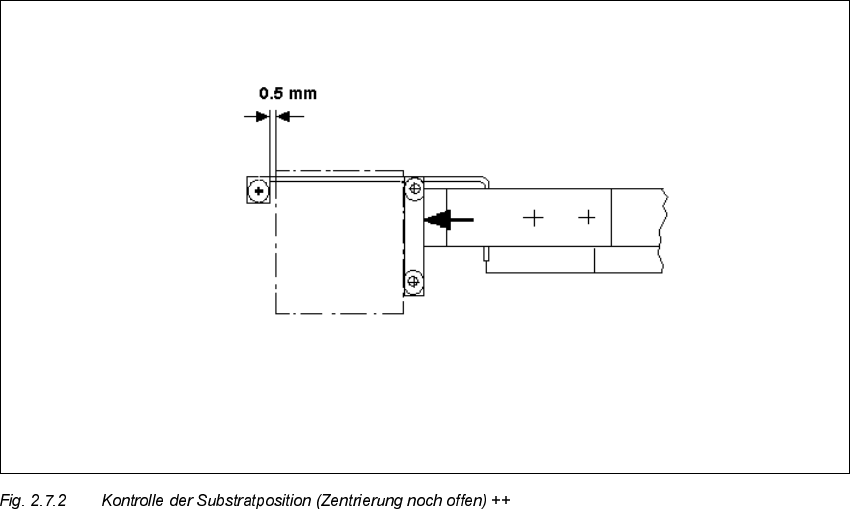
As shown below, the substrate edge pointing toward the unloader must still be 0.5 mm IN FRONT
OF that of the unmovable roller of the fixed stop while the centering unit is open.
SIPLACE HS-50 2 Retrofitting Instructions: Mechanical Ceramic Substrate Centering HS-50
01/01 Issue 2.7 Checking the Function
105
Å In processing area 1 loosen the screws fastening the connection rail on inside left and inside
right of the conveyor assemblies (2 socket hex head cap screws M 4 each).
Å Move the connection rails (incl. guide rods and stopper) the required diistance in PARALLEL
in the direction of the ceramic substrate centering unit and retighten the screws to fasten the
connection rails in this position.
Å Conduct a trial placement with substrate and check whether the fiducials of the substrate can
be reliably recognized. If necessary, select a different type of illumination (see User Manual).
2 Retrofitting Instructions: Mechanical Ceramic Substrate Centering HS-50 SIPLACE HS-50
2.7 Checking the Function 01/01 Issue
106
(UURU0HVVDJHV3RVVLEOH&DXVHV
If an error occurs, the following error message is output:
– "Error ceramic substrate centering
"
or
– "Error ceramic substrate centering
"
This stops the placement sequence.
The message means that the proximity switch signal for "opened" (1) / "closed" (0) is not present.
– The suffix
means: The error is in processing area 1 or 4 (see Fig. 2.1.1).
– The suffix
means: The error is in processing area 2 or 3 (see Fig. 2.1.1).
3RVVLEOH&DX VHV
– Problem in compressed air branch / leaky connection / poor, missing or incorrectly allocated
plug-in connection of the solenoid valve cable on the solenoid valve / faulty solenoid valve.
– Incorrect triggering distance / tension spring on the flat cylinder unhooked, poor, missing or in-
correctly allocated plug-in connection of the proximity switch cable on the X-centering unit /
faulty proximity switch.
– Incorrectly allocated plug-in connection on the conversion board (X34/X35) or plug-in connec-
tions for conveyor 1 and 2 switched.