00192299-02.pdf - 第98页
2 Retrofitting Instructions: Mechanical Ceramic Substrate Centering HS -50 SIPLACE HS -50 2.6 Activating t he Option 01/01 Issue 98 $FWLY DWLQJDQG&RQI LJXULQJWKH&H UDPLF6XEVWUDWH &HQ WHULQJ8QLW …

SIPLACE HS-50 2 Retrofitting Instructions: Mechanical Ceramic Substrate Centering HS-50
01/01 Issue 2.6 Activating the Option
97
$FWLY DWLQJWKH2SWLRQ
2 Y H UY LHZ
The software version 502.xx is required in order to use the mechanical ceramic substrate center-
ing unit on the HS-50.
When the hardware of the option "mechanical ceramic substrate centering unit HS-50" is com-
pletely installed, the software automatically recognizes it on the HS-50 machine due to the cod-
ing plug (plug-in connection of the option to the conveyor control). Nevertheless, the option must
be activated in the SITEST program.
On the HS-50 the mechanical ceramic substrate centering unit is always combined with position
recognition of the fiducials on the substrate.
This position recognition is performed with the PCB camera with normal illumination or with the
optional oblique illumination. If the machine is already equipped with the multicolor PCB camera,
the fiducials are always centered with this camera. The optional oblique illumination is eliminated
in this case.
3OHDVHQRWH
– When the hardware of the mechanical ceramic substrate centering unit is installed, it MUST
also be ACTIVATED in the "Machine configuration" menu.
– Before the mechanical ceramic substrate centering unit in the "Machine configuration" menu
is deactivated, it MUST also be completely DEINSTALLED in BOTH processing areas of the
pertinent conveyor, i.e., the plug-in connections of the option must also be disconnected first.
In parallel to this, the conveyor assemblies must be changed over to transport PCBs.
DANGER
During the following work, pay attention to the DANGER text regarding work with the SITEST pro-
gram in Section 2.2
2 Retrofitting Instructions: Mechanical Ceramic Substrate Centering HS-50 SIPLACE HS-50
2.6 Activating the Option 01/01 Issue
98
$FWLYDWLQJDQG&RQI LJXULQJWKH&HUDPLF6XEVWUDWH &HQWHULQJ8QLW
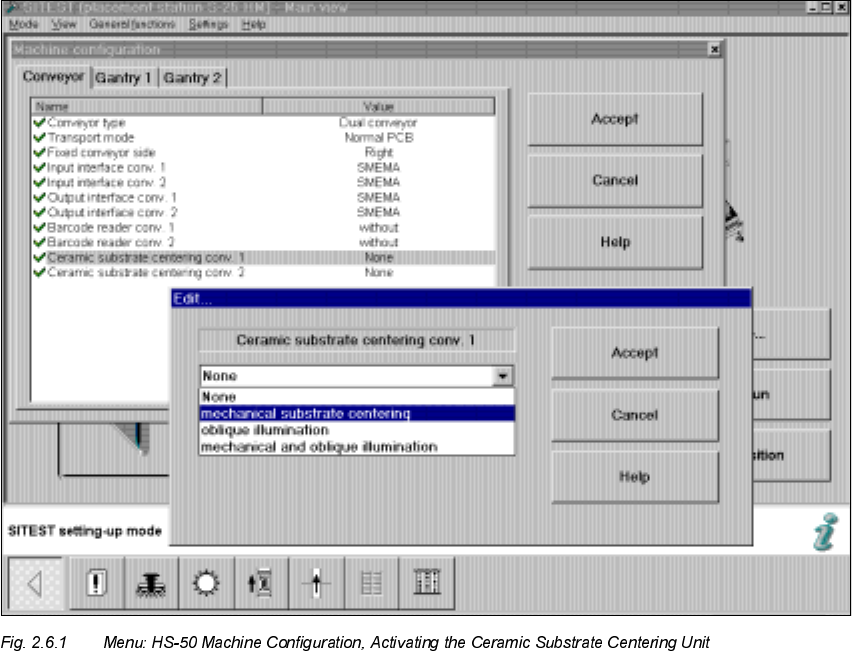
Å Start the SITEST program.
Å Select "Settings" in the menu bar.
Å In the "Machine configuration" menu, select the option "Ceramic substrate centering conveyor
" (= processing area 1 and 2) -> "Edit".
The "Edit" window will appear, as follows:

SIPLACE HS-50 2 Retrofitting Instructions: Mechanical Ceramic Substrate Centering HS-50
01/01 Issue 2.6 Activating the Option
99
Å The following options are available in the "Edit" window.
CAUTION
The options "Oblique illumination" or "None" are not relevant for the ceramic substrate centering
unit.
If you select one of these options, the mechanical ceramic substrate centering unit must be com-
pletely DEinstalled first and the corresponding conveyor must be reinstalled for PCB clamping as
described in the Service Manual.
If this is overlooked, this may result in damaged to the next PCB or to the mechanical ceramic
substrate centering unit.
Å If you wish to have the mechanical ceramic substrate centering unit in combination with the
substrate position recognition via PCB camera (normal illumination) or optional multicolor PCB
camera, choose:
0HFKDQLFDO VXEVW UDWHFHQWHULQJ-> "Accept".
2SWLRQLQWKH(GLWPHQX ([SODQDWLRQ
NONE Normal PCB conveyor with PCB clamp and PCB position
recognition via PCB camera with normal illumination or
optional multicolor PCB camera.
The mech. ceramic substrate centering unit MUST be dein-
stalled and the conveyor must be equipped to keep PCBs
in place.
0HFKDQLFDOVXEVWUDWHFHQWHULQJ
Mechanical ceramic substrate centering unit AND
substrate position recognition by means of PCB camera
(normal illumination) or multicolor PCB camera.
Oblique illumination No mechanical centering,
ONLY position recognition for PCBs via optional oblique
illumination (annular lamp)
-> Oblique illumination is always possible for both convey-
ors only.
ATENTION:
For this purpose the mech. ceramic substrate centering unit
MUST be deinstalled and the conveyor must be equipped
to clamp PCBs.
0HFKDQLFDODQGRE OLTXHLOOXPL
QDWLRQ
Mechanical ceramic substrate centering unit AND substrate
position recognition via optional oblique illumination of the
PCB camera.
-> Oblique illumination is always possible for both convey-
ors only.