00192299-02.pdf - 第94页
2 Retrofitting Instructions: Mechanical Ceramic Substrate Centering HS -50 SIPLACE HS -50 2.5 Sequence of Retrofitt ing 01/01 Issue 94 CAUTION The cables are not to be p inched whe n the lifting table pl ate is moving up…
SIPLACE HS-50 2 Retrofitting Instructions: Mechanical Ceramic Substrate Centering HS-50
01/01 Issue 2.5 Sequence of Retrofitting
93
0DNLQJ&RQQHFW LRQVLQWKH3URF HVVLQJ$UH D
Å Make the plug-in connection on the allocated solenoid valve.
Å Starting from the solenoid valve, run the pneumatic hose -> further in the crosswise cable pit
to the ceramic substrate centering unit (processing areas 2 and 3).
DANGER
Do not perform the cleaning work with alcohol near an open flame.
Å Using isopropyl alcohol, degrease the assembly surfaces for the mounting pedestal on the ver-
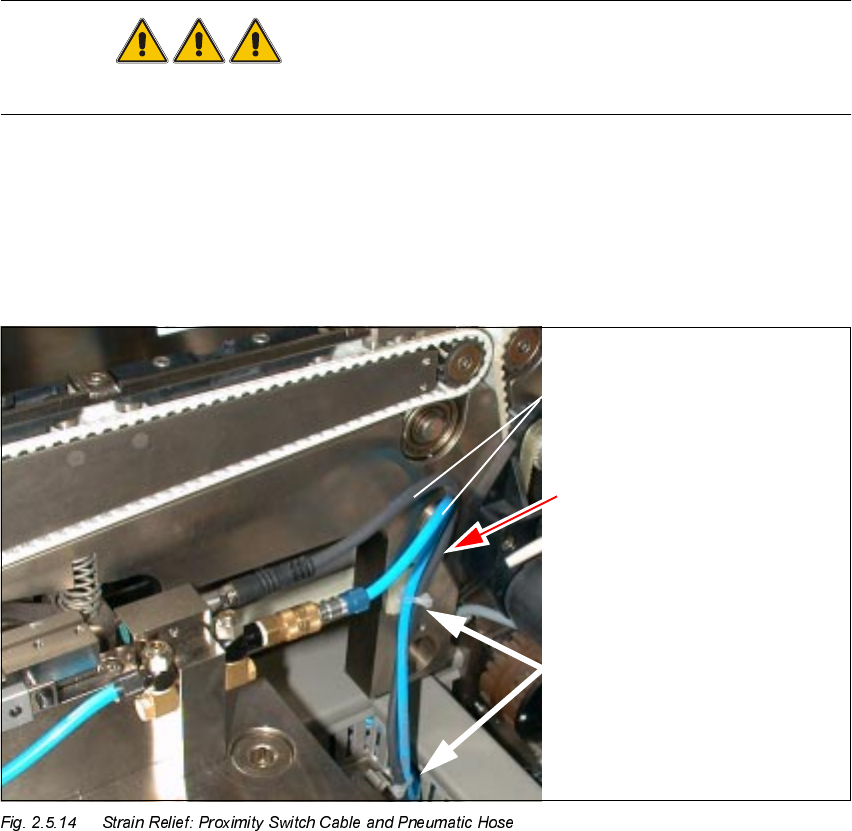
tical surface of the conveyor assembly (Fig. 2.5.14 -> 1) of each of the processing areas
.
Å In processing areas 2 and 3, degrease the surface for the mounting pedestal on the cable pit.
Å Mount the adhesive mounting pedestal.
.H\
1. Proximity switch cable and pneumatic hose
2. Cable and hose guide with strain relief device
3. 2 mounting pedestals, adhesive, with cable tie

2 Retrofitting Instructions: Mechanical Ceramic Substrate Centering HS-50 SIPLACE HS-50
2.5 Sequence of Retrofitting 01/01 Issue
94
CAUTION
The cables are not to be pinched when the lifting table plate is moving upward and they are not to
rub against the edges of the plate.
The strain on the plug-in connection of the proximity switch and the threaded hose coupling must
be relieved.
Å Plug the proximity switch cable into the pertinent centering unit.
NOTE:
Insert the connector of the proximity switch cable into the plug until you feel it engage.
Å Connect the pneumatic hose onto the threaded hose coupling of the X-centering unit.
Å Lay the hose and cable next to all X-centering units as shown in Fig. 2.5.14 -> 2. The strain on
the connections of the X-centering units must be relieved.
Å Use cable ties to secure the hose and cable exactly in this position (Fig. 2.5.14 -> 3).
Å Place the excess lengths of cables and hoses in the cable pits.
Å Using cable ties, fasten the solenoid valve cable in the longitudinal cable pit in such a manner
that the strain on the plug-in connection on the solenoid valve is relieved.
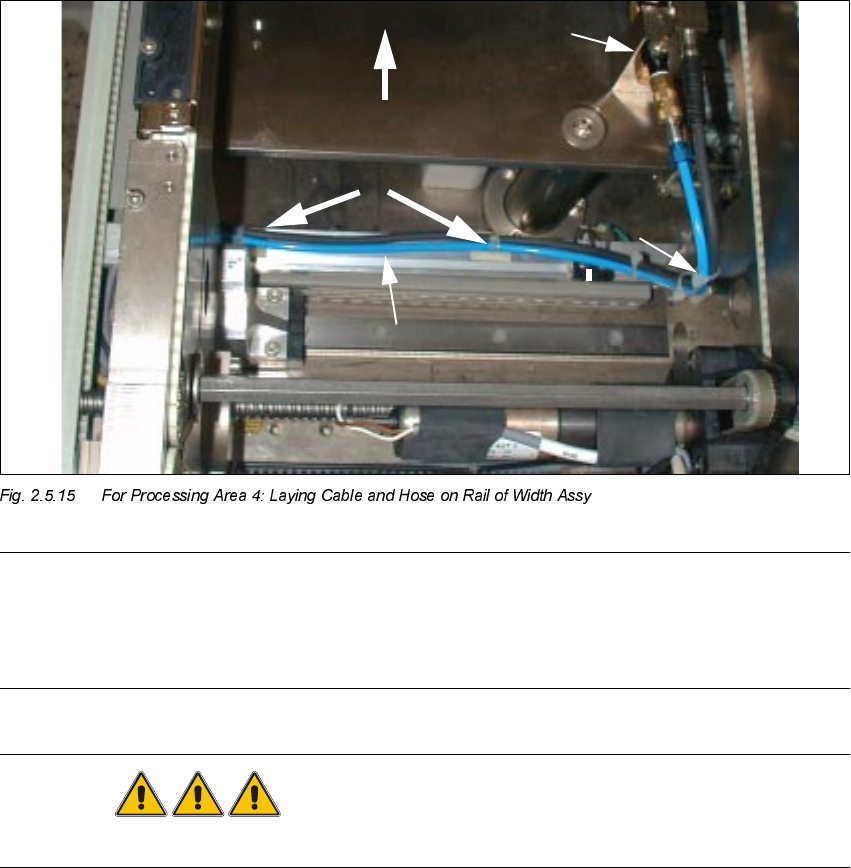
Å Run the cables and hoses on the rail of the conveyor width adjustment assy in processing ar-
eas 1and 4, as described below.
.H\WR)LJ
1. 1 Mounting pedestal with cable ties (see also Fig. 2.5.14)
2. Cables laid correctly on the rail
3. 2 mounting pedestals with cable ties
4. Ceramic substrate centering unit
SIPLACE HS-50 2 Retrofitting Instructions: Mechanical Ceramic Substrate Centering HS-50
01/01 Issue 2.5 Sequence of Retrofitting
95
NOTE:
In processing areas 1 and 4 the cable and the pneumatic hose must be laid on the rail of the width
adjustment assy and fastened such that when the width adjustment assy is moved they do NOT
come into contact with it, causing them damage or tearing off the mounting pedestal.
DANGER
Do not perform the cleaning work with alcohol near an open flame.
Å Using isopropyl alcohol, remove the grease from the assembly surfaces for the mounting ped-
estal on the rail of the conveyor width adjustment assy:
– 2 mounting pedestals in conveyor 2, processing area 4 (see Fig. 2.5.15) and, in a like
manner,
– 1 mounting pedestal in conveyor 1, processing area 1, next to the fixed side of the conveyor.
Å In processing area 4 (see Fig. 2.5.7) mount two mounting pedestals on the top of the rail of the
conveyor width adjustment assy as shown in Fig. 2.5.15 and one mounting pedestal in pro-
cessing area 1.
Å Using cable ties, fasten the pneumatic hose and the proximity switch cable such that cable and
hose are close to the top of the rail. Resume work with the steps in Section 2.5.14.
Substrate