ASM_Manual_TQSeries_VerificationAndTraceability_03233976_online.pdf - 第13页
1 VERIFICATION AND TRACEABILITY 1.3 VERIFICATION ITEMS STANDALONE MANUAL VERIFICATION AND TRACEABILITY TQ SERIES 07/2020 13 4. Select Create . The following page is displayed: 5. Select the Name parameter. 6. Enter a nam…

1 VERIFICATION AND TRACEABILITY
1.3 VERIFICATION ITEMS
12 STANDALONE MANUAL VERIFICATION AND TRACEABILITY TQ SERIES 07/2020
1.3 VERIFICATION ITEMS
The following is a default list of items that may be used for verification:
●
Board Clamp Front
●
Board Clamp Rear
●
Cleaner Fabric
●
Cleaner Solvent
●
Dedicated Tooling
●
Material
●
Operator Name
●
Print Medium
●
Print Medium Cartridge/Jar
●
Stencil
●
Spatula
●
Squeegee Blade Front
●
Squeegee Blade Rear
●
Squeegee Holder Front
●
Squeegee Holder Rear
●
Work Order
The permitted rules for the verification items may be a barcode, a serial number or a name. Care
must be taken when entering rules as these must be entered exactly when verification is reques-
ted.
Each verifiable item may have multiple rules associated with it allowing, for example, stencils from
two different manufacturers to be used on the same product run.
1.3.1 Create Item
A default list of items was included when the software was installed on the printer, items can be
created, edited or deleted. This section details creating a new item:
1. Select the Menu icon.
2. Select Programming.
3. Select Verification Item Definitions.
1 VERIFICATION AND TRACEABILITY
1.3 VERIFICATION ITEMS
STANDALONE MANUAL VERIFICATION AND TRACEABILITY TQ SERIES 07/2020 13
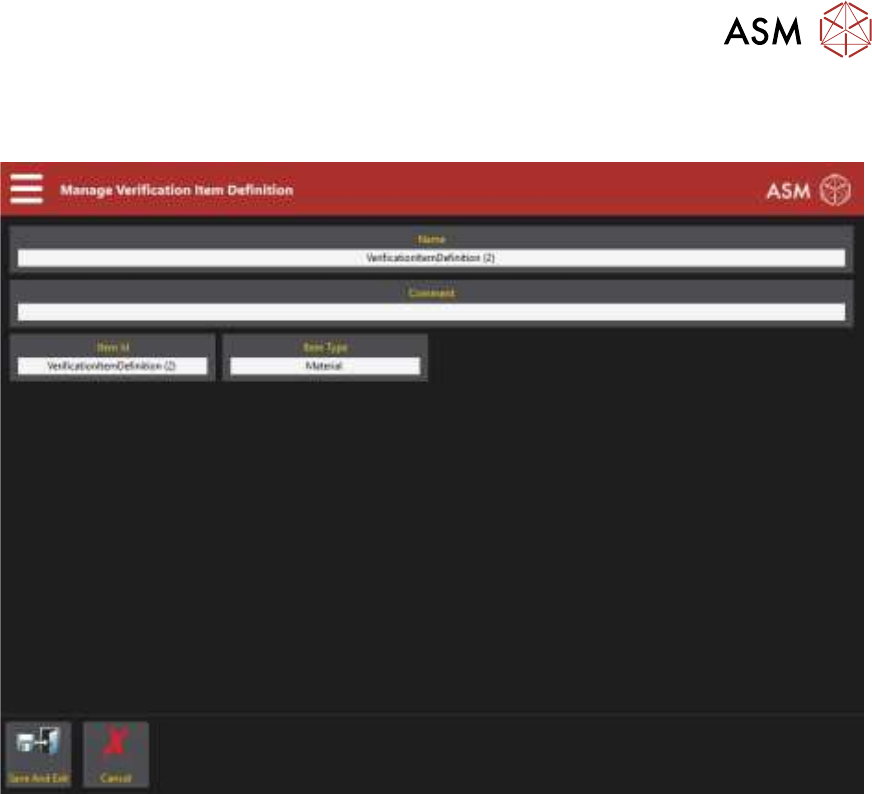
4. Select Create.
The following page is displayed:
5. Select the Name parameter.
6. Enter a name for the item.
7. Select Accept.
8. Select the Comment parameter.
9. Enter a comment if required.
This is displayed next to the item name in the table on the previous page.
10. Select Accept.
11. Select the Item ID parameter.
12. Enter the Item ID.
13. Select Accept.
14. Select the Item Type parameter and select the correct type using the table at the end of this
procedure for guidance.
15. Select Accept.
16. Select Save And Exit.
17. Select Exit.
1 VERIFICATION AND TRACEABILITY
1.3 VERIFICATION ITEMS
14 STANDALONE MANUAL VERIFICATION AND TRACEABILITY TQ SERIES 07/2020
Item Item ID Item Type
Squeegee Holder Front SqueegeeHolderFront Tool
Squeegee Holder Rear SqueegeeHolderRear Tool
Squeegee Blade Front SqueegeeBladeFront Tool
Squeegee Blade Rear SqueegeeBladeRear Tool
Stencil Screen Tool
Tooling Tooling Tool
Board Clamp Front BoardClampFront Tool
Board Clamp Rear BoardClampRear Tool
Operator Name OperatorName Tool
Vacuum Tooling VacuumTooling Tool
Spatula Spatula Tool
Work Order WorkOrder Tool
Print Medium PrintMedium Material
Print Medium Cartridge PrintMediumCartridge Material
Cleaner Paper CleanerPaper Tool
Cleaner Solvent CleanerSolvent Tool
1.3.2 Delete Item
This section details deleting an item:
1. Select the Menu icon.
2. Select Programming.
3. Select Verification Item Definitions.
4. Select the item to be deleted from the list.
5. Select Delete.
6. Select Confirm.
7. Select Exit.