ASM_Manual_TQSeries_VerificationAndTraceability_03233976_online.pdf - 第21页
1 VERIFICATION AND TRACEABILITY 1.4 TRACEABILITY STANDALONE MANUAL VERIFICATION AND TRACEABILITY TQ SERIES 07/2020 21 10. Select Accept . NOTE To delete a user defined field, select the ‘ - ‘ sign to the right of the fie…
1 VERIFICATION AND TRACEABILITY
1.4 TRACEABILITY
20 STANDALONE MANUAL VERIFICATION AND TRACEABILITY TQ SERIES 07/2020
1.4 TRACEABILITY
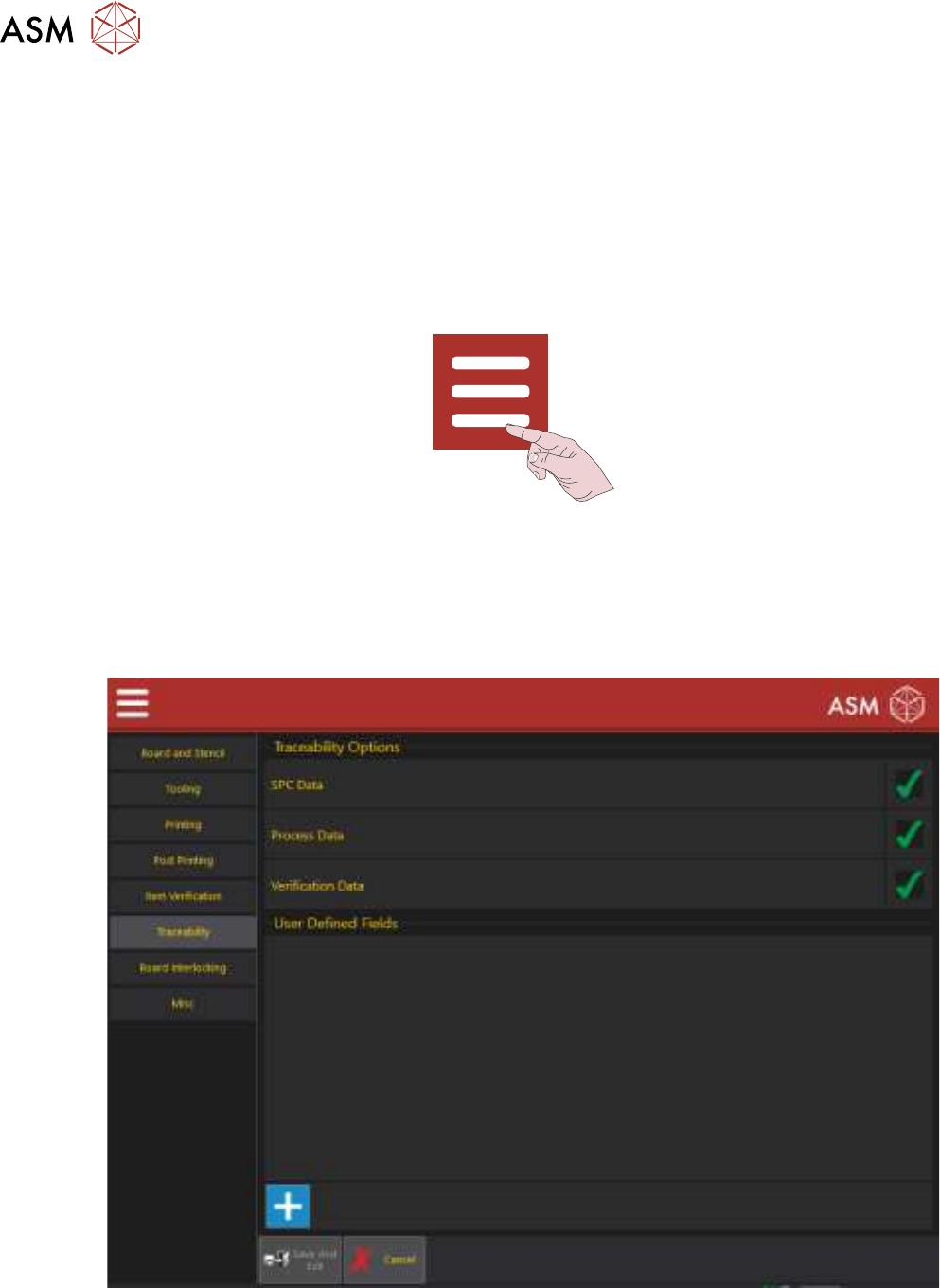
Traceability records the following groups of data:
●
SPC Data (QC Calc Output Data)
●
Process Data (Printing Process Parameter Settings)
●
Verification Data (Items that must be verified during production)
These groups can be selected/deselected for recording to the traceability file. To check or change
the status, use the following procedure:
1. Select the Menu icon.
2. Select Programing.
3. Select Edit.
4. Select Top Side or Bottom Side.
5. Select Edit.
6. Select Traceability to display the following page:
7. Select the green tick to deselect a group or the blank space to select the group.
8. User Defined Fields are used to add information to the traceability file. To add a field, select
the ‘+’ sign otherwise go to Step 11.
9. Enter the additional information to be added.

1 VERIFICATION AND TRACEABILITY
1.4 TRACEABILITY
STANDALONE MANUAL VERIFICATION AND TRACEABILITY TQ SERIES 07/2020 21
10. Select Accept.
NOTE
To delete a user defined field, select the ‘-‘ sign to the right of the field.
11. Select Save And Exit.
12. Select Save And Exit.
13. Select Exit.
1 VERIFICATION AND TRACEABILITY
1.5 TRACEABILITY FILE CONFIGURATION
22 STANDALONE MANUAL VERIFICATION AND TRACEABILITY TQ SERIES 07/2020
1.5 TRACEABILITY FILE CONFIGURATION
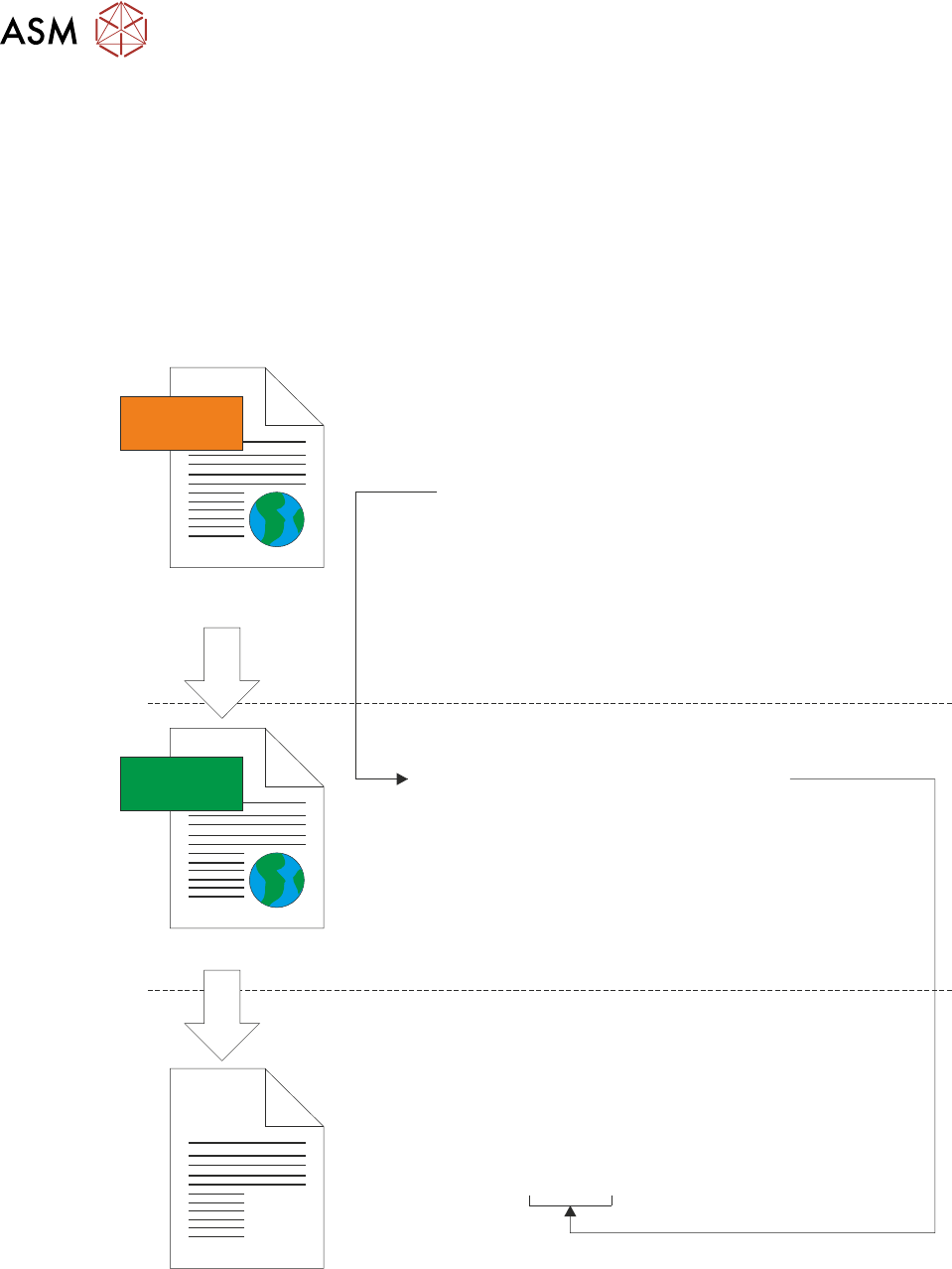
The tsv.xsl file, located in E:\Config\Traceability\TraceabilityViews, contains the definitions that
define the naming convention of the new *.tsv traceability file. These definitions can be edited to
change the naming convention and also the parameters that define when a new traceability file
should be created.
The following two examples explain the concept.
1.5.1 Example 1: Parameters
The following illustration shows the creation of the *.tsv traceability file using only the ProductName
parameter from the LastBoard.xml file:
<xsl:template match=”/TraceabilityData”>
<TsvConfiguration>
<SaveAs>
<xsl:value-of select=”ProductName/Value”/>.tsv
</SaveAs>
</TsvConfiguration>
</xsl:template>
</xsl:stylesheet>
<TraceabilityData>
<DateTime>
<Value>05/10/2020 12:12:16</Value>
<Units/>
</DateTime>
<ProductName>
<Value>DEK08</Value>
<Units/>
</ProductName>
<MachineSerialNo.>
<Value>312780</Value>
<Units/>
</MachineSerialNo.>
<OperatorID>
<Value>mc</Value>
<Units/>
</OperatorID>
</TraceabilityData>
XML
XSL
LoadBoard.xml
tsv.xsl
Filename = DEK08.tsv
In the example above, the following section of the tsv.xsl file defines the building blocks for the *.tsv
file name:
<SaveAs>
<xsl:value-of select=“ProductName/Value”/>.tsv
</SaveAs>