ASM_Manual_TQSeries_VerificationAndTraceability_03233976_online.pdf - 第22页
1 VERIFICATION AND TRACEABILITY 1.5 TRACEABILITY FILE CONFIGURATION 22 STANDALONE MANUAL VERIFICATION AND TRACEABILITY TQ SERIES 07/2020 1.5 TRACEABILITY FILE CONFIGURATION The tsv.xsl file, located in E:\Config\Traceabi…

1 VERIFICATION AND TRACEABILITY
1.4 TRACEABILITY
STANDALONE MANUAL VERIFICATION AND TRACEABILITY TQ SERIES 07/2020 21
10. Select Accept.
NOTE
To delete a user defined field, select the ‘-‘ sign to the right of the field.
11. Select Save And Exit.
12. Select Save And Exit.
13. Select Exit.
1 VERIFICATION AND TRACEABILITY
1.5 TRACEABILITY FILE CONFIGURATION
22 STANDALONE MANUAL VERIFICATION AND TRACEABILITY TQ SERIES 07/2020
1.5 TRACEABILITY FILE CONFIGURATION
The tsv.xsl file, located in E:\Config\Traceability\TraceabilityViews, contains the definitions that
define the naming convention of the new *.tsv traceability file. These definitions can be edited to
change the naming convention and also the parameters that define when a new traceability file
should be created.
The following two examples explain the concept.
1.5.1 Example 1: Parameters
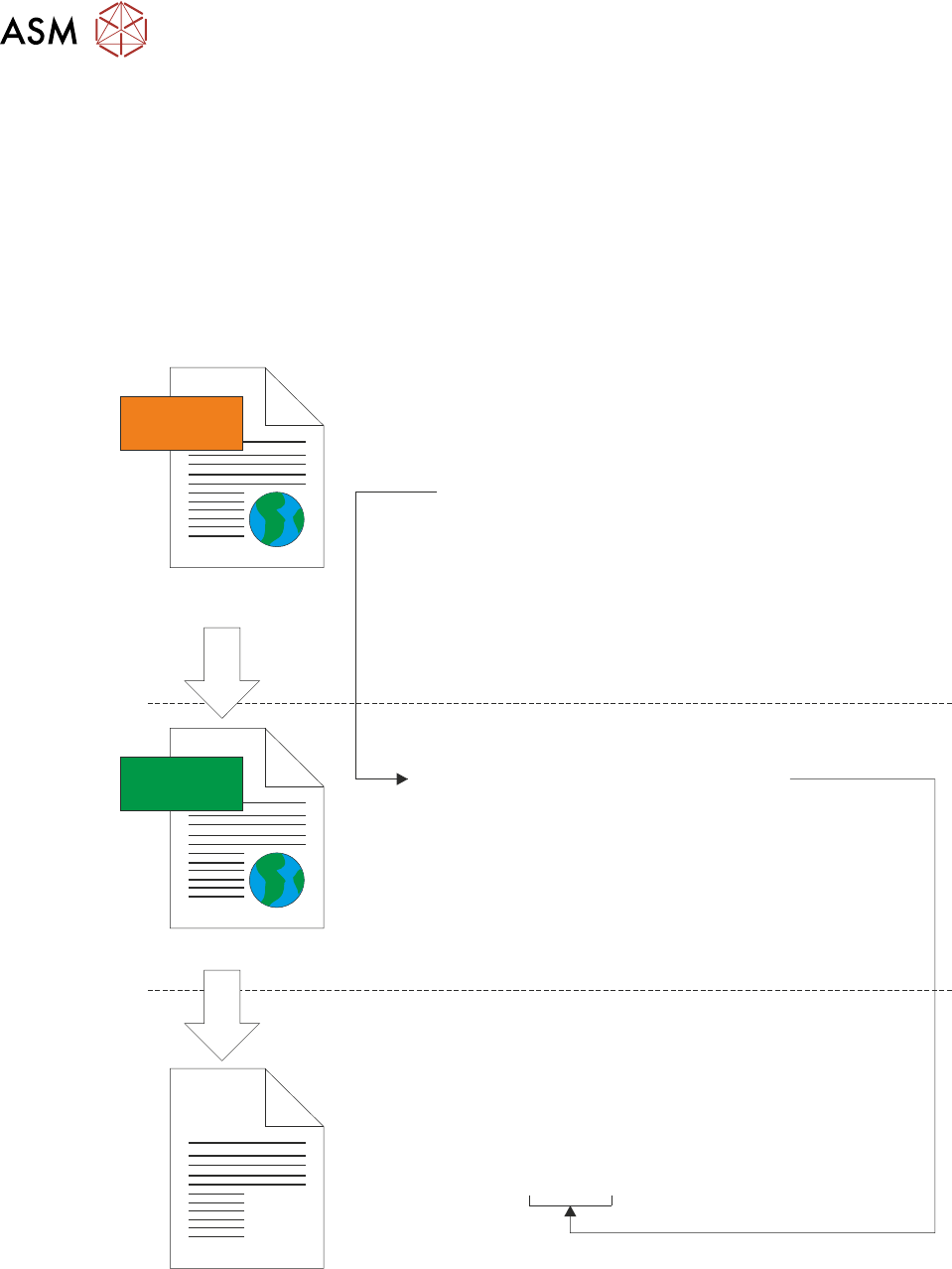
The following illustration shows the creation of the *.tsv traceability file using only the ProductName
parameter from the LastBoard.xml file:
<xsl:template match=”/TraceabilityData”>
<TsvConfiguration>
<SaveAs>
<xsl:value-of select=”ProductName/Value”/>.tsv
</SaveAs>
</TsvConfiguration>
</xsl:template>
</xsl:stylesheet>
<TraceabilityData>
<DateTime>
<Value>05/10/2020 12:12:16</Value>
<Units/>
</DateTime>
<ProductName>
<Value>DEK08</Value>
<Units/>
</ProductName>
<MachineSerialNo.>
<Value>312780</Value>
<Units/>
</MachineSerialNo.>
<OperatorID>
<Value>mc</Value>
<Units/>
</OperatorID>
</TraceabilityData>
XML
XSL
LoadBoard.xml
tsv.xsl
Filename = DEK08.tsv
In the example above, the following section of the tsv.xsl file defines the building blocks for the *.tsv
file name:
<SaveAs>
<xsl:value-of select=“ProductName/Value”/>.tsv
</SaveAs>
1 VERIFICATION AND TRACEABILITY
1.5 TRACEABILITY FILE CONFIGURATION
STANDALONE MANUAL VERIFICATION AND TRACEABILITY TQ SERIES 07/2020 23
The line between the SaveAs tags instructs the XSLT procedure to locate the parameter Product-
Name in the LastBoard.xml file, and use its <Value> to name the file. This value also defines when
a new tsv file should be created, all the print information for boards will be stored in the same tsv
file until a different product (having a different ProductName/Value) is printed.
1.5.2 Example 2: Template
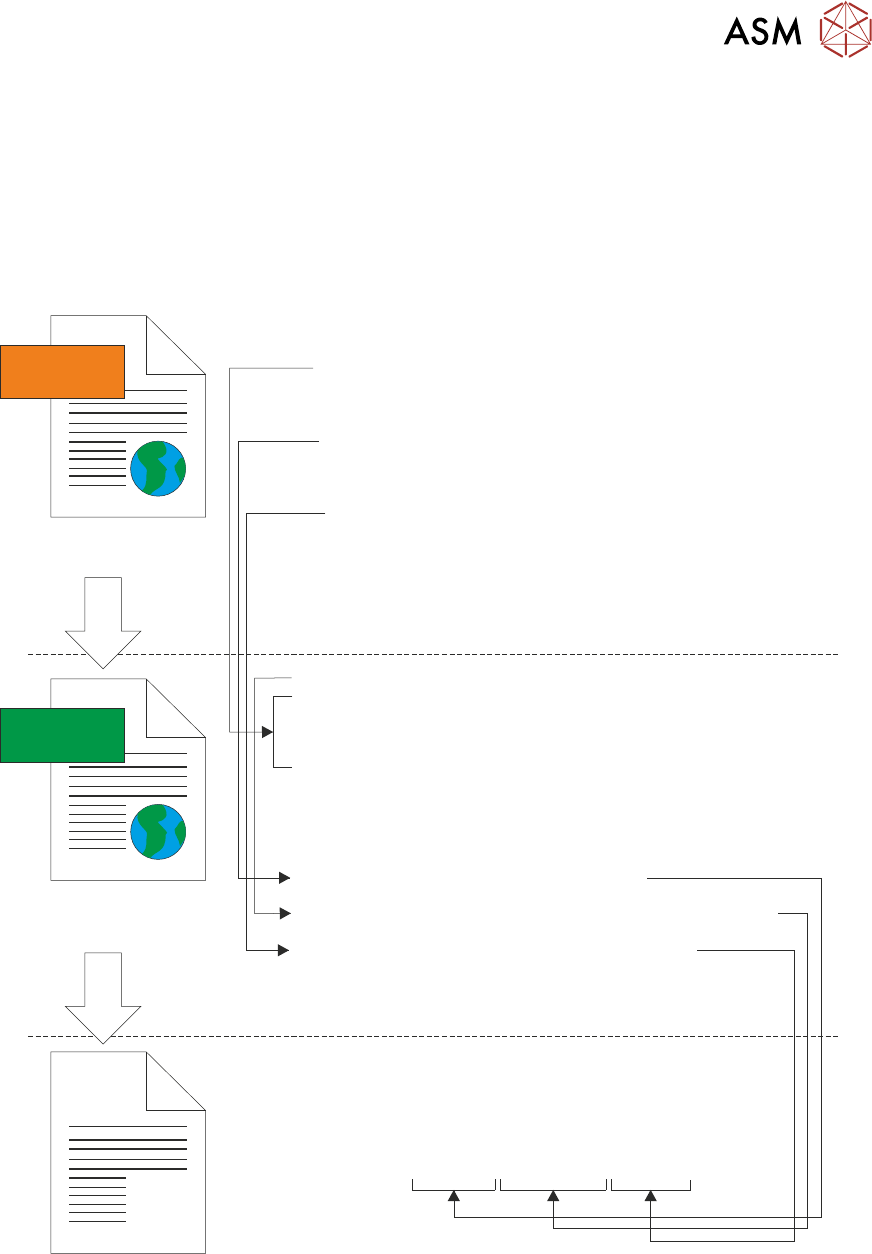
The following illustration shows the creation of the default file:
“ProductName”-“DateTime”-“MachineSerialNo.”.tsv:
<xsl:template name=”CreateDateStamp”>
<xsl:param name=”DateTime”/>
<xsl:variable name=”Year” select=”substring($DateTime, 7, 4)” />
<xsl:variable name=”Month” select=”substring($DateTime, 4, 2)” />
<xsl:variable name=”Day” select=”substring($DateTime, 1, 2)” />
<xsl:value-of select=”concat($Year, $Month, $Day)”/>
</xsl:template>
<xsl:template match=”/TraceabilityData”>
<TsvConfiguration>
<SaveAs>
<xsl:value-of select=”ProductName/Value”/>-
<xsl:call-template name=”CreateDateStamp”>
<xsl:with-param name=”DateTime” select=”DateTime\Value”/>
</xsl:call-template>-
<xsl:value-of select=”MachineSerialNo./Value”/>.tsv
</SaveAs>
</TsvConfiguration>
</xsl:template>
</xsl:stylesheet>
<TraceabilityData>
<DateTime>
<Value>05/10/2020 12:12:16</Value>
<Units/>
</DateTime>
<ProductName>
<Value>DEK08</Value>
<Units/>
</ProductName>
<MachineSerialNo.>
<Value>312780</Value>
<Units/>
</MachineSerialNo.>
<OperatorID>
<Value>mc</Value>
<Units/>
</OperatorID>
</TraceabilityData>
XML
XSL
LoadBoard.xml
tsv.xsl
Filename = DEK08-20201005-312780.tsv
In the example above, the use of ProductName and MachineSerialNo. to call their values from the
LastBoard.xml file works in the same way as the previous example. Use of the DateTime para-
meter is also required, the value in the LastBoard.xml file is stored in the UK format Day-Month-
Year but the user would like it in Year-Month-Day format. This can be achieved by creating a set of
template rules outside the <SaveAs> section of the tsv.xsl file.