ASM_Manual_TQSeries_VerificationAndTraceability_03233976_online.pdf - 第23页
1 VERIFICATION AND TRACEABILITY 1.5 TRACEABILITY FILE CONFIGURATION STANDALONE MANUAL VERIFICATION AND TRACEABILITY TQ SERIES 07/2020 23 The line between the SaveAs tags instructs the XSLT procedure to locate the paramet…
1 VERIFICATION AND TRACEABILITY
1.5 TRACEABILITY FILE CONFIGURATION
22 STANDALONE MANUAL VERIFICATION AND TRACEABILITY TQ SERIES 07/2020
1.5 TRACEABILITY FILE CONFIGURATION
The tsv.xsl file, located in E:\Config\Traceability\TraceabilityViews, contains the definitions that
define the naming convention of the new *.tsv traceability file. These definitions can be edited to
change the naming convention and also the parameters that define when a new traceability file
should be created.
The following two examples explain the concept.
1.5.1 Example 1: Parameters
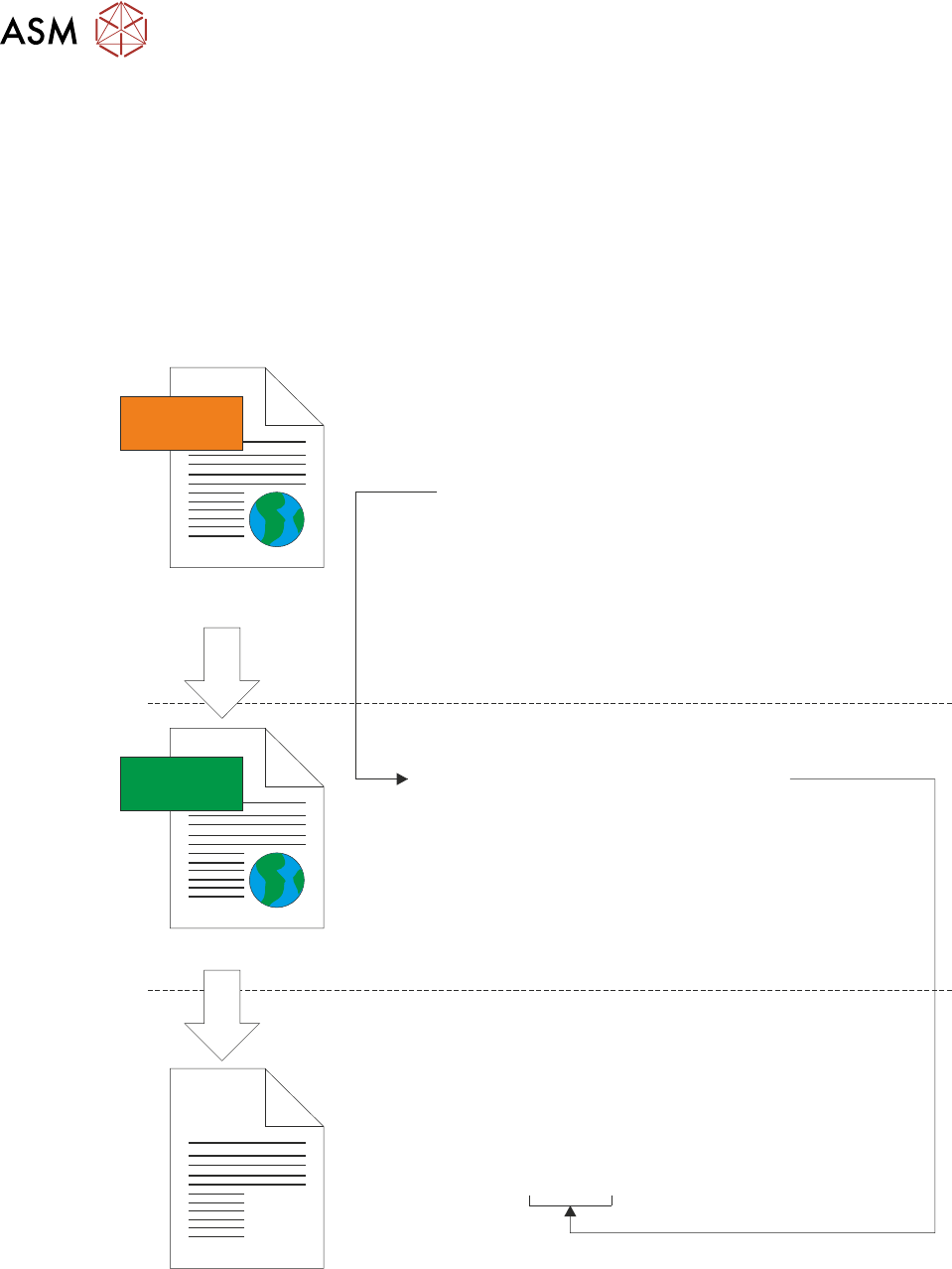
The following illustration shows the creation of the *.tsv traceability file using only the ProductName
parameter from the LastBoard.xml file:
<xsl:template match=”/TraceabilityData”>
<TsvConfiguration>
<SaveAs>
<xsl:value-of select=”ProductName/Value”/>.tsv
</SaveAs>
</TsvConfiguration>
</xsl:template>
</xsl:stylesheet>
<TraceabilityData>
<DateTime>
<Value>05/10/2020 12:12:16</Value>
<Units/>
</DateTime>
<ProductName>
<Value>DEK08</Value>
<Units/>
</ProductName>
<MachineSerialNo.>
<Value>312780</Value>
<Units/>
</MachineSerialNo.>
<OperatorID>
<Value>mc</Value>
<Units/>
</OperatorID>
</TraceabilityData>
XML
XSL
LoadBoard.xml
tsv.xsl
Filename = DEK08.tsv
In the example above, the following section of the tsv.xsl file defines the building blocks for the *.tsv
file name:
<SaveAs>
<xsl:value-of select=“ProductName/Value”/>.tsv
</SaveAs>
1 VERIFICATION AND TRACEABILITY
1.5 TRACEABILITY FILE CONFIGURATION
STANDALONE MANUAL VERIFICATION AND TRACEABILITY TQ SERIES 07/2020 23
The line between the SaveAs tags instructs the XSLT procedure to locate the parameter Product-
Name in the LastBoard.xml file, and use its <Value> to name the file. This value also defines when
a new tsv file should be created, all the print information for boards will be stored in the same tsv
file until a different product (having a different ProductName/Value) is printed.
1.5.2 Example 2: Template
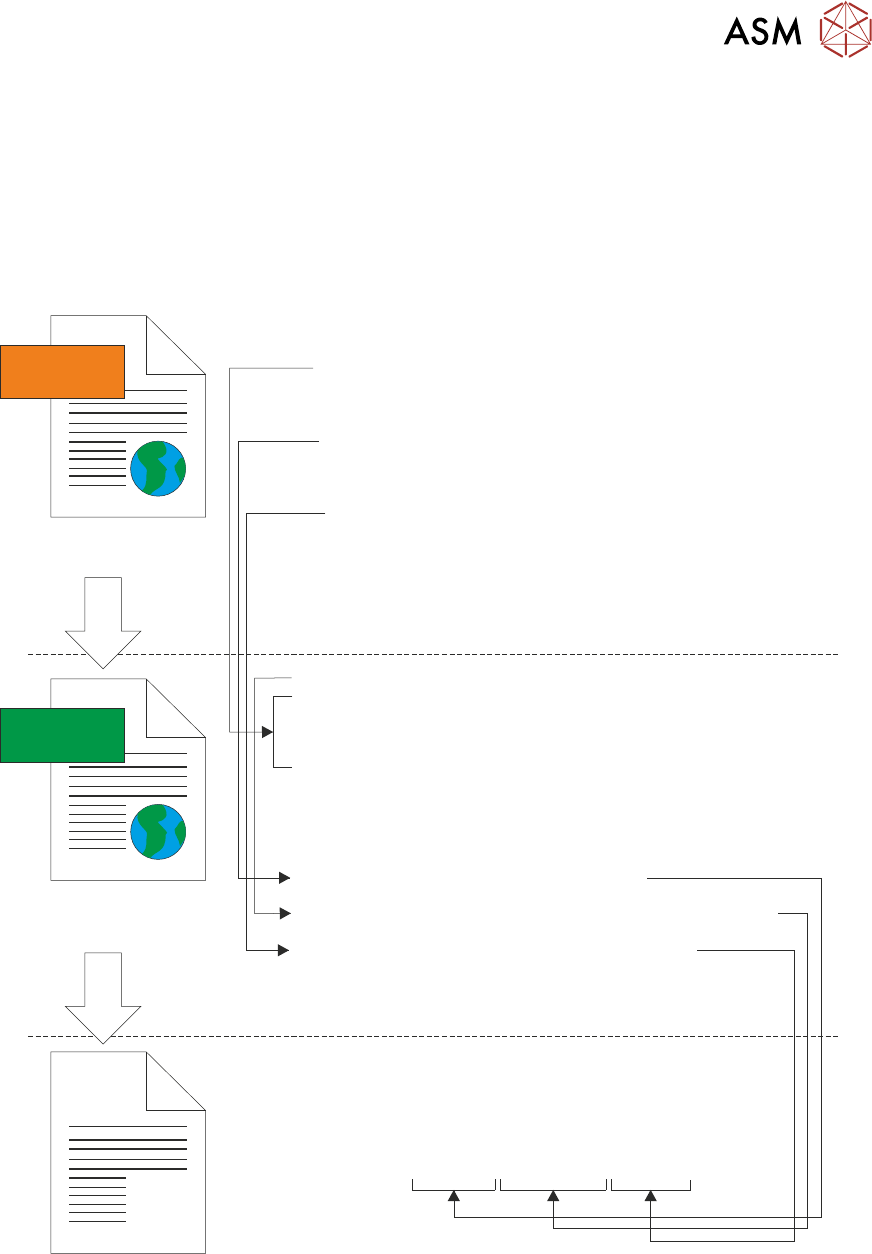
The following illustration shows the creation of the default file:
“ProductName”-“DateTime”-“MachineSerialNo.”.tsv:
<xsl:template name=”CreateDateStamp”>
<xsl:param name=”DateTime”/>
<xsl:variable name=”Year” select=”substring($DateTime, 7, 4)” />
<xsl:variable name=”Month” select=”substring($DateTime, 4, 2)” />
<xsl:variable name=”Day” select=”substring($DateTime, 1, 2)” />
<xsl:value-of select=”concat($Year, $Month, $Day)”/>
</xsl:template>
<xsl:template match=”/TraceabilityData”>
<TsvConfiguration>
<SaveAs>
<xsl:value-of select=”ProductName/Value”/>-
<xsl:call-template name=”CreateDateStamp”>
<xsl:with-param name=”DateTime” select=”DateTime\Value”/>
</xsl:call-template>-
<xsl:value-of select=”MachineSerialNo./Value”/>.tsv
</SaveAs>
</TsvConfiguration>
</xsl:template>
</xsl:stylesheet>
<TraceabilityData>
<DateTime>
<Value>05/10/2020 12:12:16</Value>
<Units/>
</DateTime>
<ProductName>
<Value>DEK08</Value>
<Units/>
</ProductName>
<MachineSerialNo.>
<Value>312780</Value>
<Units/>
</MachineSerialNo.>
<OperatorID>
<Value>mc</Value>
<Units/>
</OperatorID>
</TraceabilityData>
XML
XSL
LoadBoard.xml
tsv.xsl
Filename = DEK08-20201005-312780.tsv
In the example above, the use of ProductName and MachineSerialNo. to call their values from the
LastBoard.xml file works in the same way as the previous example. Use of the DateTime para-
meter is also required, the value in the LastBoard.xml file is stored in the UK format Day-Month-
Year but the user would like it in Year-Month-Day format. This can be achieved by creating a set of
template rules outside the <SaveAs> section of the tsv.xsl file.
1 VERIFICATION AND TRACEABILITY
1.5 TRACEABILITY FILE CONFIGURATION
24 STANDALONE MANUAL VERIFICATION AND TRACEABILITY TQ SERIES 07/2020
The following code example shows the created template lines:
<xsl:template name=“CreateDateStamp”>
<xsl:param name=“DateTime”/>
<xsl:variable name=“Year” select=“substring($DateTime, 7, 4” />
<xsl:variable name=“Month” select=“substring($DateTime, 4, 2” />
<xsl:variable name=“Day” select=“substring($DateTime, 1, 2” />
</xsl:template>
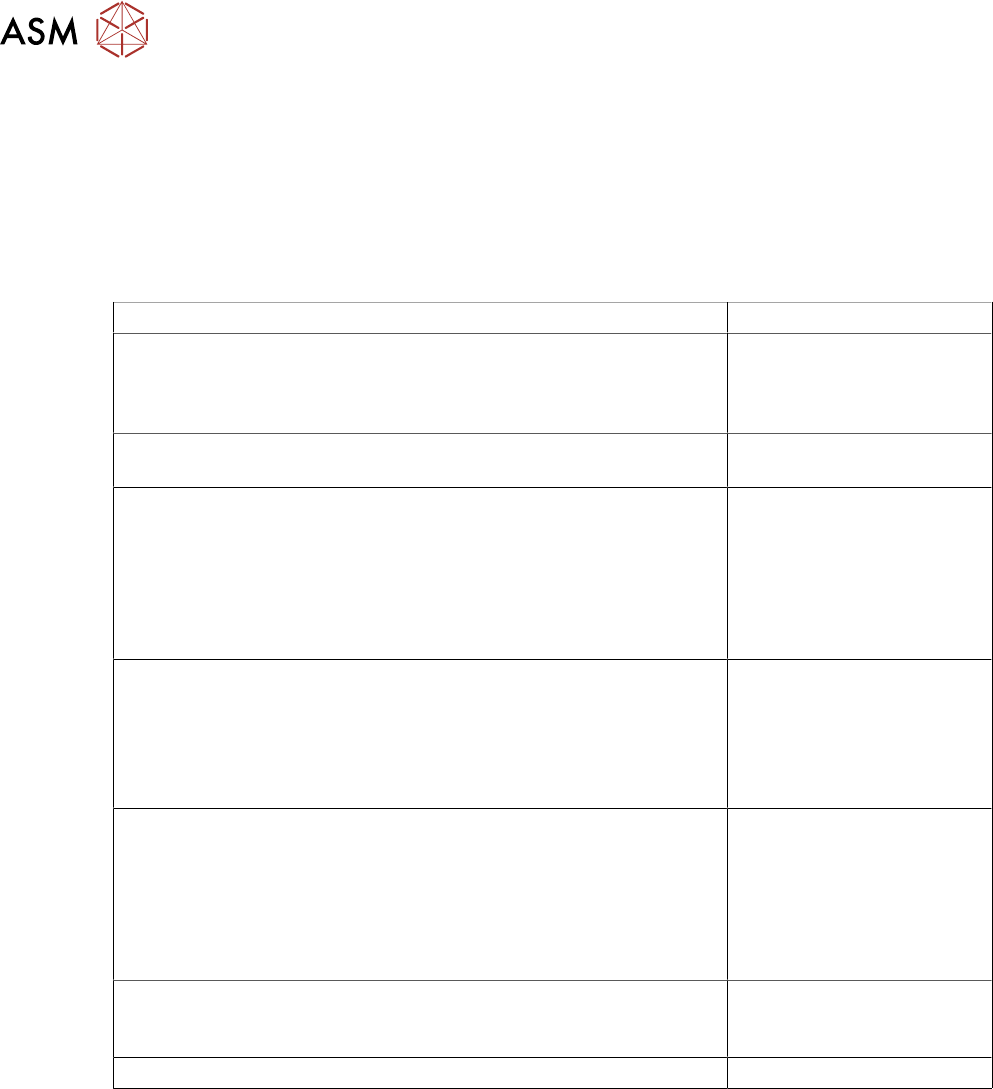
The following table below details the CreateDateStamp template creation section of the tsv.xsl file:
xsl contents of xsl:template section Location of Information
<xsl:template name=”CreateDateStamp”> Defines the name of the
template being created -
must be unique in the tsv.xsl
file
<xsl:param name=”DateTime”/> Defines the parameter
name in LastBoard.xml
<xsl:variable name=”year” select=”substring($DateTime,7,4)”/> Defines a variable name -
must be unique in the tsv.xsl
file.
Looks at the value of Date-
Time in LastBoard.xml and
calls four characters starting
at character seven
<xsl:variable name=”Month” select substring ($DateTime,4,2,)”/> Defines the variable name -
must be unique in the tsv.xsl
file.
Looks for the value and
calls two characters starting
at character four
<xsl:variable name=”Day” select=”substring(DateTime,1,2)”/> Defines a variable name -
must be unique in the tsv.xsl
file.
Looks at the value of Date-
Time in the LastBoard.xml
and calls two characters
starting at character one
<xsl:value-of select”concat($Year, $Month, $Day)”/> Defines the end value of
CreateDateStamp by joining
the three variables together
<xsl:template> Closes the template
To use the template, it must be called in the <SaveAs> section, as shown below:
<xsl:call-template name=“CreateDateStamp”>
<xsl:with-param name=“DateTime” select=“DateTime\Value” />
</xsl:call-template>
1.5.3 Editing a tsv.xsl File
See below for advice for Editing tsv.xsl file:
●
The tsv.xsl file can be opened and edited using any text editing software (e.g. Notepad).
●
The tsv.xsl file should not be edited while the machine is in the middle of a print run.
●
Care should be taken when editing the tsv.xsl file, as basic text editing software does not
parse the xsl for correctness. The deletion of open/close tags will stop the XSLT process
working. The parameter name called from LastBoard.xml must match exactly (case, spacing
etc) as this will prevent the XSLT process from working as expected.
●
Removing all the content from between the <SaveAs> tags will stop the *.tsv traceability file
from being created.