ASM_Manual_TQSeries_VerificationAndTraceability_03233976_online.pdf - 第6页
1 VERIFICATION AND TRACEABILITY 1.1 OVERVIEW 6 STANDALONE MANUAL VERIFICATION AND TRACEABILITY TQ SERIES 07/2020 ● Operator ID ● Line ID ● Process Data ● Item Identifications ● Board Number After each print stroke the La…

1 VERIFICATION AND TRACEABILITY
1.1 OVERVIEW
STANDALONE MANUAL VERIFICATION AND TRACEABILITY TQ SERIES 07/2020 5
1
VERIFICATION AND TRACEABILITY
1.1 OVERVIEW
1.1.1 Introduction
Verification and Traceability is a software tool that validates (verification) certain items before print-
ing and records data (traceability) to a file.
1.1.1.1 Purpose
Verification ensures that the correct program, board, material, tooling and user defined items are
used during printing.
At the end of each print cycle, verification information is written to the traceability file. This informa-
tion may be used to trace particular batches of a product run and identify all consumables used for
that batch.
1.1.2 Verification
There are two types of verification, local and remote:
●
Local Verification – Verification is performed without a connection between the printer and an
external system. Verification is validated on the printer
●
Remote Verification – Verification is performed with a connection between the printer and an
external system (via the ASM Operations Information Broker (OIB) interface) for example a re-
mote Manufacturing Execution Systems (MES). Verification is validated on a remote server
The three main areas of verification are:
●
Program Verification
●
Board Verification
●
Item Verification
1.1.2.1 Program Verification
With Program Verification set to Remote, the printer checks with the MES server to validate the
program. If the program is not verified, printing cannot start.
With Program Verification set to Local, program verification is disabled.
1.1.2.2 Board Verification
Before a board is loaded, it is scanned by the remote barcode reader. If the barcode is not recog-
nized as a valid item, depending on how the software is set up, the board is either:
●
Printed as normal
●
Passed through the printer without printing
●
Held at the current location, awaiting removal
1.1.2.3 Item Verification
Item verification includes material, tooling and consumable items that are used in the print process.
Items are verified using a handheld barcode reader at the beginning of a product run and when re-
placed during the print run (consumables).
1.1.3 Traceability
Traceability records the following information to a data file, entitled LastBoard.xml for every board
that is printed:
●
Date/Time
●
Program ID
●
Program Name
●
Batch ID
●
Machine Serial Number

1 VERIFICATION AND TRACEABILITY
1.1 OVERVIEW
6 STANDALONE MANUAL VERIFICATION AND TRACEABILITY TQ SERIES 07/2020
●
Operator ID
●
Line ID
●
Process Data
●
Item Identifications
●
Board Number
After each print stroke the LastBoard.xml file, saved on the hard drive of the machine controller is
updated with traceability information from the last printed board. Using a naming-convention
stylesheet file (tsv.xsl) and XSLT (Extensible Stylesheet Language Transformation) the information
from LastBoard.xml is converted to a tsv (tab separated value) file and stored in the E:\Config
\Traceability folder (the file can also be replicated to a network drive if required).
The default naming convention for the traceability file is based on the parameter values “Product
Name”-“DateTime”and“MachineSerialNo.”, found in the LastBoard.xml file, an example of a file-
name is shown in the following table:
LastBoard.xml Parameter Values Generated Filename
Product Name DateTime MachineSerialNo.
DEK08 20201005 321780 DEK08-20201005-312780.tsv
To prevent the traceability file becoming too large and unmanageable, the file is terminated and a
new one created under the following circumstance
●
A different program is loaded
●
The printer software detects a date change
NOTE
The naming convention (and therefore the circumstances on which a new .tsv is created) can
be changed by editing the tsv.xsl file found in the E:\Config\Traceability\TraceabilityViews
folder - see Traceability File Configuration section for details.
The .tsv file can be viewed in Notepad or Microsoft Excel.
1.1.4 Operation
At the beginning of a production run or when an item is replaced on the machine during the product
run, the operator is requested to verify the item by entering the identity of the item using the hand-
held barcode reader or keyboard.
During the product run, the board is automatically scanned by one of the remote barcode readers.
The reader(s) can be located inside the printer on the inroad auxiliary conveyor or upline of the
printer. Each board is checked against the stored list of valid barcodes.
There can be up to three barcode readers fitted to the machine:
●
One or two Remote Barcode Readers – One above the board and possibly a second below
the board
●
One Handheld Barcode Reader
NOTE
Details of the barcode readers and how to install and set them up are detailed in the Optical
Reader Setup manual (Part No.03233975-01) which is supplied with the reader(s).
1 VERIFICATION AND TRACEABILITY
1.2 ENABLE VERIFICATION
STANDALONE MANUAL VERIFICATION AND TRACEABILITY TQ SERIES 07/2020 7
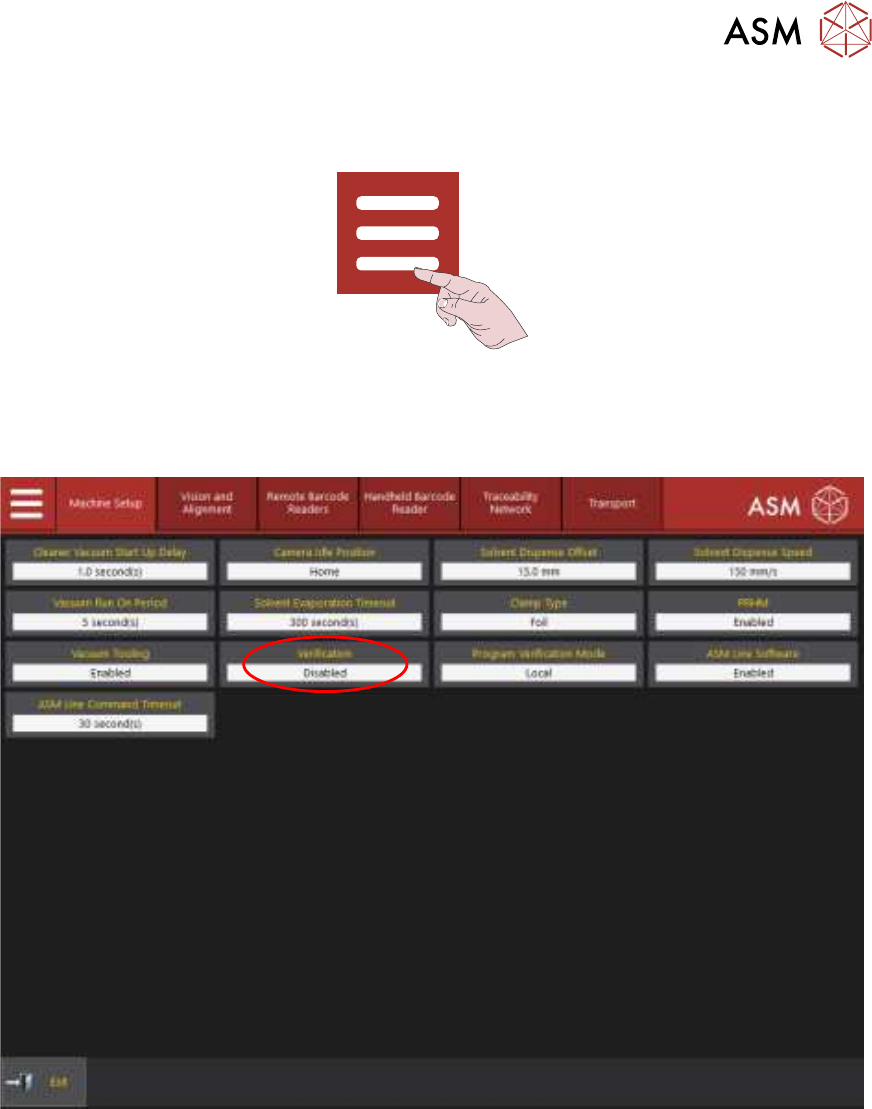
1.2 ENABLE VERIFICATION
1. Select the Menu icon.
2. Select Service.
3. Select Machine Setup.
4. Select the Verification parameter.
5. Select Enabled.
6. Select Accept.