YC8_Mainte_E.pdf - 第74页
3-25 3 Periodic maintenance items 5 Reconnect the air hose to the air coupler . After connecting the air hose, check that no air is leaking. n NOTE Leave the filter cup removed to clean the air coupler as explained in the…
3-24
3
Periodic maintenance items
3.2 Base and other units
3.2.1 Inspecting and cleaning the air/mist filters
Air/mist filters are used to prevent oil, mist and other impurities in the air compressor from penetrating into the
machine. These filters should be inspected and cleaned periodically as instructed below.
c
the air coupler.
n
Required tools
• Neutral detergent
• Air blow tool
• Cleaning rag
c
n
Cleaning the filter cup
1
Check the inside of the filer cup.
Check for oil or water deposits in the filter
cup through the window. If the window is
dirty, follow the steps below to clean the
filter cup.
TIP
The drain cock at the bottom of the filter cup is an
auto-drain type. It automatically drains the oil or water
when deposited in the cup. We recommend
connecting a hose to this drain cock.
2
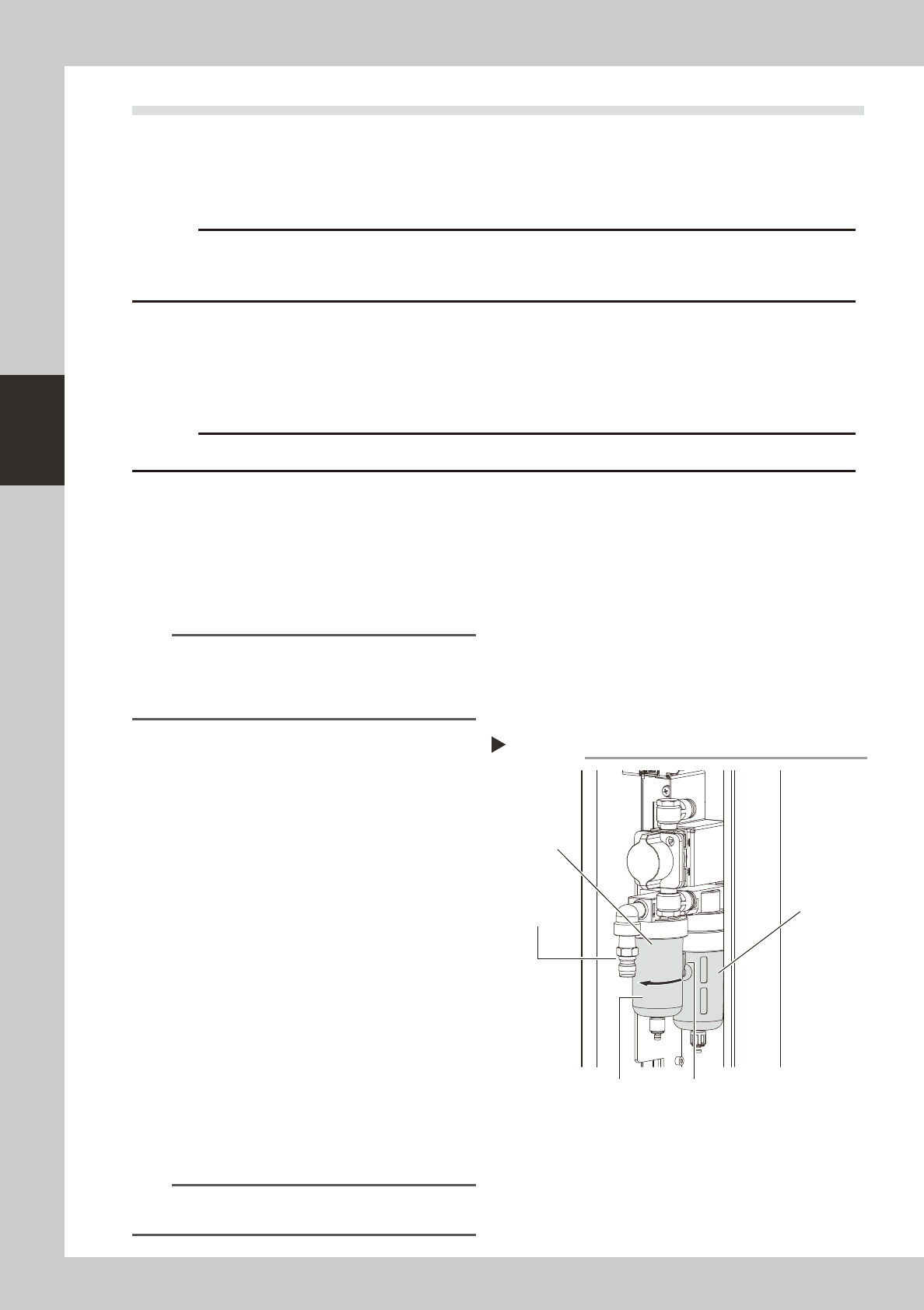
Remove the filter cup.
While pressing the button on the side of the
filter cup, turn it clockwise, and pull the filter
cup downwards. The cup you have removed
has a double structure. The inner transparent
cup should be cleaned.
53326-N8-00
3
Clean the inside of the filter cup.
1. Lightly clean the filter cup with water.
2. Then, pour water-diluted neutral
detergent into the filter cup and clean
the inside while shaking it.
3. Air blow the filter cup and wipe away
any moisture with clean cloth or paper.
4
Reattach the filter cup.
1. Align the button on the side of the cup
with the attach/detach position and
push the cup upwards.
2. Turn the cup counterclockwise until you
hear a click.
n
NOTE
Leave the filter cup removed to clean the air filter as
explained in the next procedure.
Removing the filter cup
Step 2
Filter cup
Disconnect the
air coupler.
Button
Air filer
Oil mist filter
3-25
3
Periodic maintenance items
5
Reconnect the air hose to the air
coupler.
After connecting the air hose, check that no
air is leaking.
n
NOTE
Leave the filter cup removed to clean the air coupler
as explained in the next procedure.
n
Cleaning the air filter
1
Remove the filter cup.
See the previous procedure in "Cleaning the
filter cup".
2
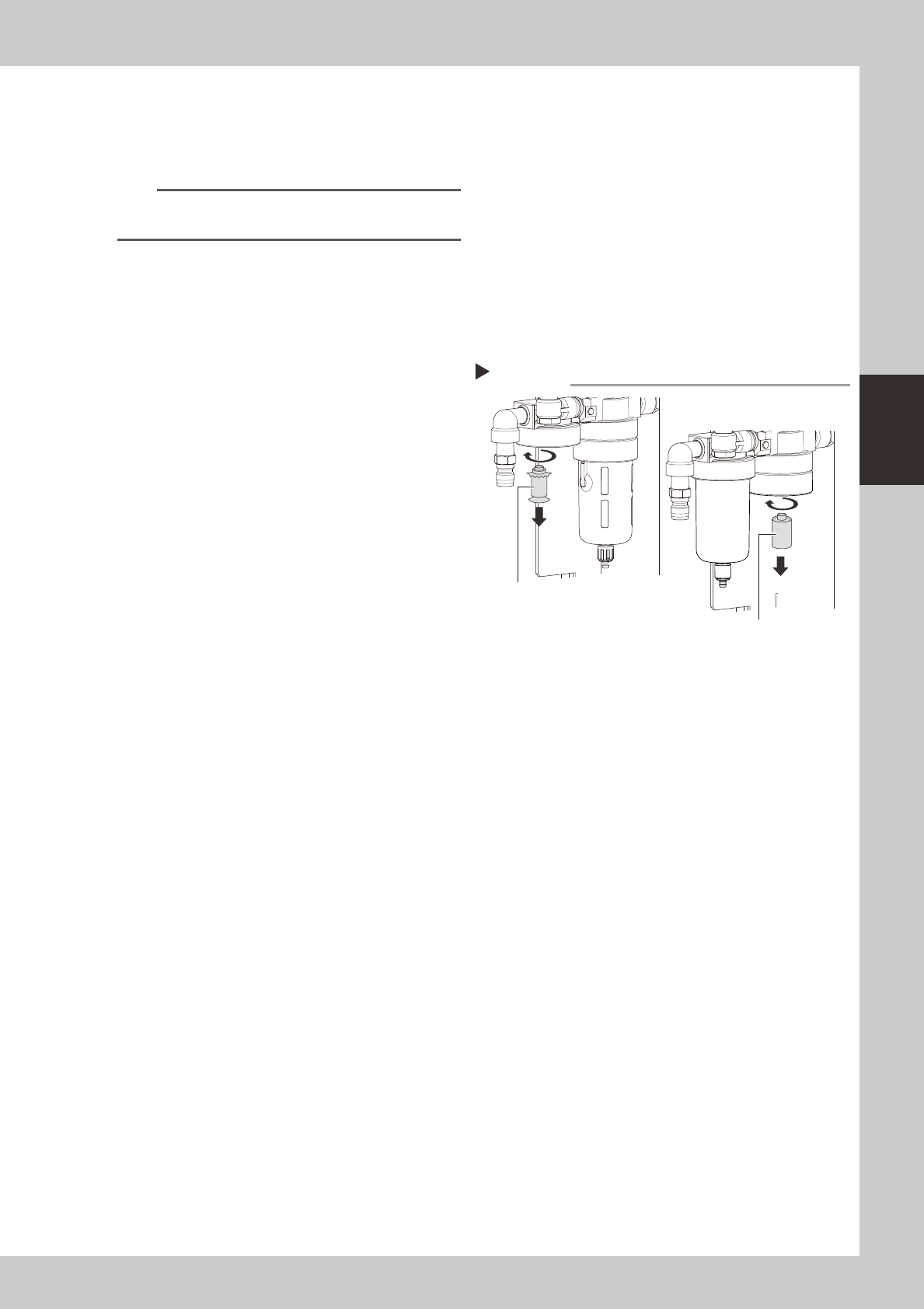
Remove the filter.
Remove the filter by turning it.
53327-N8-00
3
Clean the filter element.
Use an air blow gun to blow away dust and
impurities trapped by the filter element. If
the filter is excessively dirty and cannot be
cleaned, replace it with a new filter.
4
Reattach the filter.
5
Reattach the filter cup.
6
Reconnect the air hose to the air
coupler.
After connecting the air hose, check that no
air is leaking.
Removing thefilter
Step 2
MIST FILTER ELEMENT
FILTER ELEMEN
3-26
3
Periodic maintenance items
4. Six-month or one-year inspection
4.1 Vision system (6-month)
4.1.1 Cleaning the camera lighting units
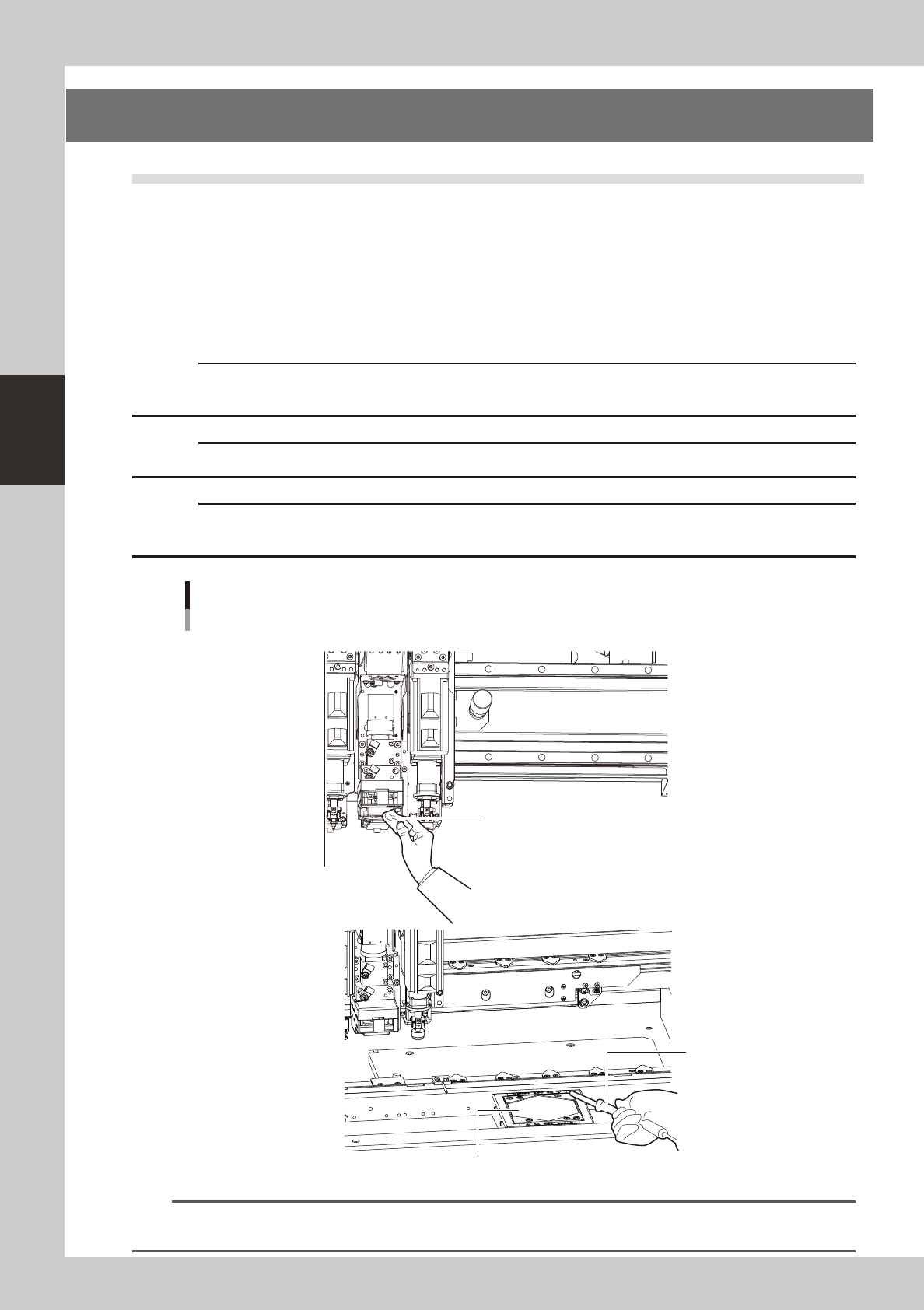
Clean the camera lighting units for the fiducial camera, multi-/single-view camera, and wafer camera
periodically.
• Remove the dirt or dust sticking to the LED lighting units.
• Use the lint-free cleaning cloth or paper towel or vacuum ASSY to clean the lighting units.
• To remove the contamination, use the lens cleaner. Do not use any solvent.
c
work.
c
c
of the lighting unit by the user will void the warranty.
Cleaning the camera lighting units (Example of V2 head)
Fiducial, multi
Lint-free cleaning cloth or paper towel
Vacuum ASSY
Protective glass
NFiducial camera
N Multi camera
53328-N8-00
n
NOTE
For details about how to clean the protective glass of the multi-view camera, see section 2, "Cleaning the camera
protective glass", in Chapter 2.