YAMAHA errer code-a.pdf - 第30页
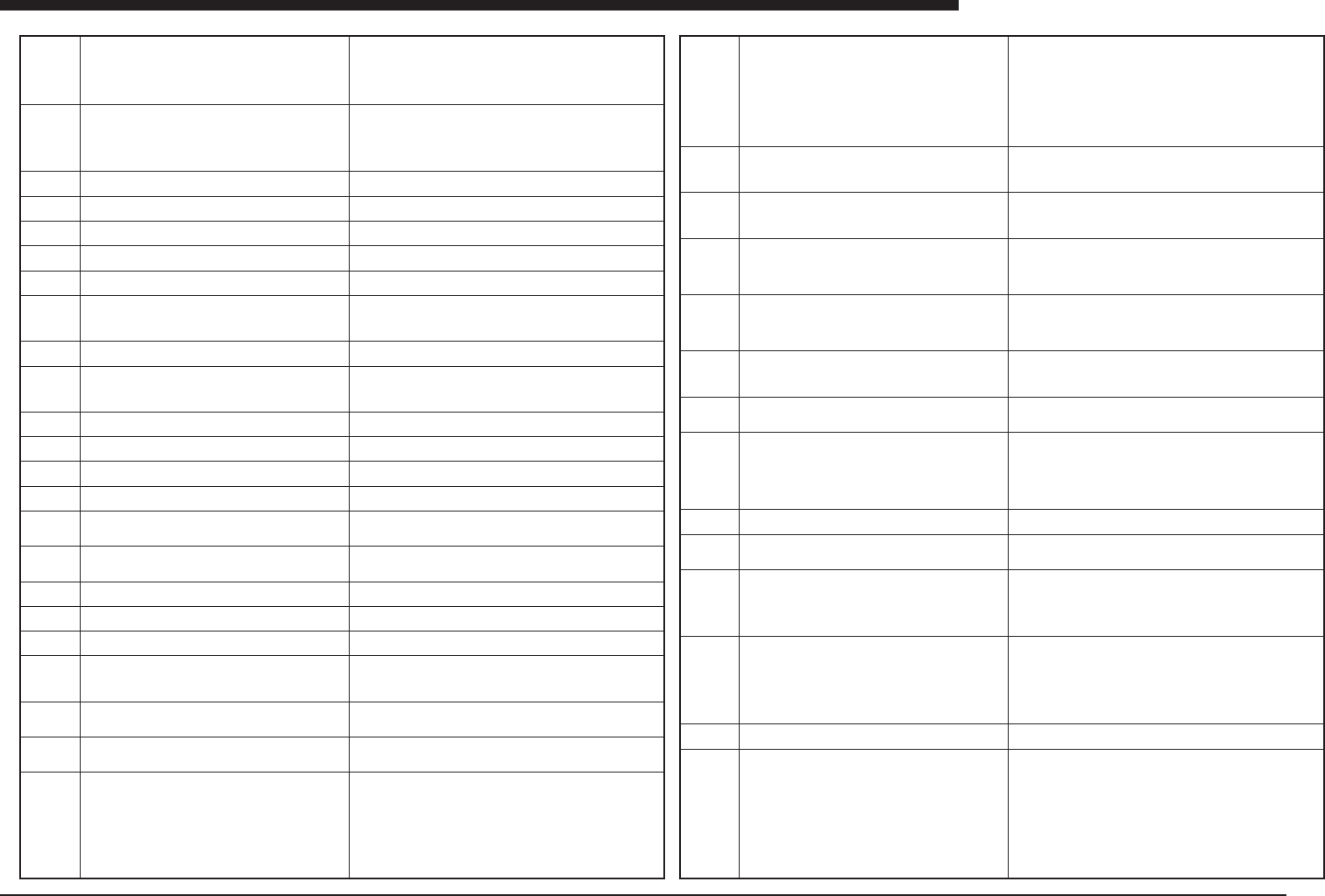
Ea - 30 ERROR MESSAGES LIST Ea Ea03043 Ea03044 Ea03045 Ea03095 Ea03096 Ea03097 Ea03100 Ea03101 Ea03102 Ea03103 Ea03104 Ea03105 Ea03106 Ea03107 Ea03108 Ea031 10 Ea031 1 1 Ea031 12 Ea031 13 Ea03120 Ea03121 Ea03122 Ea03123 …
Ea -29
ERROR MESSAGES LIST
Ea
Ea02813
Ea02814
Ea02815
Ea02816
Ea02817
Ea02818
Ea02819
Ea02820
Ea02821
Ea02822
Ea02823
Ea02824
Ea02825
Ea02826
Ea02827
Ea02828
Ea02829
Ea02830
Ea02831
Ea02832
Ea02833
Ea02834
Ea02900
Ea02901
Ea02902
Ea02903
Ea02904
Ea02905
Ea02906
Ea02907
Ea02908
Ea02909
Ea03000
Ea03001
Ea03040
Ea03041
Ea03042
DATABASE
Set to Mark-DATABASE has been completed.
From
Mark No. ***
To
Database No. ***
DATABASE
Add to Mark-DATABASE has been completed.
From
Mark No. ***
To
Database No. ***
COMPONENT DATA TRANSFER ERROR
Component Data couldn’t be transfered to vision board.
TEMPLATE DATA READ ERRROR
Failed to read Template Data.
VT FILE CONVERT ERROR
Failed to convert VT file to IBMF file.
IBMF FILE CONVERT ERROR
Failed to convert IBMF file to VT file.
APPL CPU HANDSHAKE ERROR
Failed to communictae with APPL CPU.
FES FIDUCIAL MARK DATA READ ERROR
Failed to read FES Fiducial data from Mark-DATABASE.
Database No. ***
Please check Mark-DATABASE.
MULTI-MACS DATA TRANSFER ERROR
Multi-Macs Data couldn’t be transfered to vision board.
ILLEGAL IO ACCESS ERROR
A reference was done toward the illegal IO data.
PORT ID ***
***
FULL AUTO MOUNT FEEDBACK (FAMF)
Data of FAMF was initialized.
FULL AUTO MOUNT FEEDBACK (FAMF)
Result data of FAMF was totaled.
FULL AUTO MOUNT FEEDBACK (FAMF)
Feedback value was calculated from totaled result.
FULL AUTO MOUNT FEEDBACK (FAMF)
Feedback value was saved to Machine-Data..
ORIGIN IMCOMPLETE
Return to origin can not be done. Because it fails in read-
ing of the necessary data.
FAILED TO SEND IO DATA
Update Vacuum Data to IO SYSTEM is failed. Please run
again.
Parts data is not ready.
Please prepare correct parts data.
Fiducial Mark data is not ready.
Please prepare correct mark data.
Badmark Mark data is not ready.
Please prepare correct mark data.
OPERATION START ERROR
A machine adjustment program is starting. Start opera-
tion again after the machine adjustment program comple-
tion.
DATABASE
Set all component data from Component-DATABASE has
been completed.
DATABASE
Set all mark data from Mark-DATABASE has been com-
pleted.
NOZZLE CHANGE
NOZZLE CHANGE is done successfully.
NOZZLE CHANGE SETTING ERROR
This head cannot be used for NOZZLE CHANGE. Please
make sure the following items.
1. Machine Config : Is Machine Type available for NOZZLE
CHANGE ?
2. Machine Config : Is Setting of Nozzle Station is “Exist”
?3. Machine Data : Is Setting of Head Offset is “Auto
Nozzle Change” ?
4. Machine Data : Is Setting of Flying Nozzle Spec cor-
rect ?
NOZZLE CHANGE SETTING ERROR
There is no Nozzle for Anc. Please make sure the follow-
ing items.
1. Machine Data : Is Setting of Nozzle Station correct ?
NOZZLE CHANGE SETTING ERROR
There is too much Nozzles for Anc. Please make sure the
following items.
1. Machine Data : Is Setting of Nozzle Station correct ?
NOZZLE CHANGE SETTING ERROR
There is no Nozzle for Fnc. Please make sure the follow-
ing items.
1. Machine Data : Is Setting of Flying Nozzle Spec cor-
rect ?
NOZZLE CHANGE SETTING ERROR
There is too much Nozzle for Fnc. Please make sure the
following items.
1. Machine Data : Is Setting of Flying Nozzle Spec cor-
rect ?
NOZZLE CHANGE STATUS ERROR
To specify nozzle on head is impossible. Please make
sure the following items.
1. Status of Nozzle Station.
COMPONENT DATA ERROR
This component has no feeder set number. Please set
feeder set number.
DATA ERROR
Required nozzle for this component can’t be attached this
head.
Head No. ***
Nozzle No. ***
Please check [COMPONENT DATA] and [HEAD SPEC
INFO].
NOZZLE CHANGE ERROR
Failed to change nozzles.
DIP STATION ERROR
The machine could not do the dip action, because the dip
station was not ready.
Dip impossibility
An dip action can’t be done. The cause is which the fol-
lowing:
• Dip station size is unusual.
• Dip pitch, zero.
• Dip number, zero.
CONFIRMATION OF EMPTY
The component may be empty. Please confirm the status
of following component.
Mount Data ***
Component Data *** Name ***
Feeder set position **
Empty :[SPACE]
Not Empty :Others
CAUTION: Please check barcodes, then clear the INTER-
LOCK error using line control system.
CONFIRMATION OF EMPTY
The component may be empty. Please confirm the status
of following component.
Mount Data ***
Component Data *** Name ***
Feeder set position **
Empty :[SPACE]
Not Empty :ESC]
Ea -30
ERROR MESSAGES LIST
Ea
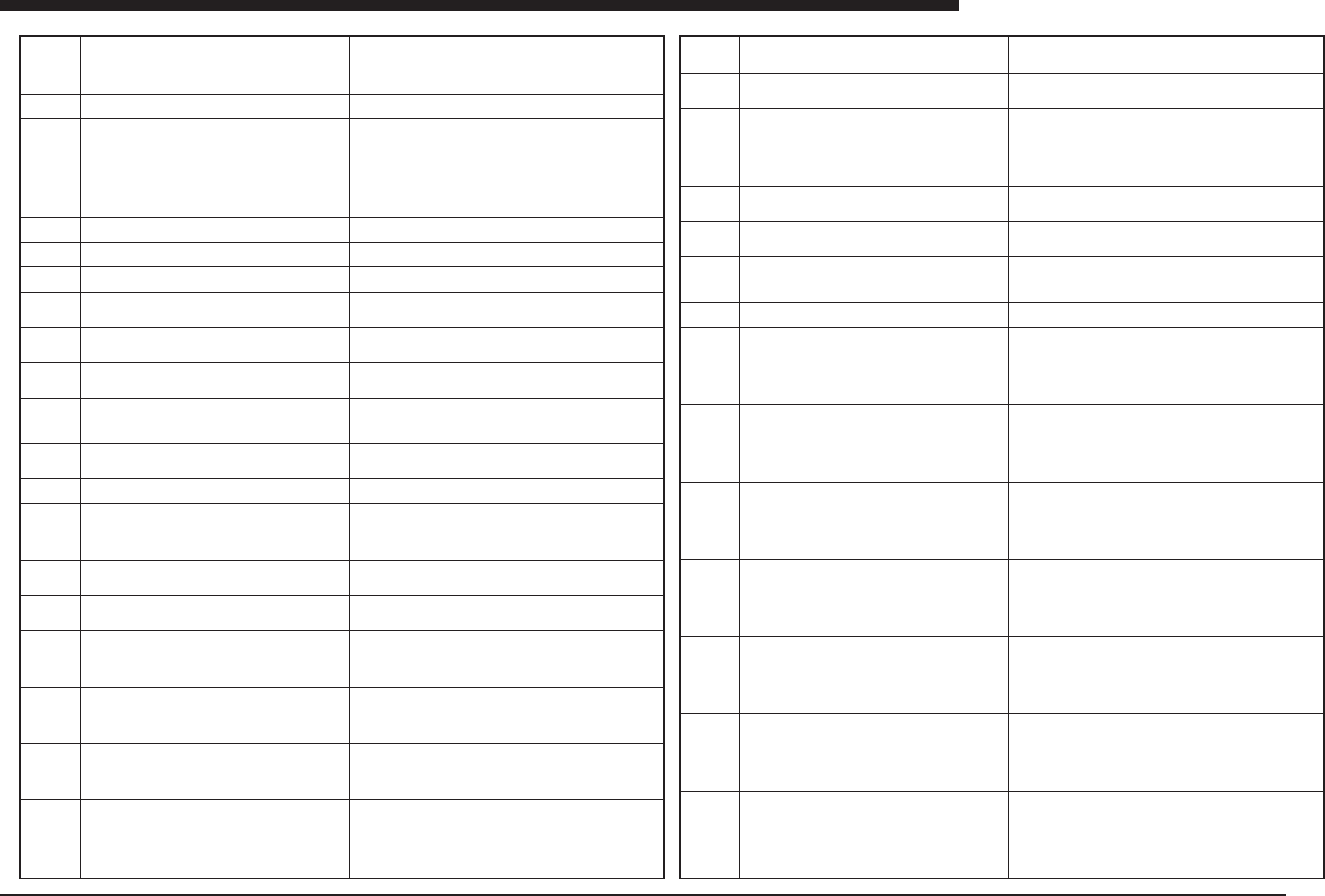
Ea03043
Ea03044
Ea03045
Ea03095
Ea03096
Ea03097
Ea03100
Ea03101
Ea03102
Ea03103
Ea03104
Ea03105
Ea03106
Ea03107
Ea03108
Ea03110
Ea03111
Ea03112
Ea03113
Ea03120
Ea03121
Ea03122
Ea03123
Ea03200
Ea03202
Ea03203
Ea03210
Ea03501
Ea03502
Ea03503
Ea03504
Ea03505
Ea03506
CAUTION: Please check barcodes, then clear the INTER-
LOCK error using line control system.
Mount Data ***
Component Data *** Name ***
Feeder set position **
INTERLOCK clear.
NUMBER: ***
ERROR BRING BACK COMPONENTS
Vacuum level is too high.The following item causes it.
The component may be sticked on the nozzle. The nozzle
is pluged. The setting for vacuum level is wrong.
TABLE ***
HEAD ***
CURRENT VAC ***
SETTING VAC ***
Please stop the production and check these points.
There is not parameter to edit special setting. This com-
mand is not (yet) available.
Failed to load special setting.
Failed to save special setting value.
NO SCHEDULE
Please throw in new schedule to the machine. You can
send it from YVOSX via communication.
Please exchenge FES system.
FrontID ***
Detected FES system ID is different from next PCB data.
Please exchenge FES system.
RearID ***
Detected FES system ID is different from next PCB data.
Please exchenge FES system.
FrontID ***
RearID ***
Detected FES system ID is different from next PCB data.
Please recieve specific FES setting of machine once
before checking. Press the [ENTER] key to recieve. Press
the [ESC] key to abort.
Please send FES setting after checking. Press the [EN-
TER] key to send. Press the [ESC] key to abort.
No Need to chenge setting of FES. Please check next
item.
1.Don’t recieve FES setting from machine.
2.Difference of PCB data on machine and PC.
3.Already finish changing FES setting.
There is a interrupted schedule. Press the [SPACE] key
to abandon it and to read new schedule, or any other key
to abort.
SCHEDULE FILE READ ERROR.
Please check schedule file format, or try to read new
schedule.
FIRST PCB CHECK
Please check first pcb of a lot by moving camera. Press
the [SPACE] key to check, or any other key to abort. Af-
ter checking and correcting, please return to RUNNING
mode and start production.
FINAL PCB CHECK
Please check last pcb of a lot by moving camera. Press
the [SPACE] key to check, or any other key to abort. Af-
ter checking and correcting, please return to RUNNING
mode and start production.
FIRST PCB CHECK
Please check first pcb of a lot on the conveyor of tray
changer. Press the CHECK button on the conveyor be-
fore picking uo PCB. After checking pcb, put it on the
conveyor and release CHECK button.
FINAL PCB CHECK
Please check last pcb of a lot on the conveyor of tray
changer. Press the CHECK button on the conveyor be-
fore picking uo PCB. After checking pcb, put it on the
conveyor and release CHECK button.
CONVEYOR WIDTH ERROR
When you want to chenge conveyor width less than
250.00mm, please remove fixed buckup plate before
changing. (Then sensor NL06 detected the plate.)
Please recieve specific FES setting of machine once
before comfirming. Press the [ENTER] key to recieve.
Press the [ESC] key to abort.
No need to setup for next production. Please check next
item.
1.Don’t recieve FES setting from machine.
2.Difference of PCB data on machine and PC.
3.Already finish changing FES setting.
4.Current schedule has not recieved from MCH.
Clear flag for setup for next production. Press the [EN-
TER] key to clear it on PC, but the call on machine will
not clear.
DEFINED PRODUCTION AMOUNT OF PCBs IS
REACHED. Change PCB data using Barcode Reader
connected to PC.
COMMUNICATION ERROR
Cannot confirm machine condition by communication
command. Error in the communication settings in the
machines or PC.
W-axis interlock stop.
DATA READ ERROR
Failed to read Multi-Macs data from Component-DATA-
BASE.
Database No. ***
Please check
1.Database number for Multi-Macs in Machine Data.
2.Component-DATABASE.
WAFER TRAY CHANGER ERROR
The component can not be found on the wafer tray
changer head. It may be lost during traverse.
Mount data ***
Component data *** Name ***
Pallet **
WT Head **
WAFER TRAY CHANGER ERROR
The component can not be found on the wafer tray
changer station. It may be left on the WT head.
Mount data ***
Component data *** Name ***
Pallet **
WT Station ***
WAFER TRAY CHANGER ERROR
The component can not be handed to the main machine
head. It may be left on the WT head.
Mount data ***
Component data *** Name ***
Pallet **
WT Head ***
WAFER TRAY CHANGER ERROR
The component can not be handed to the main machine
head. It may be left on the WT station.
Mount data ***
Component data *** Name ***
Pallet **
WT Station ***
WAFER TRAY CHANGER ERROR
Failed to pick up the component from the wafer. It can
not be found on the wafer tray changer head.
Mount data ***
Component data *** Name ***
Pallet **
WT Head ***
WAFER TRAY CHANGER ERROR
Continuous badmark count reached the specified limit.
Mount data ***
Component data *** Name ***
Pallet **
Ea -31
ERROR MESSAGES LIST
Ea
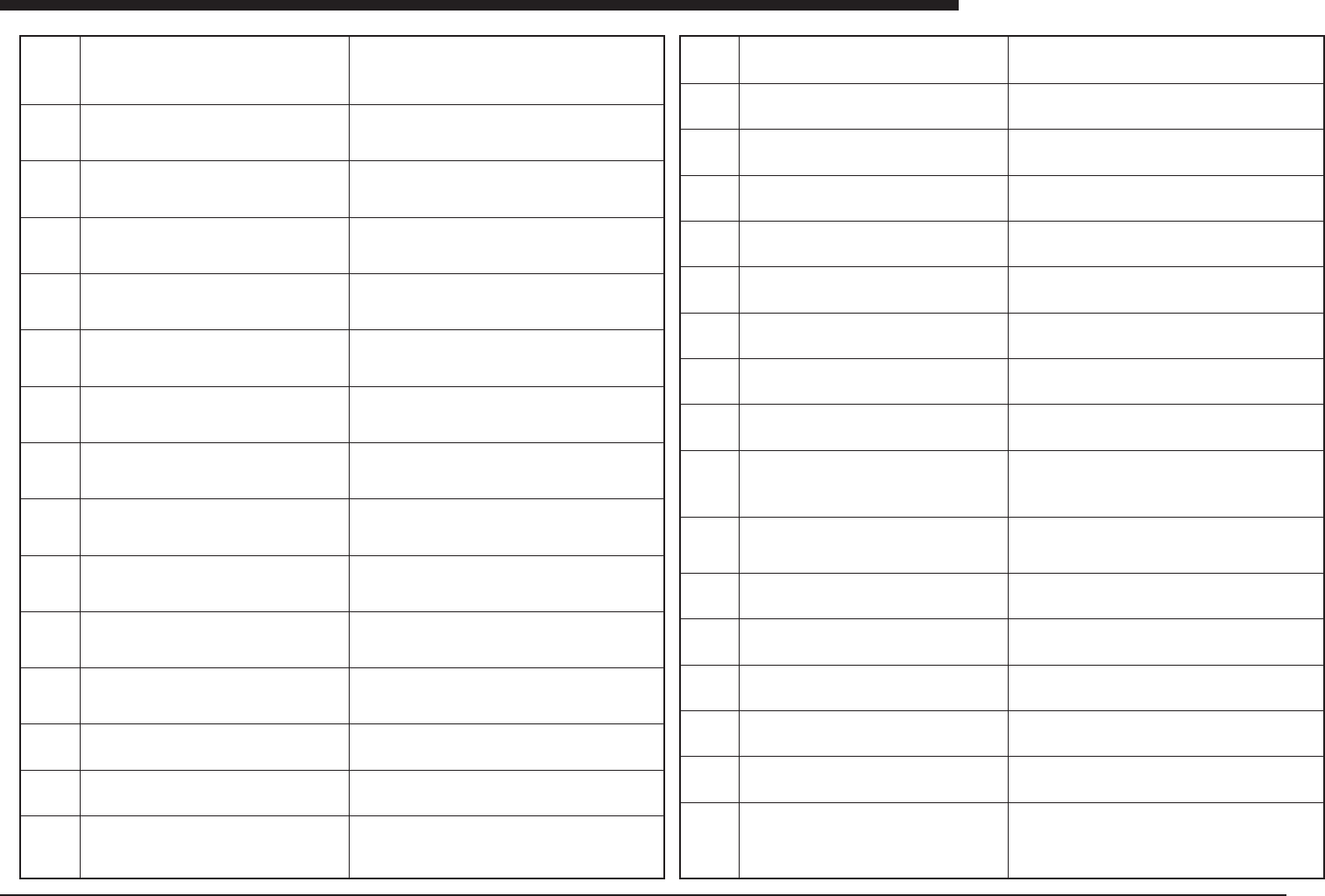
Ea03507
Ea03601
Ea03602
Ea03603
Ea03604
Ea03605
Ea03606
Ea03607
Ea03608
Ea03609
Ea03610
Ea03611
Ea03612
Ea03613
Ea03614
Ea03615
Ea03616
Ea03617
Ea03618
Ea03619
Ea03620
Ea03621
Ea03622
Ea03623
Ea03624
Ea03625
Ea03626
Ea03627
Ea03628
Ea03629
Ea03630
Ea03631
WAFER TRAY CHANGER ERROR
Continuous component error count reached the speci-
fied limit.
Mount data ***
Component data *** Name ***
Pallet **
PCB DATA ERROR
The “FeederType Wafer” can not be used for component
data V20 compatible mode.
Machine *
Component data *** Name ***
PCB DATA ERROR
No mark is specified for the “Mark for Comp” field of the
wafer component.
Machine *
Component data *** Name ***
PCB DATA ERROR
No mark data exists for the “Mark for Comp” of the wafer
component.
Machine *
Component data *** Name ***
PCB DATA ERROR
The “MarkType” is not suitable for the “Mark for Comp” of
the wafer component.
Machine *
Component data *** Name ***
PCB DATA ERROR
The “SearchArea” is larger than F.O.V. of the camara for
the “Mark for Comp” of the wafer component.
Machine *
Component data *** Name ***
PCB DATA ERROR
No mark data exists for the “Mark for Bad” of the wafer
component.
Machine *
Component data *** Name ***
PCB DATA ERROR
The “MarkType” is not suitable for the “Mark for Bad” of
the wafer component.
Machine *
Component data *** Name ***
PCB DATA ERROR
The “SearchArea” is larger than F.O.V. of the camara for
the “Mark for Bad” of the wafer component.
Machine *
Component data *** Name ***
PCB DATA ERROR
The relation between “InitSearchDir” and
“SwitchDirection” is illogical.
Machine *
Component data *** Name ***
PCB DATA ERROR
The relation between “InitSearchDir” and “CurSearchDir”
is illogical.
Machine *
Component data *** Name ***
PCB DATA ERROR
No Wafer-TC head carries the nozzle that can handle
this component.
Machine *
Component data *** Name ***
PCB DATA ERROR
No Wafer-TC station can handle this component.
Machine *
Component data *** Name ***
PCB DATA ERROR
Illegal pallet number for the wafer component.
Machine *
Component data *** Name ***
PCB DATA ERROR
Negative value for the “TapeThickness” is not allowed.
Machine *
Component data *** Name ***
PCB DATA ERROR
Negative value for the “WaferDia.” is not allowed.
Machine *
Component data *** Name ***
PCB DATA ERROR
Negative value for the “RingDiameter” is not allowed.
Machine *
Component data *** Name ***
PCB DATA ERROR
”WaferDia.” should be smaller than “RingDiameter”.
Machine *
Component data *** Name ***
PCB DATA ERROR
Negative value for the “CompPitch” is not allowed.
Machine *
Component data *** Name ***
PCB DATA ERROR
”Start Pos” is out of the “WaferDia.”.
Machine *
Component data *** Name ***
PCB DATA ERROR
”Current Pos” is out of the “WaferDia.”.
Machine *
Component data *** Name ***
PCB DATA ERROR
”Comp Num” is out of the allowed range.
Machine *
Component data *** Name ***
PCB DATA ERROR
”Start Count” is out of the allowed range.
Machine *
Component data *** Name ***
PCB DATA ERROR
”Current Count” is out of the allowed range.
Machine *
Component data *** Name ***
PCB DATA ERROR
The relation between “Start Pos” and “Start Count” is il-
logical.
At least one edge will be out of the “WaferDia.”.
Machine *
Component data *** Name ***
PCB DATA ERROR
The relation between “Current Pos” and “Current Count”
is illogical. At least one edge will be out of the “WaferDia.”.
Machine *
Component data *** Name ***
PCB DATA ERROR
The “WaferDia.” is out of the LXY moving area.
Machine *
Component data *** Name ***
PCB DATA ERROR
The “EjectHeight” is out of the LU moving area.
Machine *
Component data *** Name ***
PCB DATA ERROR
The “PickHeight” is out of the LP moving area.
Machine *
Component data *** Name ***
PCB DATA ERROR
The “EjectDownTiming” is out of the LP moving area.
Machine *
Component data *** Name ***
PCB DATA ERROR
The “Wafer Pick Height” is too deep.
Machine *
Component data *** Name ***
PCB DATA ERROR
The “Wafer Place Height” is too deep.
Machine *
Component data *** Name ***