YAMAHA errer code-a.pdf - 第35页
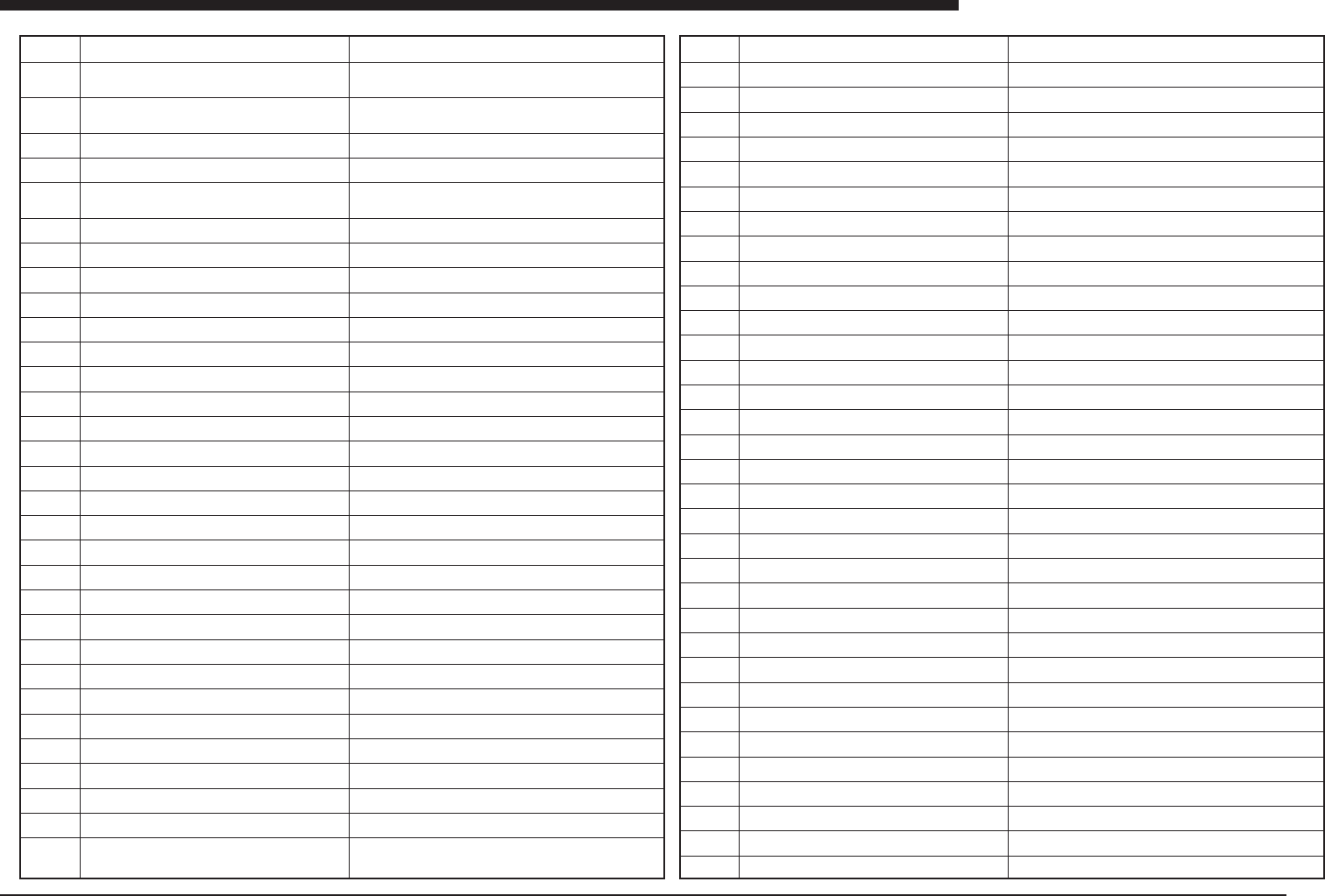
Ea - 35 ERROR MESSAGES LIST Ea Ea061 1 1 Ea061 12 Ea061 13 Ea061 14 Ea061 15 Ea061 16 Ea061 17 Ea061 18 Ea061 19 Ea06120 Ea06121 Ea06123 Ea06124 Ea06125 Ea06127 Ea06129 Ea06141 Ea06143 Ea06144 Ea06145 Ea06150 Ea06151 Ea0…
Ea -34
ERROR MESSAGES LIST
Ea
Ea05153
Ea05154
Ea05160
Ea05161
Ea05162
Ea05163
Ea06004
Ea06005
Ea06006
Ea06007
Ea06010
Ea06011
Ea06012
Ea06014
Ea06015
Ea06016
Ea06020
Ea06021
Ea06022
Ea06023
Ea06025
Ea06026
Ea06029
Ea06030
Ea06031
Ea06032
Ea06033
Ea06034
Ea06035
Ea06036
Ea06037
Ea06038
FILE SAVE ERROR
Failed to save the file.
ILLEGAL COMMAND
Can not execute while a file was opened by “FOPEN”
command.
EMURATOR PROGRAM ERROR
Error occured in emulator program. Please modify emu-
lator program.
NOT ALLOCATE MEMORY
Memoy for robot language program is not allocated.
ROBOT LANGUAGE PROGRAM ALREADY RUNNING
Can not execute while robot language program is runninig.
NOT SET UP EMUTATION
Can not change the input variables,because those are
not set up for emulation.
PROGRAM DESTROYED
POINT DESTROYED
SECOND LIMIT OVER
* MOTOR DRIVER ERROR
CANNOT EXECUTE
RUNNING
REMOTE STOP
FAN STOPPED
TEMP. ALARM
WATCH-DOG
NUMBER ERROR
PORT NUMBER ERROR
TOO MANY CHARACTERS
TOO MANY PARAMETERS
PLEASE WAIT A MOMENT
PLEASE INPUT HEAD Z OFFSET
EMG.STOP ON
CHECK COVER OR AIR OR FEEDER
DO LOCKED
ORIGIN INCOMPLETE
NO STD. COORDINATE
* BAD POSITION
DRIFT CHECK
ARM LOCKED
HEAD LOWER POS. SENSOR OFF!
NOZZLE ST. IS UPPER POSITION!
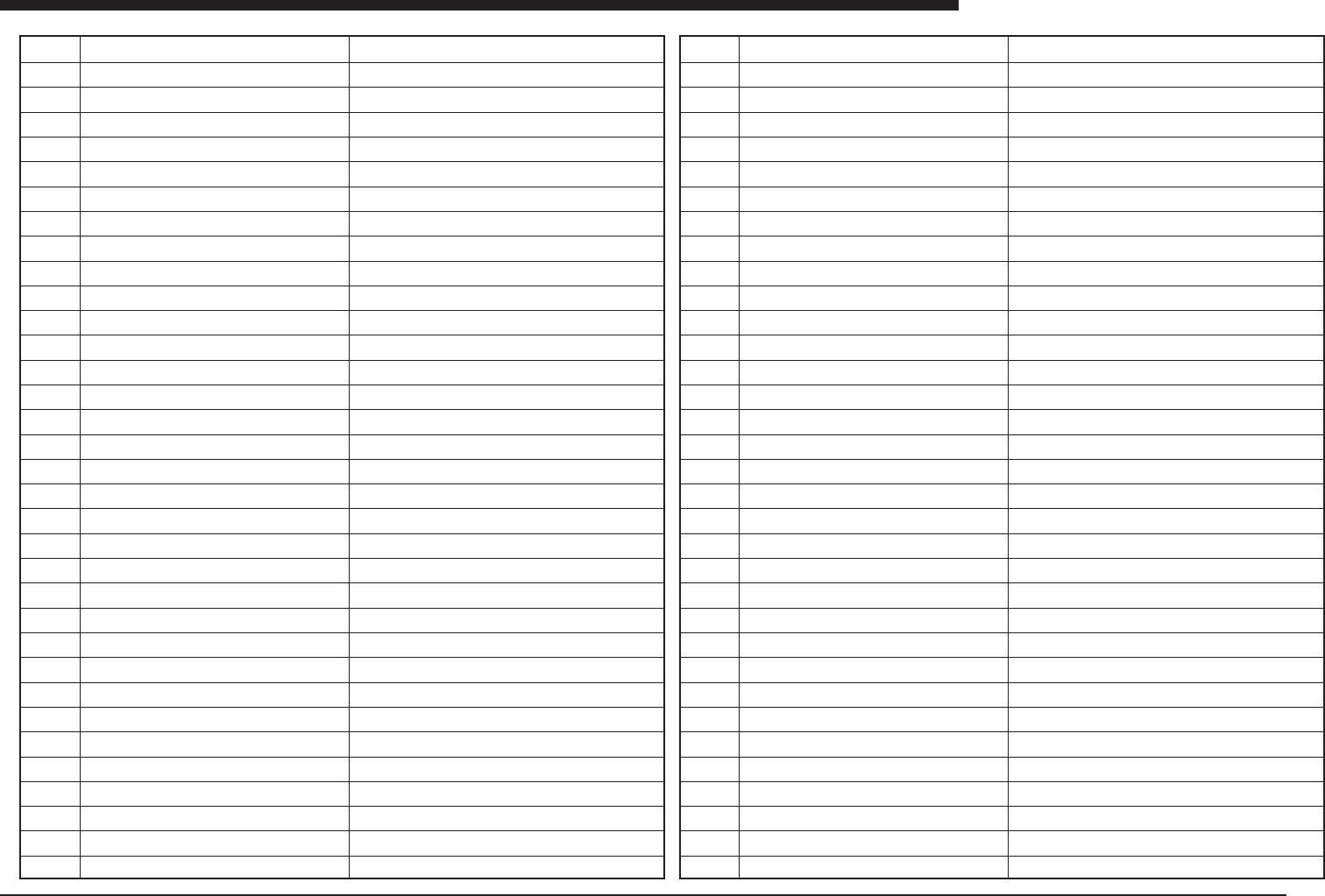
Ea06039
Ea06060
Ea06061
Ea06063
Ea06064
Ea06065
Ea06066
Ea06067
Ea06068
Ea06069
Ea06070
Ea06071
Ea06072
Ea06073
Ea06074
Ea06075
Ea06076
Ea06077
Ea06078
Ea06079
Ea06080
Ea06081
Ea06082
Ea06083
Ea06090
Ea06091
Ea06095
Ea06098
Ea06099
Ea06101
Ea06102
Ea06105
Ea06107
Ea06108
ORIGIN COMPLETE
PCB INF. DESTROYED
PRODUC. INF. DESTROYED
WARNING: OVERFLOW
TOO MANY PCB
PAUSE !
SELECT DATUM POINT
VISION HEAD MULTI DEFINED
ANC HEAD MULTI DEFINED
NO SUCH PCB
PCB EXISTS
HEAD NUMBER ERROR
PARTS NUMBER ERROR
CANNOT DELETE
UNDEFINED PCB NAME
TOP CHARACTER MUST BE A-Z
INPUT ORIGIN POINT
PLEASE TEACH 2ND POINT
CANNOT DELETE. PLEASE RESET
OPERATION INTERRUPTED
WHILE WITHOUT WEND
WEND WITHOUT WHILE
ILLEGAL FUNCTION CALL
ILLEGAL CHARACTER
NO “DIM” COMMAND
TOO MANY ON COMMANDS
BAD SOFT LIMIT DATA
ARRAY EXISTS
OUT OF RANGE
FORMAT ERROR
DATA ERROR
ILLEGAL CODE
DIGIT NUMBER ERROR
SPEC. DISAGREEMENT
Ea -35
ERROR MESSAGES LIST
Ea
Ea06111
Ea06112
Ea06113
Ea06114
Ea06115
Ea06116
Ea06117
Ea06118
Ea06119
Ea06120
Ea06121
Ea06123
Ea06124
Ea06125
Ea06127
Ea06129
Ea06141
Ea06143
Ea06144
Ea06145
Ea06150
Ea06151
Ea06180
Ea06181
Ea06182
Ea06183
Ea06184
Ea06185
Ea06186
Ea06199
Ea06200
Ea06201
Ea06202
Ea06203
TOO MANY LABELS
UNDEFINED LABEL
LABEL EXISTS
FOR VARIABLE ERROR
NEXT WITHOUT FOR
RETURN WITHOUT CALL
OVERFLOW
DIVISION BY 0
MEMORY FULL
NO POINT
BAD VARIABLE
* SOFT LIMIT OVER
COMMUNICATION ERROR
CMU IS NOT READY
CK CMU CABLE OR EXT.UNIT STATUS
PARITY ERROR
CANNOT EXECUTE.ROBOT IS RUNNING
NO RETURN CODE
NO START CODE (@)
BUFFER OVERFLOW
STOP EXECUTED
ARRIVED AT BREAK POINT
ILLEGAL NAME
ILLEGAL FILE NAME
V-FILE UNDEFINED
V-MEMORY DESTROYED
VISION ERROR
V-INTERFACE ERROR
VISION ABORTED
PROGRAM EXISTS
NO SUCH PROGRAM
READ ONLY PROGRAM
STACK OVERFLOW
MEMORY DESTROYED
Ea06204
Ea06205
Ea06206
Ea06207
Ea06210
Ea06211
Ea06212
Ea06213
Ea06214
Ea06215
Ea06216
Ea06230
Ea06240
Ea06241
Ea06242
Ea06243
Ea06250
Ea06252
Ea06253
Ea06254
Ea06255
Ea06260
Ea06261
Ea06262
Ea06263
Ea06264
Ea06265
Ea06266
Ea06267
Ea06268
Ea06269
Ea06270
Ea06271
Ea06272
PARAMETER DESTROYED
BATTERY NO GOOD
CANNOT EDIT
CANNOT FIND <COMMON> PGM
SYSTEMERROR 10
SYSTEMERROR 20
SYSTEMERROR 30
SYSTEMERROR 40
SYSTEMERROR 50
SYSTEMERROR 60
SYSTEMERROR 70
<SCSI>
POWER FAILURE
24V POWER OFF
* ENCODER ZERO NO GOOD
* DRIFT ADJUSTMENT NO GOOD
DIPSWITCH ERROR
* FEEDBACK ERROR
PICN DISCONNECTED
ROBOT DISCONNECTION
PLEASE EXIT AND SAVE DATA
DISK FULL!
ALREADY SAME FILE EXISTS
NO MORE FILES
NOT SAME DEVICE
INVALID DRIVE
INVALID ACCESS CODE
INVALID HANDLE
FDD ACCESS ABORTED
TOO MANY FILES OPEN
PATH NOT FOUND
FILE NOT FOUND
INVALID PARAMETER
NOZZLE NUMBER ERROR
Ea -36
ERROR MESSAGES LIST
Ea
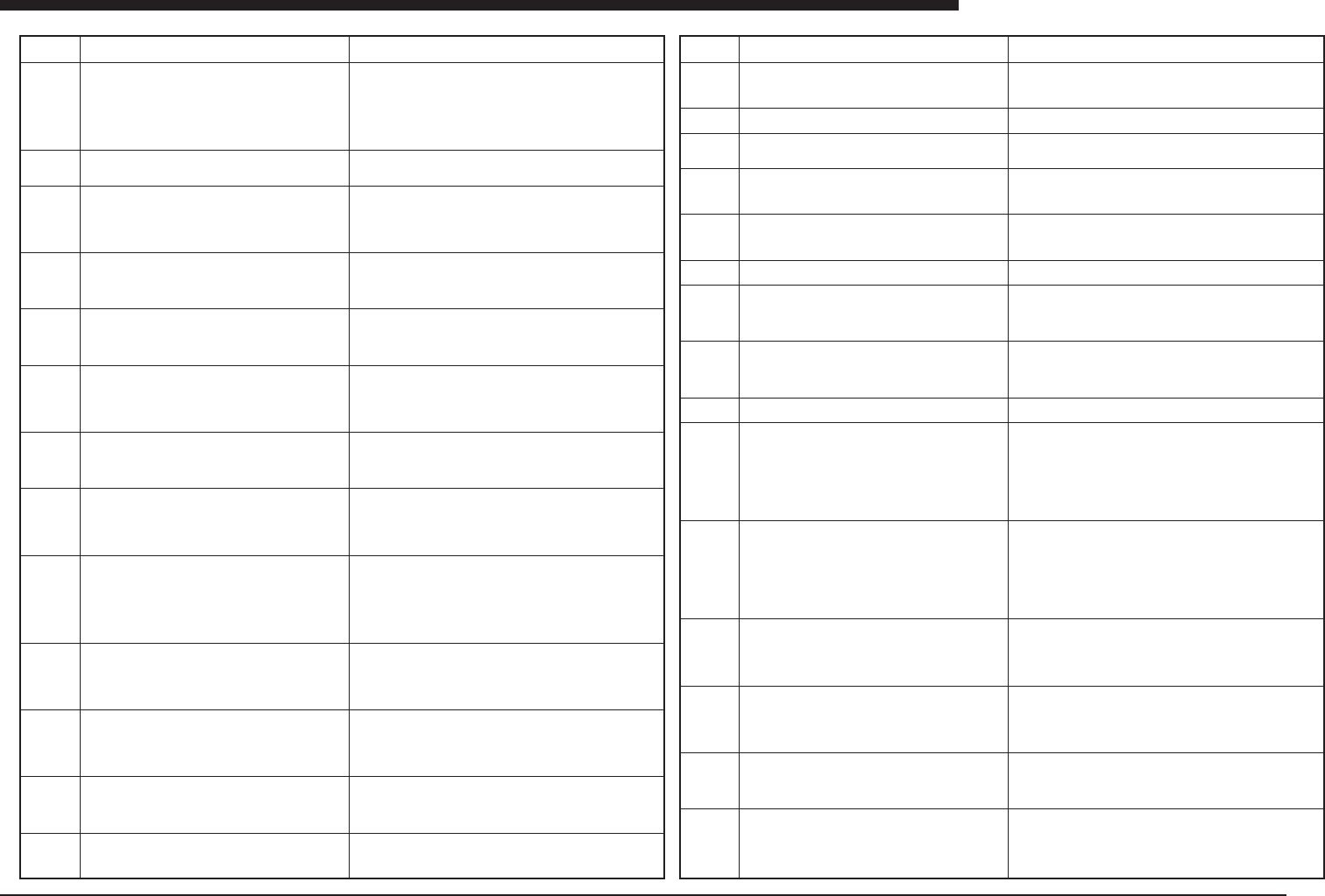
Ea06273
Ea07000
Ea07001
Ea07200
Ea07201
Ea07202
Ea07203
Ea07204
Ea07205
Ea07206
Ea07220
Ea07221
Ea07222
Ea07400
Ea07401
Ea07402
Ea07403
Ea07404
Ea07405
Ea07406
Ea07407
Ea07408
Ea07500
Ea07502
Ea07600
Ea07601
Ea07602
Ea07403
Ea07604
Ea07605
CANNOT EXECUTE IN SERVICE MODE
FILL UP CYLINDER
######### Now dispensing ##########
Head No.1
Please continue this command until dispense glue is is-
sued from nozzle of this head. After that, clean up the
dispense nozzle of that head.
And initialized total consumption of that head. To finish,
press any key.
DOT STATION
During pressing [Space] key, paper in "Dot Station" is
moved. To return to command menu, press [ESC] key.
CO-PLANARITY CHECK UNIT COMMUNICATION ER-
ROR
Please check the power supply to the unit and the con-
nection of the communication cable.
CO-PLANARITY CHECK UNIT PARAMETER ERROR
Failed to send the correct command to the Co-Planarity
check unit.
CO-PLANARITY CHECK UNIT TEMPERATURE ERROR
Temperature of co-planarity check unit is out of the stan-
dard (0Å`40 Celsius).
Please check whether the fun of the unit works or not.
CO-PLANARITY CHECK SENSOR HEAD ERROR
The cause may be the connection of the sensor head or
the sensor LD trouble.
CO-PLANARITY CHECK UNIT HARDWARE ERROR
There is trouble of memory access of co-planarity check
unit.
The cause may be the fully discharged battery.
CO-PLANARITY CHECK SENSOR HARDWARE ER-
ROR
The cause may be connection of the sensor and the unit
or power supply to the sensor controller.
CO-PLANARITY CHECK UNIT HARDWARE ERROR
Encoder pulse signal is not sent correctly to the co-pla-
narity check unit.
CO-PLANARITY CHECK SENSOR COORDINATE ER-
ROR
Coordinate of co-planarity check sensor position is not
proper.
Please check coordinate of the machine position of the
co-planarity check sensor. Axis
ALIGNMENT TYPE ERROR FOR CO-PLANARITY
CHECK
Alignment type of the component is not proper for co-
planarity check.
Component
Name
ALIGNMENT MODULE ERROR FOR CO-PLANARITY
CHECK
Alignment module of the component is not proper for co-
planarity check.
Component *** Name ***
Succeeded to write servo error information.
Canceled to write servo error information.
The reserved file already exists.
Overwrite?
[Enter] key : Execute to overwrite
Another key : Cancel
Failed to write servo error information.
CAUTION: Not exist the flash ROM, or cannot read the
information from the flash ROM. Please check the flash
ROM.
Failed to write servo error information. Not exist the disk,
or Reserved an illegal drive. Please check the drive. If
the disk isn’t inserted, please the write protected off and
insert.
Failed to write servo error information. Not exist the path.
Please check the path. Please make the directory in the
DISK_MAINTENANCE mode or reserve the other exist
path.
Failed to write servo error information. Cannot open the
file. Please check the disk is write protected on or off.
Failed to write servo error information. The cause is which
the following reason.
- The disk is write protected on.
- The disk is full.
- The disk or drive is destroyed.
Ready to start MOVING-AXIS.
Ensure that there are no obstructions to the head as-
sembly.
Push [Space] key to start.
Push any key to abort.
FATAL FAILURE VISION SYSTEM
Failure to communicate the hardware of Vision.
MACHINE DATA ERROR
Specification of camera number is incorrect. Please set
up parameters in [CameraCoordinate] again
Correct specification on SML80/SML88/SML88-2 is as
followings.
Camera1 : Moving Camera
Camera2 : Single Camera (1st)
Camera3 : Single Camera (2nd)
Camera4 : Single Camera (3rd)
MACHINE DATA ERROR
Specification of camera number is incorrect. Please set
up parameters in [CameraCoordinate] again
Correct specification on SM100/SM64/SM100-2 is as fol-
lowings.
Camera1 : Moving Camera
Camera2 : Single Camera
Camera3 : Multi Camera (2nd)
Camera4 : Multi Camera (1st)
MACHINE DATA ERROR
Specification of camera number is incorrect. Please set
up parameters in [CameraCoordinate] again
Correct specification on SM86D/SM100D/SM64D is as
followings.
Camera1 : Moving Camera
MACHINE DATA ERROR
Specification of camera number is incorrect. Please set
up parameters in [CameraCoordinate] again
Correct specification on SM112-3 is as followings.
Camera1A,Camera1B : Moving Camera
Camera4A,Camera4B : Multi Camera
MACHINE DATA ERROR
Specification of camera number is incorrect. Please set
up parameters in [CameraCoordinate] again
Correct specification on SML88-3 (tentative name) is as
followings.
MACHINE DATA ERROR
Specification of camera number is incorrect. Please set
up parameters in [CameraCoordinate] again
Correct specification on SM100-3 (tentative name) is as
followings.
(meaning) This message is explanation for [FULL UP CYLINDER].
(meaning)This massage is explanation for [DOT STATION].
(Meaning)No response from Co-planarity checking system.
(Cause)The power is not supplied to the system, or the communi-
cation cable is not connected, or the cable is damaged, or the power
switch of the system is off.
(Remedy)Confirm the cable connection and power on the system
again.
(Meaning)Problem had been detected in communication between
co-planarity checking system and the mounter.
(Cause)Extension communication card problem or cable problem..
(Remedy)Take off and put on the extension communication card,
and confirm the cable electrically, and power on again.
(Meaning)Co-planarity checking system detected temperature to
be out of the specifications.
(Cause)The air conditioner for the room is not working, or the fan
of the co-planarity control box is not working.
(Remedy)Confirm fan to be working, and turn on the air conditioner.
(Meaning)Problems had been detected on the communication be-
tween co-planarity sensor and the controlling box.
(Cause)Cable is not connected. Co-planarity sensor is out of con-
dition.
(Remedy)Confirm the condition of the cable and turn on the power
again.
(Meaning)The memory of the controlling box for co-planarity sen-
sor is destroyed.
(Cause)Battery down.
(Remedy)Exchange the battery if the power-up-again did not solve
the problem.
(Meaning)Problems had been detected on the communication be-
tween co-planarity sensor and the controlling box.
(Cause)Cable is not connected. Co-planarity sensor is out of con-
dition.
(Remedy)Confirm the condition of the cable and turn on the power
again.
(Meaning)The co-planarity checking control box could not read the
encoder signal of the mounter.
(Cause)The interface of the controlling box and the encoder of the
machine is not suitable. Shield of the encoder cable is not fine.
Electrical noise via the power line.
(Remedy)Confirm the power is not noisy, and confirm the cable
connection. Or if it is the initial trouble for the machine, confirm the
interface specification of the encoder signal.
(Meaning)The coordinate of Co-planarity in [position] page in
MCH_DATA is out of the area.
(Cause)Data is not adjusted.
(Remedy)Adjust data.
(Meaning)Although the co-planarity checking is for QFP/SOP and
others, and is not for the alignment type for this component.
(Cause)Component data has some contradiction.
(Remedy)Correct data.
(Meaning)This is warning message before to confirm the soft limit
value by actually traveling axis.
(Cause)
(Remedy)Confirm any obstacle is not in the area and press [SPACE].